AI Agent is a paradigm shift that we are closely tracking, and the series of articles on Langchain have been helpful in understanding the development trend of Agent. In this compilation, the first part is the State of AI Agent report published by the Langchain team. They interviewed more than 1,300 practitioners, including developers, product managers, and company executives, revealing the current status and implementation bottlenecks of Agent this year: Nine out of ten companies have plans and demand for AI Agent, but the limitations of Agent capabilities mean that users can only implement it in a few processes and scenarios. Compared to cost and latency, people are more concerned about the improvement of Agent capabilities and the observability and controllability of their behavior.
The second part is our compilation of the analysis of the key elements of AI Agent in the In the Loop series articles on the LangChain website: planning capabilities, UI/UX interaction innovation, and memory mechanisms. The article analyzes the interaction modes of 5 LLM-native products, and draws analogies to 3 complex memory mechanisms of humans, which provides some inspiration for understanding AI Agent and these key elements. In this part, we also include some representative Agent company case studies, such as an interview with the founder of Reflection AI, to look forward to the key breakthroughs of AI Agent by 2025.
01. Agent Usage Trends:
Every company is planning to deploy Agent
The competition in the Agent field is becoming more intense. In the past year, many Agent frameworks have become popular: for example, using ReAct combined with LLM for reasoning and action, using a multi-agent framework for orchestration, or using a more controllable framework like LangGraph.
The discussion about Agent is not just hype on Twitter. About 51% of respondents are currently using Agent in production. According to Langchain's data by company size, medium-sized companies with 100-2,000 employees are the most active in deploying Agent in production, with a proportion of 63%.
Furthermore, 78% of respondents have plans to adopt Agent in production in the near future. It is clear that everyone has a strong interest in AI Agent, but actually making a production-ready Agent is still a challenge for many.
Common Use Cases of Agent
The most common use cases of Agent include research and summarization (58%), followed by simplifying workflows through customized Agent (53.5%).
These reflect people's hope to have products to handle tasks that are too time-consuming. Users can rely on AI Agent to extract key information and insights from a large amount of information, rather than sifting through massive data themselves for review or research analysis. Similarly, AI Agent can enhance personal productivity by assisting with daily tasks, allowing users to focus on important matters.
Monitoring: Agent Applications Require Observability and Controllability
As the functionality of Agent becomes more powerful, methods for managing and monitoring Agent are needed. Tracking and observability tools top the must-have list, helping developers understand the behavior and performance of Agent. Many companies also use guardrails to prevent Agent from deviating from the track.
Offline evaluation (39.8%) is more commonly used than online evaluation (32.5%) when testing LLM applications, reflecting the difficulty of real-time monitoring of LLM. In the open-ended responses provided by LangChain, many companies also have human experts manually check or evaluate the responses as an additional preventive layer.
Barriers and Challenges to Deploying Agent
Ensuring high-quality performance of LLM is difficult, with responses needing high accuracy and conforming to the correct style. This is the biggest concern for Agent users - more than twice as important as other factors like cost and security.
LLM Agent is a probabilistic content output, meaning a higher degree of unpredictability. This introduces more potential for errors, making it difficult for teams to ensure their Agent consistently provides accurate, contextual responses.
For small companies in particular, performance quality far outweighs other considerations, with 45.8% citing it as the primary focus, compared to only 22.4% for cost (the second biggest concern). This gap highlights the importance of reliable, high-quality performance for organizations to transition Agent from development to production.
Security is also a widespread concern for large companies that require strict compliance and sensitive customer data handling.
Other Emerging Themes
In the open-ended questions, people praised the following capabilities demonstrated by AI Agent:
• Managing multi-step tasks: AI Agent can perform deeper reasoning and context management, allowing them to handle more complex tasks;
• Automating repetitive tasks: AI Agent continues to be seen as key to automating tasks, freeing up users to solve more creative problems;
• Task planning and collaboration: Better task planning ensures the right Agent handles the right problem at the right time, especially in multi-agent systems;
• Human-like reasoning: Unlike traditional LLM, AI Agent can trace their decisions, including reviewing and modifying past decisions based on new information.
Additionally, people have two main expectations for future progress:
• Expectations for open-source AI Agent: There is clear interest in open-source AI Agent, with many mentioning that collective intelligence can accelerate Agent innovation;
• Expectations for more powerful models: Many are anticipating the next leap of AI Agent driven by larger, more powerful models - when Agent can handle more complex tasks with higher efficiency and autonomy.
Many people in the Q&A also mentioned the biggest challenge in Agent development: how to understand the behavior of the Agent. Some engineers mentioned that they encountered difficulties in explaining the capabilities and behavior of the AI Agent to the company's stakeholders. Visualization plugins can sometimes help explain the Agent's behavior, but in more cases, the LLM is still a black box. The additional burden of interpretability is left to the engineering team.
02.Core Elements of the AI Agent
What is an Agentic System
Before the release of the State of AI Agent report, the Langchain team had already written their own Langraph framework in the Agent domain and discussed many key components of the AI Agent through the In the Loop blog. Now, let's compile the key content.
First, everyone has a slightly different definition of the AI Agent. The definition given by Langchain founder Harrison Chase is as follows:
An AI agent is a system that uses an LLM to decide the control flow of an application.
An AI agent is a system that uses an LLM to decide the control flow of an application.
Regarding the implementation method, the article introduces the concept of Cognitive architecture, which refers to how the Agent thinks and how the system orchestrates code/prompts the LLM:
• Cognitive: The Agent uses an LLM to semantically reason how to orchestrate code/prompt the LLM;
• Architecture: These Agent systems still involve a lot of engineering similar to traditional system architecture.
The following diagram shows examples of Cognitive architecture at different levels:
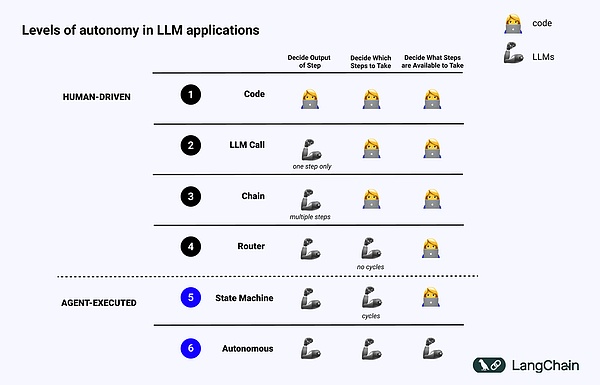
• Standardized software code (code): Everything is Hard Code, with relevant input or output parameters directly fixed in the source code, which does not constitute a cognitive architecture because there is no cognitive part;
• LLM Call: Except for some data preprocessing, the invocation of a single LLM constitutes most of the application, simple Chatbots belong to this category;
• Chain: A series of LLM calls, Chain tries to break down the problem-solving into several steps, calling different LLMs to solve the problem. Complex RAG belongs to this type: calling the first LLM for search/query, calling the second LLM for answer generation;
• Router: In the previous three systems, the user can know in advance all the steps the program will take, but in the Router, the LLM decides which LLMs to call and what steps to take, which adds more randomness and unpredictability;
• State Machine: Combining LLM with Router, this will be even more unpredictable, because by putting this combination into a loop, the system can (theoretically) make an infinite number of LLM calls;
• Agentic systems: Also called "Autonomous Agent", when using State Machine, there are still restrictions on what operations can be taken and what flow to execute after performing the operation; but when using Autonomous Agent, these restrictions will be removed. The LLM decides what steps to take and how to orchestrate different LLMs, which can be done through using different Prompts, tools, or code.
In simple terms, the more "Agentic" a system is, the more the LLM determines the behavior of the system.
Key Elements of the Agent
Planning
The reliability of the Agent is a major pain point. Often, companies use LLM to build Agents, but mention that the Agents cannot plan and reason well. What do we mean by planning and reasoning here?
The planning and reasoning of the Agent refers to the LLM's ability to think about what actions to take. This involves short-term and long-term reasoning, where the LLM evaluates all available information and then decides: What series of steps do I need to take, and what is the first step I should take now?
Often, developers use Function calling to let the LLM choose the operations to perform. Function calling is a capability first added to the LLM API by OpenAI in June 2023, where users can provide JSON structures for different functions and let the LLM match one (or more) of the structures.
To successfully complete a complex task, the system needs to take a series of actions in sequence. This long-term planning and reasoning is very complex for the LLM: first, the LLM must consider a long-term action plan, then go back to the short-term actions to be taken; secondly, as the Agent performs more and more operations, the results of the operations will be fed back to the LLM, causing the context window to grow, which may cause the LLM to "get distracted" and perform poorly.
The easiest way to improve planning is to ensure that the LLM has all the information it needs for proper reasoning/planning. Although this sounds simple, the information typically passed to the LLM is often not enough for it to make reasonable decisions, and adding retrieval steps or clarifying the Prompt may be a simple improvement.
Afterwards, you can consider changing the cognitive architecture of the application. There are two types of cognitive architectures to improve reasoning, general cognitive architectures and domain-specific cognitive architectures:
1. General Cognitive Architecture
General cognitive architectures can be applied to any task. There are two papers that propose two general architectures, one is the "plan and solve" architecture proposed in the paper Plan-and-Solve Prompting: Improving Zero-Shot Chain-of-Thought Reasoning by Large Language Models, in which the Agent first proposes a plan and then executes each step in that plan. The other general architecture is the Reflexion architecture, proposed in Reflexion: Language Agents with Verbal Reinforcement Learning, in which the Agent has a clear "reflection" step after executing a task to reflect on whether it executed the task correctly. I won't go into details here, you can refer to the above two papers.
Although these ideas show improvements, they are often too general to be actually used by Agents in production. (Note: This article was published before the o1 series models)
2. Domain-Specific Cognitive Architecture
In contrast, we see that Agents are built using domain-specific cognitive architectures. This is often manifested in domain-specific classification/planning steps and domain-specific verification steps. Some of the ideas of planning and reflection can be applied here, but they are usually applied in a domain-specific way.
A paper from AlphaCodium gives a specific example: they achieved state-of-the-art performance by using what they call "flow engineering" (another way of talking about cognitive architecture).
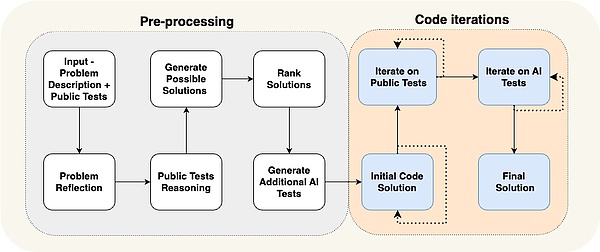
You can see that the Agent's workflow is very specific to the problem they are trying to solve. They tell the Agent what to do step-by-step: propose a test, then propose a solution, then iterate more tests, etc. This cognitive architecture is highly domain-specific and cannot be generalized to other domains.
Case Study:
Reflection AI Founder Laskin's Vision for the Future of Agents
In an interview with Sequoia Capital with Reflection AI founder Misha Laskin, Misha mentioned that he is starting to realize his vision: to build the best Agent model by combining RL's Search Capability with LLM, in his new company Reflection AI. He and co-founder Ioannis Antonoglou (responsible for AlphaGo, AlphaZero, Gemini RLHF) are training models designed for Agentic Workflows, the main points of the interview are as follows:
• Depth is the missing part in AI Agents. While current language models perform well in breadth, they lack the depth required to reliably complete tasks. Laskin believes that solving the "depth problem" is crucial for creating truly capable AI Agents, where capability means: Agents can plan and execute complex tasks through multiple steps;
• Combining Learn and Search is the key to achieving superhuman performance. Drawing on the success of AlphaGo, Laskin emphasizes that the deepest idea in AI is the combination of Learn (relying on LLM) and Search (finding the optimal path). This approach is crucial for creating Agents that can outperform humans in complex tasks;
• Post-training and Reward modeling pose major challenges. Unlike games with clear rewards, real-world tasks often lack true rewards. Developing a reliable reward model is a key challenge in creating reliable AI Agents;
• Universal Agents may be closer than we think. Laskin estimates that we may be able to achieve "digital AGI", i.e. AI systems with both breadth and depth, in as little as three years. This accelerated timeline highlights the urgency of solving safety and reliability issues as capabilities develop;
• The path to Universal Agents requires a methodical approach. Reflection AI is focused on expanding Agent capabilities, starting from some specific environments like browsers, coding, and operating systems. Their goal is to develop Universal Agents that are not limited to specific tasks.
UI/UX Interaction
Here is the English translation of the text, with the specified terms preserved: In the coming years, human-machine interaction will become a key research area: Agent systems are different from traditional computer systems of the past, as latency, unreliability, and natural language interfaces bring new challenges. Therefore, new UI/UX paradigms for interacting with these Agent applications will emerge. Agent systems are still in the early stages, but multiple emerging UX paradigms have already appeared. Let's discuss them separately: 1. Conversational Interaction (Chat UI) Chat is generally divided into two types: streaming chat and non-streaming Chat. Streaming chat is the most common UX at the moment. It is a Chatbot that streams its thoughts and behaviors back in a chat format - ChatGPT is the most popular example. This interaction mode looks simple but also has good effects, because: first, it allows natural language dialogue with LLM, which means there is no barrier between the customer and the LLM; second, LLM may take some time to work, and streaming allows the user to accurately understand what is happening in the background; third, LLM often makes mistakes, and Chat provides a good interface to naturally correct and guide it, as we are already very used to follow-up conversations and iterative discussions on things in chat. However, streaming chat also has its drawbacks. First, streaming chat is a relatively new user experience, so our existing chat platforms (iMessage, Facebook Messenger, Slack, etc.) do not have this mode; second, it's a bit awkward for tasks with longer runtime - does the user just sit there and watch the Agent work; third, streaming chat usually requires human triggering, which means a lot of human in the loop is still needed. The biggest difference of non-streaming chat is that the responses are returned in batches, with the LLM working in the background, and the user is not in a hurry to get an immediate response from the LLM, which means it may be easier to integrate into existing workflows. People are already used to texting humans - why can't they get used to texting AI? Non-streaming chat will make it easier to interact with more complex Agent systems - these systems often take time, and if instant response is expected, it may be frustrating. Non-streaming chat often eliminates this expectation, making it easier to perform more complex tasks. The advantages and disadvantages of these two chat modes are as follows: 2. Background Environment (Ambient UX) Users may consider sending messages to the AI, which is the Chat mentioned above, but if the Agent is just working in the background, how do we interact with the Agent? To truly unleash the potential of the Agent system, this shift that allows the AI to work in the background is needed. When tasks are processed in the background, users are usually more tolerant of longer completion times (as they relax their expectations of low latency). This allows the Agent to take more time to do more work, often more carefully and diligently than in a chat UX. In addition, running the Agent in the background can expand the capabilities of us human users. Chat interfaces often limit us to only executing one task at a time. However, if the Agent runs in a background environment, there may be multiple Agents simultaneously processing multiple tasks. To have the Agent run in the background, it requires the user's trust, how to build this trust? A simple idea is to accurately show the user what the Agent is doing. Display all the steps it is executing, and let the user observe what is happening. Although these steps may not be immediately visible (as in streaming response), it should be available for the user to click and observe. The next step is not only to let the user see what is happening, but also to let them correct the Agent. If they find that the Agent made a wrong choice in step 4 (out of 10 steps), the customer can choose to go back to step 4 and correct the Agent in some way. This approach will transform the user from "In-the-loop" to "On-the-loop". "On-the-loop" requires the ability to show the user all the intermediate steps the Agent is executing, allowing the user to pause the workflow midway, provide feedback, and then let the Agent continue. AI software engineer Devin is an application that implements a similar UX. Devin runs for a long time, but customers can see all the steps taken, rewind to a specific point in time during development, and publish corrections from there. Although the Agent may be running in the background, this does not mean it needs to execute the task completely autonomously. Sometimes the Agent doesn't know what to do or how to respond, and it needs to draw the attention of a human and seek help. A concrete example is the email assistant Agent that Harrison is building. While the email assistant can respond to basic emails, it often needs Harrison to input certain tasks that he doesn't want to automate, including: reviewing complex LangChain error reports, deciding whether to attend meetings, etc. In this case, the email assistant needs a way to convey to Harrison that it needs information to respond. Note that it is not asking him to directly answer; instead, it will solicit Harrison's input on certain tasks, and then it can use those tasks to compose and send a nice email or schedule a calendar invitation. Currently, Harrison has set up this assistant in Slack. It sends a question to Harrison, and Harrison answers it in the Dashboard, which is natively integrated into his workflow. This type of UX is similar to the UX of a customer support Dashboard. This interface will display all the areas where the assistant needs human help, the priority of the requests, and any other relevant data. 3. Spreadsheet UX The spreadsheet UX is a super intuitive and user-friendly way to support batch processing of work. Each spreadsheet, or even each column, becomes its own Agent, investigating specific things. This batch processing allows users to expand their interactions with multiple Agents. This UX also has other benefits. The spreadsheet format is a UX that most users are familiar with, so it fits well with existing workflows. This type of UX is very suitable for data augmentation, a common LLM use case, where each column can represent a different attribute to be augmented. Products from companies like Exa AI, Clay AI, and Manaflow are using this UX, and we'll use Manaflow as an example to show how this spreadsheet UX handles workflows. Case Study: How Manaflow Uses Spreadsheet for Agent Interaction Manaflow's inspiration comes from Lawrence, the founder, who previously worked at Minion AI, a company that built Web Agents. Web Agents can control the local Google Chrome, allowing it to interact with applications, such as booking flights, sending emails, scheduling car washes, etc. Inspired by Minion AI, Manaflow chose to have Agents operate on spreadsheet-like tools, as Agents are not good at handling human UIs, but are really good at Coding. So Manaflow has Agents call Python scripts, database interfaces, and API links, and then directly operate on the database: including reading times, booking, sending emails, etc. Their workflow is as follows: Manaflow's main interface is a spreadsheet (Manasheet), where each column represents a step in the workflow, and each row corresponds to an AI Agent executing a task. Each spreadsheet workflow can be programmed using natural language (allowing non-technical users to describe tasks and steps in natural language). Each spreadsheet has an internal dependency graph to determine the execution order of each column. These orders are assigned to the Agents in each row to execute tasks in parallel, handling data transformations, API calls, content retrieval, and sending messages, etc. 4. Generative UI "Generative UI" has two different implementation approaches. One way is for the model to generate the necessary primitive components on its own. This is similar to products like Websim. In the backend, the Agent mainly writes raw HTML, allowing it to fully control the displayed content. But this method allows for high uncertainty in the quality of the generated web app, so the final result may have significant fluctuations. Another more constrained approach is to pre-define some UI components, which is often done through tool invocations. For example, if the LLM calls a weather API, it will trigger the rendering of a weather map UI component. Since the rendered components are not truly generated (but have more choices), the generated UI will be more refined, although the content it can generate may not be fully flexible. Case Study: Personal AI Product dot For example, Dot, which was once called the best Personal AI product in 2024, is a good example of a Generative UI product. Dot is a product of New Computer Company: Its goal is to become a long-term companion for users, rather than a better task management tool. According to co-founder Jason Yuan, the feeling of Dot is that when you don't know where to go, what to do or what to say, you will turn to Dot. Here are two examples to introduce what the product does: • Founder Jason Yuan often asks Dot to recommend bars late at night, saying he wants to get drunk and pass out. After a few months of this, one day after work, Yuan asked a similar question, and Dot actually started to persuade Jason not to continue this way. • Fast Company reporter Mark Wilson has also been interacting with Dot for a few months. One time, he shared with Dot a "O" he had handwritten in a calligraphy class, and Dot actually pulled up a photo of the "O" he had written a few weeks earlier, praising the improvement in his calligraphy skills. • As Dot is used more and more, Dot understands that users like to check in at cafes, and proactively recommends good cafes nearby, explaining why the cafe is good, and even asks if the user wants navigation. It can be seen from this cafe recommendation example that Dot achieves the LLM-native interaction effect through pre-defined UI components. What happens when an Agent and a human work together? Think about Google Docs, where clients can collaborate with team members to write or edit documents, but what if one of the collaborators is an Agent? The by and is a good example of human-Agent collaboration. (Note: This may be the inspiration for the recent update of OpenAI's Canvas product). Compared to the previously discussed , how does differ? LangChain founder engineer Nuno emphasized the main difference is whether there is concurrency: • In , the client and the LLM often work simultaneously, using each other's work as input. • In , the LLM works continuously in the background, while the user is completely focused on other things. Memory is crucial for a good Agent experience. Imagine if you had a colleague who never remembered what you told them, forcing you to constantly repeat that information - the collaboration experience would be very poor. People often expect LLM systems to have inherent memory, perhaps because LLMs already feel so human-like. However, LLMs themselves cannot remember anything. An Agent's memory is based on the needs of the product itself, and different UXs provide different ways to collect information and update feedback. We can see different types of advanced memory mechanisms in Agent products, mimicking different types of human memory. The paper maps human memory types to Agent memory, classifying them as follows: : Long-term memory about how to perform tasks, similar to the brain's core instruction set. : Long-term knowledge repository. : Recollection of specific past events. In addition to considering the types of memory to be updated in the Agent, developers also need to consider how to update the Agent's memory: The first method of updating Agent memory is "in the hot path". In this case, the Agent system will remember facts before responding (often through tool calls), and ChatGPT takes this approach to update its memory. The other method of updating Agent memory is "in the background". In this case, a background process runs after the conversation to update the memory. Comparing these two methods, the downside of the "in the hot path" method is that there will be some latency before passing any response, and it also requires combining memory logic with agent logic. However, "in the background" can avoid these issues - it doesn't increase latency, and the memory logic remains independent. But "in the background" also has its own drawbacks: the memory won't be updated immediately, and additional logic is needed to determine when to start the background process. Another method of updating memory involves user feedback, which is particularly relevant to episodic memory. For example, if the user gives a high rating for an interaction (Positive Feedback), the Agent can save that feedback for future use. Based on the compiled content above, we look forward to the simultaneous progress of the three components of planning, interaction, and memory, which will allow us to see more usable AI Agents and enter a new era of human-machine collaboration by 2025.