
Author: Xiao Xiao Hai

Background
Morpho is one of my favorite projects in this cycle (I only recognize the value of the protocol, not recommending to buy the token), its code is concise and highly praised. It combines the elements of idle money management/traditional fund management, making it convenient for both cash management and those who need capital leverage.
Address: https://app.morpho.org/
We discussed the security of the project in the previous issue. If you want to earn interest steadily, based on your assets, find a high-yield Vault, deposit and the earnings will be settled instantly, and you can withdraw at any time.
This issue mainly focuses on helping you understand where your funds are going, what key points you need to pay attention to in the Vault you deposit in, how your APY is generated and how to improve it (if interested).
INFO
Some terms may be different in translation, so I will retain the English terms for proper nouns to ensure the meaning is accurate.
Basic Mechanism
First, after the Morpho upgrade, the homepage is clearly divided into Earn / Borrow, clearly defining the demand users of the two.


Some Concepts
Before we start, there are some concepts to understand first.

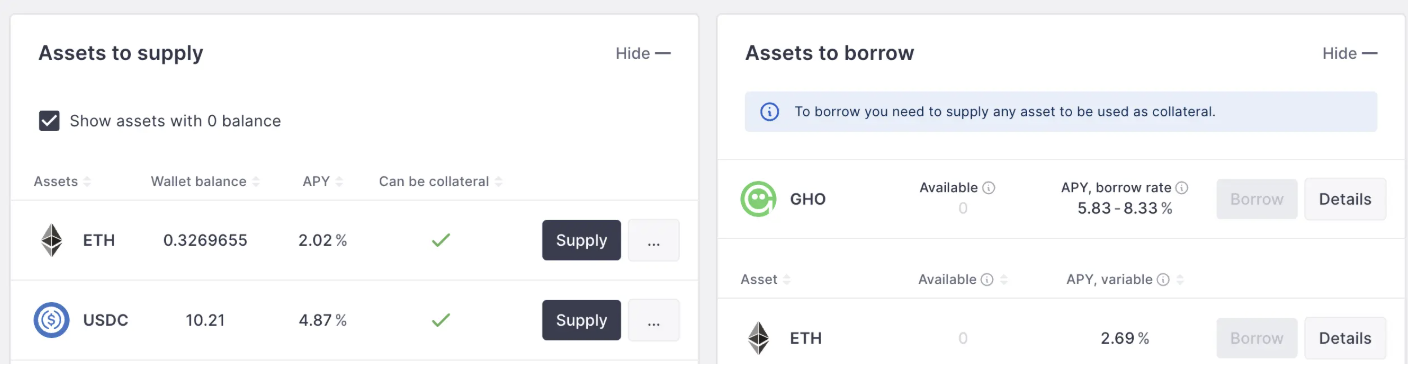
Vault: Traditional lending protocols are classified by token type, and when you deposit, the interest rate is based on the token you deposit, more like a bank. In Morpho, the deposit is a conceptual Vault, which can be roughly understood as a certain type of fund, with an independent fund manager, running a vault to manage your funds.
AAVE
Curator: The manager of the Vault, similar to a fund manager, the person or organization managing this Vault, representing risk control and strength, and mainly formulating the APY realization strategy.
Collateral: Collateral, after the Vault gets everyone's money, it goes out to lend and earn interest, and the collateral it gets back is what will be discussed in detail below.
Earnings Transfer Mechanism
In lending protocols, the interest ultimately comes from the borrowers, and Morpho is no exception. The difference from traditional lending protocols is that you used to give your money to the protocol, which acted as the intermediary; here you give your money to the protocol, which guarantees the safety of the funds, and then hands it over to a fund to manage, to lend out. The simplified relationship is as follows, this is the diagram on the Morpho official document homepage, take a few seconds to look at it and you will understand the core of the entire protocol:
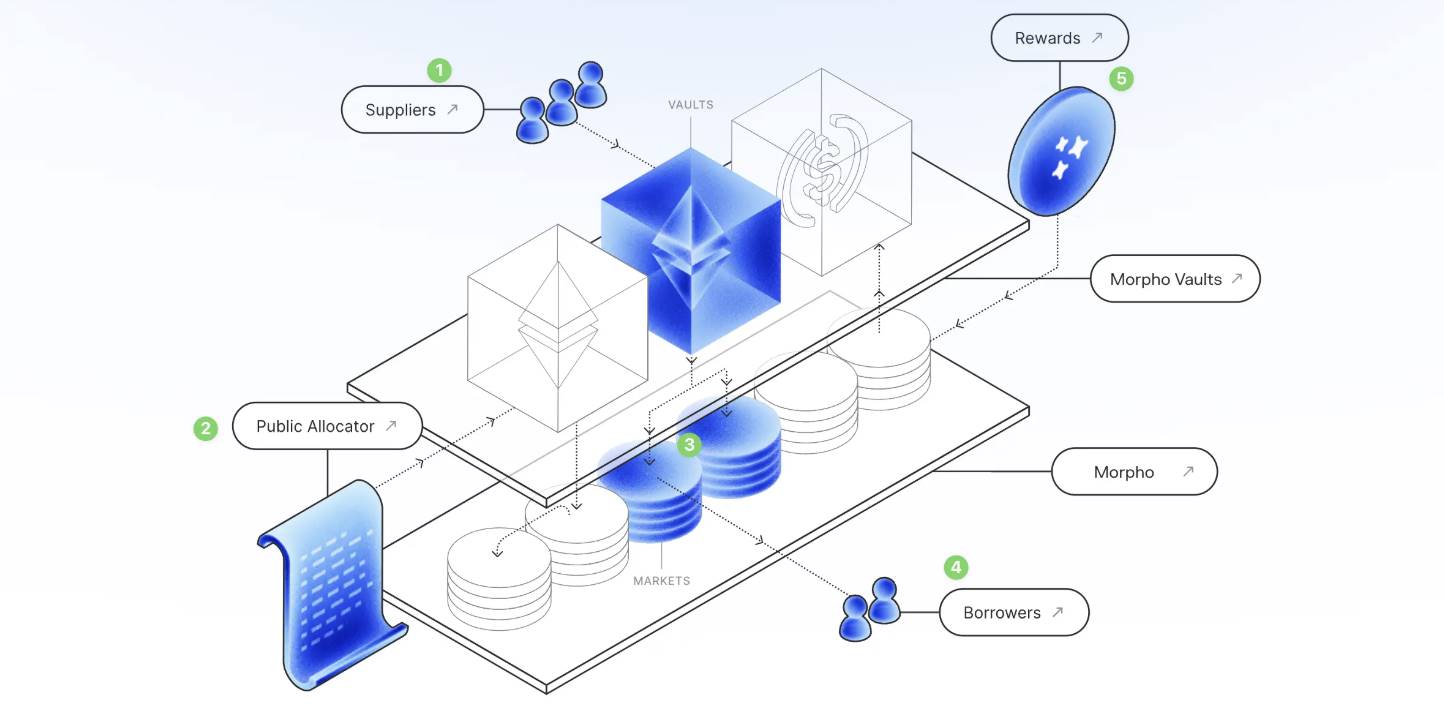
Supplier (depositor), holding ETH/USDC and other assets, deposits them into the Morpho Vault from the Earn section.
Through the Public Allocator, an audited smart contract, the Curator safely accesses the funds.
The Vault allocates the funds to the corresponding Market (full name Borrow Market).
The Borrower pledges assets from the Borrow Market to borrow funds and pay interest.
Then the Reward mechanism distributes the interest and other rewards to the Market and the Vault.
If you don't understand, read it a few more times.
The difference between Morpho and traditional lending is:
Traditional lending protocols usually require borrowers to pledge large-cap or more universal assets like USDC, USDT, ETH, etc.; while Morpho supports assets with lower applicability like PT/USD0++/Berastone as collateral, which can improve the utilization rate of idle funds for borrowers (pledge PT-sUSDe to borrow DAI).
Another difference is that the risk fluctuation of a single asset in traditional lending may affect the entire protocol, for example, if one asset has an incident, it may lead to other bad debts, while in Morpho, the Vaults are isolated from each other (an incident in Vault A does not affect the fund security of Vault B).
Understanding Earn and Borrow
Let's look at an example of each to understand.
Earn Parameter Interpretation
https://app.morpho.org/ethereum/earn
First, Earn is aimed at users who have idle funds and want to earn interest, which is the demand of most people. The Vaults listed here are all whitelisted by the official, but in fact, anyone can create a Vault (Permissionless), you and your friends can start one happily, the fund security, usage and transparency are guaranteed by the Morpho underlying, no need to worry about unauthorized misappropriation. Vaults that are not whitelisted will not be displayed on this homepage and cannot be searched.
We'll take the 🔗 MEV Capital Usual USDC Vault as an example and look at each parameter one by one. If you're not familiar with it, I suggest slowing down.
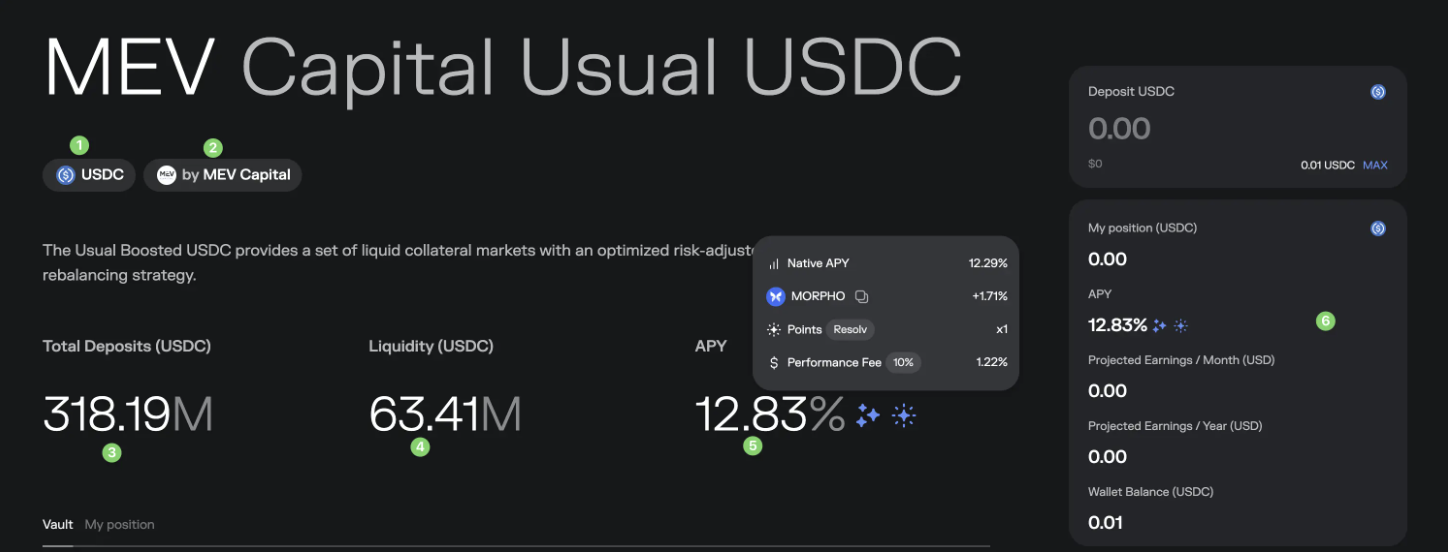
USDC: This indicates the token type accepted by the Vault, here it is USDC, other Vaults may have USDT/DAI/BTC LST and other token types.
MEV Capital: The Curator (manager) of this Vault, usually various institutions, you can search for the qualifications, history, asset management scale, etc. of the corresponding institution to better understand their risk management capabilities.
Total Deposits: The total amount of funds currently deposited in this Vault, which is 318M USDC here.
Liquidity: Remaining liquidity, similar to bank reserves, for people who want to withdraw. Here it is 63M, meaning that if you previously deposited 100M, you cannot fully withdraw in one step, the Morpho mechanism to solve this problem will be discussed below.
APY: The parameter most people care about. Generally composed of *Native APY + $Morpho token subsidy - Performance fee*, there may be other parameters, such as here showing a 1x bonus from the Resolv project, which may be redeemable for Resolv rewards in the future.
Personal asset related: How much money you have in your wallet, how much you have deposited, and how much you can expect to earn in a month/year.
Then look at the Overview
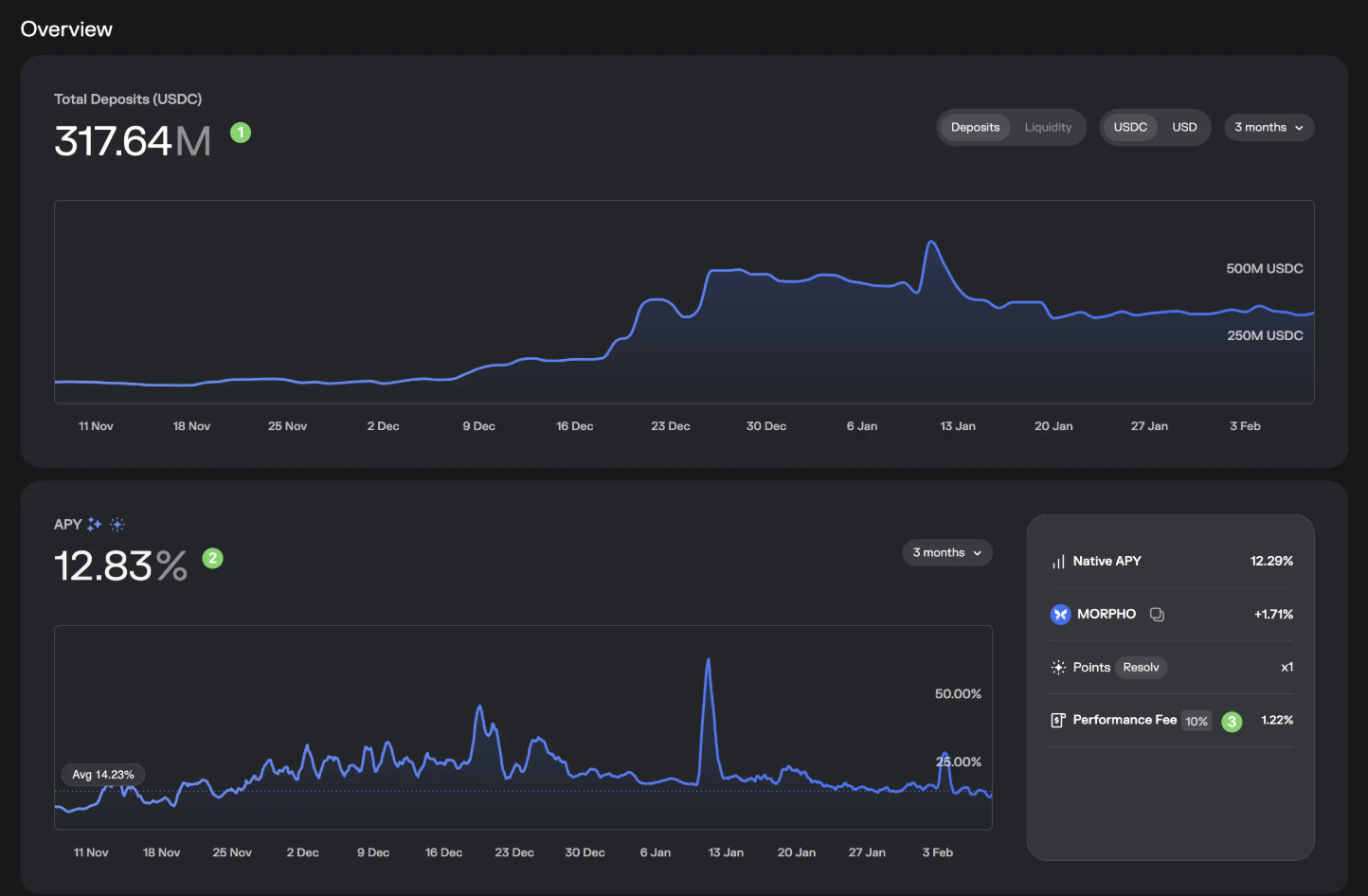
First is the basic trend of the deposited funds, you can switch the view, if the decline is rapid, it may indicate that there are risks brewing, pay attention to protect yourself.
Secondly, the basic trend of APY, which can also be switched.
Performance Fee: The APY here is a particularly noteworthy indicator, this is the performance fee of the Vault fund manager, deducted from your earnings, here it is 10%, representing 10% of your earnings, belonging to the Vault management, which is a 1.22% loss based on the current APY.
Then look at the Market allocation
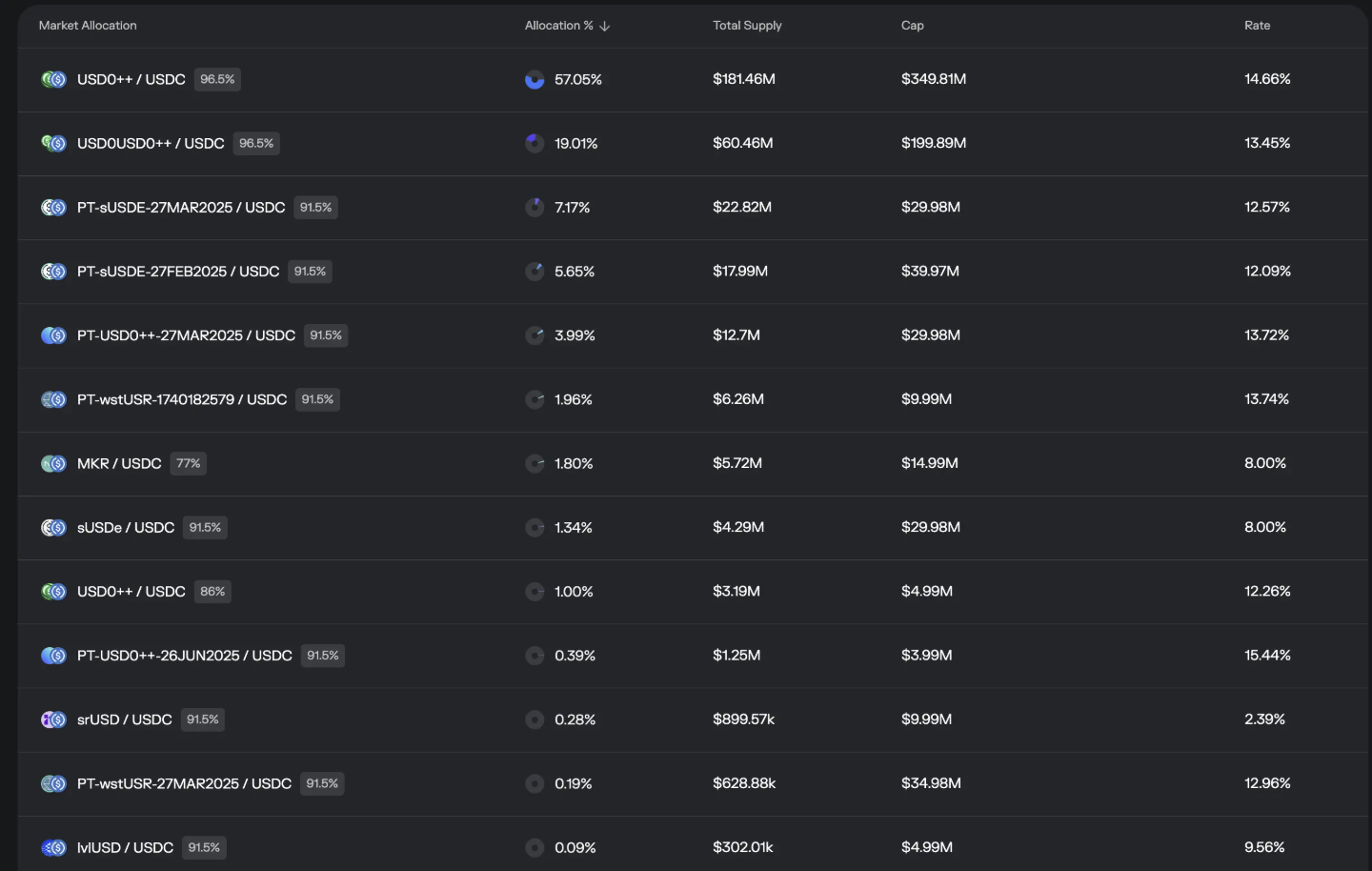
Here it publicly shows where the money you deposited is used for lending, which is the source of your earnings, this is the appeal of decentralized funds, open and real-time.
As shown in the figure, we see that 57.05% of this Vault's funds are in the USD0++/USDC Market, which allows users to pledge USD0++ to borrow USDC, with a maximum margin rate of 96.5%; a total of 181.46M has been supplied to it, with a strategy limit of 349.81M, and the APY in the last day was 14.66%.
The interpretation of the other Markets is the same. At this point, you may be wondering if this part is also the core risk source of the Vault, i.e. what if the collateral recovered by the Vault is not worth much? Indeed, this is also Morpho's biggest risk source, not from the protocol itself, but from the collateral.
Here is the English translation of the text, with the specified terms translated as instructed:Recently, USD0++ de-pegged, although there was no actual financial loss, the panic spread, and many people could not withdraw their deposited funds in the short term. Later, it was rescued by the active injection of liquidity by the new administrator and some operations to change the Market.
Next, let's look at the Performance
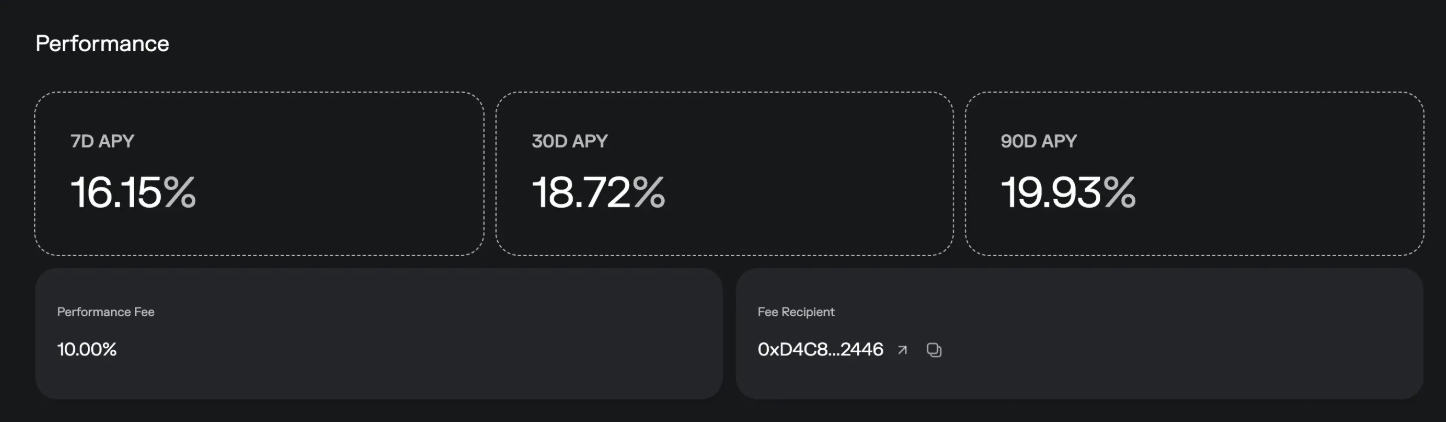
Nothing much to say, just past performance and the payout address for the performance fee.
Let's look at the Vault Configuration
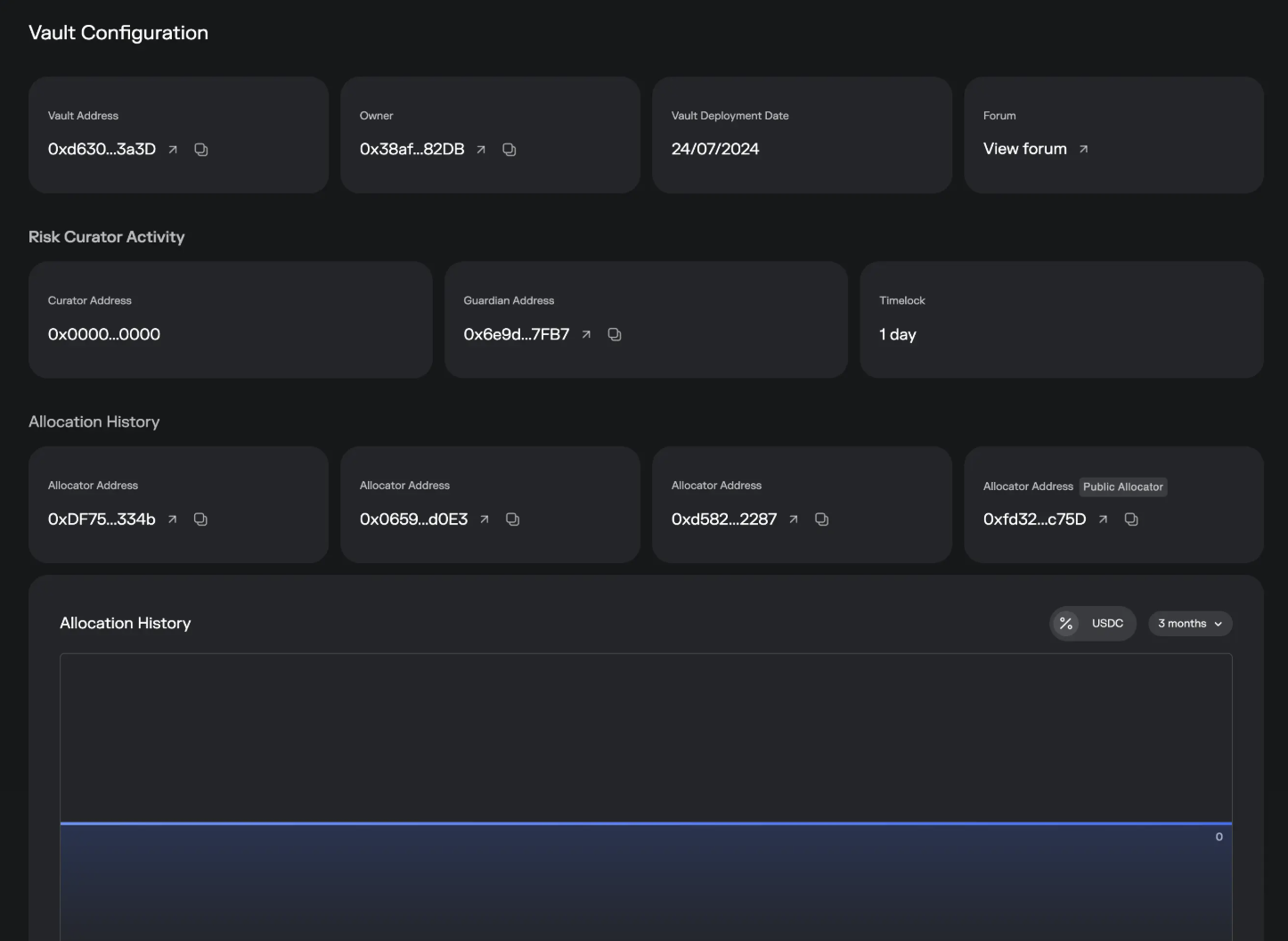
This part is mostly transparency reporting information, such as the Guardian Address used to monitor and counter-authorize some risk operations of the Vault, and the Timelock, which is the minimum waiting time when facing core changes, and this time is for the reaction time of the market, Curator, and Guardian.
Let's look at the Depositors
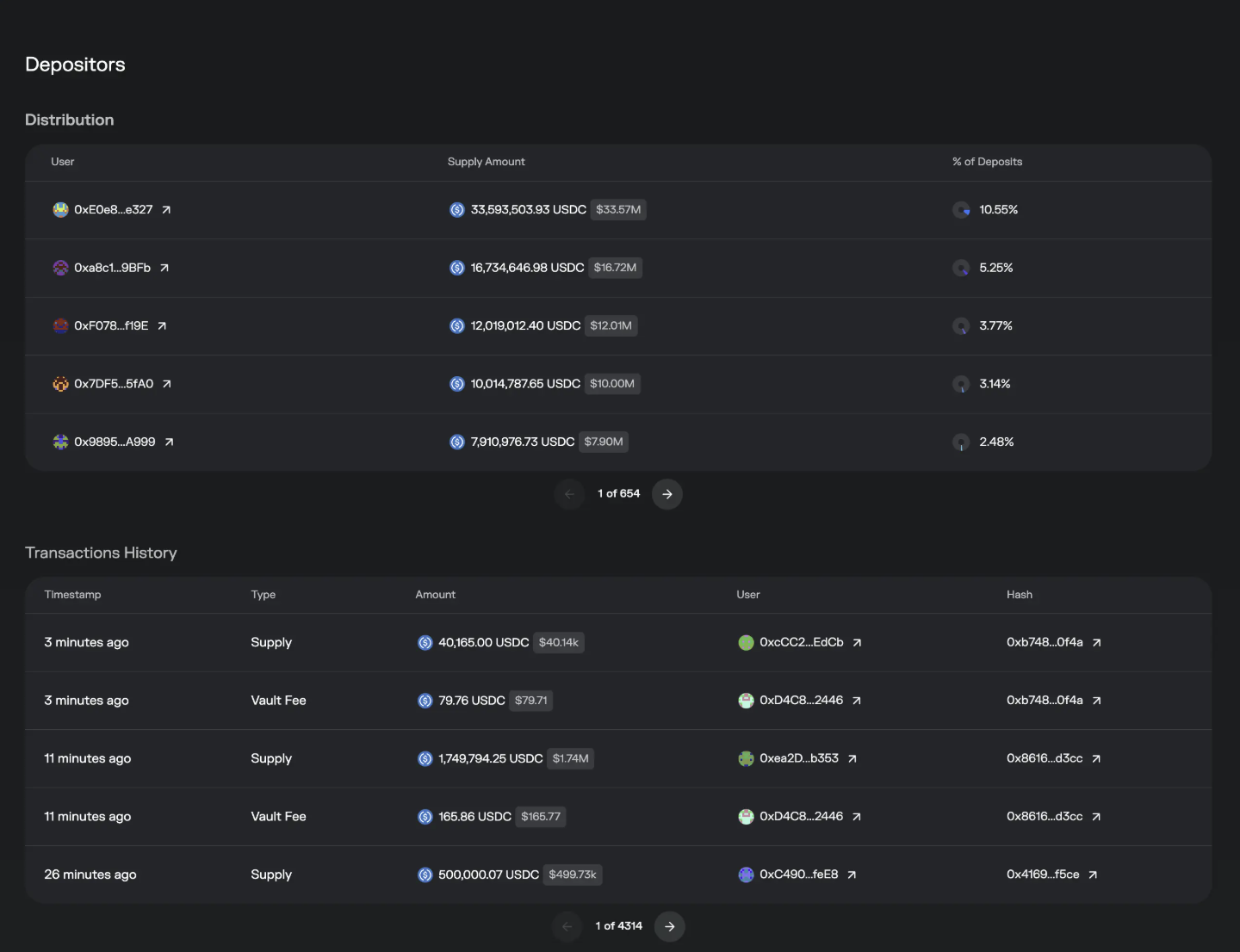
Distribution: How much each user has deposited, the percentage, with the largest depositors first.
Transactions History: This is the deposit and withdrawal dynamics of everyone. Attentive friends will find that for each Supply / Withdraw transaction, there is a Vault Fee transaction at the same time, and the mechanism here is: every time a user operates the Vault, it will help the Curator extract the performance fee already earned from Morpho, which is also one of the reasons why the gas for direct interaction with Morpho is quite expensive 😂.
The above is the full content of the Earn parameters.
Borrow Parameter Interpretation
https://app.morpho.org/ethereum/borrow
The individual pools in the Borrow section are called Markets, generally provided for those with revolving loans or other borrowing needs.
We'll use 🔗USD0++ / USDC as an example
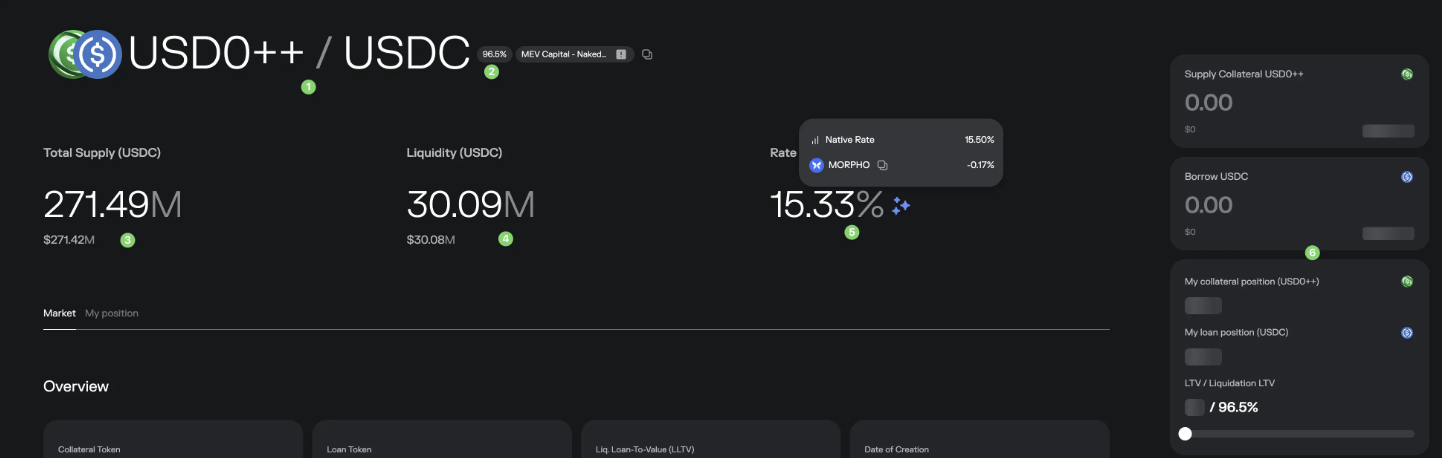
First, the title indicates that it supports collateralizing USD0++ to borrow USDC
96.5%: LLTV, which will be explained in detail later
Total Supply: The total amount of funds deposited into this Market
Liquidity: The amount of funds in this Market that are still available to be borrowed
Rate: The interest that borrowers need to pay, the native interest is 15.5%, of which there is a 0.17% $Morpho subsidy, so the actual rate is a bit lower
Your position information: How much you have collateralized, how much you have borrowed, what your LLTV is, and if you are not familiar with LLTV, you should never get close to the target value, as reaching it will trigger automatic liquidation.
Looking at the Overview
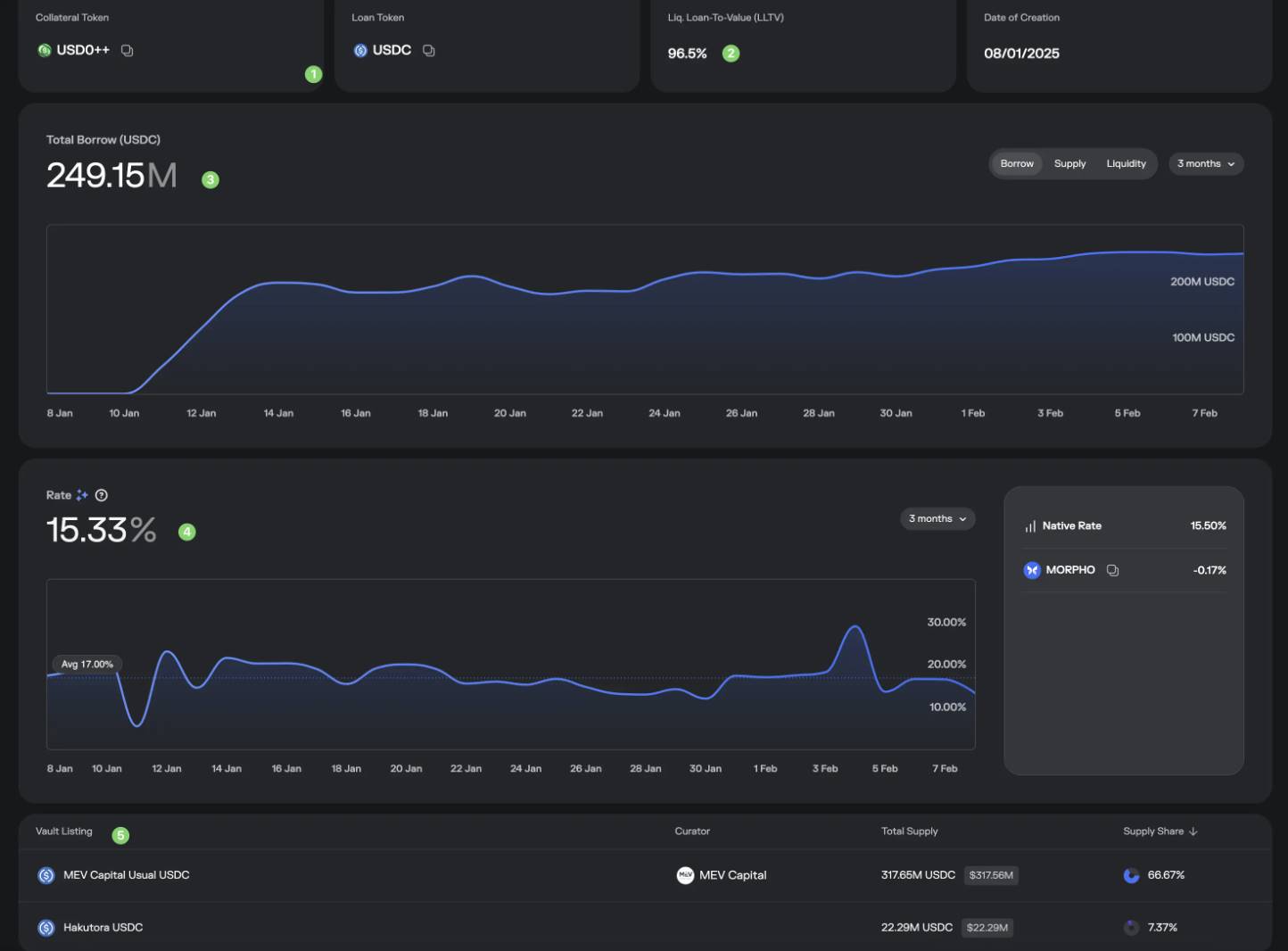
First, the collateral asset and the borrowing asset, which were mentioned earlier
Liq. Loan-To-Value (LLTV): Simply put, this is the liquidation line, when your borrowed asset value / collateral value = 96.5%, your collateral may be liquidated. To protect the collateral, first try not to let your loan amount get too close to this value, and monitor the prices of the collateral and loan tokens, and then look at the oracle structure of this Market (how the prices of the two are determined), which will be discussed below.
Borrowing amount trend
Borrowing rate trend, and the calculation method on the right
Which Vaults have deposited funds into this Market, and you'll also notice that the Supply Share of these 2 Vaults doesn't add up to 100%, because there are also some "individual investors" who have deposited funds, but they are not counted as Vaults, so they are not shown here, and are displayed below.
Let's look at the Oracles

This explains the price determination mechanism of the collateral, most of which are contracts, and are not easy for ordinary people to understand, but you can seek help from AI, for example:
1️⃣ It tells you that the last price was 1 USD0++ = 0.87 USDC
2️⃣ The contract tells us how the USD0++ price is defined (ask the AI), it says it is taken from the fixed FloorPrice in the USD0++ contract, and those familiar with the USD0++ project know that its FloorPrice is currently fixed at 0.87, which means that this price is currently fixed and will not change with market price changes.
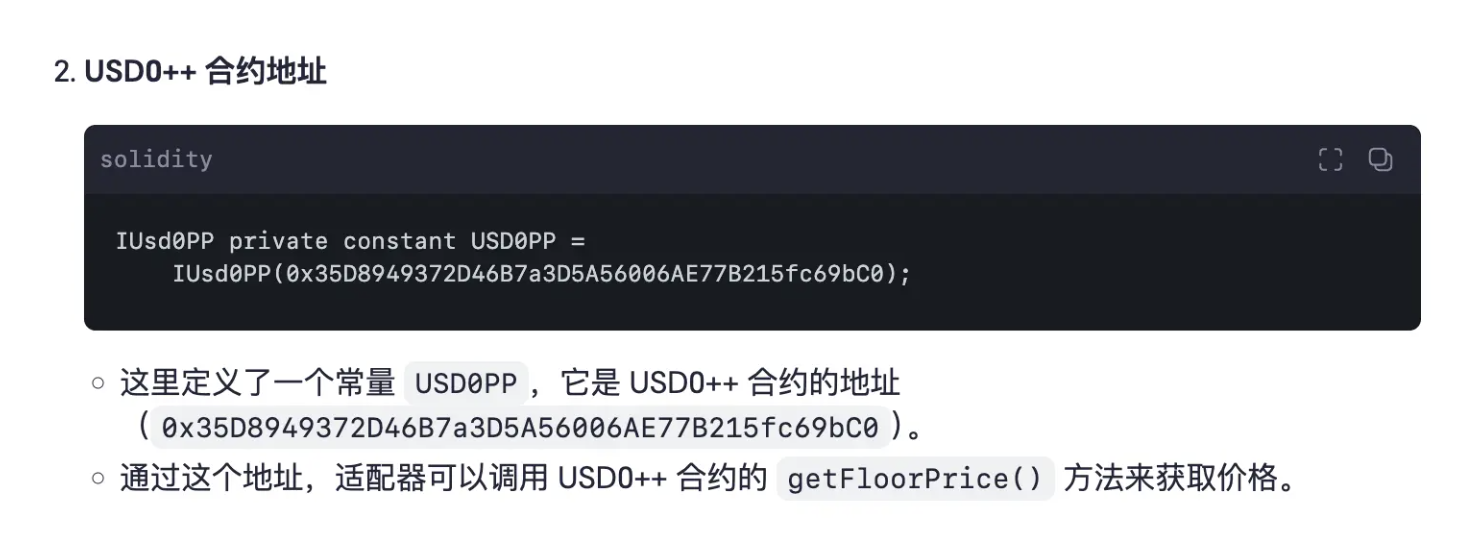
The oracle situation is not the same for each Market, some are volatile, and some are linearly increasing at a fixed rate.
Let's look at the Instantaneous Rates, this part is very important.
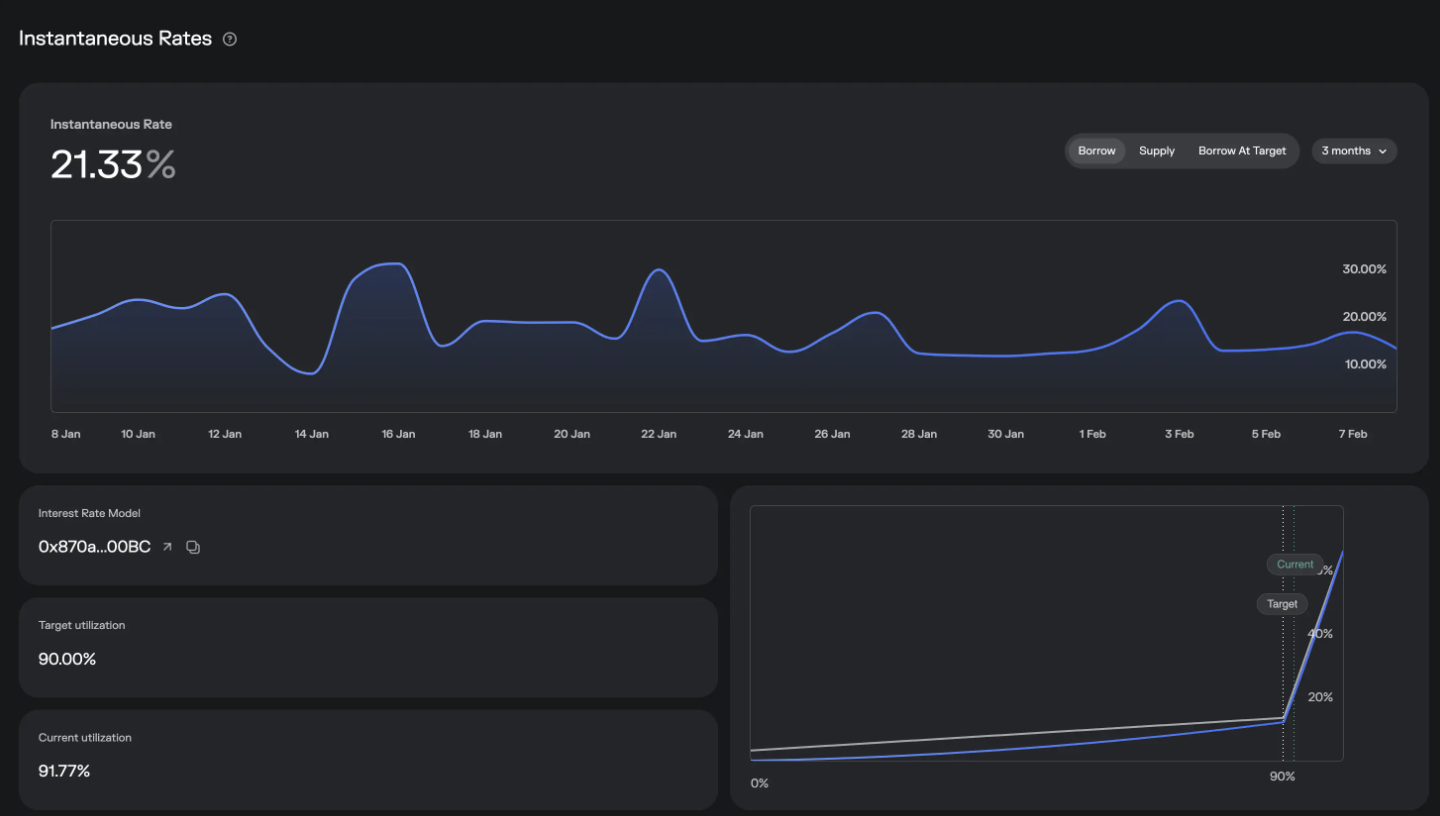
First, we can see the real-time borrowing and supply rates, as well as the trend, and the important parameter is the Target utilization, which is currently 90%, while the Current utilization is 91.77%. The utilization calculation is: the money that has been borrowed / the money that has been supplied, simple math tells us: the more money that is borrowed, or the less money that is supplied, the higher the utilization will be.
The graph on the bottom right, the gray line is the borrowing rate, and the blue line is the supply rate. 90% is a dividing line, when the utilization exceeds 90%, the borrowing rate will skyrocket, and this is the mechanism to protect the problem mentioned earlier in the Earn section: what if I want to withdraw from the Vault but there is not enough liquidity? Let's use an example to explain:
Suppose a Vault has lent out the money and supplied it to a Borrow Market, and it only has 50M in remaining liquidity, and a large depositor wants to withdraw 100M, what to do?
Suppose the large depositor first withdraws these 50M, then the Vault's liquidity is gone, the Borrow Market's supply is reduced, the utilization (utilization rate) rises, the borrowing rate rises, forcing the borrowers to repay the loans; at the same time, the Vault's APY rises, attracting external people to supply; then the borrowers repay the loans, new people deposit, continue to provide funds for the large depositor to withdraw, and so on, until a new equilibrium is reached.
Through this interest rate control mechanism, it can ensure interest rate stability and also ensure large-scale withdrawal demands.
Let's look at Liquidations, there's not much content here
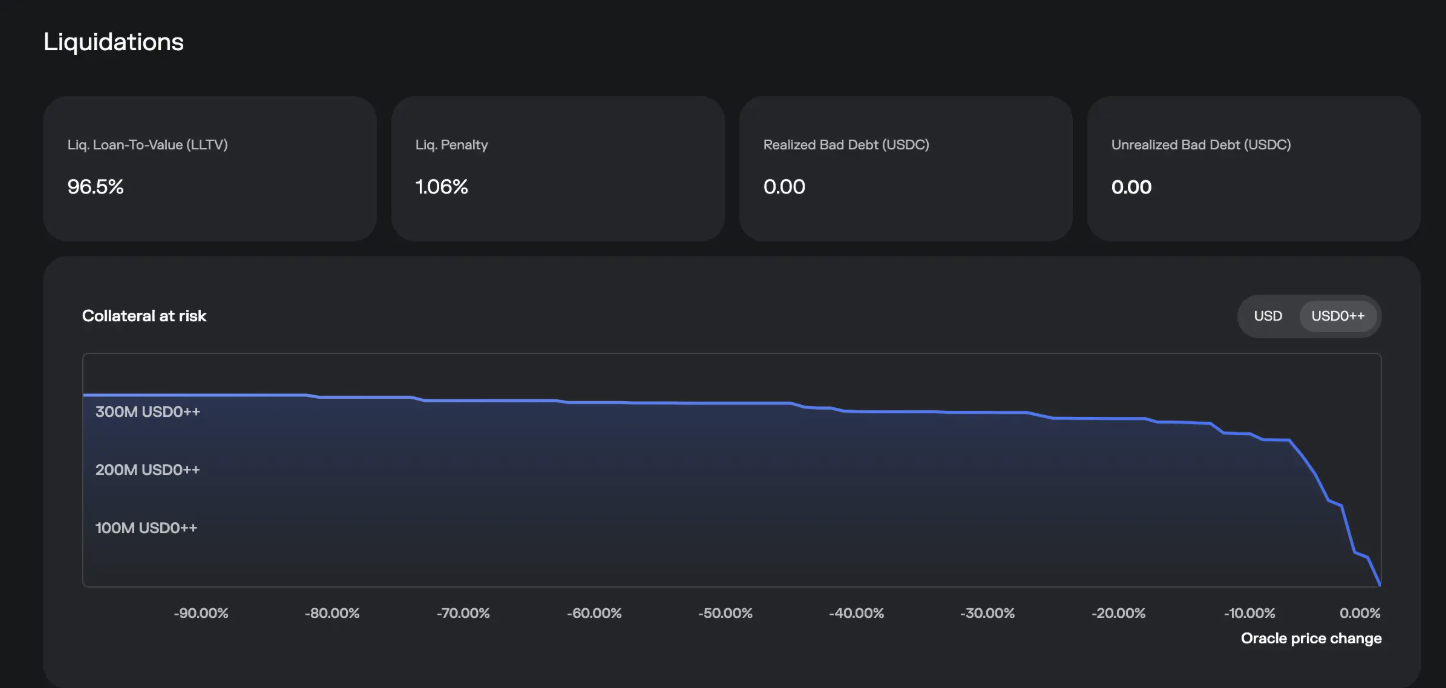
One is the Liq. Penalty (liquidation penalty)
The other is the graph, from right to left, showing how much of the asset will be at risk of liquidation as the collateral price declines, just hover the mouse over it to see.
Let's look at Market Activity
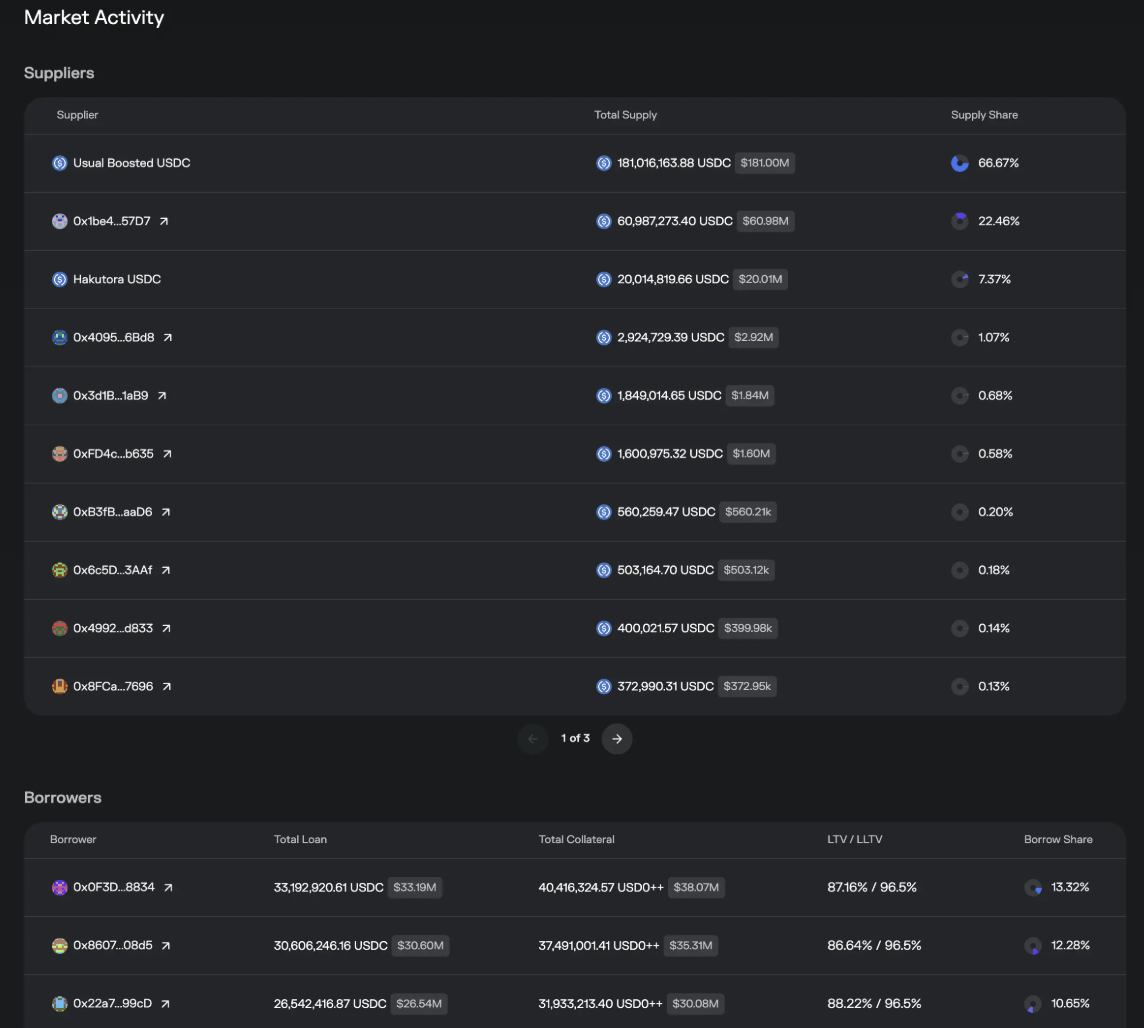
Here we can see from the Suppliers that in addition to Vaults, there are also some individual addresses (such as 0x1be4...57D7) that have provided funds to this Vault. In the advanced part below, we can see why these individual addresses are doing this and how they operate.
The Borrower list is self-explanatory, who has borrowed how much.
Finally, the warning section
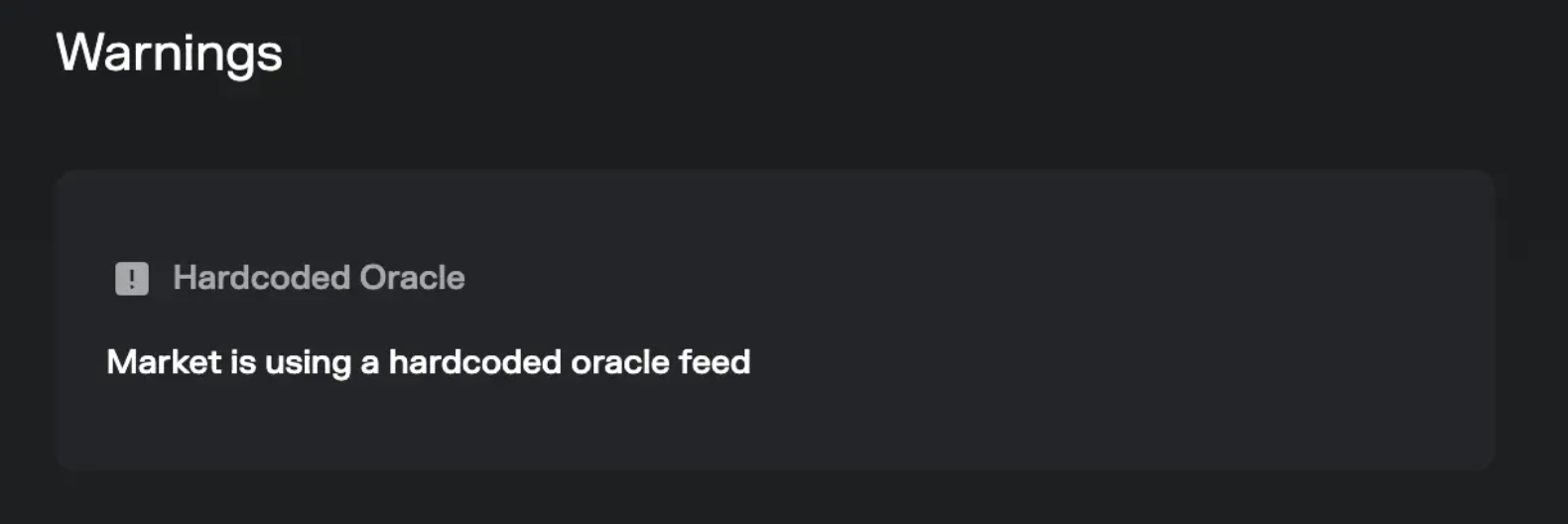
This warns of the potential risks of this Market, such as the one we mentioned above, that the USD0++ price is fixed, this is warned here. Not all Markets have this warning, and having this warning does not mean it is very dangerous, and not having this warning does not mean it is 100% safe, respect the market.
The above is the full parameter interpretation of the Borrow section.
By now, you should have a deeper understanding of the Morpho protocol. If you still don't understand, read it again, my friend.
Extended question: If there is actual risk, can you demand compensation from Morpho? The answer is no. (Mature Crypto surfers already know this)

Morpho_Terms_of_Use.pdf
Advanced Operation: Achieve the Highest Yield + Bypass the Performance Fee
When we were talking about the Borrow Market, we knew that the liquidity of most Markets is provided by Vaults, and the money in the Vaults is provided by users. In the figure below, we find that some individual users have directly supplied to the Market (called direct supply).
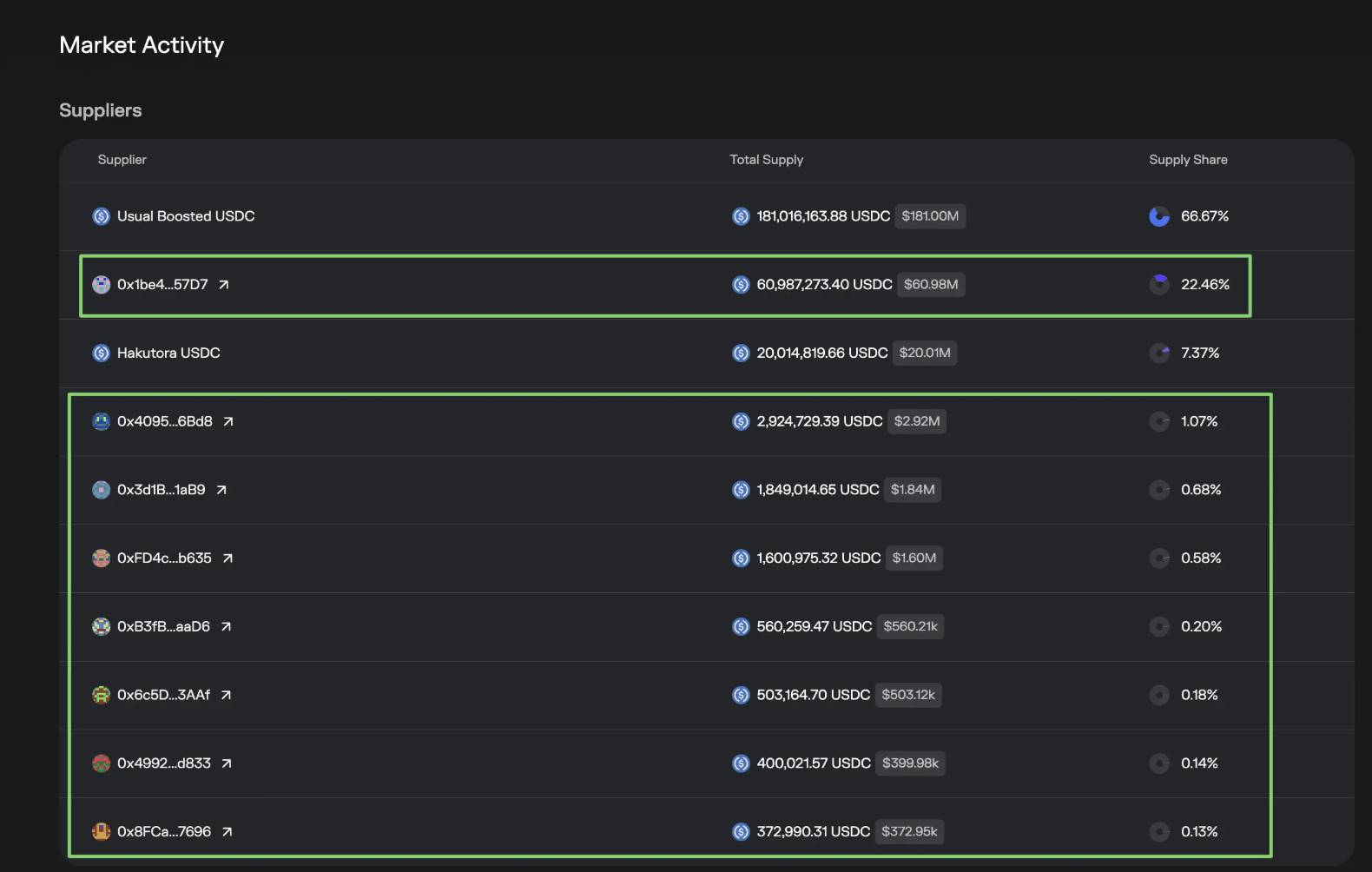
This is thanks to Morpho's non-authorization mode, where anyone can become a Market Supplier, and you can too.
The benefits of doing this are:
You can eat the full Supply yield, as shown in the figure, the Vault's yield is averaged out due to the multi-pool lending, if we find the highest APY in 2️⃣, and directly deposit it, the yield rate can be increased.

The second benefit is that by directly depositing and bypassing the Vault, you avoid the performance fee, and the yield can be further increased by 1-2%.
However, there are also downsides to this approach:
When the Market experiences risks and there is insufficient Liquidity, you cannot withdraw your funds in a timely manner.
You need to monitor the volatility risk of the collateral yourself, a good fund manager will help you monitor and withdraw in advance (e.g. OneKey Hakutora USDC), which is the reason for the performance fee. Of course, there are also Vaults that charge performance fees but do not have many risk control measures.
The following are the operations, provided for those who need them.
WARNING
For the first operation, be sure to use a small amount, such as 1 USDC, and a new wallet, to prevent any conflicts with your previous operations, and ensure the Withdraw is successful before operating with a large amount. All the following operations are contract interactions, and any operational mistakes / contract information updates / Market changes may result in the funds being lost forever, so please operate with caution. I am not responsible for any results, this is for learning purposes only, and the risk is borne by you.
Still using this 🔗USD0++ / USDCMarket as an example, you can change the corresponding parameters for other Markets. The token we want to Supply is the loan Token, which is USDC.
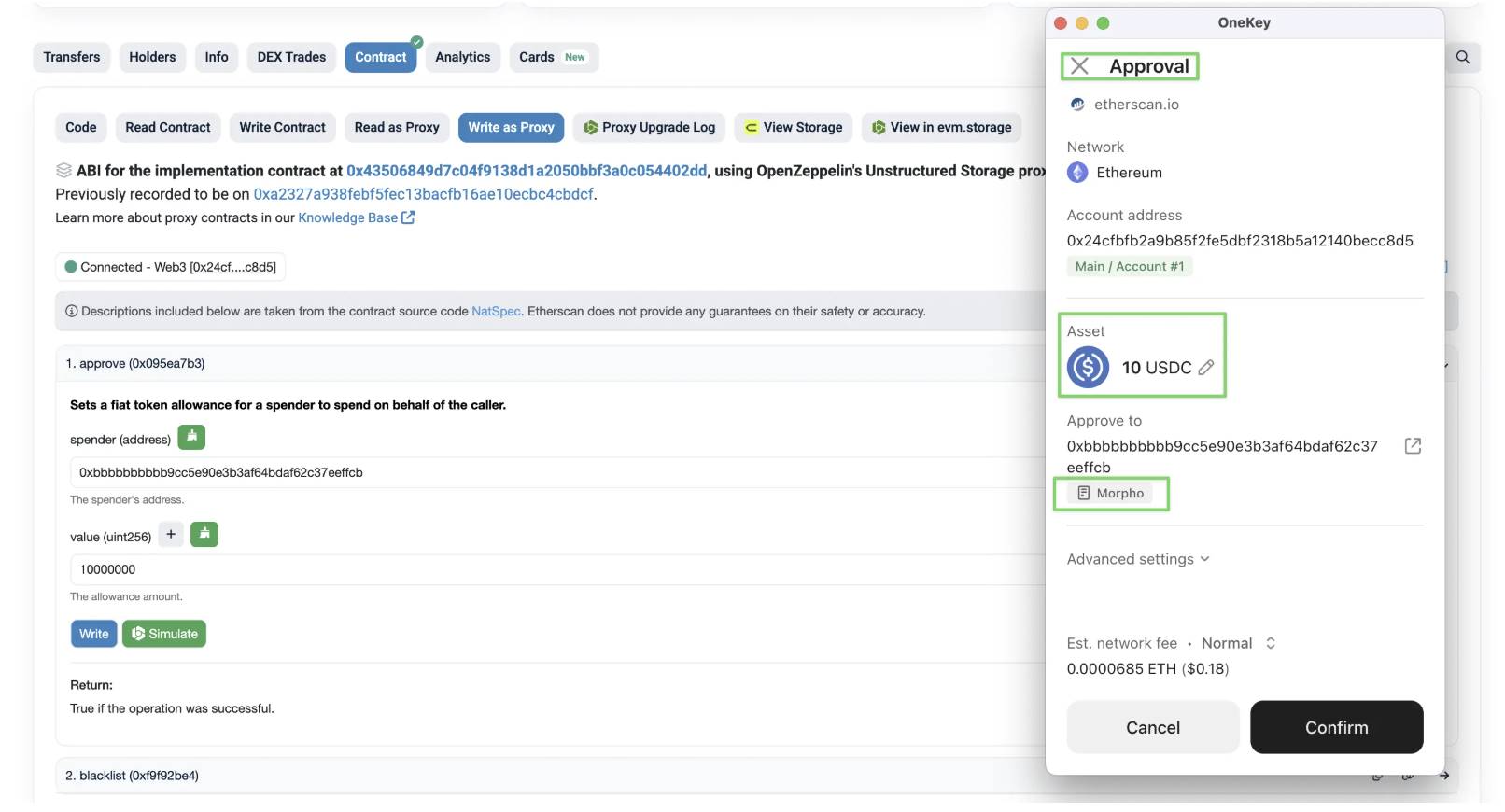
First, we need to authorize USDC to Morpho.
Go to the USDC contract:
https://etherscan.io/token/0xa0b86991c6218b36c1d19d4a2e9eb0ce3606eb48#writeProxyContract
Select writeProxyContract, then Connect to Web3.
Find the Approve function.
The spender is 0xbbbbbbbbbb9cc5e90e3b3af64bdaf62c37eeffcb, which is the Morpho contract.
The value is the amount of USDC * 1000000.
Click Write, and make sure the wallet's simulation result matches the expected one.
Second, we go to the USD0++ / USDCMarket and collect the following parameters:
LoanToken: 0xA0b86991c6218b36c1d19D4a2e9Eb0cE3606eB48CollateralToken: 0x35D8949372D46B7a3D5A56006AE77B215fc69bC0Oracle Address: 0xBf877B424bE6d06cA4755aF2c677120eC71cac53Interest Rate Model (irm): 0x870aC11D48B15DB9a138Cf899d20F13F79Ba00BCLLTV: 965000000000000000code
Third, go to the Morpho contract.
https://etherscan.io/address/0xbbbbbbbbbb9cc5e90e3b3af64bdaf62c37eeffcb#writeContract
Select Contract - WriteContract, then Connect to Web3.
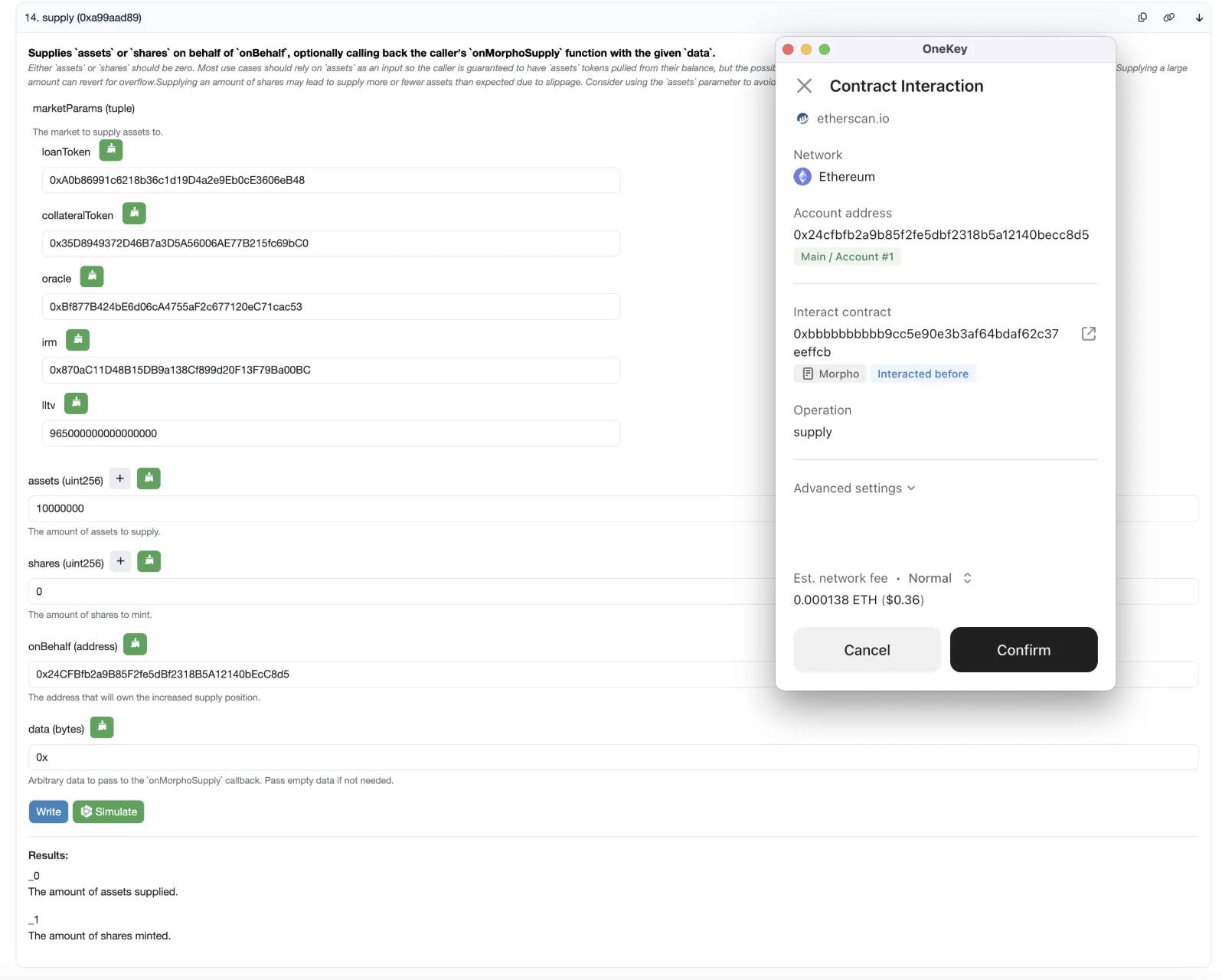
Fill in the corresponding parameters in the first few fields, and for the following fields:
Assets is the amount of USDC you want to deposit, also USDC Amount * 1000000.
shares is 0.
onBehalf is your wallet address.
data is 0x.
Click Write, and make sure the wallet's simulation result matches the expected one.
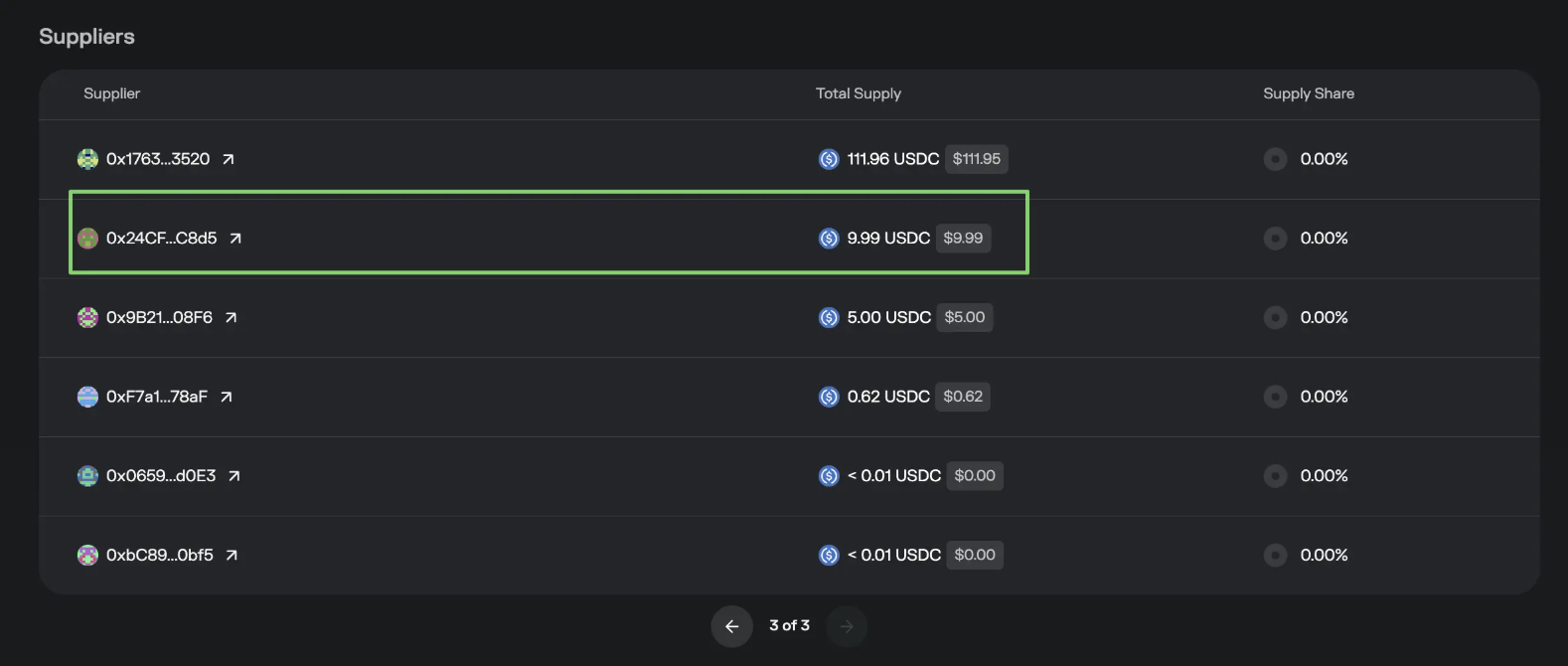
After a while, you can find your amount and address in the Supplier section of the Market. This approach has a downside, which is that you cannot see your funds in the Position on the website, only in the Market, but the $Morpho rewards are still given normally.
Fourth, prepare for withdrawal. Open the transaction of the previous deposit on the block explorer, select the log, and find the Supply event, where the shares parameter indicates how many shares you deposited, which will be used for withdrawal.

The parameter 3 in the figure
Fifth, withdraw. Go to the Morpho contract.
https://etherscan.io/address/0xbbbbbbbbbb9cc5e90e3b3af64bdaf62c37eeffcb#writeContract
Select Contract - WriteContract, then Connect to Web3.
Fill in the corresponding parameters in the first few fields, and for the following fields:
Assets is 0.
shares is the number you found in the fourth step.
onBehalf is the address you deposited the funds to.
receiver is the address you want to receive the funds.
data is 0x.
Click Write, and make sure the wallet's simulation result matches the expected one.
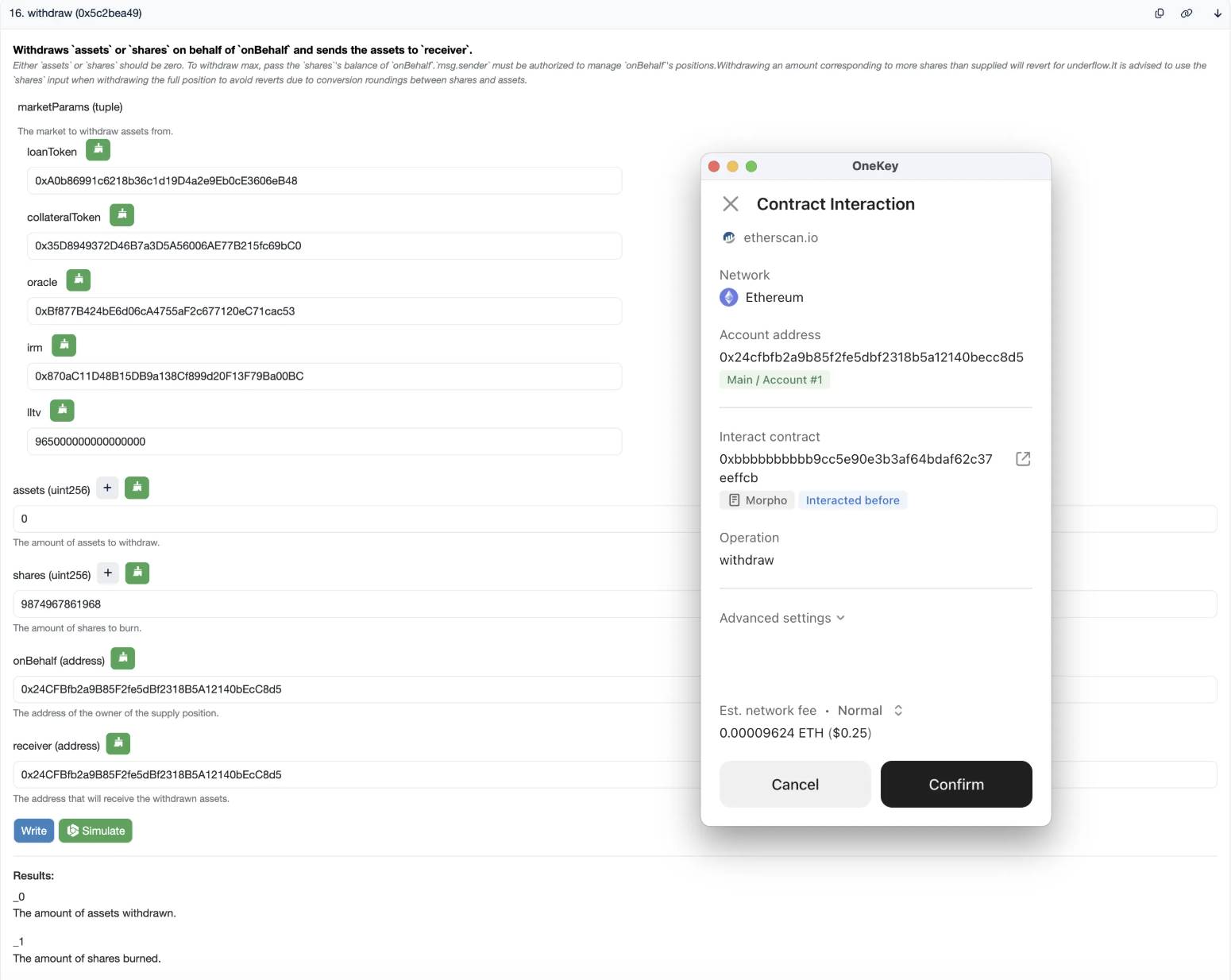
If all goes well, the deposit and withdrawal are complete.