Why is it important to manage liquidity properly?
Without liquidity, tokens are essentially impossible to buy and sell normally. With such low liquidity, prices can be driven up or down in an instant. Randomly withdrawing tokens from the pool could easily destroy market trust.
Therefore, you must think carefully about when to add to the pool, how much to add, and when to withdraw before taking any action.
What can CiaoTool 's Swap V2 do for you?
This module fully supports liquidity management on the BSC chain: 1. In the Add Liquidity V2 interface:
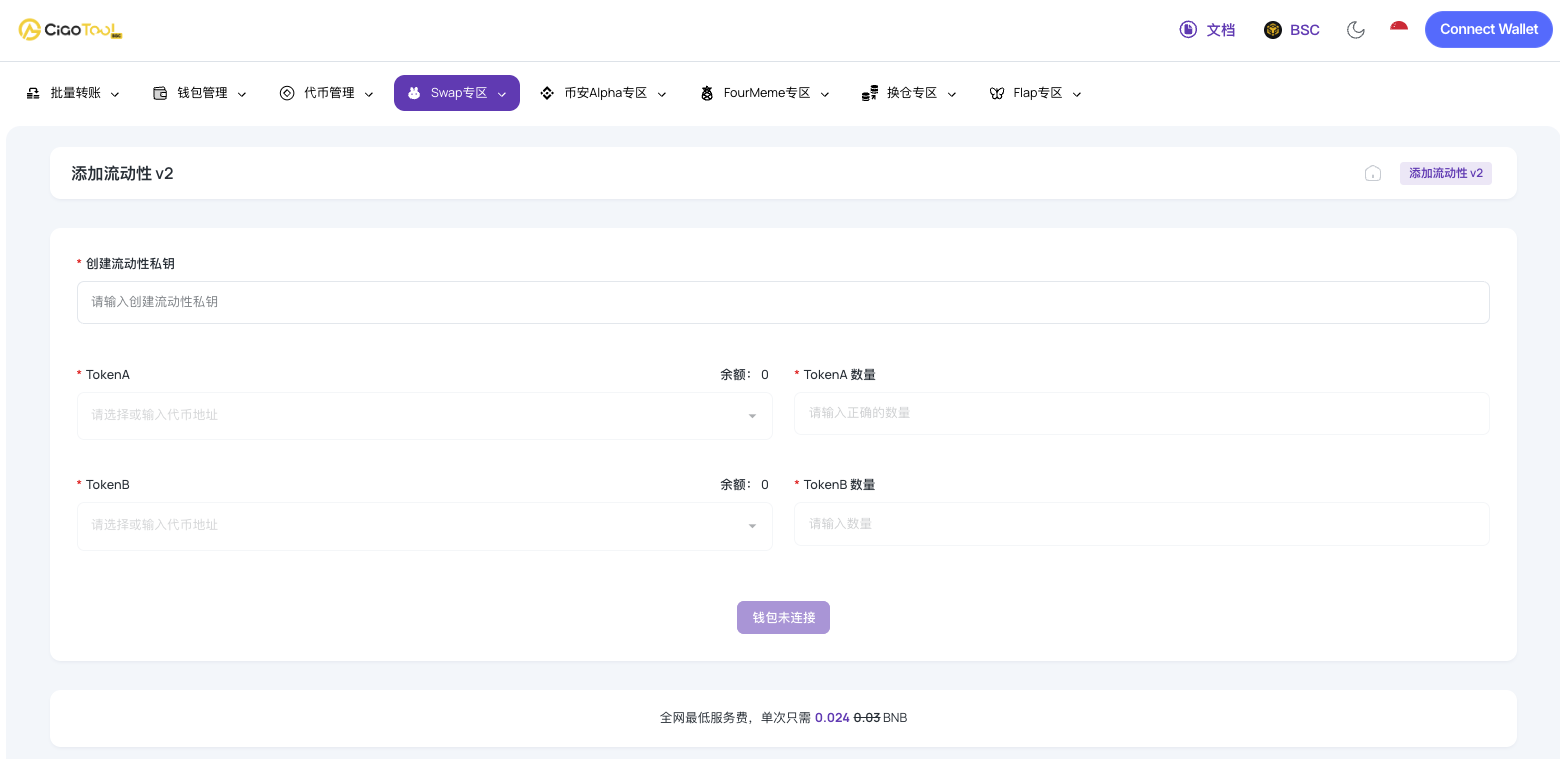
1. Set up your liquidity private key: This is for securely creating and managing your liquidity pool. 2. Select your pairing tokens: In TokenA and TokenB, you can choose mainstream coins (such as BNB, USDT), or directly enter the address of the new token you want to pair. 3. Enter the quantities: Enter the quantities for TokenA and TokenB according to your plan. The system will automatically calculate the pairing based on the current market price. Features: 1. Create an initial trading pool for a new token's first listing . 2. Increase liquidity to stabilize the price if you feel the pool depth is insufficient . 3. Adjust liquidity ratios to match the project's development stage.
II. On the Remove Liquidity V2 screen:
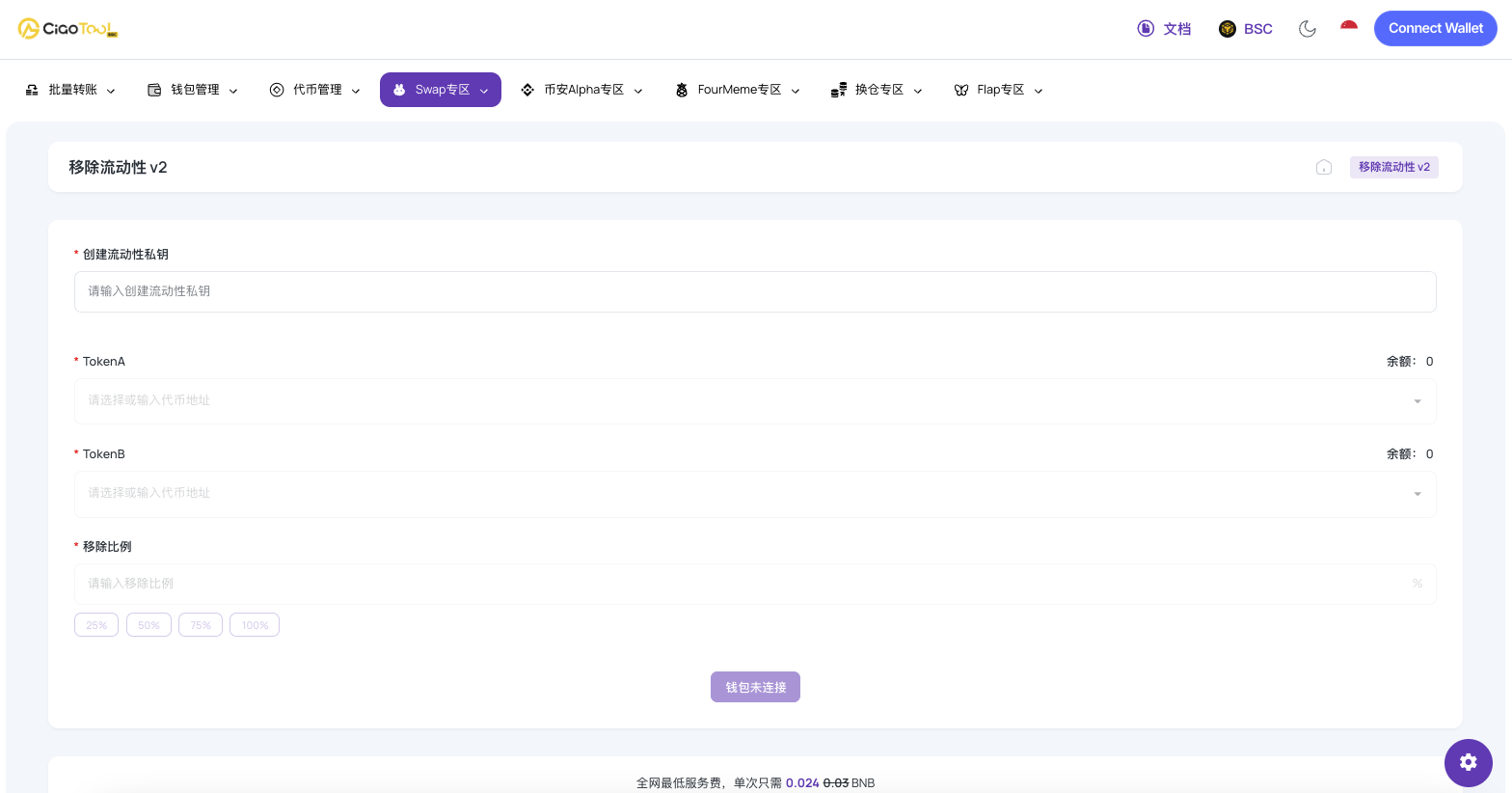
1. Verify Liquidity Private Key: As with adding liquidity, first enter your private key used to create the liquidity to ensure security. 2. Select the Corresponding Trading Pair: In TokenA and TokenB, select or enter the two token addresses of the pool from which you want to remove liquidity. 3. Decide How Much to Remove: Enter the percentage in the Remove Ratio field. Features: 1. Project phase adjustments requiring liquidity reallocation. 2. Migrating liquidity to a new pool or platform. 3. Simply wanting to recover LPs , realize cash, or use them for other purposes.
Why use CiaoTool?
1. Simple to operate and less prone to failure. No need to switch back and forth between DEX pages or repeatedly authorize; everything can be done in one interface.
2. In non-custodial mode, you always manage your assets yourself. All transactions are completed with local signatures in your wallet, and CiaoTool does not touch your assets.
Who is it suitable for?
BSC Project Team: Manages token liquidity throughout the entire lifecycle. Individual Developers: Test the trading depth of their own tokens. Operations Team: Flexibly adjusts the pool according to market rhythm . Advanced Users: Want more control over their LPs.
Summarize
In the BSC ecosystem, liquidity isn't just about "adding any pool"; it directly impacts project reliability and the user trading experience. CiaoTool's Swap V2 liquidity feature clarifies and secures the process of adding and removing pools, making these operations controllable and transparent!