
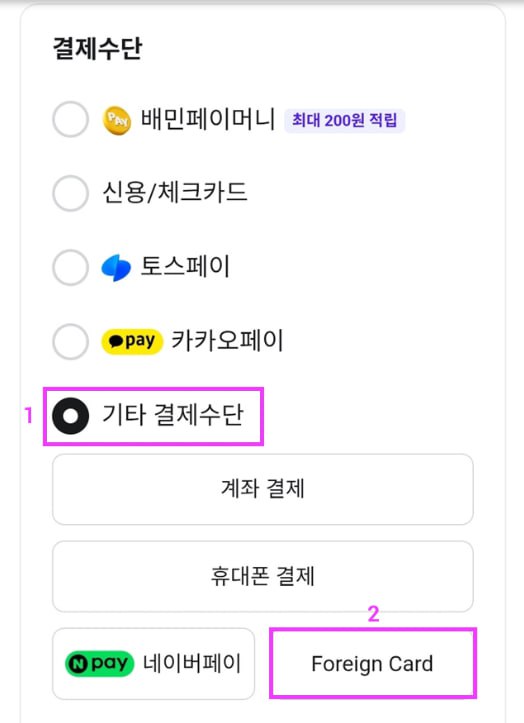
🎺 Tria - How to Use the Baedal Minjok/Coupang Eats App ➡️ Go to Tria If you received a physical card, or if it was a virtual card, you received a card number beforehand, you can use it on your Android phone. I thought you had to register Apple Pay on your iPhone, and register Google Pay on Android using a VPN. However, I found that you can register and use it within the app itself, so I'm sharing the steps. ✅ How to Use Baedal Minjok (Android) ➡️ Select a Menu ➡️ Make a Payment ➡️ Payment Method » Other Payment Methods » Foreign Card ➡️ VISA Card » 4 Checks » Full Agreement ➡️ Card Number, Expiration Date, Name of Holder, Installment Period, Email, Checkbox, and Click Payment ✅ How to Use Coupang Eats (Android) ➡️ Bottom Right [My Eats] » Payment Management ➡️ Add Payment Method ➡️ Credit/Debit Card ➡️ Manually Enter Card Information ➡️ Fill in Card Number, Expiration Date, etc. + Checkbox, and Click Register #tria
This article is machine translated
Show original

Telegram
Disclaimer: The content above is only the author's opinion which does not represent any position of Followin, and is not intended as, and shall not be understood or construed as, investment advice from Followin.
Like
Add to Favorites
Comments
Share
Relevant content