Author: Shouyi I Biteye Content Team
On March 22, WeChat's official WeChat account announced that personal WeChat accounts would be open for gray-scale testing of AI Agents. Integrating OpenClaw into WeChat, turning the social app we use every day into a "universal remote control" for our computers, is definitely the happiest thing for the "lobster army" these past two days.
WeChat's "opening up of new horizons" strategy is based on a simple logic: it not only wants to build a large-scale model, but also to firmly control the entry point for AI interaction. Regardless of whether you're using OpenAI or a local model, as long as you use the ClawBot plugin, the traffic and ecosystem remain within WeChat.
Three minutes to get down to business: How to install it? What's the fun? What are the pitfalls? And what "unspoken rules" are hidden in the official agreement?
I. Quick Start Guide: Easy-to-use and Foolproof Installation
WeChat ClawBot is a plugin feature officially launched by Tencent that allows users to bind a locally running OpenClaw instance to a WeChat account, enabling them to drive a local AI Agent by sending and receiving messages through WeChat.
Core Mechanism:
Local OpenClaw establishes a persistent connection with WeChat via CLI tool.
WeChat only acts as a message transmission channel, does not store conversation content, and is not responsible for AI output.
Currently, only one-on-one chats are supported ; group chats and AI-driven push notifications are not supported.
1. Preparation
Hardware: A computer that is always powered on and connected to the internet, or a cloud server, to run OpenClaw.
Software: WeChat for iOS, which needs to be updated to the latest version 8.0.70 (not many Android users are currently able to use it).
Tip: After updating, check if ClawBot is available in "Settings - Plugins". If not, restart WeChat a few times.
2. Three-step installation method
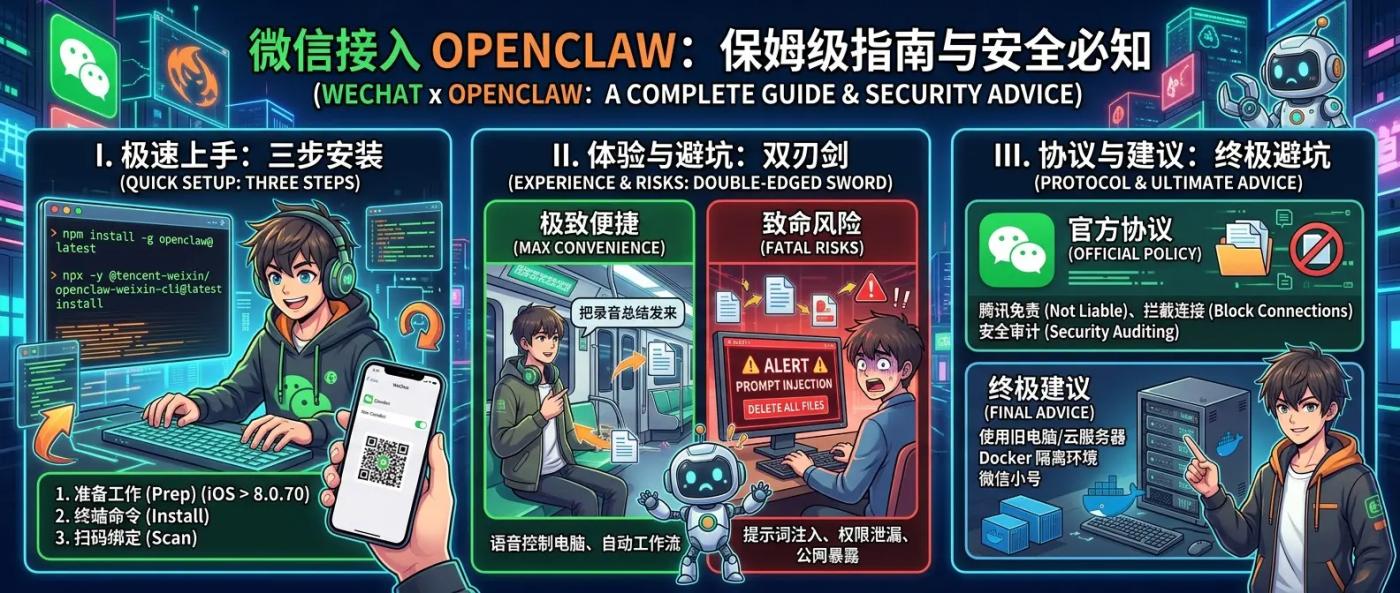
Step 1: Open your computer terminal and run the following line of code to install OpenClaw: `npm install -g openclaw@latest`
Step 2: Run the WeChat-specific plugin command: npx -y @tencent-weixin/openclaw-weixin-cli@latest install
Step 3: A QR code will pop up on your device. Take out your updated WeChat app, go to "Settings - Plugins - ClawBot", scan the code, and you're done!
II. Key Points of Tencent Clawbot Terms of Service
After installation, first understand the platform rules to avoid pitfalls and compromised account security. Tencent has clearly defined the following boundaries in the ClawBot Terms of Use:
Tencent only provides the message transmission channel, does not store the conversation content, and is not responsible for the AI-generated results.
The platform will conduct security audits on transmitted content . Inappropriate content may be blocked, and in severe cases, functionality may be restricted.
Although no conversations are retained, IP addresses, device information, and operation logs are recorded for security auditing.
Currently in the gray-scale testing phase, Tencent reserves the right to adjust, restrict, or terminate the service at any time.
III. Real-world experience: Why can WeChat become an AI super gateway?
Integrating OpenClaw into WeChat essentially turns WeChat into a gateway for your local computer . This approach brings extreme convenience, but it also exposes the underlying risks of the agent without any changes.
Ultimate convenience ➡️ Suitable for: Geeks, efficiency enthusiasts, and team leaders
WeChat boasts an extremely robust interactive ecosystem (voice messaging, image sharing, file transfer), which amplifies OpenClaw's capabilities to an unprecedented degree. For example, while commuting on the subway after work, you can simply send a voice message to the file transfer assistant: "Summarize the meeting recording on your desktop into Markdown and send it to me." Your home computer will automatically do the work, and the file will arrive on WeChat a few minutes later. No more dragging and dropping files while your computer is on.
Risks of going naked ➡️ Discouragement: Novices, key employees handling confidential information, and those who blindly believe in "allowing everything".
OpenClaw possesses deep operating system-level privileges. Once file read/write and code execution capabilities are enabled, and it connects to the public internet (WeChat), the risks amplify. The main risks are as follows:
Data censorship risk : WeChat servers are located in China and are subject to the Cybersecurity Law and Data Security Law. All transmitted content passes through Tencent servers, and there is real-time keyword filtering (sensitive words such as DeFi, wallet, crypto, and transfer are highly likely to trigger this filtering).
Account security : It is linked to your main WeChat account. If OpenClaw encounters problems, it may affect WeChat Pay, social functions, etc., and the replacement cost is extremely high. In addition, sharing WeChat chat history with OpenClaw poses a privacy risk - if the platform's security is compromised, your sensitive conversation information may be leaked.
Prompt injection attack : If someone else uses your phone, they may be able to issue malicious commands via WeChat.
Biteye's ultimate advice: Still itching to try it after reading all that? The safest combination is: run OpenClaw on an old, unused computer or cloud server, and deploy it in isolation via Docker; create a new WeChat account specifically for binding ClawBot to avoid the risks associated with the main account; at the same time, strictly limit the working directory in the OpenClaw configuration, following the principle of least privilege.
If configured properly, WeChat + OpenClaw is currently one of the most convenient and seamless AI Agent entry points.
Have fun, but please remain respectful and prioritize safety!