Compiled & translated by: TechFlow TechFlow
Guest: Jenny Wen, Head of Design at Cowork
Host: Peter Yang
Podcast source: Peter Yang
Original title: Claude Cowork Tutorial from Cowork's Design Lead (40 Min) | Jenny Wen
Broadcast date: March 29, 2026
Key points summary
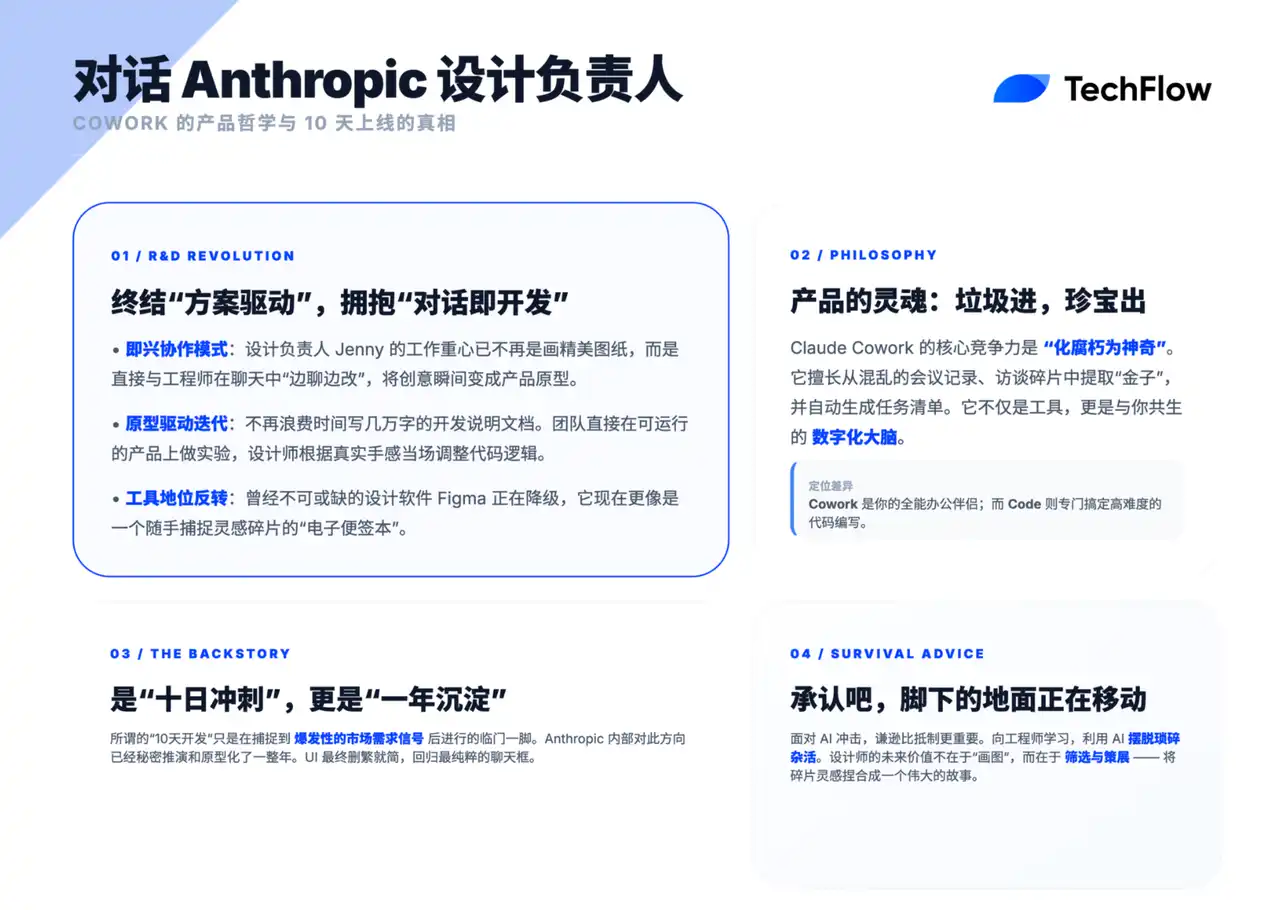
Jenny is the design lead at Cowork. She gave me a deep dive into the inner workings of Anthropic, including how she uses Cowork to design and develop products, and the real story behind Cowork's creation. Anthropic releases new features almost daily, and seeing how they work is truly impressive.
Summary of key viewpoints
Regarding daily work methods
- Most of what I do involves pushing products out there. But I think it might look a little different than it did a year or two ago. A large part of it is actually jamming (impromptu collaboration) with engineers, product managers, and the like in a less formal way. Usually, we'd look at a prototype together, then point out and think about how it could evolve.
The philosophy of "trash in, treasure out"
- What I find most impressive about Cowork is its ability to organize information. I like to call it "garbage in, treasure out." It can collect information from various sources, quickly identify the key points, extract valuable content, and transform it into productive results.
The difference between Cowork and Claude Code
- Aside from very detailed production code work, I now use Cowork for almost everything. If I need to focus on certain code details, I'll still use Claude Code. But for daily communication and collaboration, I now rely entirely on Cowork.
The story of Cowork's creation
- The statement that "they finished it in 10 days" was actually taken from an interview or media report. But the truth is, we actually started conceiving about the Cowork concept when I joined Anthropic a year ago. We've been thinking about how to create a "thinking partner" that can help all general knowledge workers.
- While Claude Code already handles code-related tasks quite well, our goal is to cover all knowledge-based work scenarios. I think the real challenge lies in: how do we execute this idea? What architecture is most suitable? What kind of user experience (UX) is correct?
Evolution of the design process
- I'll still do Figma. But we don't do specification documents as often now, and they're usually not as detailed. We'll still do prioritization, and it'll still exist as a document, but it'll usually just be a few bullet points, not some overly designed, fancy table.
Regarding planning and vision
- The technology field we operate in is changing extremely rapidly, with new models constantly emerging and being updated at an ever-increasing pace. Therefore, it is unrealistic for us to formulate a one-year vision, let alone a two- to five-year vision, because there are too many unknowns.
The Future of Designers
- If you feel the ground beneath your feet moving, it's because it is indeed changing. We must acknowledge this and learn to adapt, while also re-examining our current ways of working with an open mind.
- Whenever I feel challenged in my career, I think of my engineering colleagues. Their work has undergone tremendous changes, but they have not only adapted to these changes but also embraced the challenges with great courage and humility, ultimately achieving more efficient and outstanding results. They are my source of inspiration—I tell myself that if these colleagues I deeply respect can do it, so can I. They are my role models for adapting to change.
Opening
Peter Yang: Hi everyone, I'm very excited to welcome Jenny, the Design Lead at Anthropic. Jenny will be showing us how she uses Claude Cowork and Claude Code to design and launch products, sharing inside stories about Cowork, and perhaps even discussing the next steps in her product's development.
Jenny, what's a typical workday like for you? What tasks take up most of your time?
Jenny:
I don't know if there's a typical day, but most of what I do involves pushing products out there. However, I feel it might be different from a year or two ago. A large part of it is actually jamming (impromptu collaboration) with engineers and product people in a less formal way. Usually, we look at a prototype together, then point out and think about how it can evolve. Sometimes it's just discussing the performance of features, and sometimes I implement things myself. I think I still spend a lot of time designing and prototyping, but the way design work feels very loose now.
Peter Yang: Basically you would generate a bunch of prototypes using something like Claude, then jam them with the engineers, give them some feedback, and then use prompts to let the AI improve them, right?
Jenny:
In fact, these are often not even prototypes, but working prototypes already built internally and running in Claude or Cowork instances. I typically spend time using the feature, pushing it, seeing what it can do, forming opinions, and the next iteration usually involves me sitting down with an engineer and saying, "Hey, this is what I think. These are the places I feel should be changed." I feel there's still time for iterating, refining, and polishing within design tools that's still very, very important. So that part hasn't disappeared. It's just that because I'm handling more projects simultaneously, it feels more effective to do it in a very casual, very informal way.
Peter Yang: I think that's always been the part I enjoyed most as a product manager or designer—bringing designers and engineers together and watching the product iterate together. So, do you guys not create those specification documents or Figma files anymore? Or do you just iterate on the prototype directly in the code?
Jenny:
I still do Figma. But we don't do specification documents as often now, and they're usually not as detailed. Yes. We still prioritize, and it still exists as a document. This is actually helpful when we hand it over to the security or legal teams so they understand what the release is about, but it's usually just a few bullet points. Not some overly designed, fancy table. I think our Figma files are the same.
Cowork Practical Demonstration
Peter Yang: Could you show us how you use these products, or what you use each product for?
Jenny:
Of course! Let me tell you how I use Cowork. Actually, I have a little secret: aside from very detailed production code work, I now use Cowork for almost everything. If I need to focus on certain code details, I'll still use Claude Code. But for daily communication and collaboration, I now rely entirely on Cowork.
What I find most impressive about Cowork is its ability to organize information. I like to call it "garbage in, treasure out." It can collect information from various sources, quickly identify the key points, extract valuable content, and transform it into productive results.
For example, I've connected to a folder containing user interview transcripts. Our Cowork team places great emphasis on close contact with users, which is one of the keys to our success. We engage directly with users through traditional User Experience Research (UXR), as well as internal methods, such as a dedicated Slack channel for collecting feedback. Furthermore, we monitor social media discussions and listen to the opinions of enthusiastic users. It is precisely because we maintain close contact with users and can iterate rapidly on our product that we have been able to continuously improve and achieve our current success.
So what I'm going to do now is tell Claude: Hey, I have this interview folder, but I'll also have Claude look at social media, Reddit, and other Cowork customer reviews and tell me what the biggest insights are. It might take a little time because it really has to process and manipulate that much data. But it will do things like sometimes spawning sub-agents for parallel processing and spending time searching online.
Peter Yang: In your actual work, do you have weekly insight reports or something like that? Like, something that automatically summarizes all the content and sends it to you and the team?
Jenny:
Actually, we could actually build it directly using Cowork right now. I think one of our researchers will release it, and another will ping our version on Slack. We also listen directly to the internal Slack channel. We rely heavily on internal and top-tier user feedback because internal staff are genuinely willing to be honest with you; they tend to push features to the furthest limits and are the easiest to follow up on.
Peter Yang: I think this is how it should be happening, and I feel that teams in most companies are too disconnected, but Anthropic doesn't feel that way at all.
Jenny:
I think this is also a key part of Claude Code's success—listening to frontline users. And this is something we did a lot at Figma, a lot of internal dogfooding. Because especially when it comes to interaction design and refinement, internal staff really scrutinize the details, while external users often provide feedback on whether it fits their user flow. So it provides a completely different level of feedback.
User Boundaries between Cowork and Claude Code
Peter Yang: I know that Anthropic's marketing and product managers are now mostly using Claude Code, especially after it became available internally at Cowork. What are your thoughts on different use cases? Or how do people use Cowork and Claude Code?
Jenny:
We've noticed that Cowork's overall application scope is gradually expanding and it's beginning to be used in scenarios similar to those previously explored by early adopters of Claude Code. I remember when we first started developing Cowork, our internal sales team was our primary source of information. Several of them were heavy users of Claude Code, using it to generate lead lists, write call scripts, and so on. When I first saw these use cases, I was quite surprised because I hadn't even imagined that Claude Code could be used to accomplish these tasks. Now, these users have almost entirely switched to Cowork, and even their colleagues are starting to use it frequently.
The reason I think it's really needed is because it has a nice-looking UI. And part of the reason is that it's very close to the other work they're doing—they're already using chat functionality, and they can continue using Claude Code from this desktop application, so I think it fits their existing workflow better than opening the command line.
The complete process from insight to executable artifact
Jenny:
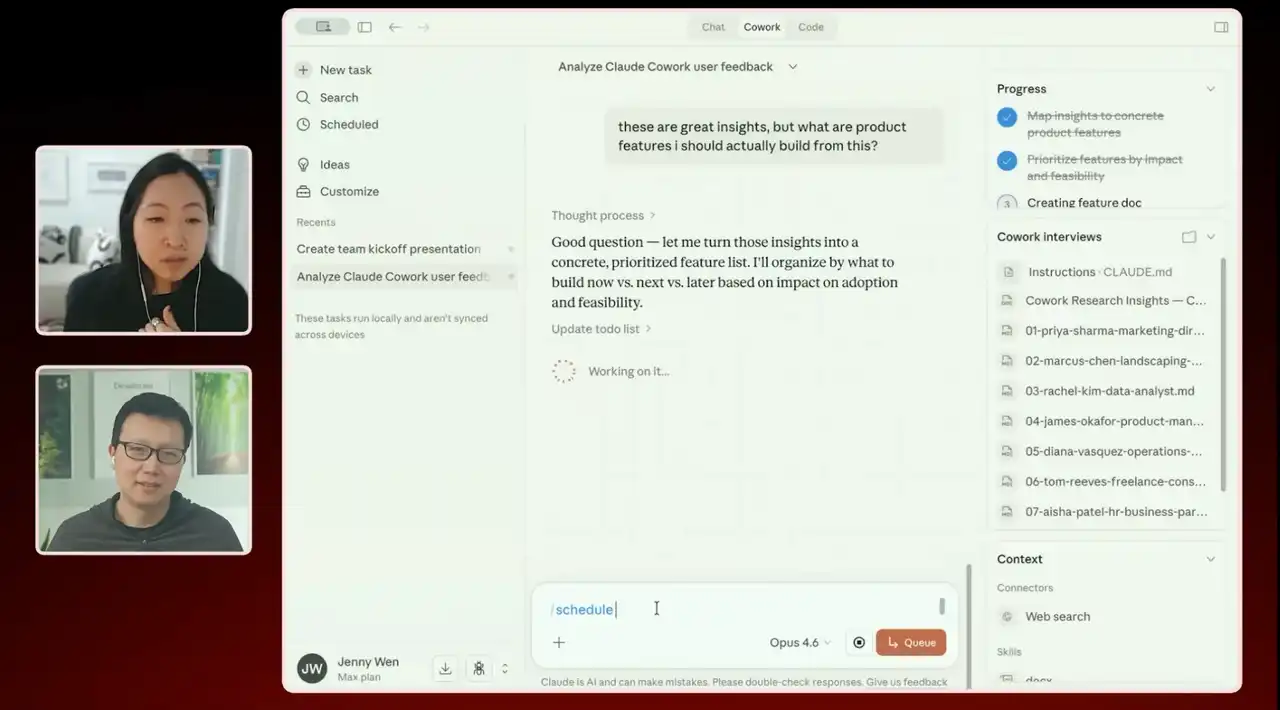
There are seven different themes, and each week it's different. I can basically just tell it: "Create this document X for me," and it's already automatically saved in a folder on my computer. I can also start two parallel tasks at the same time. For example, I can say: "These insights are great, but based on them, which product features should I actually build?" Then I can do another thing in parallel—based on the insight document you just created for me, turn it into a presentation I can share with the team at this week's kickoff.
But ultimately, I can start the design process from here—it gives me a variety of functional options. From there, I can even have Claude create some wireframes for these functionalities. It might give me a whole bunch of different options, which I can take to Figma to really refine, or to Claude Code to make them into real things with our actual design system components, and then start from there.
Another thing I can do is turn both of these into scheduled tasks. So I'll probably have it schedule this task to run automatically every Monday morning at 10 AM. That way, I'll start working every Monday morning at 10 AM with this presentation and three or four different product ideas to kick off the week. It compresses the iteration cycle from feedback to creating something tangible or an idea that the team can see very tightly, helping us iterate on the product quickly and make it better very quickly.
Peter Yang: It's all about iteration, it's all about iteration. I've become lazy now; I always let the AI do the first version, and then I react.
Jenny:
Yes. So if you really want me to organize these insights into some kind of functional priority from scratch, it will take much longer now than before.
That's exactly how I do it. For example, with this podcast note you sent me, I have a personal notes folder containing 1:1 meeting content, random thoughts, and so on. Then I simply say: "Read my personal notes, help me think of the key points for this podcast, and help me think of what I want to say here." Of course, I won't read it word for word, but it really helps me open up my thinking and helps me evolve my thought process, instead of getting stuck.
Skills and Personal Knowledge Base
Peter Yang: What skills do you use? Or do you have any personal skills for creating these documents and slides?
Jenny:
We have several internal skills specifically for creating documents and presentations, as this helps us maintain brand consistency. I don't actually have a personal skill library; most of the time I borrow existing internal skills and use them for different purposes.
Peter Yang: For example, I have a writing skill that tells the AI not to use AI slop words.
Jenny:
But I've found that using Cowork's folders—where I keep all my personal notes and such—to understand me is already incredibly useful. I actually feel less and less need for memory and skills, since it already has a knowledge base about me. Of course, I still believe skills have their place, but for my current use case, I personally feel the need isn't as strong anymore.
Peter Yang: Is it because it automatically updates its memory based on your conversations every day?
Jenny:
Yes, it's basically a memory I maintain myself because I'm always taking notes in it.
Team collaboration nodes
Peter Yang: So when do you bring the team in during the whole process? Or do you switch back and forth between iterating with the AI and then with the team, or how do you do it?
Jenny:
What I mean is, things like actual UXR interviews are things I wouldn't do myself—it's either the product manager, a researcher on the team, or someone else on the team who does it. Then, through this, you directly share artifacts, bring them in, and that actually becomes the basis for the team's operations.
Our team is at least quite bottom-up and very democratic, so the way we operate is that we share insights and goals with everyone, and then everyone prototypes and tries things out, with ideas coming from all directions. It's not about me, as the designer, coming up with all the solutions; it's more like, "Hey, here's some insight. This is what we need to achieve this month, how can we all work together to reach it?"
Even with this, I don't think we'll simply hand everything over to Claude. We'll still rely on ourselves to make many judgments and to manage and decide what to build and what to do.
Peter Yang: When people talk about taste and judgment online, I think the way to cultivate these abilities is actually through continuously gathering a lot of product feedback from both internal and external sources. In this process, you gradually develop an intuition that allows you to detect where things are going wrong and need fixing. Because you're listening to and processing this feedback every day, over time you'll develop a keen sense of judgment about problems.
Jenny:
Regarding design, one of Claude's features is its ability to generate wireframe-like sketches and provide multiple design options. As a designer, I really appreciate this approach. Even though these sketches aren't very detailed, they allow me to visually see different possibilities without relying entirely on my imagination. This helps me decide on the next design direction more quickly.
Therefore, I think letting Claude directly generate these initial options can save me the time and effort of manually creating sketches. From these options, I will choose a direction and begin small-scale iterations. Next, I might use code to create a preliminary prototype of this direction, and then continue to optimize and refine the design based on it.
The true story of Cowork's creation
Peter Yang: Let's talk about how Cowork came about. There are many stories about it being built in just 10 days, but there must have been many iterations before that, right?
Jenny:
The statement that "they finished it in 10 days" actually originated from an interview or media report, and the discussion has centered around this point ever since. However, the truth is that we actually started conceiving of the Cowork concept a year ago when I joined Anthropic. We've been thinking about how to create a "thinking partner" that can help all general knowledge workers. While Claude Code already handles code-related tasks quite well, our goal is to cover all knowledge work scenarios. I think the real challenge lies in: how do we execute this idea? What architecture is most suitable? What kind of user experience (UX) is correct?
Over the past year, we experimented with many different prototype designs, some of which were even more ambitious than our current goals. We also conducted numerous technical experiments, testing various AI agent frameworks, but some of these attempts were unsuccessful. Ultimately, we gradually settled on our current direction. We referenced not only the prototypes developed by our lab team but also those built by our product team. In the end, timing and execution became crucial, like lightning striking the target precisely.
When we decided to release this product, the whole process was incredibly fast—from "we should release it" to "the product is live" it only took 10 days. This was mainly because we saw its potential during the Claude Code holiday. During the holiday, many people finally had time to try out Claude Code, and even some non-technical users started using it, such as parsing podcast transcripts or performing complex data analysis. We found that Claude Code's agent framework was also beginning to show early product-market fit among non-technical users. Actually, we already had a working prototype internally, and we originally planned to release it a little later, but this feedback made us realize that "now is the best time." So, we decided to seize the opportunity, which led to those crazy 10 days.
Peter Yang: If I understand correctly, over the past year you've shared many prototypes on Slack internally, collected a lot of feedback, and finally identified a viable prototype. Then, seeing the market demand for it, you quickly sprinted to launch the product.
Jenny:
Yes, that's roughly it. We originally planned to launch a few weeks later, but at that time we felt that "now is the best time." This also prompted us to narrow down the product scope to a more realistic and feasible level under tight time constraints, and to devote all our energy and resources to it, ultimately successfully launching it.
Early Design Iterations: From Workflow Tools to Minimalist Chat
Peter Yang: Can you share some experience about early iterations, or show some things that are under development?
Jenny:
Of course! I've compiled some early screenshots to show our design thinking and iteration process at the time.
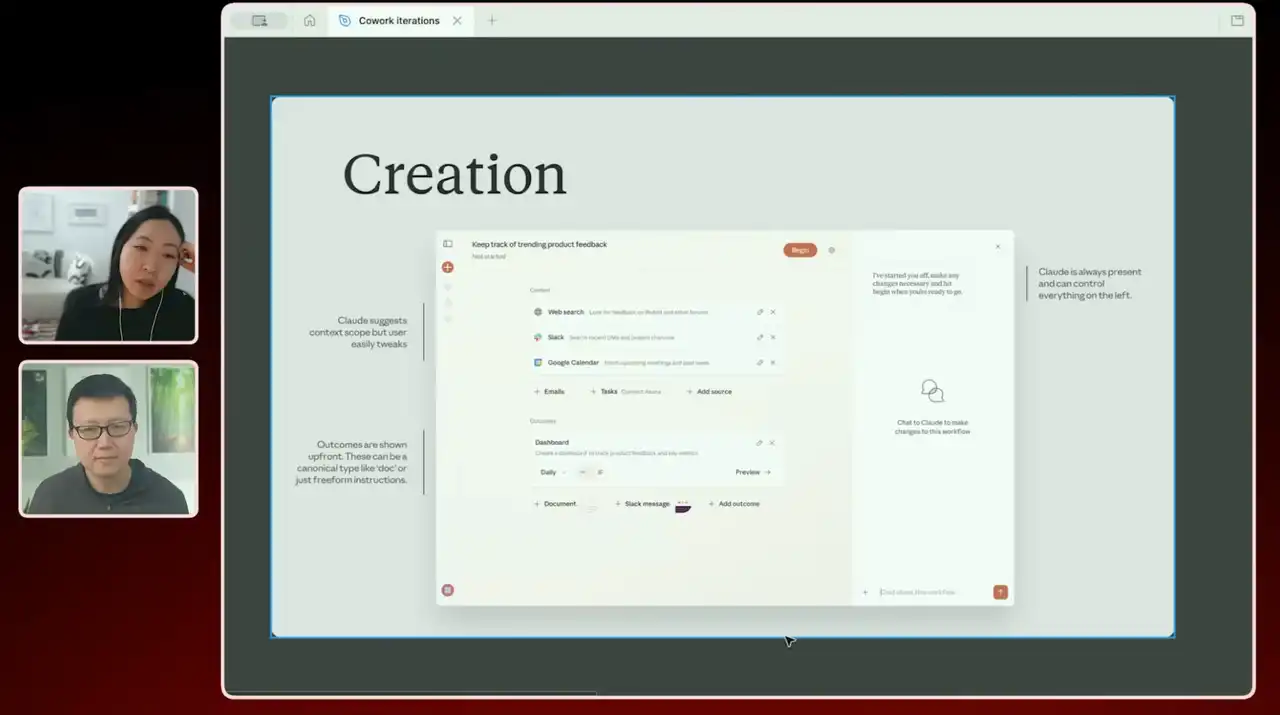
Earlier this year, we had an early prototype, which I worked on with another designer. At the time, we tried to make the tool more task-oriented or workflow-oriented. We were concerned about whether users would understand whether using a product like Cowork would allow them to complete specific tasks or achieve definite outcomes, such as creating a dashboard or integrating data from different sources. Therefore, we designed the user interface to be very structured, almost like a workflow tool—for example, "Add this content, these are the inputs, these are the outputs." Chat functionality was relegated to a secondary role.
But it feels like there are so many steps involved to complete. In 2025, why make it so complicated? Why not just let Claude handle it?
This was one of our early design directions, but we later decided to change our approach and make it simpler, like a chat box . We tried to guide users to achieve more specific goals in this way, such as analysis or document generation. We also designed a functional prototype—after the user clicked, they would see various options, each with buttons to adjust, such as document length, or select document type, such as memos or presentations, but this design ultimately felt too complex and overwhelming for users.
So through numerous explorations and attempts, we have been trying to find a balance: should we define the use cases more clearly, or should we maintain a free form like a chat box?
Ultimately, the version we released a few weeks ago looks like this now. We had experimented with a user experience that was almost like a "wizard," where users would see prompts after clicking, such as "Create a document, three to five pages long," and so on.
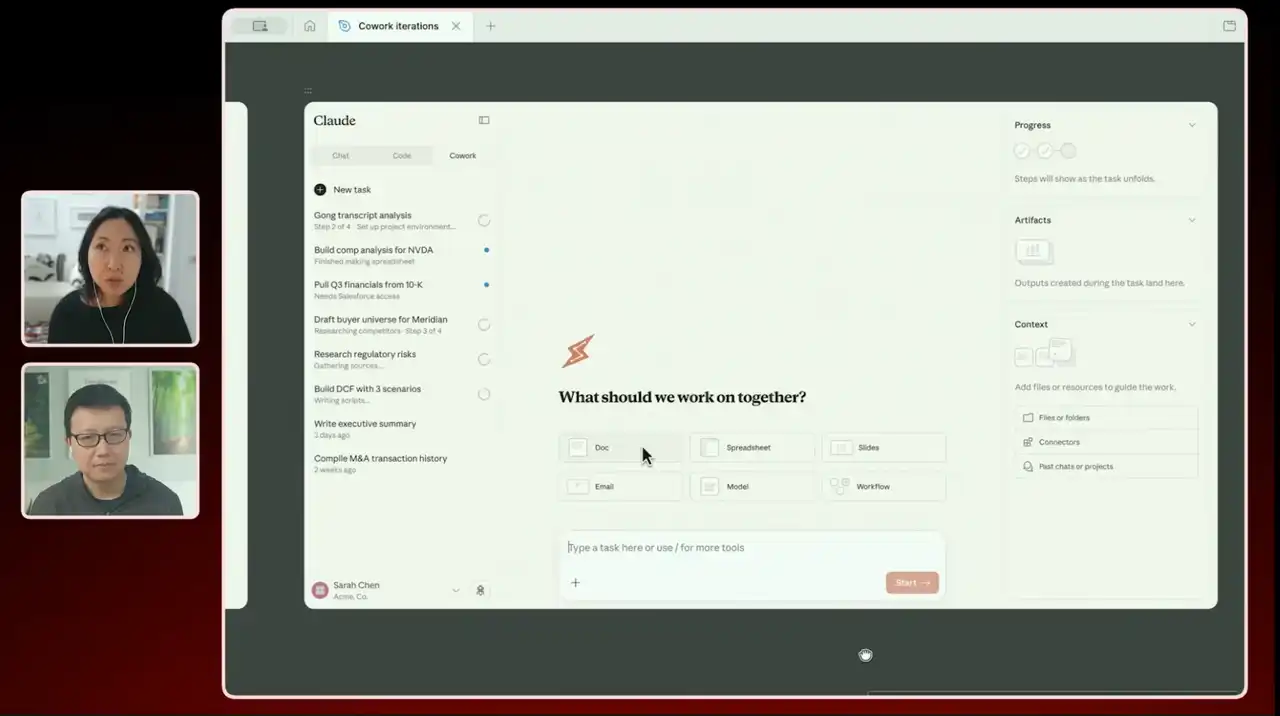
At the time, we added many elements to the interface, hoping to make it look different from a regular chat box. However, we later found that this design made the interface too complex, with too much competition between visual elements. So, we decided to simplify the design and remove most of the unnecessary elements.
The user interface you see now has been greatly simplified. We've removed the bulky sidebars, making it closer to a traditional chat box, but we've made some changes to the homepage to make it look more like a "to-do list" shared by Claude and me, rather than a chat tool full of complex suggestions and instructions.
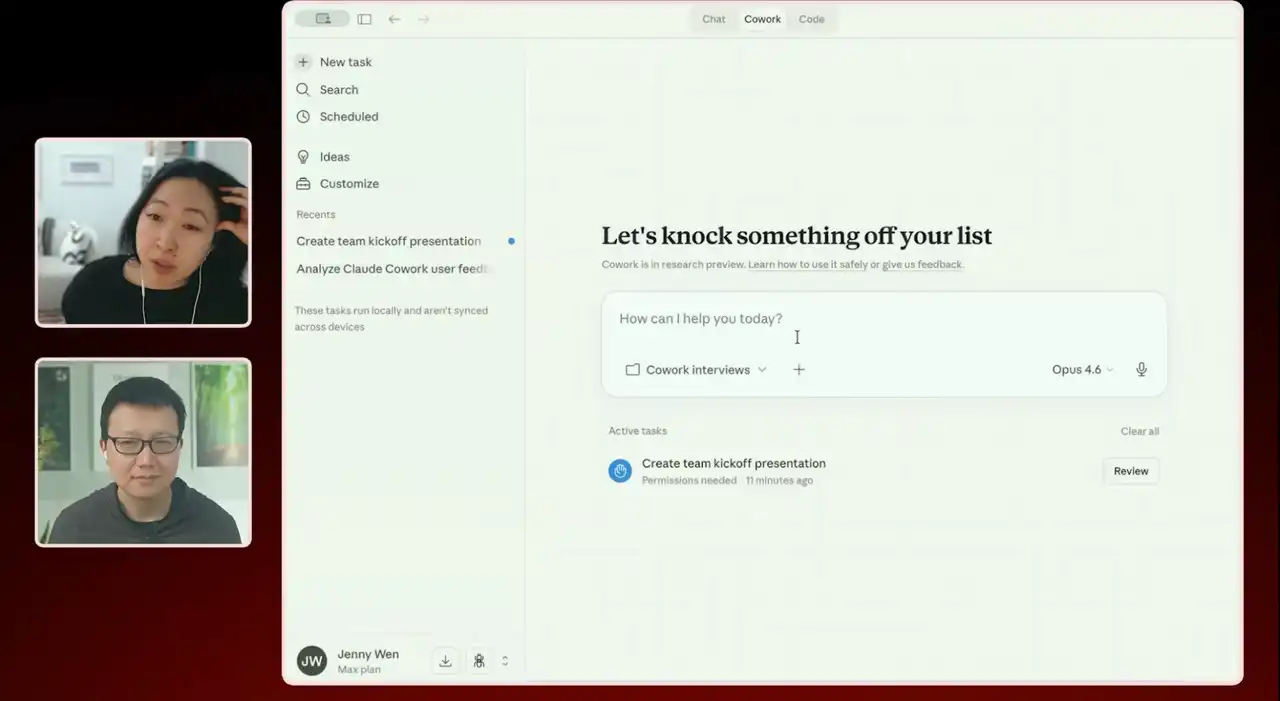
Peter Yang: Perhaps in the future it can support multiple agents, allowing users to drag and drop tasks to manage workflows.
Jenny:
Perhaps such a possibility will exist in the future. But I want to emphasize that UI design was completely different about four or five weeks ago. We have been constantly learning and exploring what kind of design works best and what kind of design doesn't work as well, while striving to find the best way to present this technology to users.
The difference between Cowork and Claude Code
Peter Yang: While using Claude Code, I often share feedback on Twitter. It has a lot of built-in slash commands, which users need to learn little by little. The experience is a bit like a "treasure hunt" when shopping at Costco; you never know what new features you'll discover.
However, this approach isn't very beginner-friendly. It's more like a game; you gradually become familiar with and master it as you use it more. I feel that Cowork might be trying to explore a middle ground between ordinary chat tools and Claude Code. It doesn't hide all the features, yet it guides users in some way to use it better.
Jenny:
Yes. Cowork still supports slash commands, but they are not the primary interaction method. Personally, I think Cowork is at least a tool geared towards professionals. We've observed that many users are already using it at a very advanced level, and some advanced users have emerged in the community. These users are typically willing to spend time learning more complex features, such as creating their own skills, sharing them with teams, or using shorthand commands.
However, our goal is for these features to be secondary interaction methods, not mandatory learning content. In other words , even if users don't understand all the commands, they can still easily use Cowork. We want user interaction with Claude to be natural and intuitive, rather than requiring them to memorize a series of commands to complete operations.
Planning process and vision
Peter Yang: What is Anthropic's planning process? Do you conduct annual planning and goal setting? Or do you rely more on prototyping and continuous experimentation?
Jenny:
Our planning approach varies each time. In my team, we do monthly planning. We have a spreadsheet with at least a Cowork section listing up to about 12 tasks, which are our highest priority (P0). Each task has a direct responsible person (DRI), and we check weekly to see if we're still on the right track. We also do some quarterly or semi-annual planning, usually with a responsible person pointing out: "I think we should move in this direction, and these are the things we need to focus on." But these plans aren't so rigid that specific projects have to be executed. They're more about providing an overall direction for the team, so they're relatively flexible.
Peter Yang: Relatively flexible, right? Interestingly, I've found that the most innovative companies tend to have less annual planning and rely more on continuous iteration and learning from users. Have you done anything similar to the North Star vision deck in your career? Did you find them useful?
Jenny:
I did do it; I created a North Star vision deck last year. I believe visions do have their value; they guide the team and help us stay clear-headed in our upcoming work. However, because the technology field we operate in changes so rapidly, with new models constantly emerging and updating at an ever-increasing pace, it's unrealistic for us to develop a one-year vision, let alone a two- to five-year vision, due to the sheer number of unknowns.
However, the true power of a vision lies in guiding everyone in the same direction, especially in an environment where everyone is free to build various projects. Therefore, I now believe a vision should have a maximum timeframe of three to six months and be presented in document form. I feel that a vision is more impactful when it's visualized. This is also where the immense value of design lies—the ability to integrate various elements and tell a coherent story over a specific period. Of course, a vision can also be a prototype, not just a static deck. It can help us coordinate work across teams, especially when we have five teams working on very similar or potentially conflicting projects. Design can help these ideas align through curation and show us a path to an ideal user experience, rather than fragmented experiences.
Peter Yang: So, do you have product manager reviews, or reviews for relevant personnel? Are these reviews formal, or are they also involved in the prototyping process?
Jenny:
We do have reviews, but unlike some companies I've worked at where every feature required a review, our reviews are primarily for larger, higher-priority projects. The purpose of these reviews isn't to waste time preparing, but rather to increase project visibility and obtain feedback. We conduct these reviews for cross-team, company-wide important projects.
Advice for designers: How to find your place in the AI era
Peter Yang: So, what advice do you have for designers who feel their professional environment is changing rapidly? Should they start learning to submit code pull requests (PRs)? Or should designers take other approaches to adapt?
Jenny:
If you feel the ground beneath your feet moving, it's because it is indeed changing. We must acknowledge this and learn to adapt, while also re-examining our existing ways of working with an open mind. I think the changes are particularly impactful for designers, especially since we are in the second wave of this transformation. Other professional roles have already undergone similar transitions, and now it's our turn. Meanwhile, our design tools are constantly evolving.
Whenever I feel my career is challenged, I feel a pang of unease, like, "Oh my god, my job is changing so much, people might not value it as much as they used to." But at times like these, I think of my engineering colleagues. Their work has already undergone tremendous changes, but they not only adapted to these changes, but also embraced the challenges with great courage and humility, ultimately achieving more efficient and outstanding results. They are my source of inspiration—I tell myself that if these colleagues I deeply respect can do it, I can too. They are my role models for adapting to change.
Peter Yang: To some extent, these changes have freed designers from a lot of tedious repetitive work, such as not having to spend time adjusting various frameworks, right? This allows you to devote more energy to higher-level thinking and creative work.
Jenny:
Yes, or rather, these changes have enabled us to accomplish more. For example, I'm truly impressed when I see my engineering colleagues now able to complete a full feature in just a few days, whereas it used to take weeks. So, yes, this change has also brought more possibilities.