Author: Bennet
Source: https://bennet.org/learn/silent-payments-bitcoin-privacy/
“A new key pair should be used for each transaction to ensure that these transactions are not linked together to point to a common owner.”
— Satoshi Nakamoto
In the Bitcoin white paper, Satoshi Nakamoto hinted that reusing the same address would come at the cost of privacy.
Publicly disclosing a Bitcoin address like an email address—for example, to receive donations—means exposing a permanent record of all payments received at that address to the entire world, not to mention any future spending from it. The problem becomes even more serious if that address is linked to your real-world identity. Another approach is to continuously rotate the address, generating a new receiving address for each payer. This is better for privacy, but also a bit more cumbersome (by the way, I once developed an open-source tool to automate this process).
Today, silent payments offer a third option. You publish an address that starts with sp1 , and you can share it freely. Then, everyone who pays you sends the money to a different Bitcoin address, meaning no one can tell that the recipient is the same person. Furthermore, the recipient doesn't need to interact with the payer—no need to provide a Lightning Invoice or an LNURL endpoint, let alone an XPUB (Extended Public Key).
In fact, this could theoretically be achieved since BIP-352 was finalized, but industry infrastructure support has only just begun. In 2026, Sparrow Wallet released support for silent payments (I'm a big advocate for this desktop wallet). Combined with a new server-side software called " Frigate ," silent payments finally became practical.
This is a step-by-step tutorial I wrote. After reading the entire article, you will have your own sp1 silent payment address.
How Silent Payment Works
First, you need to know that silent payment addresses starting with sp1 are not "regular" Bitcoin addresses. Regular Bitcoin addresses correspond to a Bitcoin script; Segregated Witness addresses starting with bc1q and Taproot addresses starting with bc1p are examples of this. Silent payment addresses do encode public keys, but these public keys don't appear directly on the blockchain—we'll discuss this in more detail later. Therefore, you won't find sp1 addresses by searching directly on a block explorer website.
An sp1 address consists of the following two types of elements:
- A scanning public key is used to discover payments made to you.
- A public key for spending money.
Both public keys have their own private keys. These two public keys, along with a checksum and sp1 prefix, form a silent payment address that can be disclosed.
The following is the process by which others send payments to this silent payment address:
- The sender's wallet software retrieves the private keys of each transaction input , combines them with the recipient's scanned public key (one of two public keys encoded in
sp1address), and calculates a shared secret value . - This shared secret value is then used to adjust the recipient's spending public key , generating a brand new Bitcoin address (specifically, a
bc1pTaproot output); only the sender and receiver can know the origin of this address. - When coins are sent to this Taproot address, there is no external indication that it is a silent payment, but the recipient's wallet can identify that it is a payment to itself by scanning the private key.
graph TD sa[发送者A] --> sp[sp1 地址] sb[发送者B] --> sp sp -.-> ta1[bc1p...q7x] sp -.-> ta2[bc1p...m4k]On the receiving end , the wallet software's job is to identify these payments. Because the final destination (receiving address) of a silent payment depends in part on the transaction's inputs (i.e., the UTXOs used to construct the transaction), there's no way to pre-calculate all possible receiving addresses. Instead, the wallet can only scan the blockchain, looking for the Taproot output destined for the recipient. Once found, the wallet can spend the funds using the spending private key—adjusted using the same shared secret value.
The key point is that even if two different senders pay the same sp1 address, they will produce two seemingly unrelated Taproot outputs. There is no public connection between them, and they cannot be traced back to the original sp1 address. This uncorrelatedness brings privacy benefits to both parties.
Satisfy your curiosity with more cryptographic details
The cryptography behind silent payments is called "Elliptic Curve Diffie-Hellman Key Exchange (ECDH)." This technology is also used to secure the vast majority of encrypted communications on the internet today. ECDH allows the sender and receiver to independently obtain the same shared secret value, so both parties can calculate the address without prior notice.
If you've already started reading these texts, it means you're probably looking for a more in-depth explanation. I can't provide that here, so I recommend two reading materials that were most helpful to me:
- The first article is " Elliptic Curve Cryptography in Bitcoin " by Greg Walker, which is a general introduction and worth reading.
- The second batch, articles by Sebastian and Benma, explain ECDH in silent payments ; it's a very good and easy-to-understand introduction.
After reading these two documents, I recommend that you read the BIP352 specification yourself.
Why is scanning so difficult? Why use Frigate?
Finding these payments requires significant computation. A hierarchical deterministic wallet has a fixed set of addresses that a standard Electrum server can monitor. However, in silent payments, there are no fixed addresses to observe: each payment generates a new, derived output that the recipient cannot predict. The only way to discover your money is to obtain every possible transaction, repeat the calculation of the shared secret value using the scanning key, and see if a match is found.
This extra work is manageable for a full node (although support is very limited in current popular node implementations). However, it's completely impractical for mobile wallets: mobile wallets only run intermittently, with limited bandwidth and battery life, and are not considered full nodes.
Frigate is Sparrow's answer. It's an Electrum server implementation—the same one that helps you connect your wallet to a full node —but with added methods to scan for silent payments. It's optimized for speed: elliptic curve operations happen in the database and can be accelerated using a GPU . It also receives transaction pool data in real time, so you can see your incoming transaction in your wallet even before it gets block confirmation.
There is now a publicly available server instance running on frigate.2140.dev —maintained jointly by Sparrow and 2140.dev —that anyone can use. This is how silent payments become available to most people, including those who don't run their own nodes. Of course, you can run your own server, and we'll discuss the benefits later.
How sensitive is your scanning of private keys?
In order to scan the silent payments sent to you, Frigate needs two things from your wallet: your scanning private key and your spending public key . If you entrust these to a public Frigate server, what can that server theoretically do?
In simple terms, it can identify every payment sent to your sp1 address and associate them with you . It can't spend that money, but a malicious or hijacked server could potentially piece together your profile from your payment history—something silent payments aim to prevent. In this sense, the key you hand over is similar to an XPUB—it exposes your payment history, but it can't move the funds.
Trusting a publicly accessible Frigate server is similar to trusting a publicly accessible Electrum server, which can see the addresses your wallet is querying. Frigate (which is open-source software, like Sparrow) stores the keys you send in memory, allowing only your session to access them, much like a regular server temporarily storing your addresses. You need to trust that the operators won't cheat you. (BIP-352 does support a more private mode—the server sends you "adjustment" data, and your wallet software matches it locally without revealing the scanning keys—but this is much more cumbersome for the client, which is why Frigate chooses server-side scanning.) If this level of trust exceeds your acceptable limits, you can run the Frigate server yourself. However, the methods for doing so are beyond the scope of this article.
Create a silent payment wallet in Sparrow
Now, let's create a new silent payment wallet. You'll need the latest version of Sparrow (version 2.5.2 at the time of this last update) installed on your computer.
Create a wallet
Open the Sparrow software interface, select File → New Wallet from the menu, give the wallet a name, and begin creating it. In the "Policy Type" section, select "Single Signature SP" (Single Signature Silent Payment). Taproot is the only available script type, as we explained earlier.
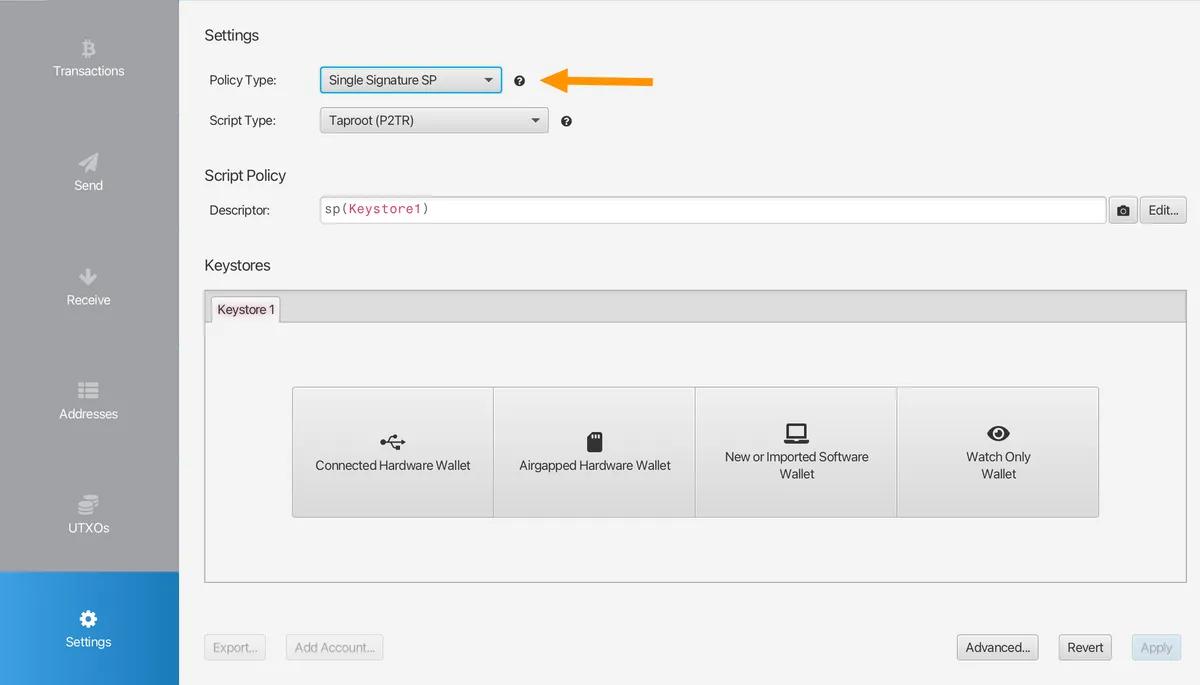
In the " Keystores " section, click "New or Imported Software Wallet". In the "Mnemonic Words (BIP39)" section, select your preferred seed phrase length. Click "Generate New", then use a banknote to write down this set of seed words and keep them safe .
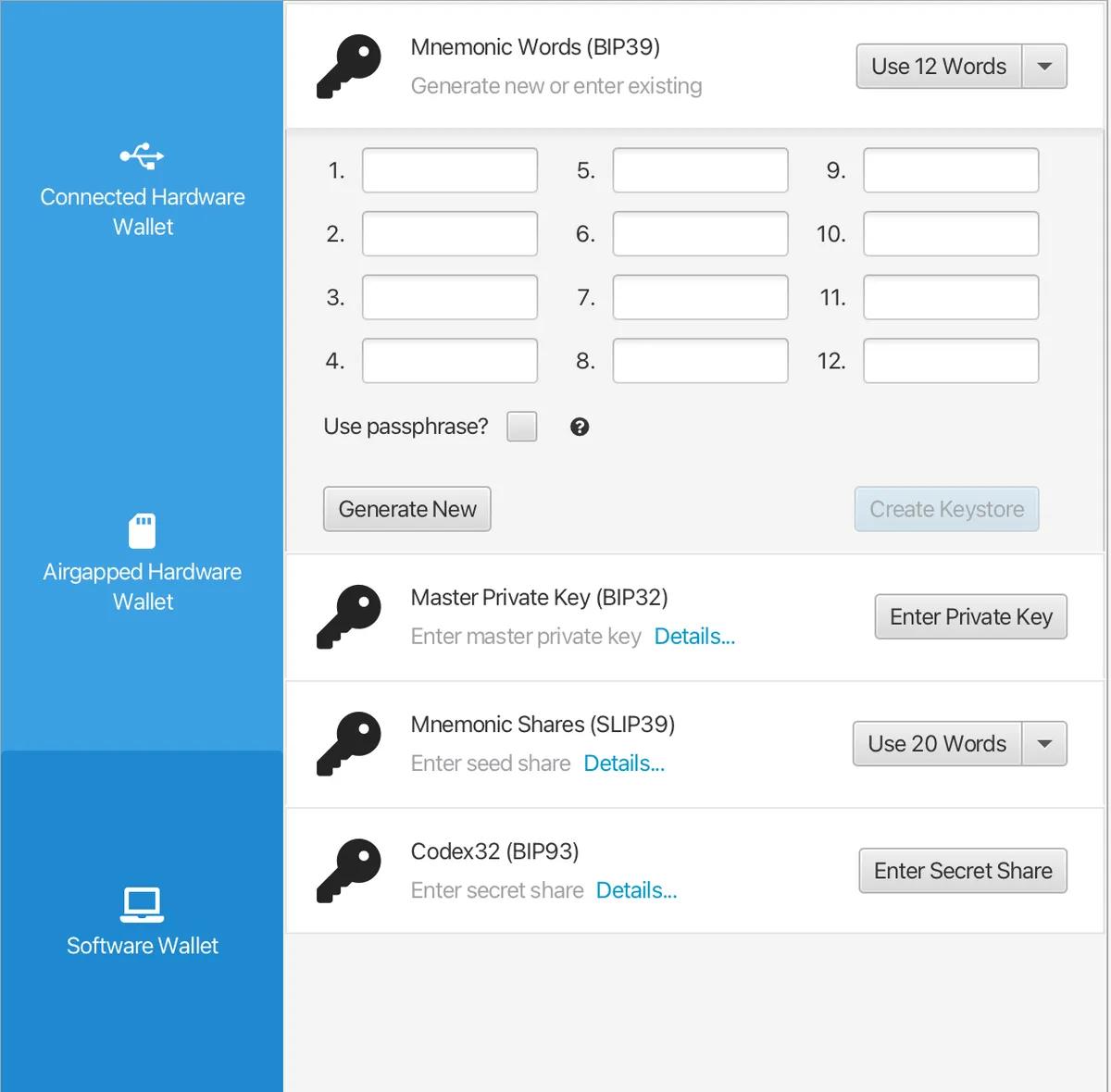
After making a proper backup, click "Confirm Backup ". A pop-up window will appear asking you to re-enter the phrase to verify the integrity of your backup. After verification, click "Import Keystore" to return to the main interface of the software. Do not change the derivation path of m/352'/0'/0' . Click the "Apply" button in the lower right corner—you will be asked if you want to add a password for this wallet.
Once everything is complete, you will return to the main interface of the Sparrow wallet app:
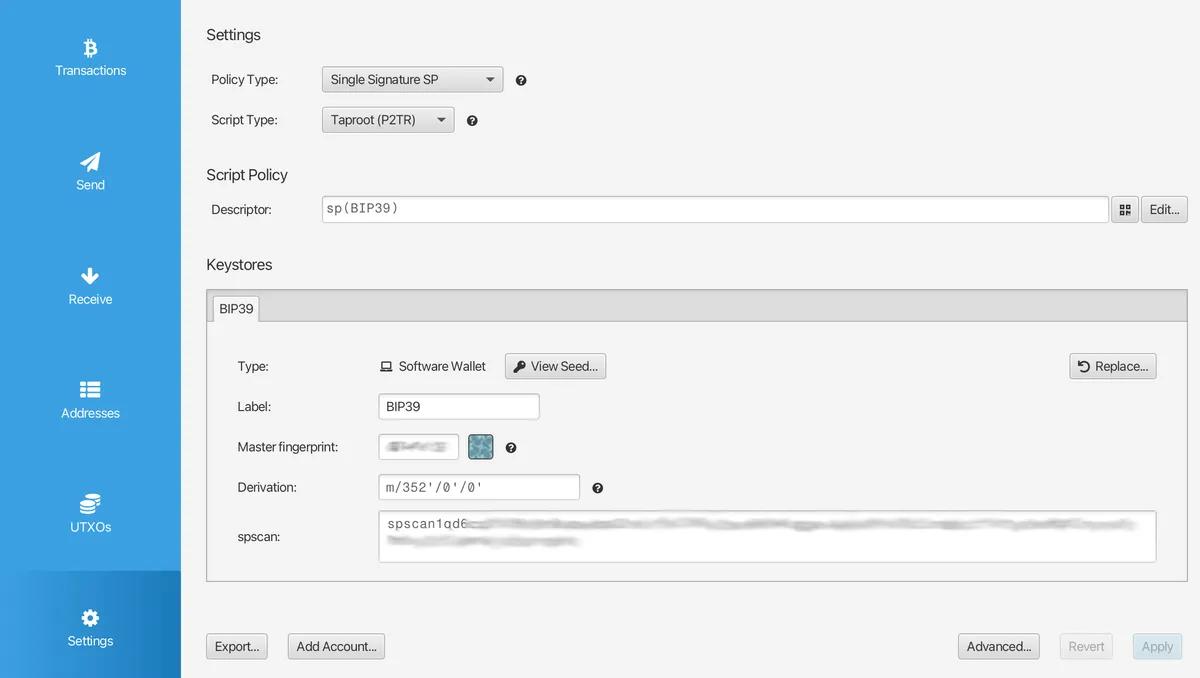
Please note that you have just created a " hot wallet ," meaning all private keys are stored on your (connected) computer. We will discuss the support for sending and receiving silent payments using cold wallets (i.e., dedicated hardware signers) below.
Connect to a silent payment server
A regular Bitcoin node cannot tell you that a silent payment has been delivered, so Sparrow requires you to notify a server that can scan the payment—in other words, a Frigate server.
Open the software's " Settings " page and click " Server " on the left. If you are running your own Frigate instance (on your own node), select "Private Electrum" and enter its details. Otherwise, use a public server by clicking "Public Server" and selecting frigate.2140.dev . Click "Test Connection" and wait for a success message.
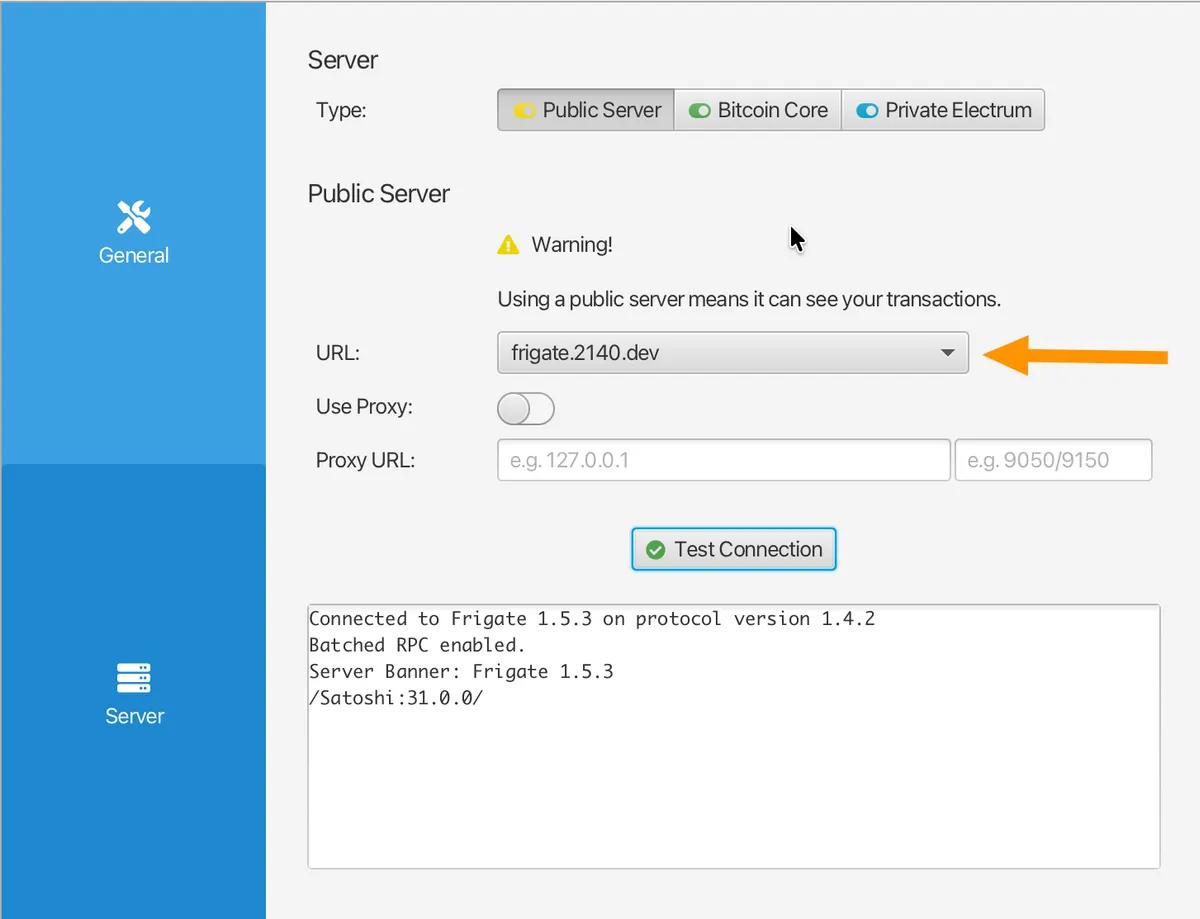
Close the settings page and open the " Transactions " sidebar in your wallet. You might see a message like " Wallet loading history for SP-Demo ," indicating that it's loading your history. Give it some time—perhaps longer than you'd wait for a regular Electrum server to scan a regular wallet—and eventually you'll see " Finished loading ." Your privacy journey begins!
Obtain a silent payment address
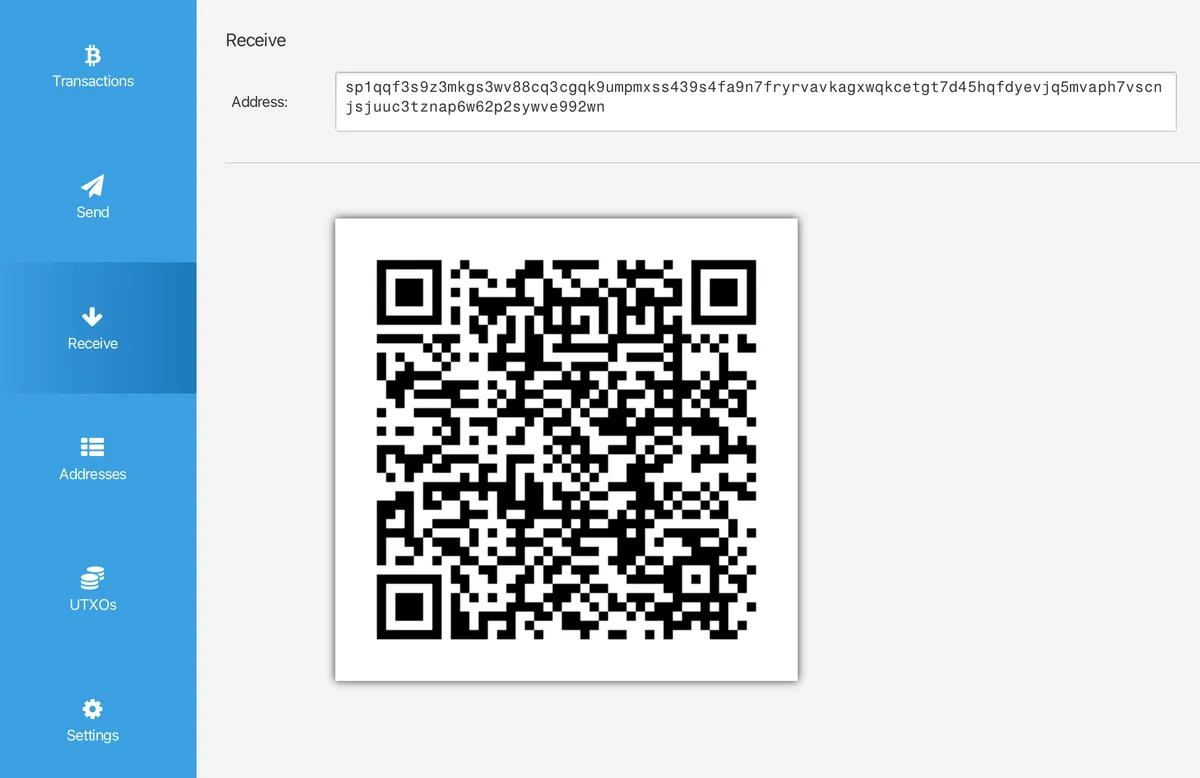
Open the " Receive " sidebar. Unlike a regular wallet, you won't see a new address every time; you'll only see the same silent payment address , which is the string of characters sp1... and its QR code representation. This is your silent payment address that you can publicly, repeatedly, and freely share! You never need to change this address.
Opening the " Transactions " and " UTXO " sidebars, you'll notice their interfaces differ slightly from a "regular" Bitcoin wallet: they are initially completely blank because addresses are not pre-derived. These screens only begin to fill up after you receive a payment. Here's what they look like after you receive your first silent payment:
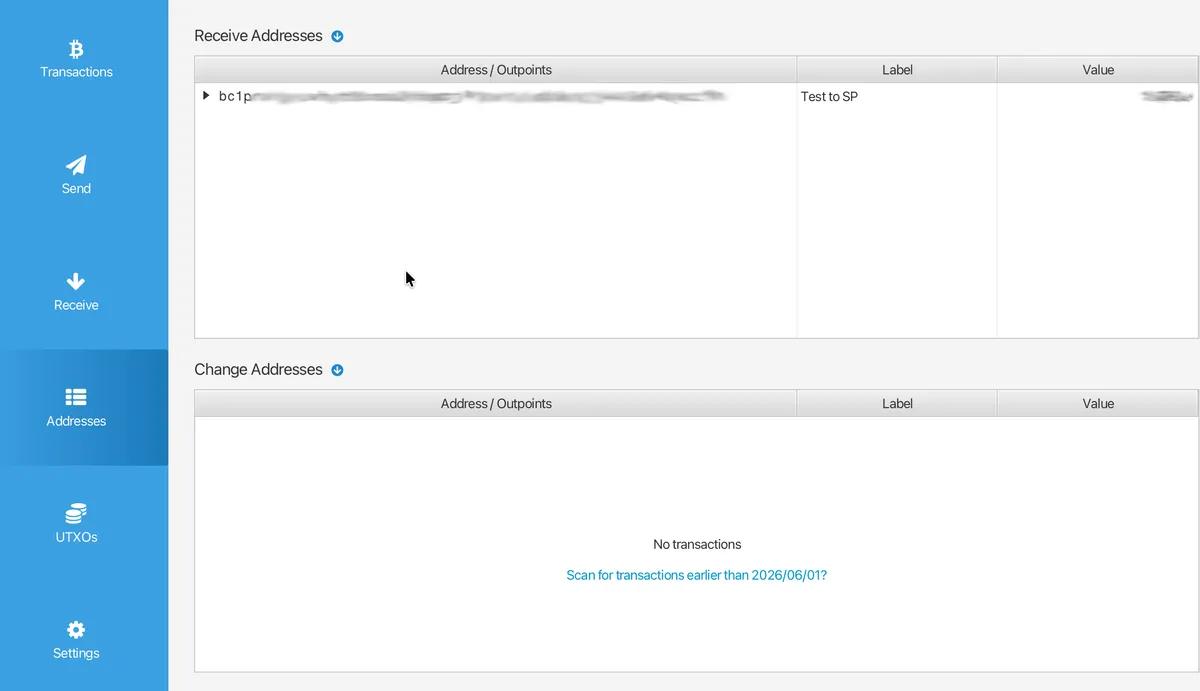
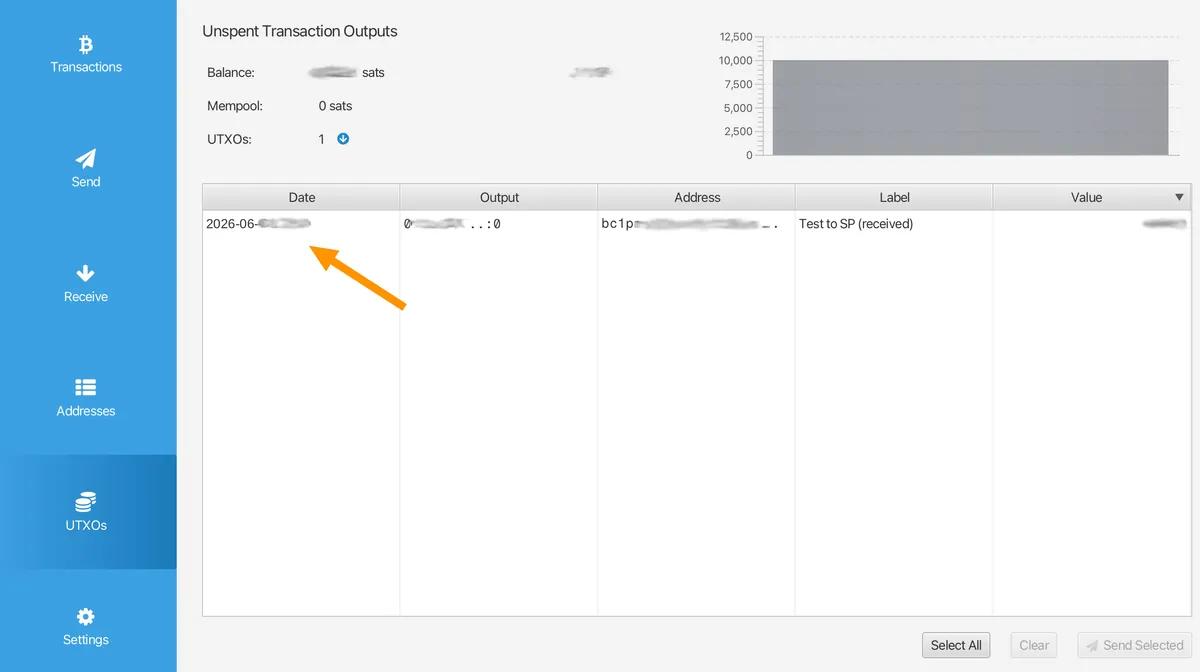
Every time you load this wallet into the Sparrow software, the server scans for the silent payments sent to you. The payments that appear on your " Transactions " and " UTXO " pages are exactly the same as any "normal" payment because, from a blockchain perspective, there is indeed no difference: they are just ordinary Taproot outputs, and only your wallet can recognize them as payments to you.
So, that concludes our discussion of receiving payments . Now, how do we send a payment to a silent payment address?
Send payment to silent payment address
Support for sending to sp1 addresses is more robust than that for receiving payments. Besides Sparrow, software wallets such as BlueWallet , Wasabi , Nunchuk , and Cake also support silent payments. The Silentpayments.xyz page provides a comprehensive compatibility table.
I will explain the process of sending a silent payment on Sparrow. Click the " Send " button on the side, copy and paste someone else's sp1 address that you know, enter the amount you want to send and the transaction fee, and then click "Create transaction ". On the transaction construction page, you will see that the destination is still listed as an sp1 address:
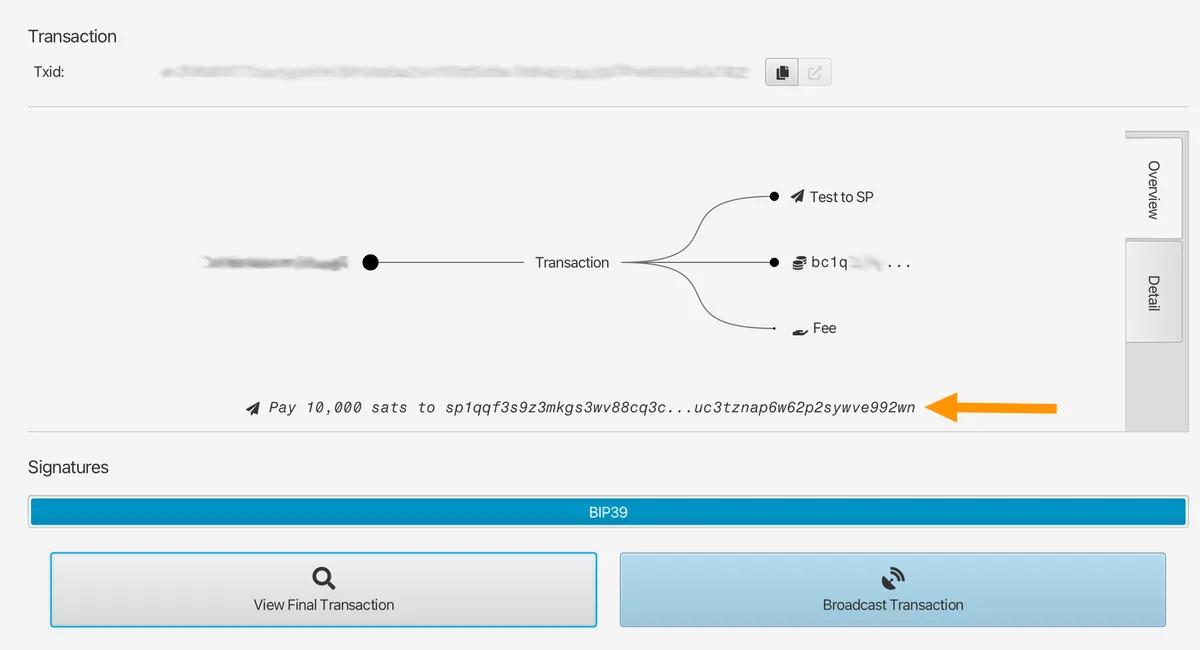
However, after signing and broadcasting the transaction, Sparrow will display the actual Taproot address (starting with bc1p ) to indicate where the coins were sent:
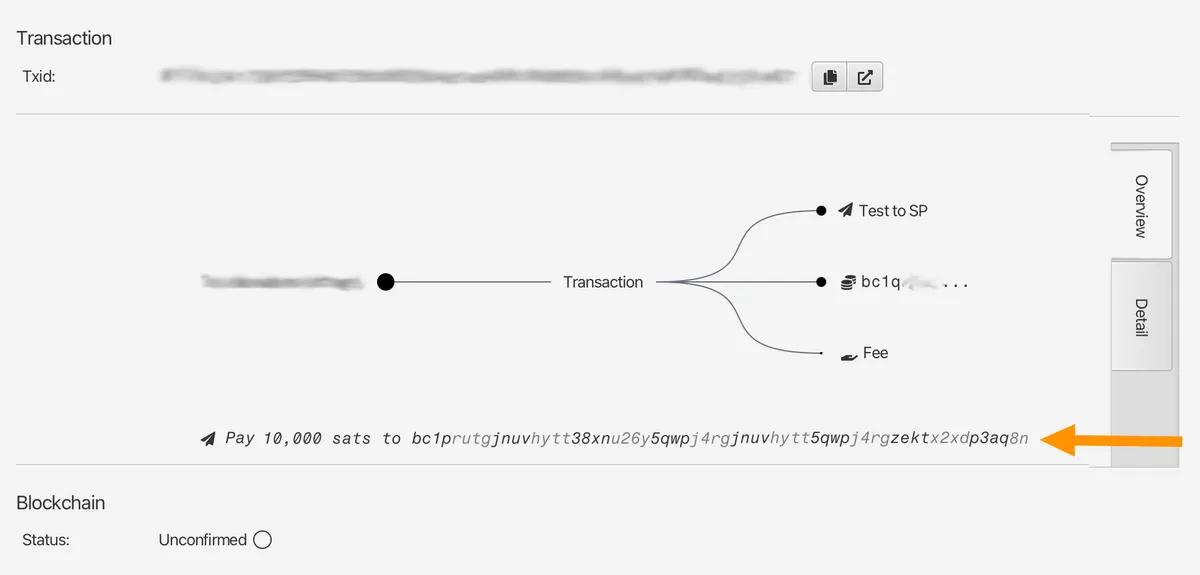
Behind this page, Sparrow has already performed the sender's mathematical operations described in the first section of this article—deriving a one-time Taproot output from the various inputs of the transaction and the recipient's public key—and broadcasting the final transaction. Visit the mempool.space website, and you'll find it looks like a regular Taproot payment. It's completely undetectable as a silent payment and cannot be associated with the sp1 address you know.
One noteworthy detail relates to hardware signers: the destination output depends on the input being spent . Therefore, during signing, the wallet must perform an ECDH operation using the input private key. This is straightforward for private keys stored in software. However, for a cold wallet device, whose entire design goal is to ensure the private key never leaves the device, this introduces a completely new compatibility issue. This will be the focus of the next chapter.
Hardware Signer and Cold Storage
Hardware support is a major obstacle slowing down the adoption of silent payments.
On the sender side, a big thumbs up to Bitbox ; they were the first hardware signer manufacturer to fully support sending payments to sp1 addresses. I believe it's possible to have an air-isolated Coldcard signer sign silent payment transactions via the PSBT file ( BIP 375 ), but I haven't verified it myself yet. I'll update this page once I figure it out.
In addition, users of other providers are less fortunate—users of Trezor, Ledger, and Blockstream Jade signature generators are still unable to send payments to silent payment addresses.
So, what about receiving payments ? If you follow my tutorial, but try importing a key from the hardware, you'll see a message like this:
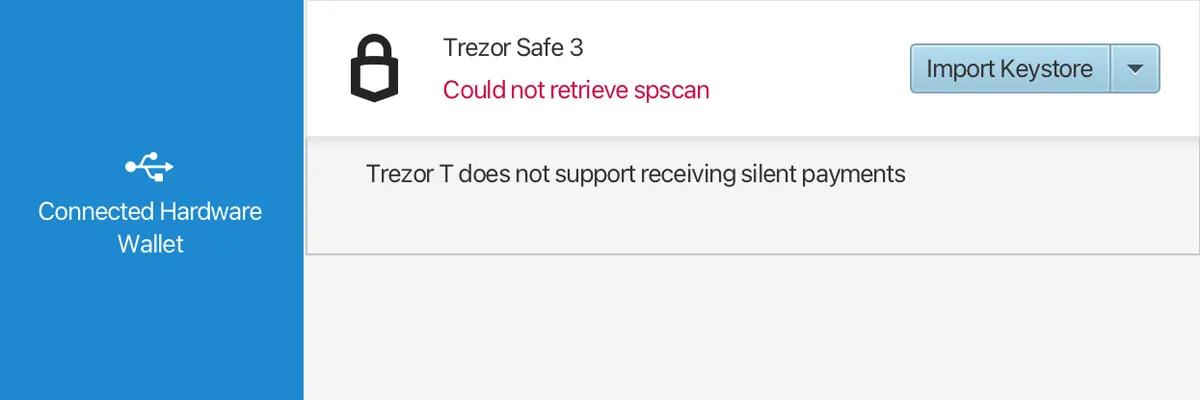
Setting aside the device identification error—I'm connected to a Safe 3, not a Trezor T—this error is accurate: you cannot yet receive silent payments to a cold wallet. As you've read the previous explanation, you know that using an sp1 address to receive payments isn't as simple as changing the public key derivation path—to detect incoming payments, the wallet must hold the scan private key and run ECDH on the input public key for almost every transaction. Hardware signers are designed to never expose the private key . While BIP352 allows the exposure of the scan key (it can only scan, not spend), doing so still requires dedicated firmware support.
In summary: most people can start by privately receiving small amounts of money in a hot wallet, and then transfer larger amounts to your cold wallet, just like using a regular hot wallet. You must accept that the vast majority of hardware signature device users are not yet able to send payments to your sp1 address.
If silent payment isn't mature enough for you yet
Silent payments are a completely new concept. The drawbacks I mentioned earlier might make it unsuitable for your needs, which is perfectly understandable—and that's precisely why I developed my serverless donation receiving software . Constantly rotating addresses remains a reliable method for accepting Bitcoin payments, works with all wallets, and doesn't sacrifice your privacy.
Try it yourself
The best way to learn more about silent payments after reading this guide is to try it yourself. A word of caution: the technical specifications for silent payments are still relatively new, so please be extremely careful when testing with real funds.
If you lack a wallet compatible with silent payments and are more interested in experimenting with the protocol, then Silent Amulet is worth considering. It's a full-fledged BIP-352 wallet that runs as a single HTML file within a browser. You can even configure it to connect to your own Blindbit indexer for local scanning without having to pass your scanning key to a server—a more private mode I mentioned in Section 2.
You can test whether your wallet software can parse an sp1 address by scanning the QR code below:

If you find this guide helpful and have a compatible wallet, I would appreciate any donation of satoshis, however small, to support the continued operation of this guide website. If your wallet does not support silent payments, you can also donate to the guidelines via a reliable Segregated Witness wallet or Lightning Payment .
I also recommend that you donate to Sparrow wallet . It's one of the best Bitcoin projects, maintained by just one developer, and it's completely free and open source.
Thank you for reading. Best wishes to Tuncong.
(over)