Binance exchange today announced the launch of a new DCA (Cost Averaging) trading bot. The Binance spot platform launched the spot DCA robot. Through this function, users can set the spot DCA robot to buy and sell assets at an average price, thereby reducing the impact of market fluctuations.
However, different from the general "regular quota" robot setting that buys according to the time interval, Binance's DCA trading robot has many different parameters, and can be adjusted to the corresponding long-term and short-term investment cycle according to the user's settings.
Binance DCA Trading Robot Parameters Introduction
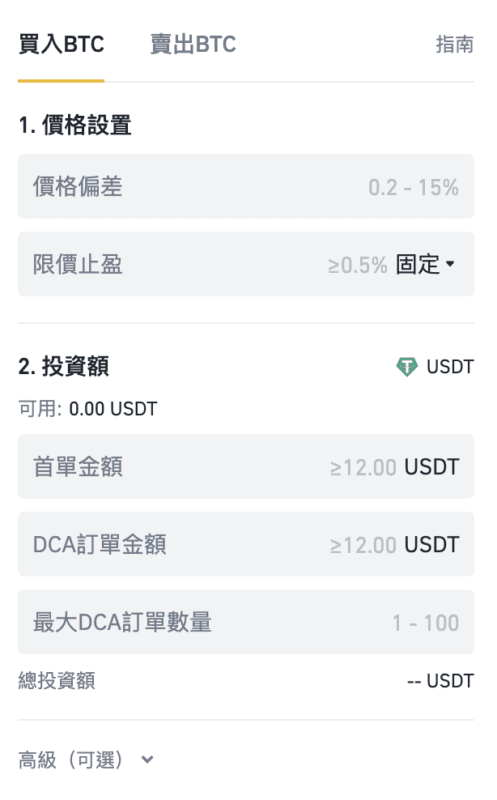
DCA robot price setting
1. Price deviation : The price difference setting range is 0.1% to 15%. For example, it is set at 5%, that is, a buy or sell order is set for every 5% drop.
2. Take profit : Take profit is divided into two modes.
- Select [Fixed]: take profit based on the target profit percentage of the average price. For example, it is set to 5%, that is, when the investment income reaches 5%, the position will be automatically closed and the profit will be settled.
- Select [Tracking]: When the market price reaches the target return percentage of the average price, continue to hold the position, and at the same time lock the return with this percentage. For example, if it is set to 5%, when the investment income reaches 5%, the robot will not exit the market immediately, but if the price rises and then falls back to the 5% income range, it will sell and take profit to lock in the profit.
DCA robot investment amount setting
1. First order amount : the investment amount of the first order. If the "price trigger condition" is not set, the first order will be executed immediately after the spot DCA starts. The investment amount of the first order can be customized. For example, if you enter 1,000 USDT as the investment amount, the maximum amount for the first order is 1,000 USDT (including transaction fees).
2. DCA order amount : that is, how much to buy or sell for each order that reaches the price deviation after the first order. Assuming that the price deviation is set at 5%, and the DCA order amount is 1,000 USDT, then for every subsequent 5% drop, a maximum of 1,000 USDT (including transaction fees) will be invested.
3. Maximum number of DCA orders : the maximum number of DCA orders for this round of investment. That is, funds should be bought or sold in several batches.
DCA robot advanced parameter setting
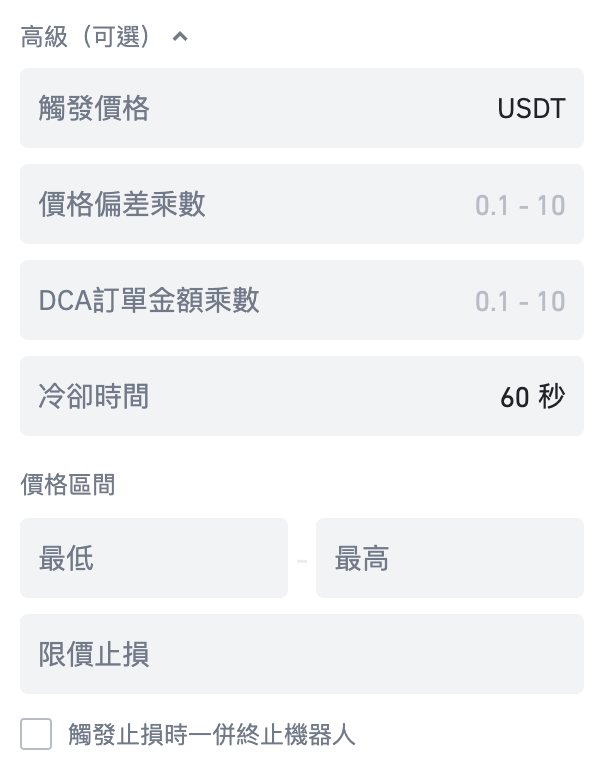
1. Trigger price : The token price that triggers the trading robot to start trading.
2. Price deviation multiplier : The higher the deviation multiplier is set, the greater the price deviation between buying and selling will be as the currency price continues to fall or rise. Example: You set up a DCA robot for the BTC/USDT trading pair with an initial order price of $30,000 on the buy side, with a price deviation of 1% and a price deviation multiplier of 2.
First order = $30,000
First DCA order price = first order - 1% = $29,700
Second DCA order price = DCA #1 – 1% * 2 = $29,106
Third DCA order price = DCA #2 – 1% * 2 * 2 = $27941.76
3. DCA order amount multiplier : The higher the order amount multiplier is set, the larger the buy and sell orders will be as the currency price continues to fall or rise (ie: the more it falls, the more it buys, the more it rises, the more it sells) more). For example, your DCA order is 1,000 USDT, and your DCA order amount multiplier is set to 2. When the price reaches the specified price deviation, the amount will be multiplied for each additional subsequent order.
First DCA order = 1,000 USDT = 1,000 USDT
Second DCA order = 1,000 USDT * 2 = 2,000 USDT
Third DCA order = 1,000 USDT * 2 * 2 = 4,000 USDT
4. Cooldown time : The pause period between executions of each round. The default cooldown between rounds is 60 seconds.
5. Upper and lower limits of the price range : the price range of the first order of the selected token, the trading robot will only execute within this range. Note: For consecutive rounds, the executed first order may deviate from the price range due to market volatility.
6. Stop loss : The stop loss percentage that triggers the trading robot to stop the current round of trading.
7. Terminate the robot when the stop loss is triggered : When the stop loss percentage is reached, the robot will terminate itself and will not continue to execute the next round of transactions.
Suitable for long and short cycles
It should be emphasized that, unlike the DCA trading robots of most exchanges, the DCA robot launched by Binance can be applied to long-term and short-term operations. As long as the market price is within the upper and lower limits of the set price range, the robot will follow the parameters to Buy and sell operations are performed in each round of price fluctuations, and after completing a round of buying and selling operations, continue to execute the next round of buying and selling, and continue to cycle. Binance's DCA trading robot is similar to the concept of grid trading in some respects.

In addition, when the market trend is downward, investors can also set up DCA robots on the selling side to increase spot holdings.