Original | Odaily
Author | Asher (@Asher_0210)

In the current cryptocurrency world, mastering the creation and use of Web3 on-chain wallets, understanding how to purchase popular on-chain tokens, and having certain on-chain data analysis capabilities have become one of the key ways to seize money-making opportunities.
As Bybit co-founder and CEO Ben Zhou said in a post on the X platform, "Last weekend, all CEXs saw a massive outflow of SOL, USDC flowing into the chain to buy TRUMP, Moonshoot + Meteora/Jupiter created over 30 billion in Meme coin TRUMP in less than 10 hours and completely independent of any CEX. We are accelerating the development and promotion of on-chain wallets, dashboard tools, etc. If we don't join this revolution, we will become outdated."
Today, Blockworks data analyst Dan Smith posted on the X platform that the trading volume of Solana's decentralized exchanges (DEXs) hit a record high, reaching $33.6 billion in a single day. Specifically, the trading volume of the Trump family tokens was $9.6 billion, the trading volume of the SOL-USD trading pair was $10.4 billion, and the trading volume of stablecoin exchanges was $850 million. This data fully reflects the high activity of the Solana ecosystem and the high participation of users in decentralized platforms.
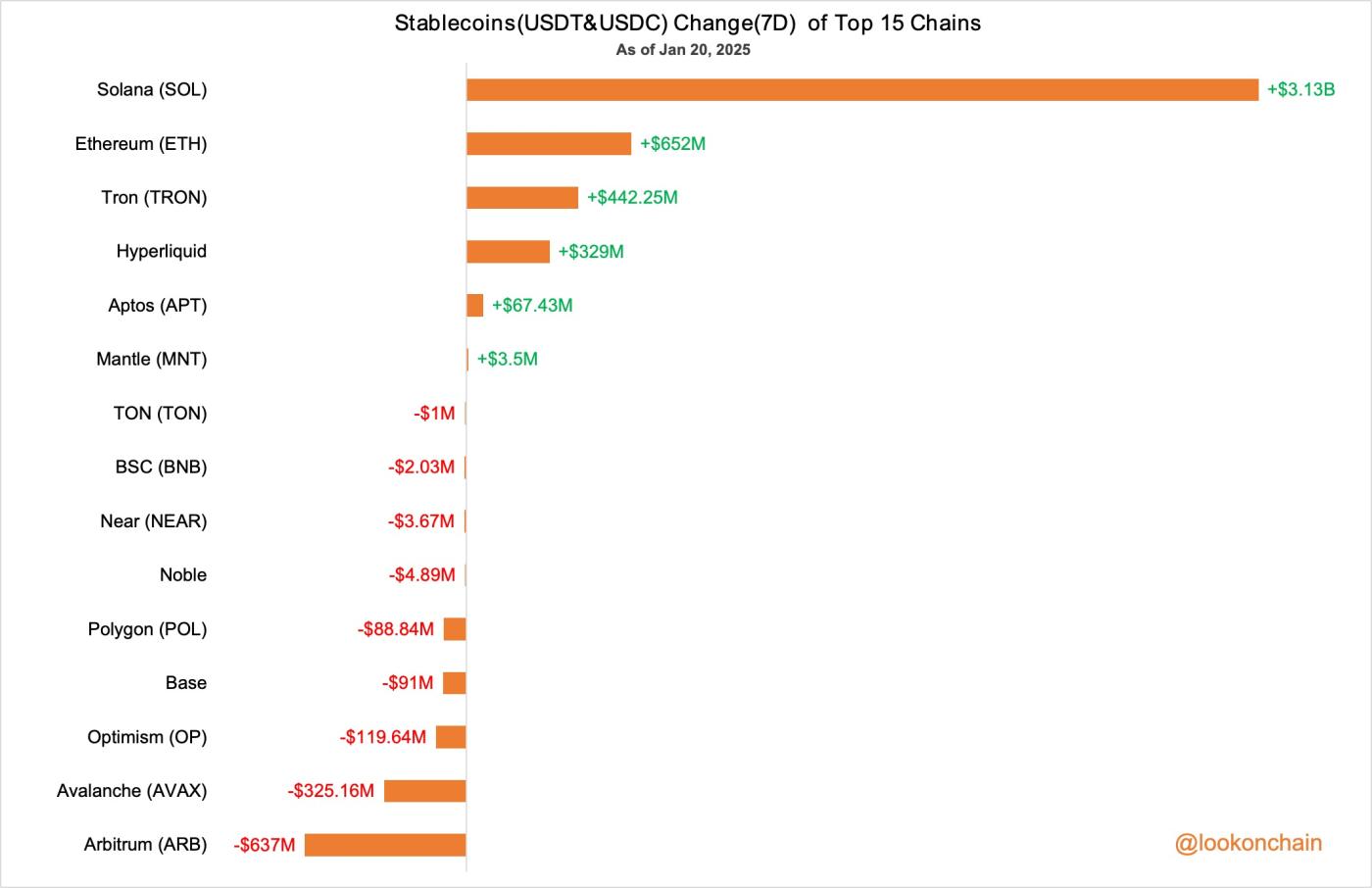
At the same time, according to Lookonchain monitoring, the total amount of stablecoins (USDT and USDC) on Solana has increased by $3.13 billion in the past 7 days, showing the market's continued optimism about the Solana ecosystem.
In view of the many requests for tutorials from new users, Odaily will use SOL as an example (which is also where most wealth opportunities occur):
For "experienced" users who have used centralized exchanges - demonstrate how to withdraw tokens from the exchange, and explain how to complete transfers through cross-chain methods when SOL withdrawals are suspended;
For complete newcomers - introduce the creation and use of Web3 wallets, how to purchase on-chain projects, and recommend common on-chain tools.
Having an on-chain wallet is a prerequisite
Unlike centralized exchanges, users participating in on-chain token trading need to have a dedicated on-chain wallet. For "on-chain newbies", this is the first step to enter the crypto market. Currently, Phantom wallet and OKX Web3 wallet are the most common on-chain wallets, especially Phantom, whose ranking in the US iOS app store has surpassed Coinbase, showing its widespread popularity. Given that most new users mainly trade on the mobile end, the following will demonstrate the detailed steps to create an on-chain wallet on the mobile end (the same for the computer end).
Creating a Phantom Wallet
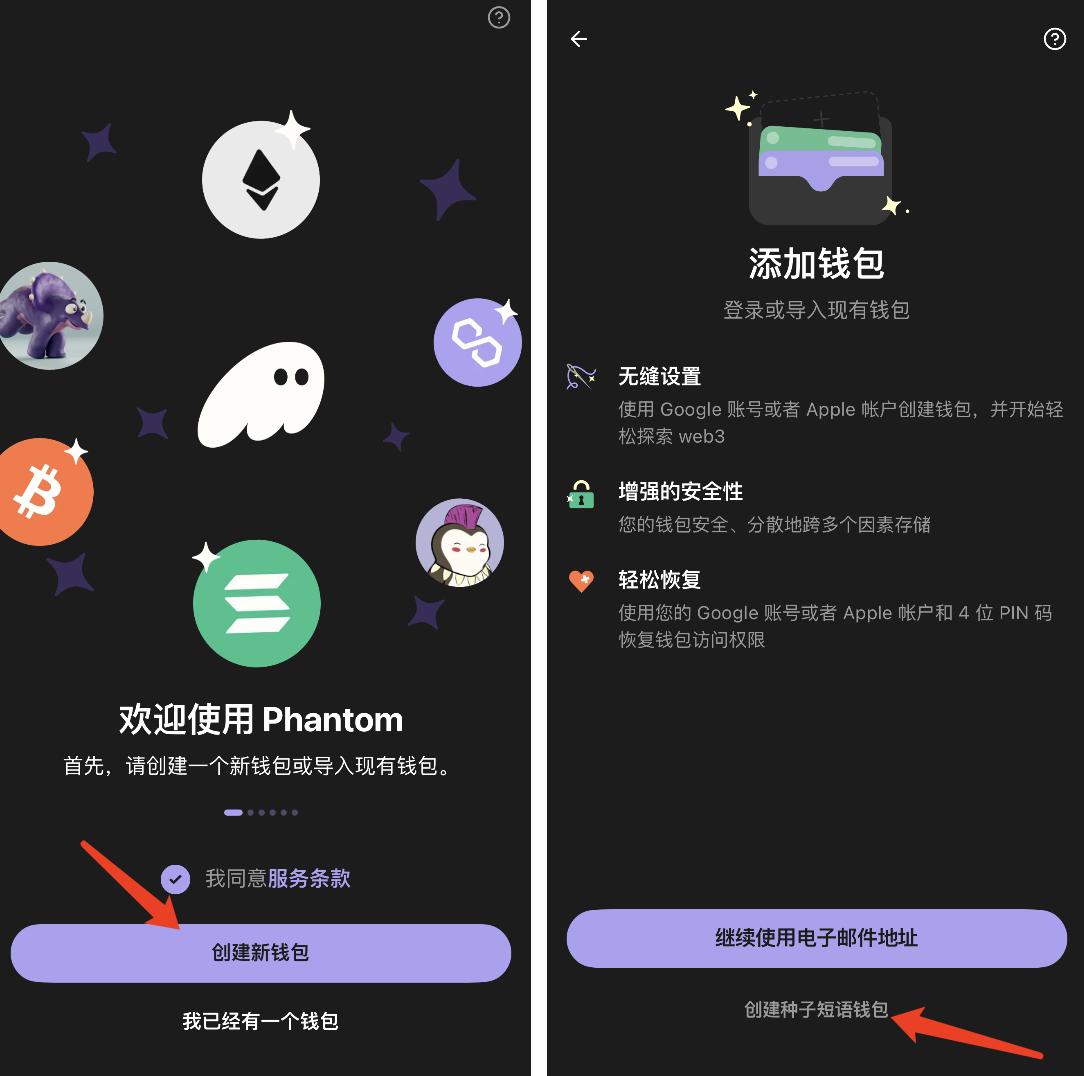
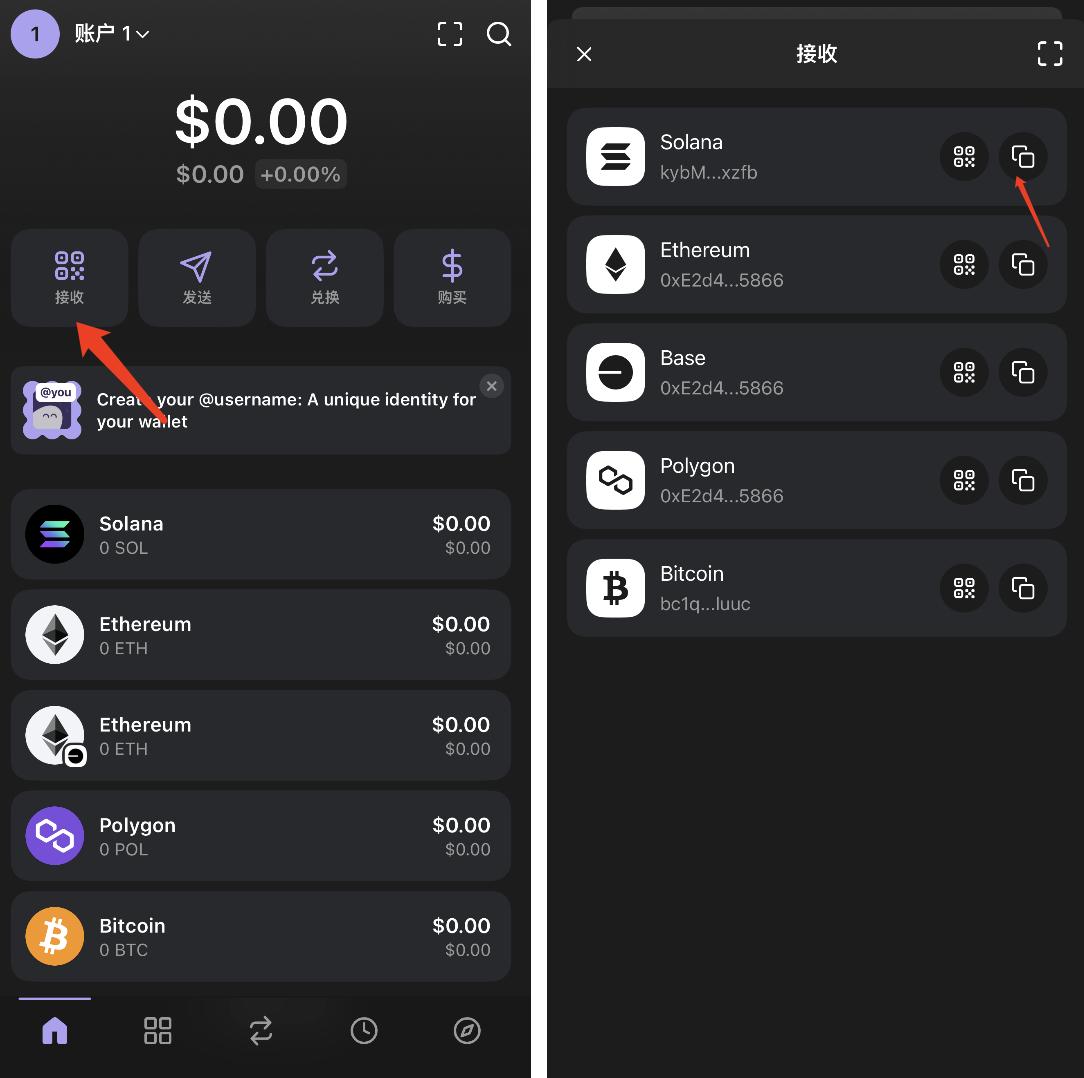
STEP 1. After downloading the Phantom App in the corresponding mobile version app store and clicking on the software, click "Create New Wallet" and then click "Select Seed Phrase Wallet".
STEP 2. Save the seed phrase well, it's best to handwrite it, as this is the only way to recover the wallet. Don't tell strangers.
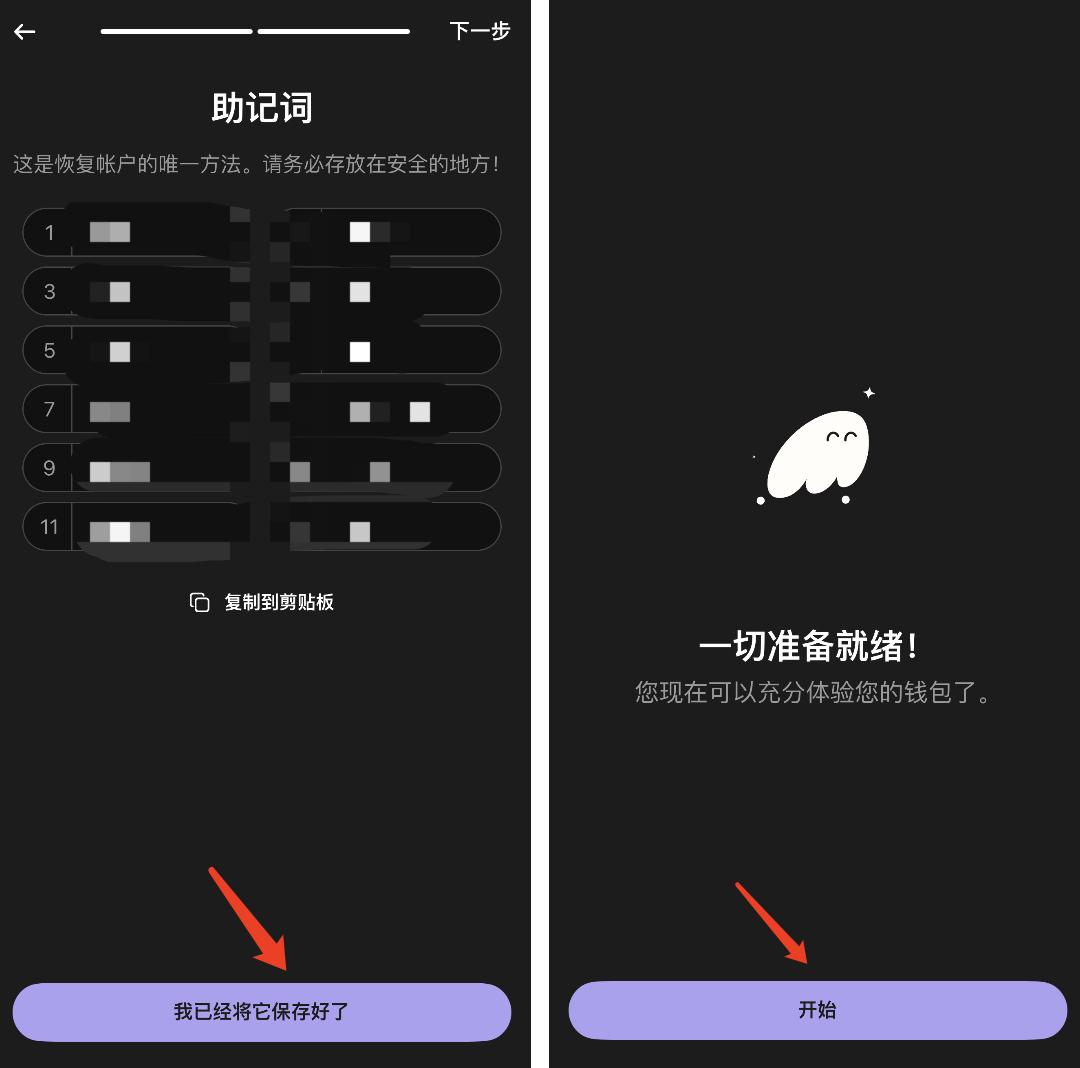
STEP 3. Obtain your own wallet address.
Creating an OKX Web3 Wallet
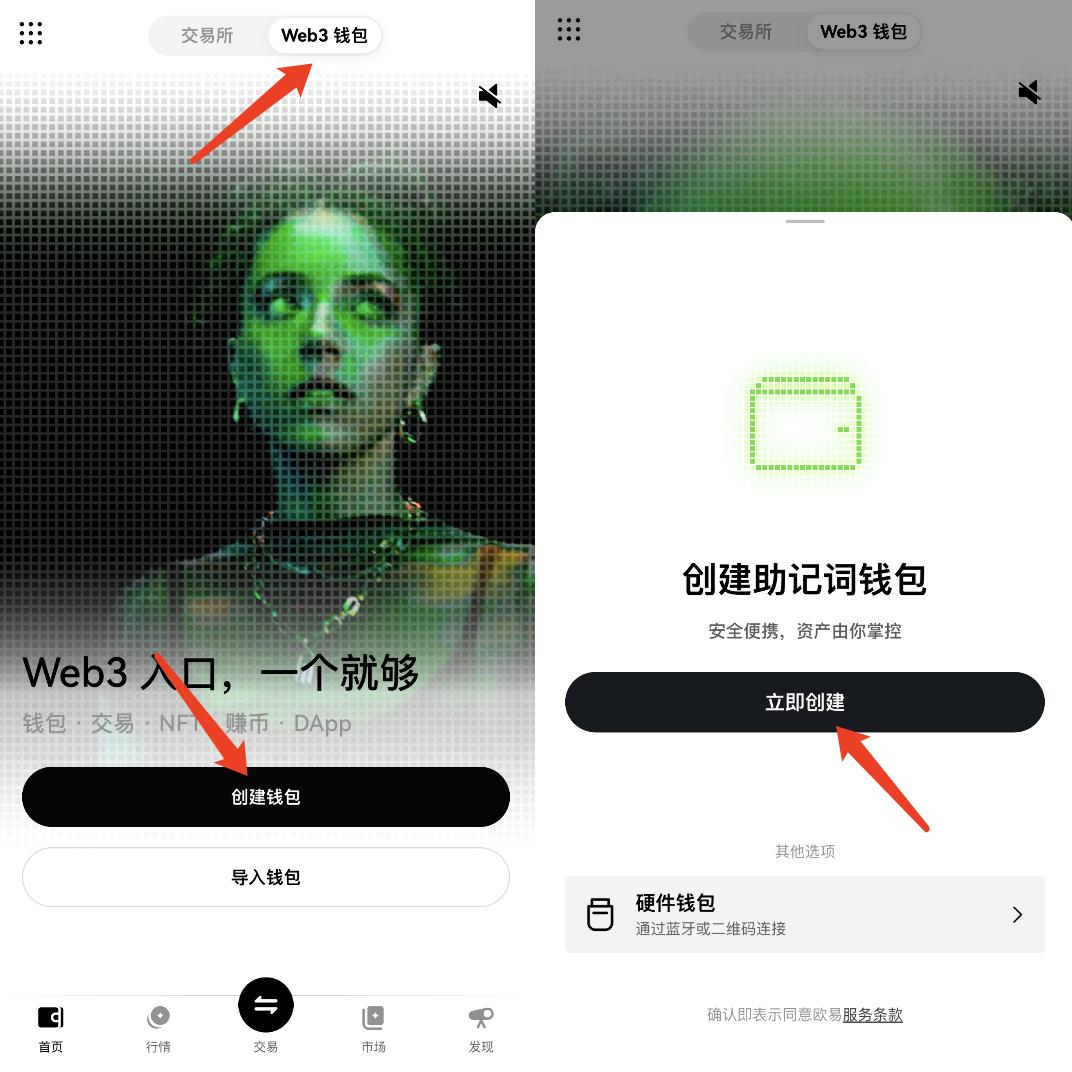
STEP 1. Enter the "OKX" App, click to switch to the "Web3 Wallet" at the top, and then click "Create Wallet".
STEP 2. Click "Manual Backup" to record the seed phrase.
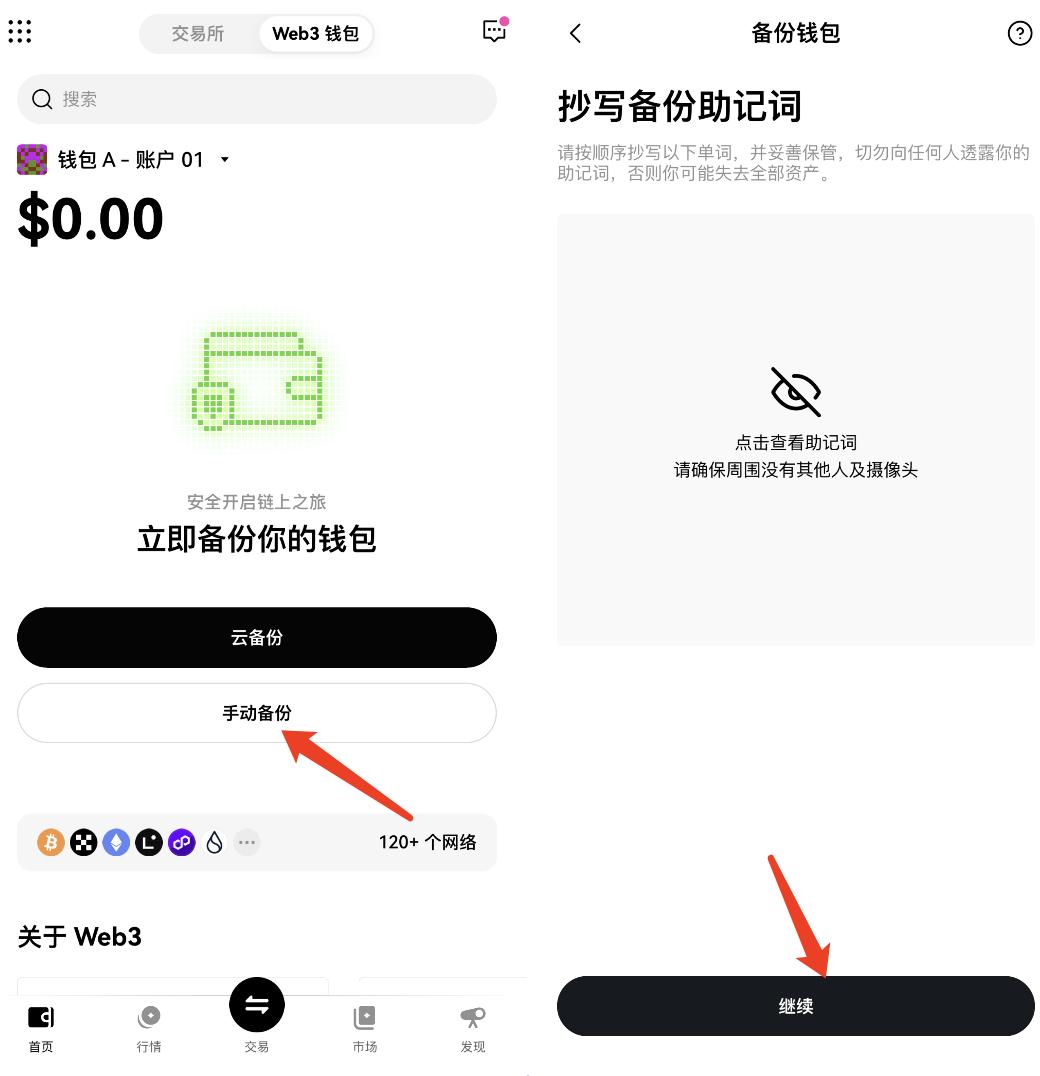
STEP 3. Obtain your own wallet address.
(Odaily reminds again: the seed phrase is very important, be sure to save it well.)
Withdraw from the exchange to the on-chain wallet
Withdraw SOL from the exchange to the on-chain wallet
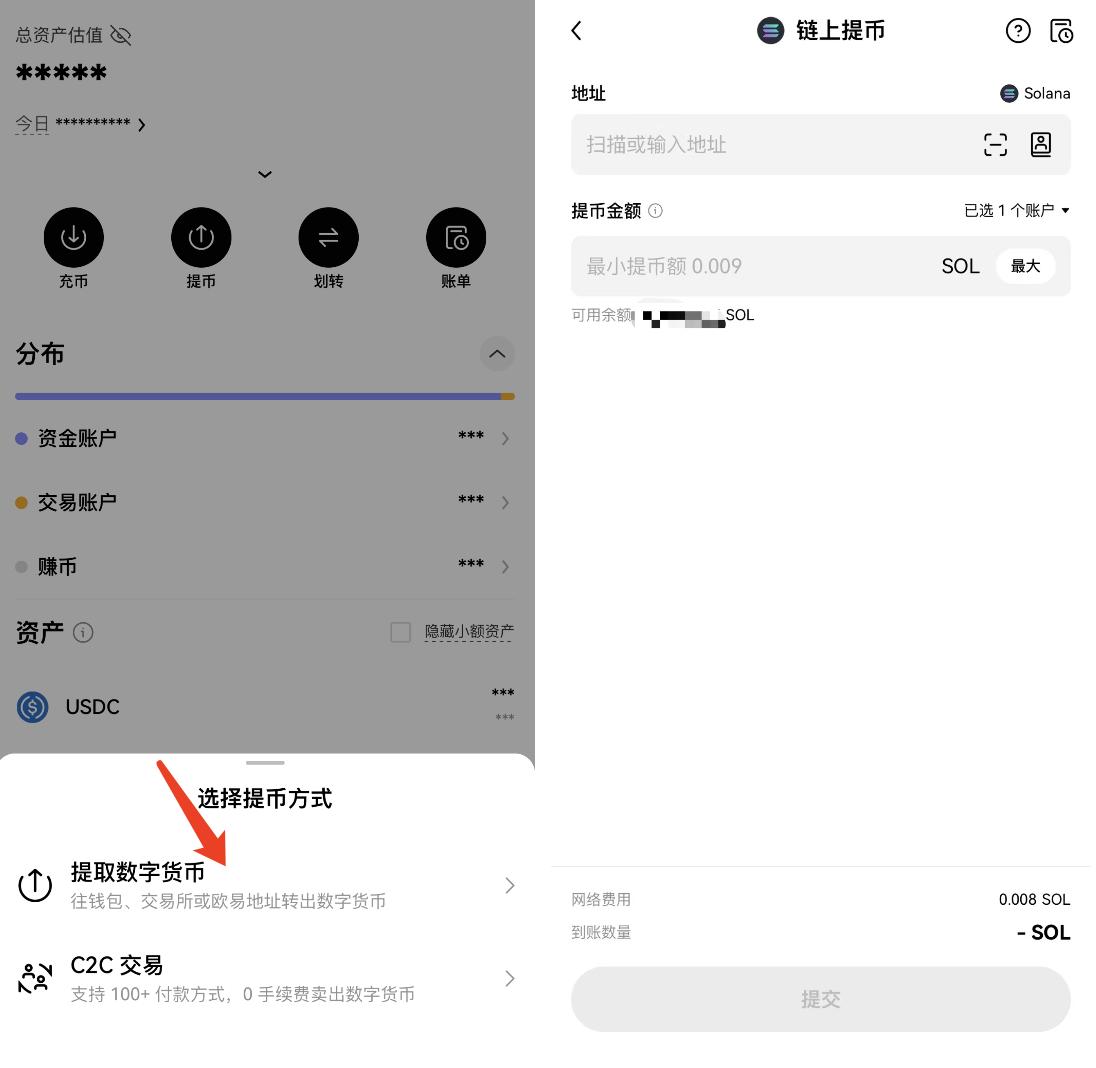
Enter the centralized exchange (using the OKX exchange as an example), select "Withdraw" and then "Withdraw Digital Currency", select the SOL token, and enter your own wallet address (some tokens like USDT have multi-chain versions, so be sure to check the network when withdrawing).
If withdrawal is suspended, how to obtain SOL through cross-chain
For most users, to purchase popular tokens in the Solana ecosystem, the usual practice is to first buy SOL on a centralized exchange and then withdraw it to an on-chain wallet. However, when events like the "Trump couple token launch" happen, due to a large number of users withdrawing SOL at the same time, the withdrawal speed may slow down or even be suspended. In this case, mastering the cross-chain withdrawal technique becomes particularly important, as it can ensure that you can buy the high-heat tokens in a timely manner. The specific operation is as follows:
Cross-chain website: https://portalbridge.com/usdc-bridge/
STEP 1. Withdraw USDC from the centralized exchange to the Avalanche, Arbitrum, or Optimism chain.
STEP 2. Use the cross-chain website mentioned above to cross USDC from Avalanche or other chains to the Solana chain (Avalanche chain is recommended, as the Ethereum second-layer chains generally require a longer transaction confirmation time, and may even exceed half an hour during congestion).

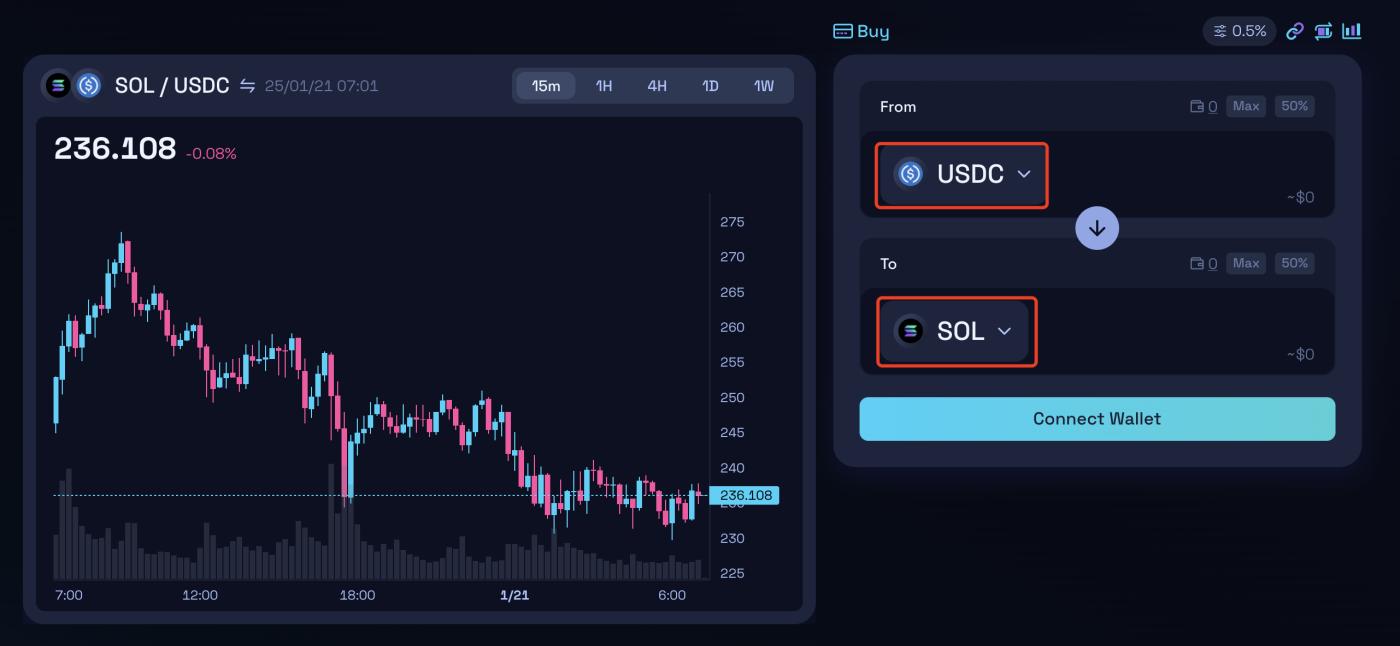
STEP 3. After successfully transferring USDC to the Solana chain, you can exchange it for SOL (demonstration using: https://raydium.io/swap/).
How to purchase popular on-chain tokens
Purchase directly on DEX
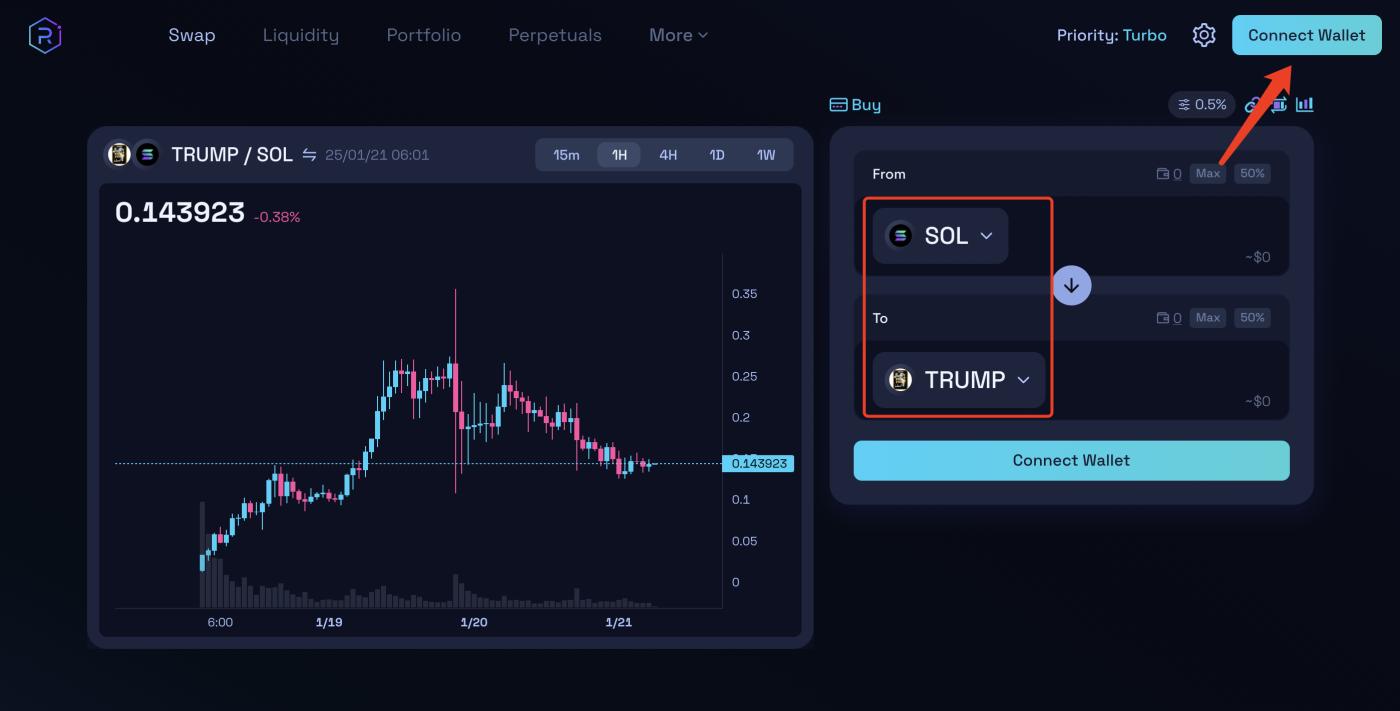
On January 19, according to DeFiLlama data, Raydium's 24-hour fees have surpassed Tether, ranking first. Raydium's 24-hour fees are $25.24 million, while Tether's 24-hour fees are $17.65 million. This shows that most of the purchases of Solana ecosystem on-chain tokens are on the Raydium platform, whose official link is: https://raydium.io/swap/, connect your wallet and select the corresponding token to trade.
On the one hand, when project transactions are frequent, relying solely on Raydium may not be able to complete buy and sell operations in a timely and smooth manner; on the other hand, due to the lack of fundamental analysis basis for newly launched on-chain projects, players can only judge their trends by observing the distribution of chips, the entry of smart money, and whether there is manipulation by the project party. Blind investment in on-chain memes is extremely risky, but by mastering the basic on-chain analysis skills, the success rate can be greatly improved.Therefore, to better participate in on-chain trading and make profits, it is recommended to use GMGN for trading.
Use the on-chain tool GMGN
GMGN is a website that combines a Meme coin data dashboard and a trading tool. Go to the GMGN official, connect your wallet, and add the token contract address you want to buy in the search bar, and enter the amount of tokens you want to buy (sell) on the right half of the interface.
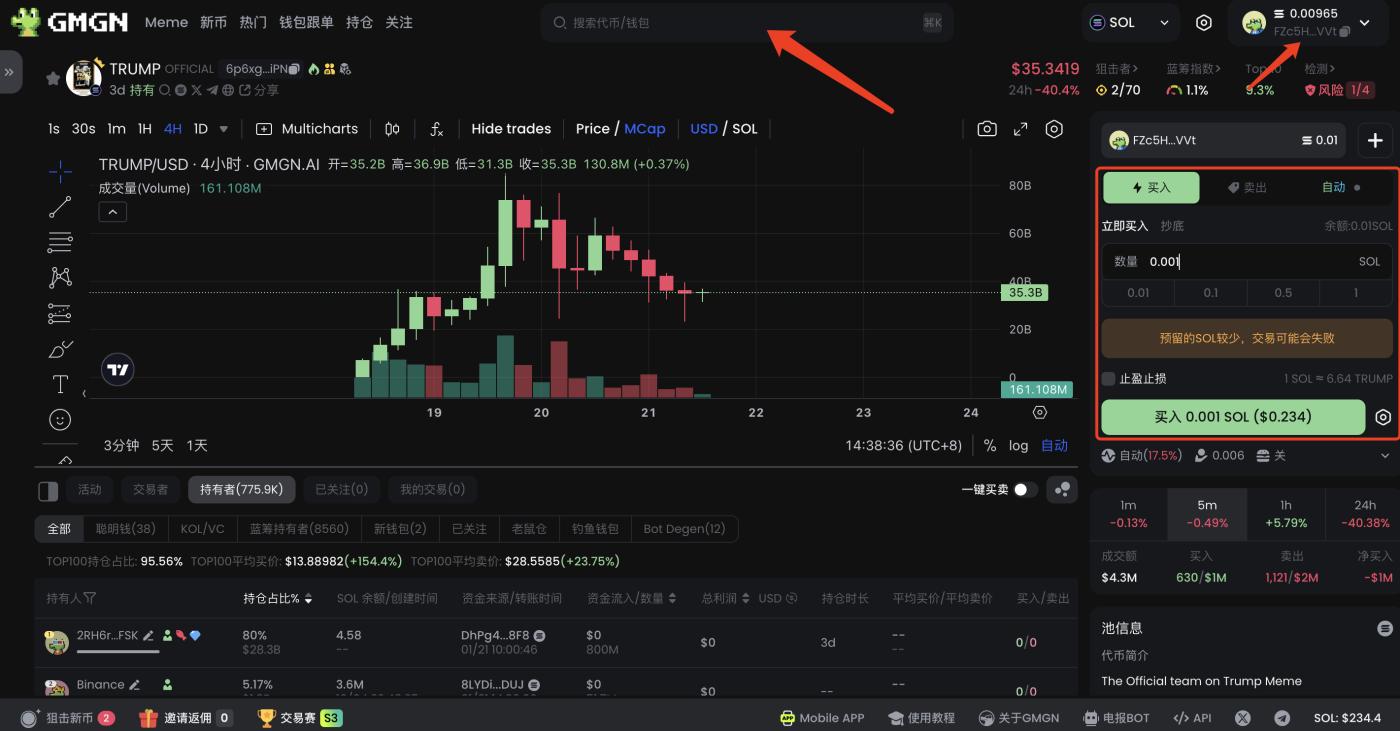
The above is a simple introduction to the GMGN operation interface, for more GMGN operation tutorials, please refer to the following two articles:
100x Overnight? How to Play Meme Coins Using GMGN (Beginner's Guide)
How to Become a Meme Coin Trading Pro? (GMGN Advanced Guide)