This article is machine translated
Show original
OKX Has Created Another Black Technology!
They have opened an automatic daily financial earning channel for VIP users, allowing order funds to no longer remain idle!
What is daily financial management?
Everyone should be familiar with it, as every exchange has it. You can place idle funds from the exchange into daily financial management, earning interest daily (calculated hourly), and can deposit/redeem at any time without any restrictions.
What is black technology automatic coin earning?
It eliminates the deposit/redemption operations, directly earning $USDT interest in the trading account (also calculated hourly), with an annual rate the same as daily financial management, potentially reaching up to 53% short-term annualized yield.
The most impressive part is that all order funds in the exchange, such as contract margin and spot buy the dips orders, can earn financial management returns on these occupied $USDT assets, maximizing fund utilization. (Simply a tool for big players)
However, this feature is currently only available to #OKX VIP users, which means a capital threshold of 100,000 USD is required. This shows that OKX is creating a product for big players to attract more of them, while small users can still enjoy good interest through regular daily financial management, which is convenient and flexible.
Demonstration of enabling automatic coin earning and daily financial management follows👇
(3/1)

OKX中文
@okxchinese
08-15
#OKXTraderSeason 全面开启,「交易账户自动赚币」今日正式上线!
你的 $USDT 无论在挂单中、全仓保证金还是资金账户闲置,都可获得赚币收益:
🔛一键开启,一步到位
🚀不影响任何交易操作,释放资产更多潜力
点击下方图片立即参与⬇️
#BetterForTraders
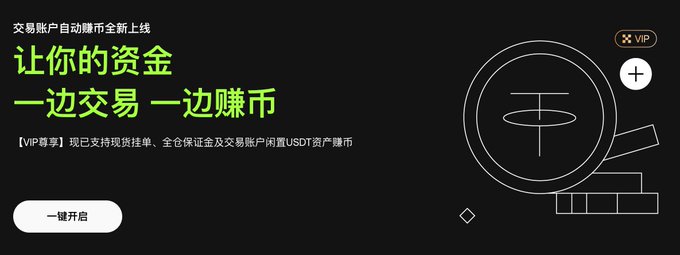
1⃣: Automatic Earning Activation Process
(This feature is only available to OKX VIP users, and there are currently two access points.)
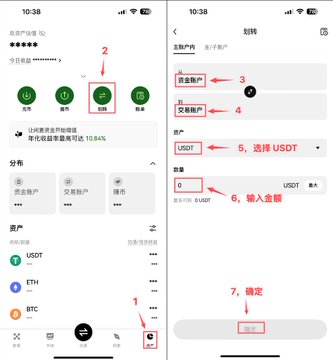
❯ Transfer First (Figure 1): Transfer funds from the exchange to your trading account.
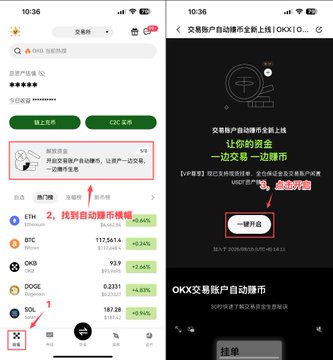
❯ Access 1 (Figure 2): Go to the homepage and find the "Automatic Earning" banner. Click it. You'll see a one-click option to enable it. Click it, and you'll be asked to enter a minimum annualized return (CG has already enabled it, but I can't take a screenshot without this interface. You can enter 1% for your account).
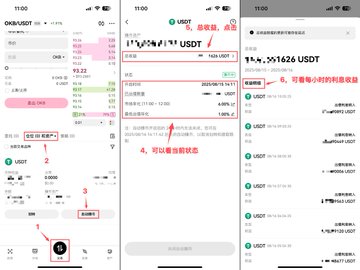
❯ Access 2 (Figure 3): Click "Trade," "Positions," and "Assets" under the exchange. Click "Automatic Earning," enter your minimum annualized return, and you're done. (This interface also allows you to view your investment returns and status.)
Note:
Once automatic earning is enabled, it cannot be disabled for 24 hours. During this period, transfers and withdrawals are not possible. Therefore, before enabling it, consider whether you will need funds on the blockchain today, otherwise withdrawals will be impossible.
(3/2)
2⃣: Current Account Deposit/Redemption
(Available to everyone, withdraw as needed, no 24-hour limit)
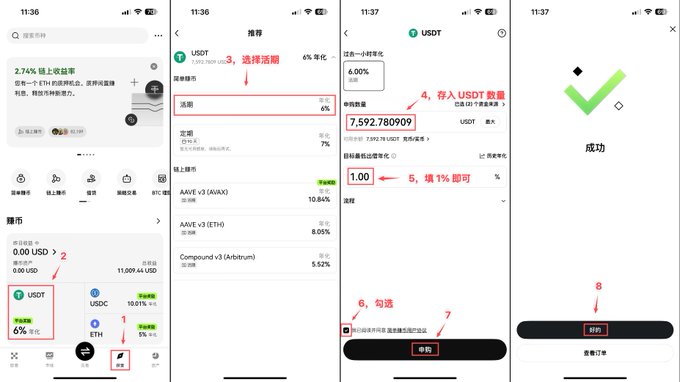
❯ Deposit (Figure 1): Click Explore below the exchange, click UTST in the Earn Coins section, select Current Account, enter the amount and 1%, then apply for subscription.
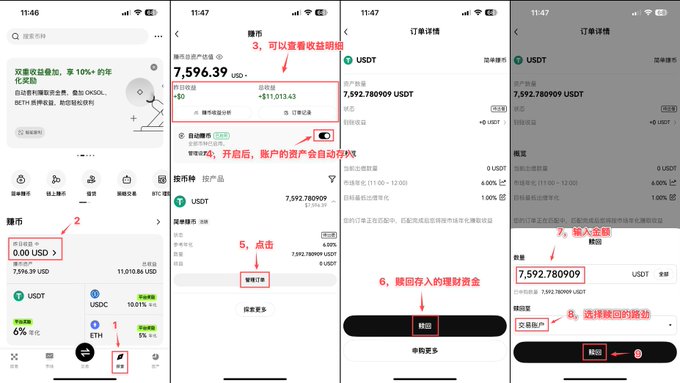
❯ Redemption (Figure 2): Also in the Earn Coins section, click Yesterday's Earnings to view the status of your investment. Click Order Management, click Redeem, enter the amount, and click Confirm to redeem your investment.
(3/3)
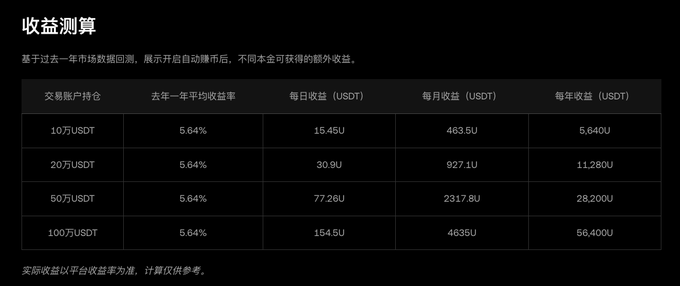
This is the average annualized return of 5.64% over the past year, which corresponds to the fund income statement. It is quite intuitive and can be used as a reference.
Sector:

From Twitter
Disclaimer: The content above is only the author's opinion which does not represent any position of Followin, and is not intended as, and shall not be understood or construed as, investment advice from Followin.
Like
Add to Favorites
Comments
Share
Relevant content