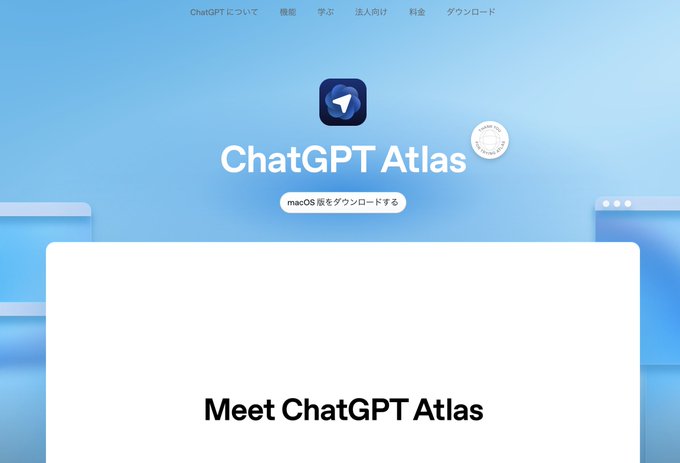
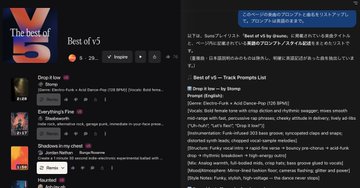
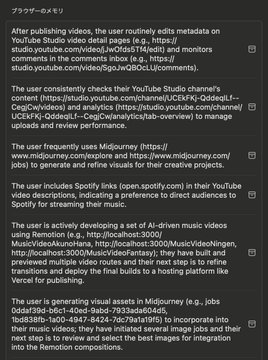
[Breaking News] ChatGPT Suddenly Releases AI Browser "Atlas"! I'll explain in three key points. This is Ikehaya. I woke up this morning to some unbelievable news. I'm typing away, knowing that this is an urgent matter that I need to share with you all. OpenAI, the developer of ChatGPT, has finally released a "browser." It's called "Atlas." "What, a browser? How is it different from Chrome or Safari?" You're probably thinking that. To cut straight to the point, this is more than just a browser. It's "a new experience of traveling the internet with AI." I spent about an hour playing around with it this morning... and it's exciting! In this article, I'll give you my first impressions of ChatGPT's AI browser "Atlas," covering its key features, how to use it, and what it points to in the future. ==== First of all, what is "Atlas"? Simply put, it's a browser with ChatGPT built in. It's a completely different experience from the previous experience of "opening a ChatGPT tab in a browser"! Having AI by your side at all times, wherever you use a browser, is more comfortable than you'd imagine. Unfortunately, it's currently only available for Mac (a common AI phenomenon). Since I'm a Mac user, I immediately put it to the test. There were three main points that made me feel particularly revolutionary after trying it out. ==== 1. The experience of "viewing" the current page together with the AI. This may be the most basic and yet most powerful change in experience. With "Atlas," the AI recognizes the information on the web page you're currently viewing. For example, I'm currently hooked on creating songs using the music generation AI "Suno." Suno's website displays a ranking of currently popular songs. So I called up the "Atlas" AI and asked it the following: "Make a list of song prompts (song recipes) for the songs displayed on this page." When I asked, the AI completely understood the content of the page I was currently viewing and instantly created a list of prompts. Isn't that amazing? Until now, this required tedious steps: copying website information, switching to a ChatGPT tab, pasting, etc. With Atlas, you can use AI to analyze and summarize without leaving the page you're currently viewing. For example, while watching a seminar video on YouTube, you can give it instructions like "Summarize this video" or "Critical evaluation of the content of this video." It's like "browsing a website with a capable assistant." It seems like there are many uses for this, so I'm looking forward to getting used to it! ==== 2. "Agent Function" for Automatic Browser Control Next, the "Agent Function" gives us a glimpse into the future. This allows AI to automatically control the browser on your behalf. As a test, I made the following requests: "My middle school daughter is looking for a book to help her learn illustration. I picked out a few highly rated books on Amazon." The AI then automatically opened the Amazon website, entered keywords into the search box, scrolled through the search results, and began checking the reviews. Watching the browser work and complete tasks without my even touching it was a slightly creepy, yet intensely futuristic, experience. That said, when asked if it's practical, I can't help but feel it's a bit lacking. The operation speed is also slow, so I think its practical use is limited... but it could revolutionize the ease of some tasks. As this function evolves, it will be possible to "ask" AI to handle routine tasks like hotel reservations, product purchases, and downloading data from company systems. I feel like I've caught a glimpse of a fundamental change in white-collar work. ==== 3. A "Memory Function" that Learns from You And it's this "memory function" that may have the greatest impact. This feature allows the AI to learn and remember what websites you visit each day. (Of course, you can turn it off.) You can check the contents of the memory, but it's hilarious that your own actions are completely exposed. This may seem unimpressive, but it's actually a huge change. Until now, ChatGPT couldn't determine what websites users use daily. Atlas can collect this data, so it can learn, for example, "This user, Ikehaya, always checks a cryptocurrency news site every morning and makes extensive use of video generation AI." What happens as a result? This is a future prediction, but the AI will actually start talking to you. "I've put together today's cryptocurrency news that you always check." "The other day, you were looking for a birthday present for your daughter. What do you think of this product?" "There's a new video generation model out there. Why don't you try it? I've linked to a summary of the latest examples and some image materials you've created in the past." In this way, the AI will anticipate your actions and provide you with the most appropriate information. I imagine the new device rumored to be under development by OpenAI will also support this kind of "communication from AI." All we have to do is go about our daily lives, and AI will suggest the most appropriate information and actions. For small tasks, AI can even complete them automatically. The "memory function" has the potential to significantly update our relationship with AI. ==== What did you think? The newly released "Atlas" is undoubtedly a major step in the history of AI. I've decided to switch to Atlas as my main browser. Not only is it incredibly easy to use, but the memory function that improves the more you use it is great. (Note: Sorry, during the morning audio broadcast I said, "I don't think I'll be able to switch because I can't install extensions yet," but I did install them lol.) The "AI browser" trend is unstoppable. Google Chrome and Apple Safari will likely follow suit. AI will become the norm in future browsers. AI will come to understand us more deeply, help us with our work, and proactively deliver information to us, becoming the ultimate "partner." Wow, we live in truly exciting times. How will this revolutionary product change the world? Let's get hands-on and try it for ourselves!
This article is machine translated
Show original

From Twitter
Disclaimer: The content above is only the author's opinion which does not represent any position of Followin, and is not intended as, and shall not be understood or construed as, investment advice from Followin.
Like
Add to Favorites
Comments
Share
Relevant content