Using U for transactions allows access to tokenized global assets such as US stocks on-chain.
Written by: Frank, a Web3 farmer
What is the greatest common divisor of RWA and the on-chain data?
Against the backdrop of US stocks hitting new highs and Alt liquidity tightening, more and more people are beginning to realize that assets with real certainty, verifiable cash flow, and real yield are becoming the new consensus in the on-chain market.
However, objectively speaking, while real-world assets such as US stocks have certainty, they are new to most traditional financial users and even Web3 players. It is difficult to overcome the cognitive gap from 0 to 1 and achieve rapid expansion from 1 to 100.
There have also been many practical explorations in this direction, including supporting the purchase of tokenized assets such as Apple, Tesla, Nvidia, and Nasdaq ETFs on the blockchain, breaking the geographical and identity restrictions of traditional finance. For example, MSX has listed more than 200 US stock tokens, allowing users to participate in US stock token trading with one click via USDT/USDC.
This article will focus on the usage process of the MSX platform, providing a detailed and practical operation guide for all users interested in on-chain US stock token trading.
MSX One-Stop Getting Started Guide
1. Registration and Login
First, open https://msx.com (make sure the domain name is correct and beware of fake and phishing links).
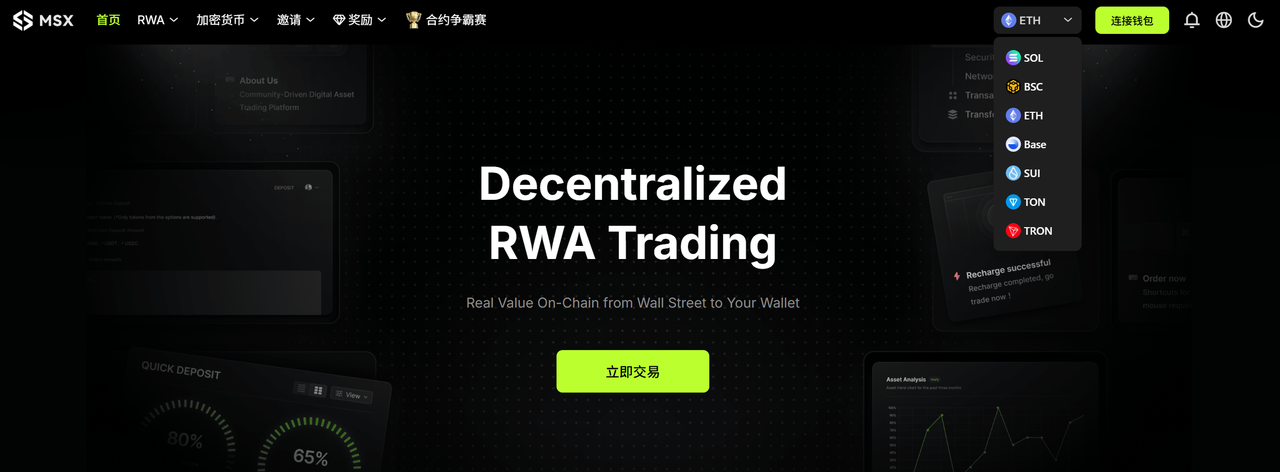
After entering the homepage, click "Connect Wallet" in the upper right corner. Currently, MSX supports registration and login using wallet addresses from four major networks: Solana, BNB Chain, Ethereum, and Base.
You can choose any frequently used network, click "Connect," and after confirming in the wallet pop-up window, the account registration will be completed automatically without needing to fill in any additional information or bind an email address.
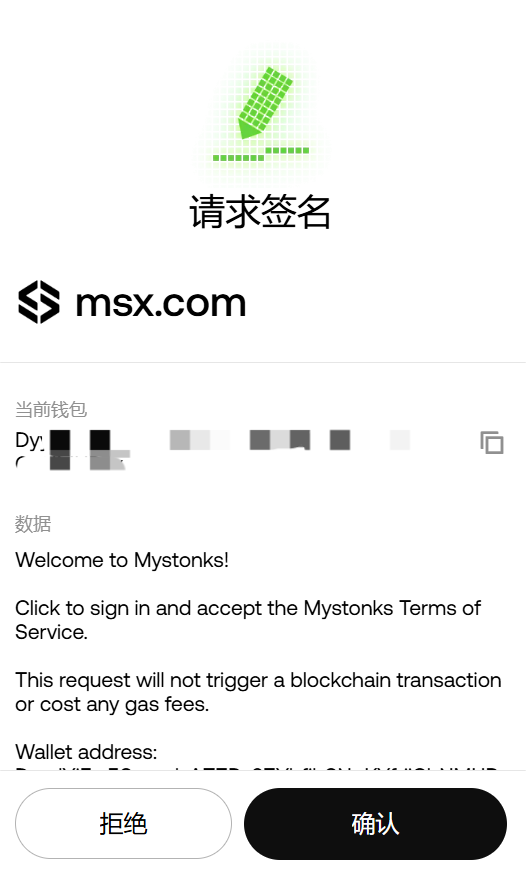
Note: When a new account logs in for the first time, the browser plugin wallet (such as MetaMask, Phantom, OKX Wallet, etc.) will pop up a signature confirmation window. Please ensure that the authorization source is the official domain.
However, it should be noted that any wallet address on each chain is treated as an independent account in MSX. In other words, even if you use the same seed phrase to generate the same set of wallets, the system will recognize it as a completely new account as long as you switch to a different network.
For example:
- If you register and log in using the Ethereum network address 0x....888, you will be automatically identified as account A.
- Switch back to the BNB Chain network and log in again using the same 0x…888 address. MSX will create a separate account B for this login. The balances, positions, and transaction records of these two accounts are not shared.
In other words, each chain's account is independent of the others. The account you log into on BNB Chain is a completely different and independent account from the account you log into on networks such as Solana or Ethereum.
Therefore, it is recommended to select the primary network to use (such as BNB Chain or Solana) during the initial registration and maintain consistency in subsequent operations to ensure unified management of assets and transaction records and avoid confusion or omissions.
In addition, to enhance security, MSX recommends that users bind their email address immediately after their first login to enable email protection and prevent malicious account manipulation.
Users can click on their wallet address in the upper right corner of the page → select "Security Center" to enter the settings page, then enter their frequently used email address in the input box (it is recommended to use international email addresses such as Gmail and Outlook to avoid blocking), and click "Send Verification Code". The system will then send a verification code email to the email address you entered.
After entering the 6-digit verification code you received in the verification code input box, click "Confirm Binding" to enable the email protection function. This email address will then be associated with your current MSX account.
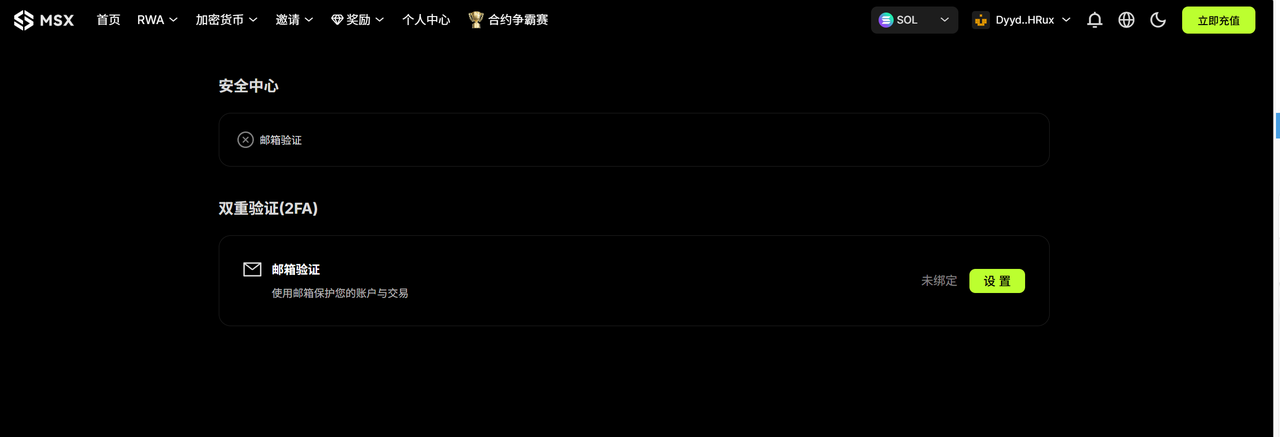
After linking your email address, the following features will be automatically enabled:
- Deposit and withdrawal notifications: Instant email reminders will be sent for every key operation such as deposit and withdrawal;
- Security and Risk Control Reminder: When an account is detected to have unusual login activity or risky operations, the system will send an immediate email alert.
- Platform announcements and upgrade notifications: Get official MSX notifications regarding product updates, system maintenance, airdrop events, etc.
- Account recovery and verification features: In the future, if you need to recover your account or perform advanced operations (such as changing your email address), the linked email address will be used as a verification credential.
If you wish to change your linked email address, you can click "Modify" in the "Security Center". The system will then ask you to complete the following steps: verify your identity using your old email address; enter your new email address and verify the verification code; confirm the change is complete.
2. Top up
After successfully logging into your account, click "Recharge Now" in the upper right corner of the homepage. The system will automatically pop up a recharge window and provide two recharge methods: "Quick Recharge" and "Normal Recharge".
(1) Quick recharge
The deposit network supports Solana, BNB Chain, Ethereum, and Base (the network selected by the login account must be the same), and the supported currencies are USDT and USDC.
- Operation process: Enter the specific recharge amount, click "Pay", and the system will automatically call the browser plugin wallet linked to MSX. As long as there is sufficient balance in the wallet, you can quickly recharge after confirmation.
- The entire process usually takes only a few seconds, with funds arriving instantly, making it ideal for users who trade frequently or wish to deposit funds quickly.
(2) Regular top-up
The deposit network supports Solana, Ethereum, BNB Chain, Base, and Tron, and supports USDT, USDC, and US stock tokens (stock tokens or non-mainstream assets not yet supported will not be recognized by the system and will not be credited).
- Operation process: After selecting the deposit network and currency, the system will generate the corresponding deposit address and QR code. After copying the address or scanning the code, you can directly withdraw funds from your wallet or CEX to this address.
- Once the corresponding network block is confirmed, the deposit amount will be automatically credited to your current logged-in account balance (total net deposit + total realized profit + total net capital fees - total transaction fees - opening margin);
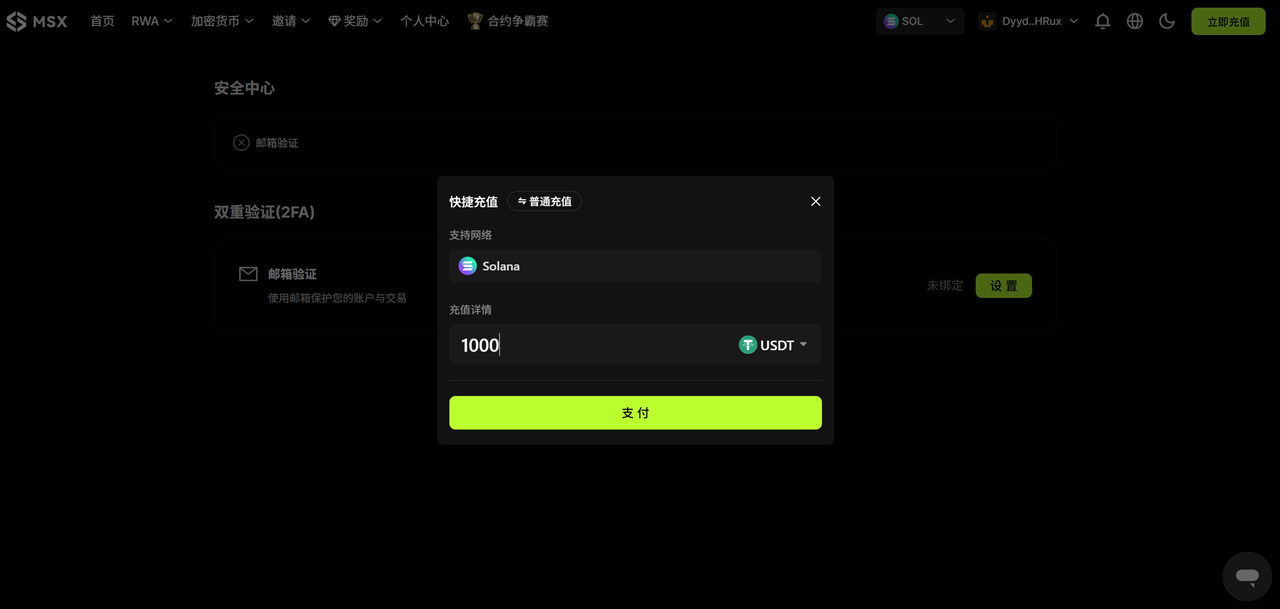
To ensure asset security, please carefully verify the network, currency, and address information before making a transfer. Make sure they are consistent. It is recommended to make a small test transfer first to confirm that everything is correct before making a large deposit. If there is a delay in arrival, you can seek manual assistance through a support ticket or 24-hour customer service.
Note: If you send an unsupported currency to the deposit address, please retain the transaction hash (TxID), take screenshots of the deposit details page and wallet transaction records, and submit an appeal through the MSX official support center. If the transfer network selected during deposit is inconsistent with the deposit network displayed by MSX, your assets will be permanently lost. Please be very careful.
It's important to distinguish that on MSX, while both "login account" and "deposit account" are related to asset ownership, they are two separate concepts:
- The login account is determined by the connected wallet address, which determines "who" the funds "belong": As mentioned above, when you connect with a wallet address from a certain chain (such as BNB Chain or Solana), the system will create and identify it as an independent account based on that address;
- The deposit account refers to the chain and currency to which funds are transferred to MSX, determining "where the funds come from": MSX supports deposits from multiple chains, and you can choose any supported chain to transfer USDT/USDC. The deposit account determines the source channel of the funds, but does not change the identity of the currently logged-in account.
To illustrate this more clearly, if you log in using a wallet address on the BNB Chain network (login account), you can choose to deposit funds into that account through the BNB Chain network or through other supported networks (such as Base or Solana). The system will automatically recognize the funds and map them to the balance of your current BNB Chain login account.
Therefore, the chain used for login does not necessarily mean that only that chain can be used for recharging . The login account determines "which account the funds ultimately belong to", while the recharge account determines "which chain the funds are transferred from". The two have a one-to-many relationship.
In short, regardless of which blockchain you use to deposit funds, the funds will ultimately be deposited into the wallet account you are currently logged into.
3. US Stock Token Trading
After completing the deposit, you can directly access the real-world asset trading section, which currently offers two types of trading: "spot" and "contract," covering a variety of tokenized assets such as US stocks and major indices.
(1) Spot trading
In the Spot area, you can directly buy tokenized real-world US stock assets, just like you would with a traditional brokerage firm, including:
- US stocks: Tesla (TSLA.M), Nvidia (NVDA.M), Apple (AAPL.M), Amazon (AMZN.M) and hundreds of other US stocks;
- Index assets: S&P 500 ETF (SPY.M), Nasdaq 100 ETF (QQQ.M), Russell 2000 ETF (IWM.M), and other index assets;
- Leveraged products: Nasdaq 3x Long/ Short ETFs (TQQQ.M / SQQQ.M), etc.
All MSX US stock tokens are derived from corresponding stocks or index ETFs in the real brokerage market, and are synchronized in real time through on-chain contract mapping and oracle price feeds. Users holding tokenized stocks such as AAPL and TSLA will enjoy the same dividend rights as the native stocks during the corresponding period.
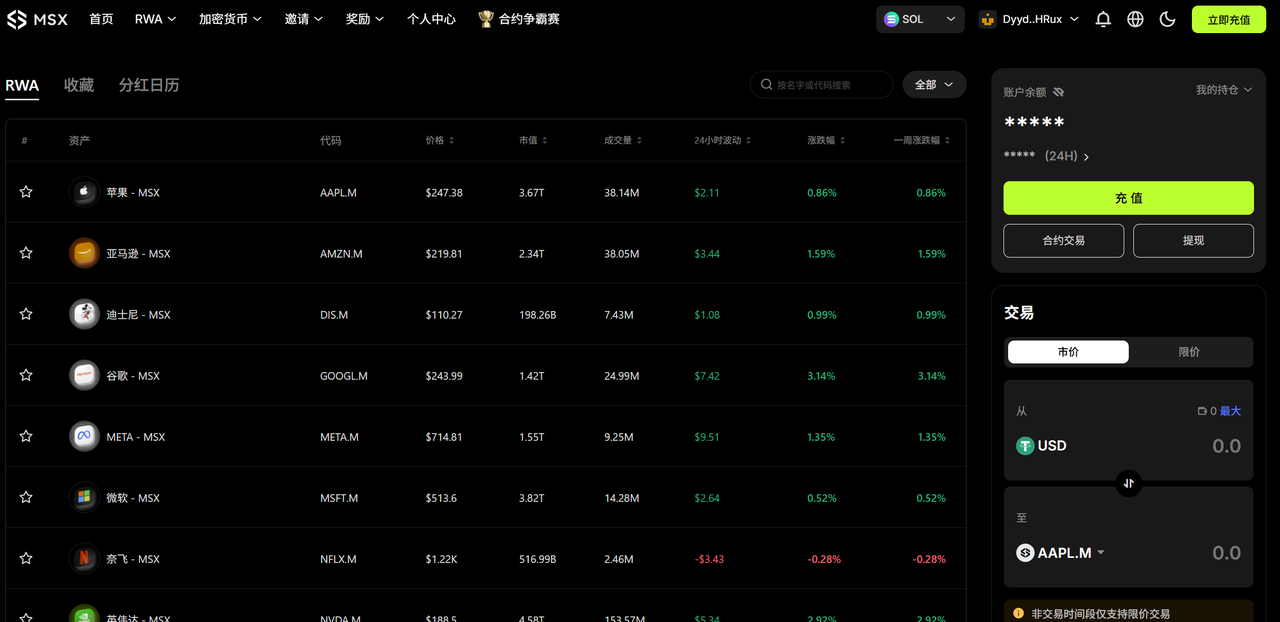
Regarding trading hours, MSX has fully opened pre-market, intraday, and after-hours trading sessions (currently during daylight saving time):
- Pre-market trading: 04:00–09:30 Eastern Time (16:00–21:30 UTC+8)
- Trading hours: 09:30–16:00 Eastern Time (21:30–04:00 UTC+8)
- After-hours: 4:00 PM – 8:00 PM ET (4:00 AM – 8:00 AM UTC+8 the following day)
It is worth mentioning that MSX currently adopts an "order flow" trading model, which is different from the traditional "custodian + market maker (MM)" architecture. When a user buys on the blockchain, MSX simultaneously initiates a corresponding buy order with the cooperating brokerage firm; when a user sells, the platform simultaneously sells the corresponding asset through the brokerage firm's account.
In other words, the user's actions are equivalent to directly participating in the real market through MSX's "trading interface," and the significance of custody is upgraded to on-chain proof of the authenticity of the transaction and the transparency of the brokerage's execution.
(2) Contract trading
MSX's Futures platform offers multiple leverage and long/ short capabilities, allowing users to participate in the price fluctuations of tokenized US stock assets in a more flexible way.
Currently , supported assets include mainstream US stocks and ETF index assets. Users can freely choose to long(Long) or short(Short) in terms of trading direction. The maximum leverage ratio is 20x. In terms of risk control, it also supports functions such as take-profit/stop-loss/automatic closing to help users manage risk.
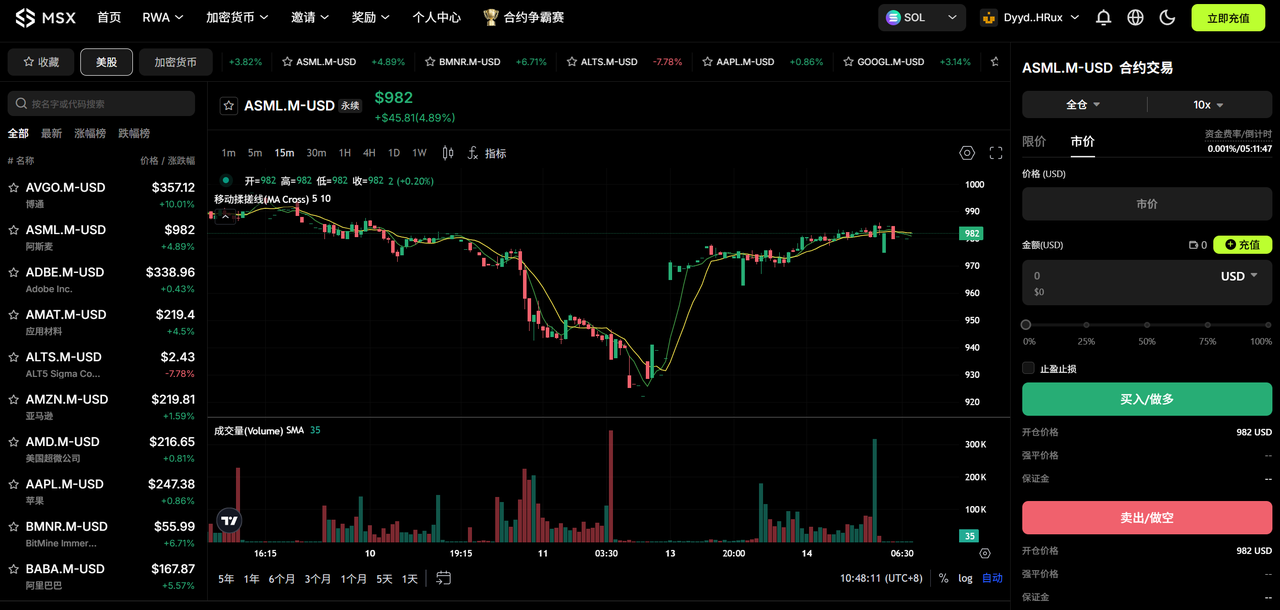
In addition, MSX contracts employ a dynamic margin system and an automatic liquidation mechanism to ensure user asset security and system stability. The initial margin = notional value of the open position × margin ratio (depending on the leverage ratio), and the maintenance margin = notional value of the open position × maintenance margin ratio.
When the account margin ratio falls below the system's maintenance margin requirement (approximately equal to the position's floating loss exceeding the acceptable range), the system will automatically trigger liquidation to prevent further losses. It should be emphasized that currently, MSX deposits of USDT and USDC are uniformly included in the total USD margin.
4. Crypto Transactions
In addition to tokenized US stocks, MSX also supports on-chain spot and contract trading of mainstream crypto assets. Users do not need to register or deposit funds into a custody account; they can start trading directly simply by connecting their wallets.
When you log in to MSX, the system will automatically detect your currently connected wallet network (such as Solana, Ethereum, BNB Chain, Base, etc.) and dynamically display the corresponding list of tradable tokens and market data based on that network. For example:
- If you are currently logged into the Solana network, MSX will automatically load the mainstream tokens and meme assets on Solana (such as BONK, WIF, etc.) and display the spot and contract interfaces based on Solana.
- If you log in to the Ethereum network, the interface will automatically switch to Ethereum ecosystem assets (such as PEPE, UNI, AAVE, etc.).
- Similarly, logging into BNB Chain, Base, etc., will load the corresponding on-chain tradable assets and market information.
Note: No need to manually switch trading pairs; MSX will automatically identify and synchronize based on the network your current wallet is on.
(1) Spot goods
Crypto spot trading supports the direct buying and selling of mainstream tokens and popular assets, with the entire process completed on-chain:
Open "Crypto" → "Spot", select the token you want to trade (such as BONK/USDC, ETH/USDT, etc.), enter the purchase quantity, and click "Buy" or "Sell". Your wallet will pop up a signature confirmation, and the transaction will be completed immediately.
The entire transaction process requires no deposit; transactions are made directly using the wallet balance. The entire process is transparent, and records can be viewed on the block explorer. It supports gas currencies from different networks such as ETH/SOL and USDT/USDC payments. Furthermore, the price source is automatically connected to mainstream aggregated depth and oracle quotes.
(2) Contract
The Crypto Contracts section offers users leveraged trading and long/ short trading capabilities, making it suitable for users with a certain risk tolerance and strategic experience.
It employs a "perpetual contract" mechanism, allowing users to participate in price fluctuations through margin operations without holding physical assets—regardless of whether the market rises or falls, flexible strategies can be implemented through "long" or "short."
- Supported trading pairs: BTC/USDT, ETH/USDT, SOL/USDT, etc.
- Maximum leverage: 100× (may vary depending on the currency);
- Margin trading mode: Supports multi-currency margin (USDT/USDC are considered as a unified USD margin);
- Funding rates: The system calculates and displays them in real time, and settles them automatically on a periodic basis;
Users click "Crypto" → "Contracts", select a trading pair (such as BTC/USDT, ETH/USDT, SOL/USDT, etc.), set the leverage ratio (up to 20x), enter the opening direction and quantity, click "Long" or "Short", and then confirm to open a position.
Furthermore, its deposit and withdrawal process is the same as that of US stock token trading platforms, offering two methods: quick deposit and regular deposit.
Quick Top-up: Top-up networks supported include Solana, BNB Chain, Ethereum, and Base (the network selected must match the one used in your login account). Supported currencies include USDT and USDC.
- Operation process: Enter the specific recharge amount, click "Pay", and the system will automatically call the browser plugin wallet linked to MSX. As long as there is sufficient balance in the wallet, you can quickly recharge after confirmation.
- The entire process usually takes only a few seconds, and the funds arrive instantly, making it ideal for users who trade frequently or want to deposit funds quickly.
Regular Deposits: The deposit network supports Solana, Ethereum, BNB Chain, Base, and Tron. Supported currencies include USDT, USDC, and US stock tokens (stock tokens or non-mainstream assets not yet supported will not be recognized by the system and will not be credited).
- Operation process: After selecting the deposit network and currency, the system will generate the corresponding deposit address and QR code. After copying the address or scanning the code, you can directly withdraw funds from your wallet or CEX to this address.
- Once the corresponding network block is confirmed, the recharge amount will be automatically credited to your currently logged-in account balance.
Risk Warning: Contract trading involves high leverage risk. Please manage your positions carefully and ensure you have sufficient margin in your wallet to prevent forced liquidation.
(3) Pay attention
The "Follow" feature allows you to track meme tokens that interest you. On the "Spot" page of "Cryptocurrency," click "Add to Favorites" to add the meme asset to your personal watchlist. You can then view real-time price monitoring and price fluctuations, as well as information such as Full Diluted Value (FDV), circulating market capitalization, number of transactions, number of unique trading addresses, trading volume, creation time, and token verification. You can also quickly jump to the trading page with one click.

(4) Cross-chain bridge
MSX has a built-in cross-chain bridge function, which helps users freely transfer assets between different public chains, enabling one-stop fund management and cross-chain liquidity scheduling.
Whether you are on Solana, BNB Chain, Ethereum, Base, or other networks, you can achieve fast and low-cost asset migration through Bridge.
Currently, the network supported includes major networks such as Solana, Ethereum, BNB Chain, Base, Tron, Optimism, Polygon, Arbitrum, zkSync, Linea, and X Layer. Supported cryptocurrencies include USDT, USDC, and most mainstream crypto assets (ETH, SOL, BNB, MATIC, AVAX, etc.).
Usage process:
- Open "Crypto" → "Bridge";
- Choose the source chain and the target chain (e.g., from BNB Chain → Solana).
- Select the asset type and quantity;
- Click "Confirm," and the cross-chain transaction will be automatically initiated after the wallet signs.
Note: After the cross-chain transaction is completed, the target network asset will be automatically mapped to your currently logged-in wallet address, without the need for manual exchange.
5. Withdrawal
After completing a transaction, you can withdraw your assets from MSX back to your personal wallet or CEX at any time to complete the withdrawal process.
In the upper right corner of the trading page, you can view: your current account balance, holdings, 24-hour profit and loss, and quick access to operations (deposit/spot or contract trading/withdrawal).
Click "Withdraw" and the system will pop up a withdrawal window. The withdrawal network supports Solana, BNB Chain, and Base, and the withdrawal currency supports USDT or USDC.
After selecting the network and currency to withdraw from, enter the withdrawal amount and target wallet address, and click "Withdraw". The system will execute the transfer. The network fee for a single withdrawal is 0.5 USDT/USDC. The withdrawal processing time usually depends on the selected network. If the withdrawal is stuck or does not arrive after a timeout, you can submit an issue through the "Support Center" along with the withdrawal amount, currency, transaction hash (TxID), and other information. The official team will assist in the verification and processing as soon as possible.
To ensure the safety of your funds, please confirm the following before withdrawing:
- The target address is correct: if the address is incorrect, the assets will be irretrievable.
- Network matching: Ensure that the withdrawal network is consistent with the network to which the target address belongs;
In conclusion
It is clearly visible that RWA is becoming an inevitable trend for both on-chain and TradFi to move towards each other.
On the one hand, Crypto assets are accelerating their "Wall Street-ification" and "institutionalization." The era of pure narratives and liquidity dividends is over. On-chain assets need higher quality, verifiable, and priced underlying assets. Therefore , introducing US stocks and other assets onto the chain is more like an asset supply-side reform, providing a real anchor for DeFi's risk pricing and return distribution.
On the other hand, TradeFi and regulators are also seeking broader reach, higher efficiency, and lower settlement costs—from Robinhood to BlackRock, and the explorations of exchanges and clearing institutions such as Nasdaq, RWA is becoming their path to incremental business growth on the blockchain.
Against this backdrop, the RWA narrative is facing a real crossroads, and the boundaries between on-chain finance and TradeFi are becoming increasingly blurred.