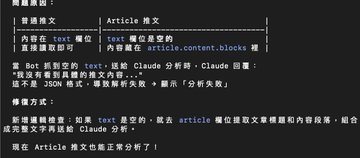
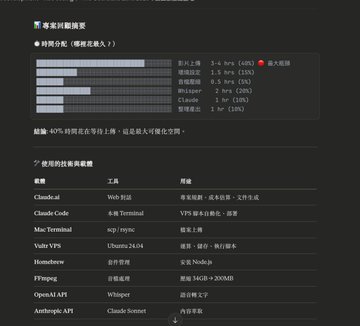
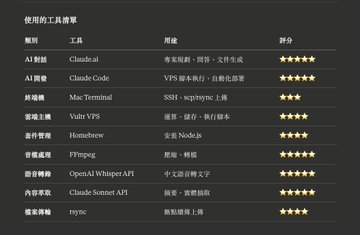
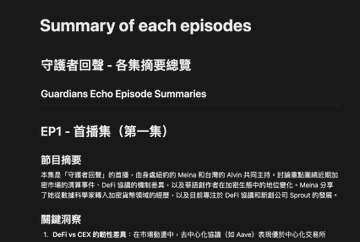
Generating a full summary of 33 GB of video content - 4 hours & $12 The power of accumulating long-term content is greater than we imagined. 20 episodes have passed just like that, meaning The Guardians Echo has been airing for 10 weeks now, which is faster than we thought. Taking advantage of the end of the year, we've summarized all the content we discussed. EP7 discussed Zcash, Monad token public sales, and Near Intents, at which time $ZEC it was around $400 USD. Starting with EPs 9-10, the topic of prediction markets and the on-chaining of US stock tokens rapidly increased, mentioning that "the current funding rate rankings are dominated by stock tokens." EP 15 begins the discussion of global economy x AI. The topic share has increased. It's quite obvious that these are the hot topics for the second half of the year. However, because the market changes quite quickly, even though we record two days a week, there's still a lot of information in each update. Even I can learn something from each episode. I'll share the summary and processing process of this episode with @CryptoMeina, "The Guardians Echo". The initial requirements were simple: - A summary of nearly 15 videos - A summary of each episode - To create an interactive agent, this is the next stage goal. Below is a list of all the tools used this time. If you also make a podcast, this might be helpful. I mainly used only three tools and platforms: Claude, Terminal, and VPS (@Vultr). The most amazing thing is the overall cost, less than 15u... It's hard to imagine that a single transaction fee used to exceed that amount. Previously, I wasn't very good at details like audio and video conversion. This time, I feel like I've learned something new because of Claude's double usage campaign before the new year. 2025 In the last few days, I was practically glued to my Claude usage list, trying to use up the daily limit that was updated every few hours 😂 At the same time, I started using Claude Code, which greatly improved speed. Claude Code is similar to Cursor or Google Antigravity, essentially a "spoken version" of a terminal. We can use simple commands to handle file processing, deployment, and other operations, solving the problems that people unfamiliar with command logic might encounter when using a terminal. Even its responses are very simple, as shown in the image. Because of this, last week I gradually created several tools I wanted to experiment with, including content summarization, better cover generation, and language tutoring. For me, spending 1.2 hours to save 20 hours in the future is completely worthwhile, and the advantage of AI is that the upper limit of our efficiency increases with usage. After completing each project, I now have a habit of having AI help me review the summary and break down the various technologies and media used, helping us clarify the entire process. As you can see, the part that took the longest this time was actually video uploading. Subsequent setup and translation were very fast. 1. 🔴 Upload bottleneck optimization (saving 2-3 hours) I actually made a big mistake this time. I should have let the AI directly access Google Drive, but I downloaded all the videos to my computer before uploading them to the VPS, which was a huge detour. Next time, there will be a better implementation path. Claude also provided an idea: if the videos are on Twitter/YouTube, it's simpler; you can directly download them to the VPS using yt-dlp. 2. 🟡 Automated environment setup (saving 30 minutes) Installing Homebrew, Node.js, and Claude Code also takes time. A script can be used to install these all at once. 3. 🟡 Whisper batch optimization (saving 30 minutes) Uploading audio files to the API one by one -> parallel processing + progress tracking 2025 Recap actually contains some unnecessary content. This is also something that should be improved in the future. After all the steps are completed, the AI should be allowed to verify the results again. This is a common practice among many developers. Finally, the file is obtained. I used the previous method to convert it and put it into Notion with the following three commands: This should be the best output path currently available, and the cost is also the lowest: - python3 to_html.py xxxx__.md - open xxxx___.html cat file_name.md | pbcopy Let the AI do the work for you, and it can also learn from each practice session, allowing you to learn something new every day.
This article is machine translated
Show original

alvin617.eth
@Alvin0617
12-30
Vibe Coding 我們的直播全記錄 - 我和 @cryptomeina 的 2025 年度復盤:用 AI 重建我們的決策軌跡 【The Guardians Echo 守護者迴聲 ep.21】 https://x.com/i/broadcasts/1ZkKzZLgDggKv…
Sector:

From Twitter
Disclaimer: The content above is only the author's opinion which does not represent any position of Followin, and is not intended as, and shall not be understood or construed as, investment advice from Followin.
Like
Add to Favorites
Comments
Share
Relevant content