This article is machine translated
Show original
Automated Access to Circumstances - Fully Automated Connection or Disconnection
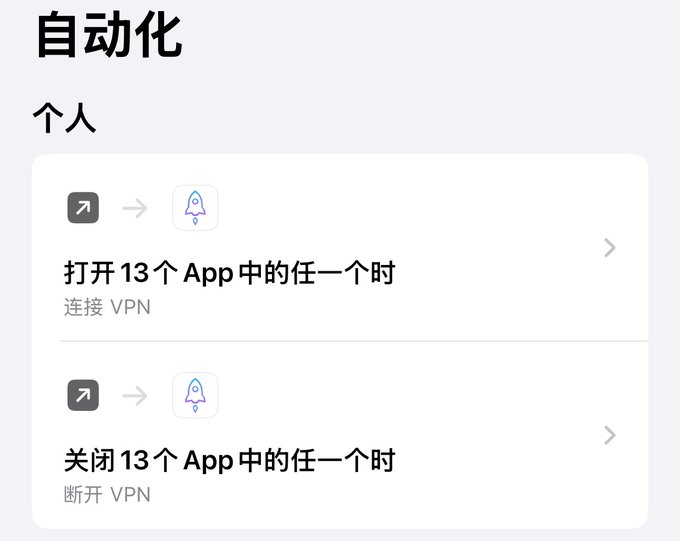
Setup takes only 1 minute. Your phone can automatically connect to or disconnect from circumstances of access to the internet while any app is open, freeing your hands! (Apple phones only)
When using apps accessing foreign networks, such as Twitter and Gmail, you need to manually enable circumstance access. If it's not disabled, some domestic apps won't open, requiring you to manually close them again. This back and forth is quite troublesome.
Setup instructions are as follows:
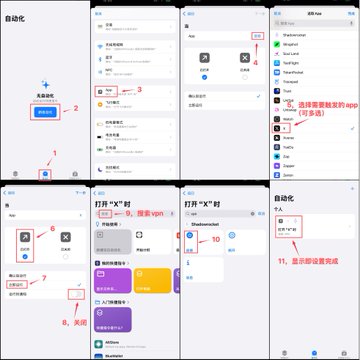
1⃣: Trigger Circumstance Access Connection When Opening an App
Open your phone's Shortcuts app and follow the steps shown in the image below.
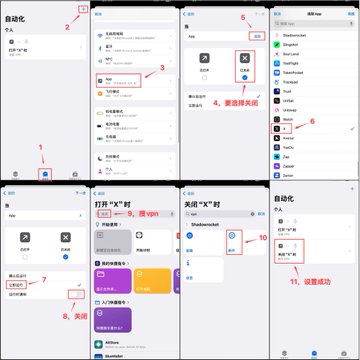
2⃣: Trigger Disconnection of Circumstances When Closing or Running an App in the Background
The setup is basically the same as above, just change the trigger to close the app and then select disconnect from circumstance access.
Note: Everyone's circumstance access app may be different. CG Brother is demonstrating Shadowrocket. However, the overall setup is similar; just follow the prompts.
User experience: I came across this weird cultivation technique today, and it seemed useful, so I tried it out. Personally, I feel it works much better than putting the VPN switch in the control center, and it also disconnects when the app is switched to the background. I've learned another strange skill! 🤪
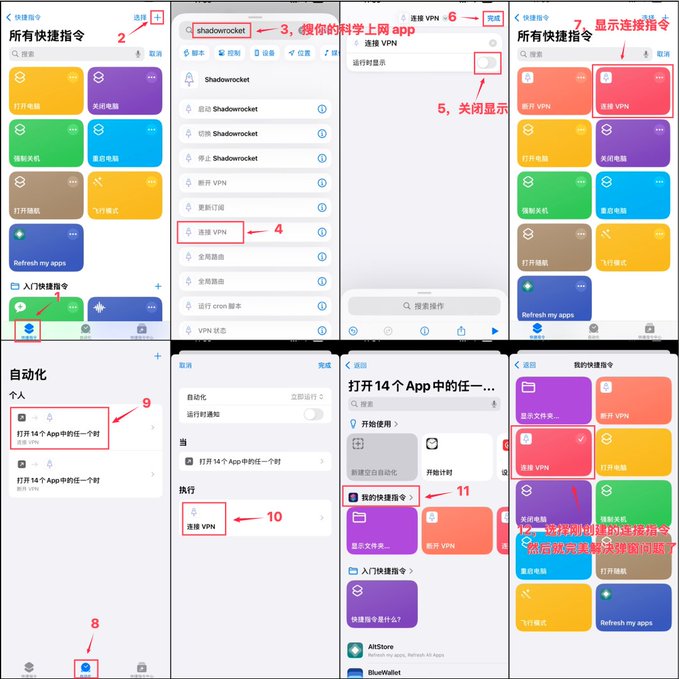
A colleague provided a perfect solution to the pop-up issue.
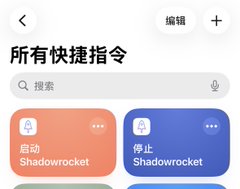
The steps are shown in the image below (only the connection was demonstrated; the steps for disconnecting are the same).

大东
@rdinals
01-05
已经成功关掉,只需要新建两个快捷指令。一个叫启动shadowrocket,一个叫停止shadowrocket。后面的操作就按照CG哥的教程,唯一的不同是搜索vpn那里不用搜索,直接选取刚刚新建的快捷指令。亲测没有弹窗!


From Twitter
Disclaimer: The content above is only the author's opinion which does not represent any position of Followin, and is not intended as, and shall not be understood or construed as, investment advice from Followin.
Like
Add to Favorites
Comments
Share
Relevant content