Detailed Explanation of Core Steps
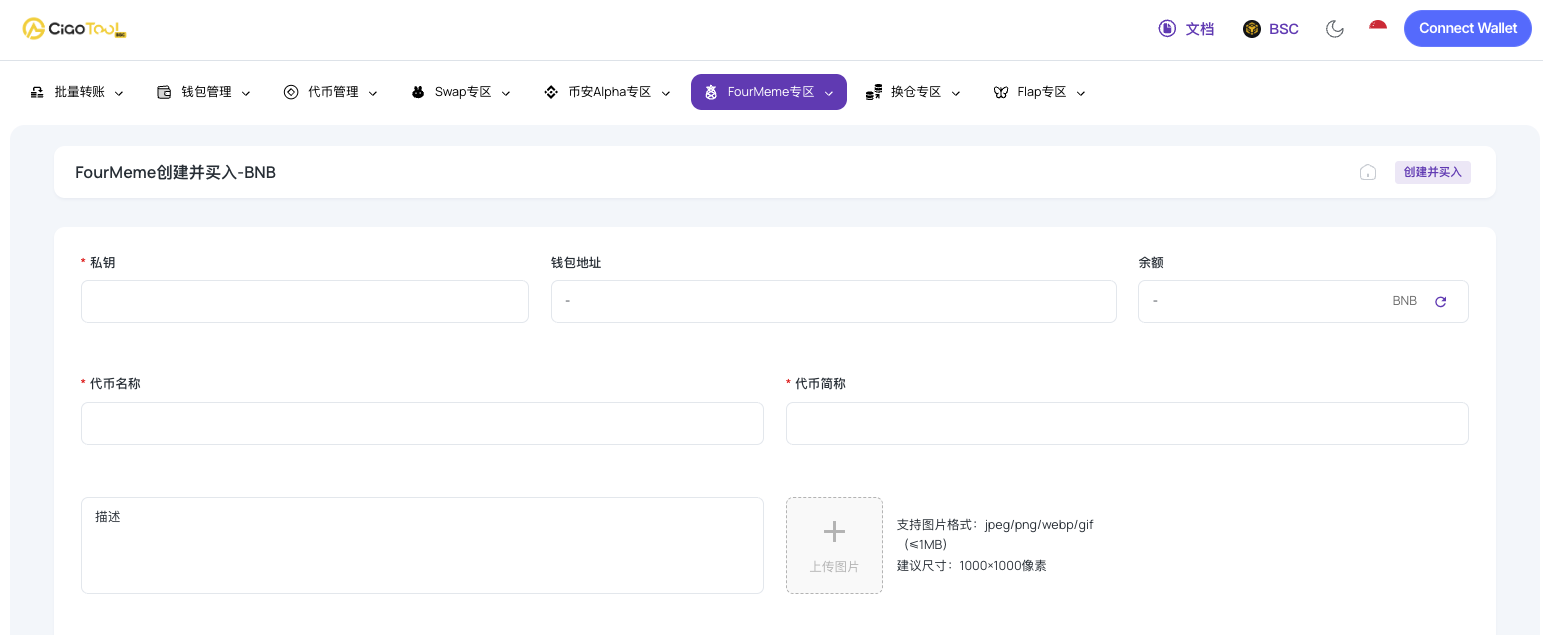
- Token Name : Enter the complete official name (Example: CiaoTool)
- Token symbol : Set a short and easy-to-remember identifier (example: CIAO)
- Project Description (Optional): Briefly explain the token's positioning, narrative background, or meme concept.
- Icon upload : We recommend using a 1000×1000 pixel JPG/PNG/WebP/GIF image.
Step Two: Social Media Development

Establishing basic community channels can effectively enhance the credibility of a project, which is of great significance even for meme-based projects.
- Official website (if already established)
- X/Twitter account
- Telegram community or channel
Step 3: Project Category Selection

Select the single category that best matches the project's positioning from the tags (e.g., Meme, AI, Game, etc.):
- Improve the efficiency of target user discovery
- Accurately connect with relevant market sectors
Step 4: Configure buy parameters
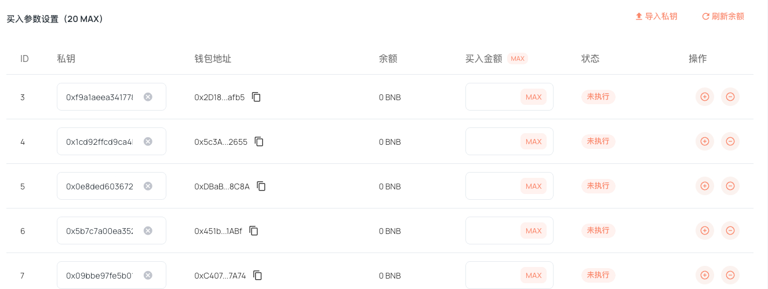
This feature supports automated buying operations across multiple wallets at the moment of token creation, which is helpful for:
- Establish initial market activity
- Optimize liquidity distribution structure
Operating procedures:
- Click "Import Private Key" to add up to 20 wallets in batches.
- The system automatically displays the available BNB balance in each wallet.
- Set specific purchase amounts for each wallet
- Supports real-time balance refresh and amount adjustment
Step 5: Confirm parameters and deploy
After all parameters have been reviewed and approved, click the "Create Token and Buy" button, and the system will execute:
- BSC On-Chain Token Contract Deployment
- Configure bulk purchase operations in your wallet
- Inject initial liquidity into PancakeSwap (BNB mode)
Frequently Asked Questions
Q1: What should I do if the system prompts that my balance is insufficient?
- Confirm that the corresponding wallet holds sufficient BNB
- Try refreshing the balance display within the interface.
Q2: Will the token automatically appear on PancakeSwap? Yes. Liquidity is provided during the creation process. Once the binding curve is complete, you can search for and trade the token pair on PancakeSwap.
Q3: Is the BNB model more volatile? Since BNB price volatility is typically higher than stablecoins, initial price fluctuations may be more pronounced. We recommend managing risk through a multi-wallet strategy and phased operations.
Summary of process advantages
Traditional token launches typically require switching between multiple independent services to complete steps such as creation, liquidity provision, and distribution. CiaoTool integrates these functions into a unified platform, significantly reducing operational complexity, minimizing potential errors, and providing a more professional and controllable complete solution for project launches.
CiaoTool's one-click FourMeme creation feature enables developers to quickly launch tokens on BSC, configure early buy strategies through multiple wallets, and add liquidity to PancakeSwap—all without coding, providing efficient, secure, and professional end-to-end support for meme projects.