This article is machine translated
Show original
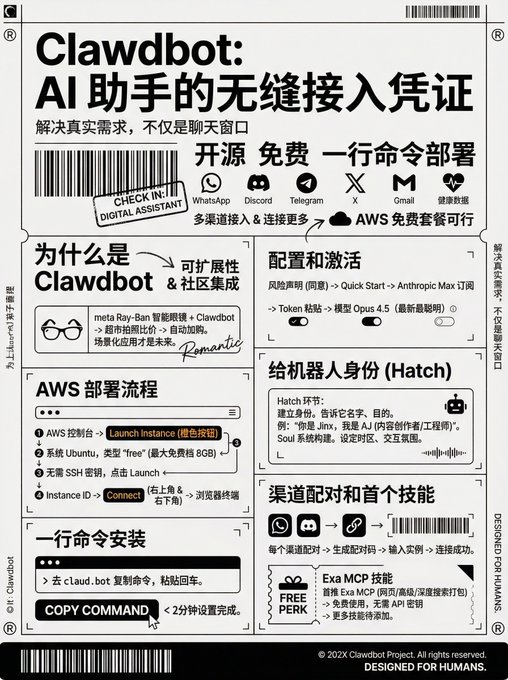
This tutorial demonstrates how to run Clawdbot on the AWS free tier. (Don't log in with your usual account here; I've transcribed the video tutorial into text:)
------ AWS Deployment Process
In the AWS console, search for EC2 and click the orange "Launch Instance" button. Name the instance anything, select Ubuntu as the system, search for "free" as the instance type, and choose the largest free tier with 8GB of memory.
It should be completely free if you don't deploy any other resources. Technically, you don't need to create an SSH key, and this tutorial doesn't require it either. Just click "Launch Instance."
After the instance is created, click on the Instance ID, then click "Connect" in the upper right corner, and then click "Connect" again in the lower right corner. This will open an SSH terminal in your browser to connect to your server.
------ One-Line Command Installation
After entering the terminal, go to the claud.bot website, copy the installation command, paste it into the terminal, and press Enter. This is the only command; the entire setup takes less than two minutes.
The actual installation process will take a little longer. After installation, you will be taken directly into the bootstrap process.
------ Configuration and Activation
You'll need to agree to the risk statement, especially if you grant it file system access or email/key permissions. Select Quick Start, subscribe with Anthropic Max, and set the token using the paste method.
It will prompt you to run a command in your local terminal to obtain the token. Then select a model: Opus 4.5 (latest version), which is the smartest.
Next, you can link channels. For Telegram, it will provide specific steps. You can also configure skills, such as Homebrew or Node package manager Bon, but you can skip these for now.
Memory and hooks can be enabled, followed by Hatch.
----- Giving the Bot an Identity
The Hatch stage is for establishing an identity for the bot. You need to tell it its name, its purpose, and any other information you want.
For example, "You are Jinx, and I am AJ. AJ is a content creator and software engineer." Keep it simple; you can update it later. It will build its identity using the Soul system and then continue the guided process.
It will ask about your time zone, desired interaction style, etc. That's basically it.
------ Channel Pairing and the First Skill Each channel needs to be paired. A pairing code will be generated, which you just need to provide to your instance. Once configured, it will be connected.
I usually install the Exa MCP skill first. Just say, "Create a skill, wrap this MCP." The Exa skill includes web search, advanced search, and deep search, all packaged in one MCP.
Using it through MCP is free and doesn't require an API key. This is the first skill; you can add more later.

Tech Friend AJ
@techfrenAJ
01-24
Deployed @clawdbot in under 5 minutes on AWS free tier.
Open source personal AI. Full system access.
Interfaces through WhatsApp, Discord, Telegram.
People are rigging it to their Ray-Bans for real-time price comparisons.
One command. That's it.
I easily translated the tutorial using my YouTube Clipper Skill.
This skill not only edits YouTube videos, but can also translate and burn any English subtitles.
Skills Introduction:

歸藏(guizang.ai)
@op7418
01-22
搞了一个牛皮 Skills !
从任何 Youtube 视频链接剪辑为带有双语字幕的短视频和发布文案!
一键完成火爆 Youtube 视频的拆解和发布。
- 自动下载视频和原始字幕
- 自动分析总结字幕并对视频进行分段
- 选择需要剪辑的具体分段
- 翻译已选分段对应多语言字幕
- 将双语字幕烧录进已剪辑视频
-

From Twitter
Disclaimer: The content above is only the author's opinion which does not represent any position of Followin, and is not intended as, and shall not be understood or construed as, investment advice from Followin.
Like
Add to Favorites
Comments
Share
Relevant content