This article is machine translated
Show original
Damn, finally got Gemini enabled in Chrome!
I'll record a video to show you how.
If you're like me, having tried everything and still not getting it working, and you're using macOS:
Just change your system language to English, and it will appear after a restart.
First, Chrome settings:
1. Turn on all Gemini-related switches.
2. Then set all Chrome browser regions to the United States.
This process can be done via command line or using an existing project (as shown below).
Then, regarding Google account and system settings:
1. Change your Google account region to the United States.
2. Set your Google account language to English.
3. The Google Chrome browser I mentioned earlier also needs to be changed to English.
On macOS, to change the Google Chrome interface to English, you need to set your entire system language to English.

歸藏(guizang.ai)
@op7418
01-29
谷歌浏览器上的 Gemini 更新了,主要的更新内容有:
- Gemini 打开方式变成了侧边栏
- 支持在后台运行,你看其他 Tab 他也会继续运行
- 支持使用 Nano Banana 编辑图像
- 自动浏览功能,支持多步骤任务
仅限美国,开启过程非常费劲,跟你网络账号、浏览器状态都有关系
Choose one of two options
Related item: github.com/lcandy2/enable-chro...…
Command:

AppSail
@AppSaildotDEV
01-29
Gemini in Chrome 终于来啦,AI 浏览器迎来了最大玩家
如果死活不出来 Gemini,我给你几条命令,退出 Chrome 在执行
cp ~/Library/Application\ Support/Google/Chrome/Local\ State \
~/Library/Application\ Support/Google/Chrome/Local\ State.bak
sed -i ''
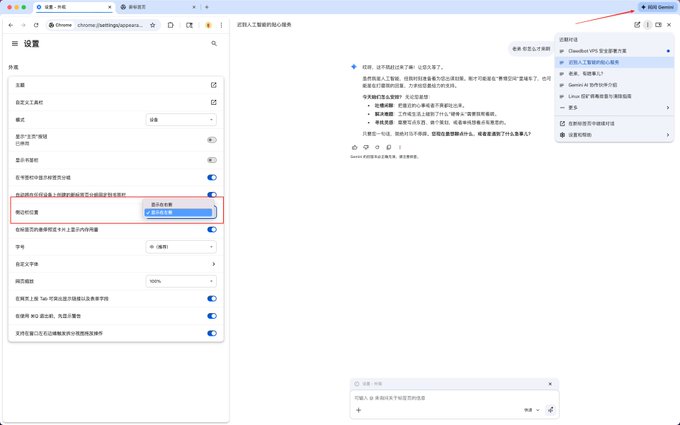
On macOS, you can use this command to change your browser language without changing the system language: `defaults write http:/com.google.Chrome AppleLanguages '("en-US")'`
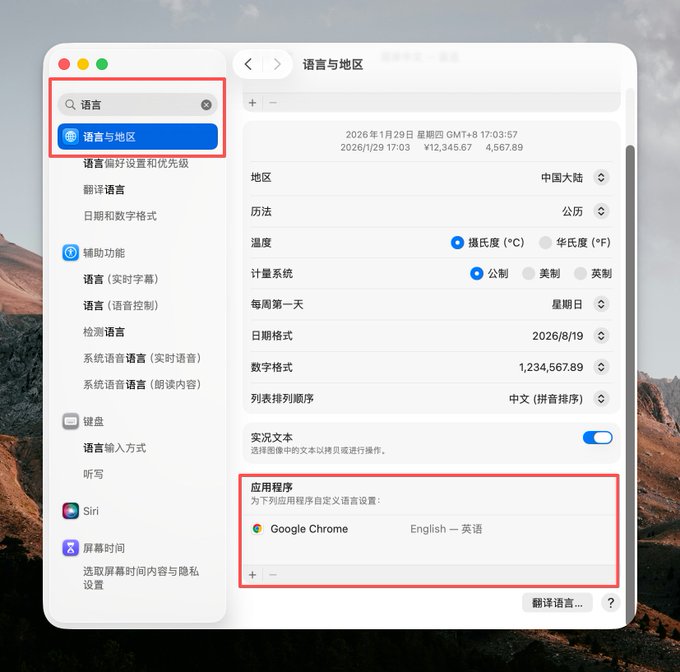
I'm getting old; I didn't know macOS allowed you to set the language for individual applications.
Just scroll down in "Language & Region," find "Applications," and click the plus sign.

From Twitter
Disclaimer: The content above is only the author's opinion which does not represent any position of Followin, and is not intended as, and shall not be understood or construed as, investment advice from Followin.
Like
Add to Favorites
Comments
Share
Relevant content