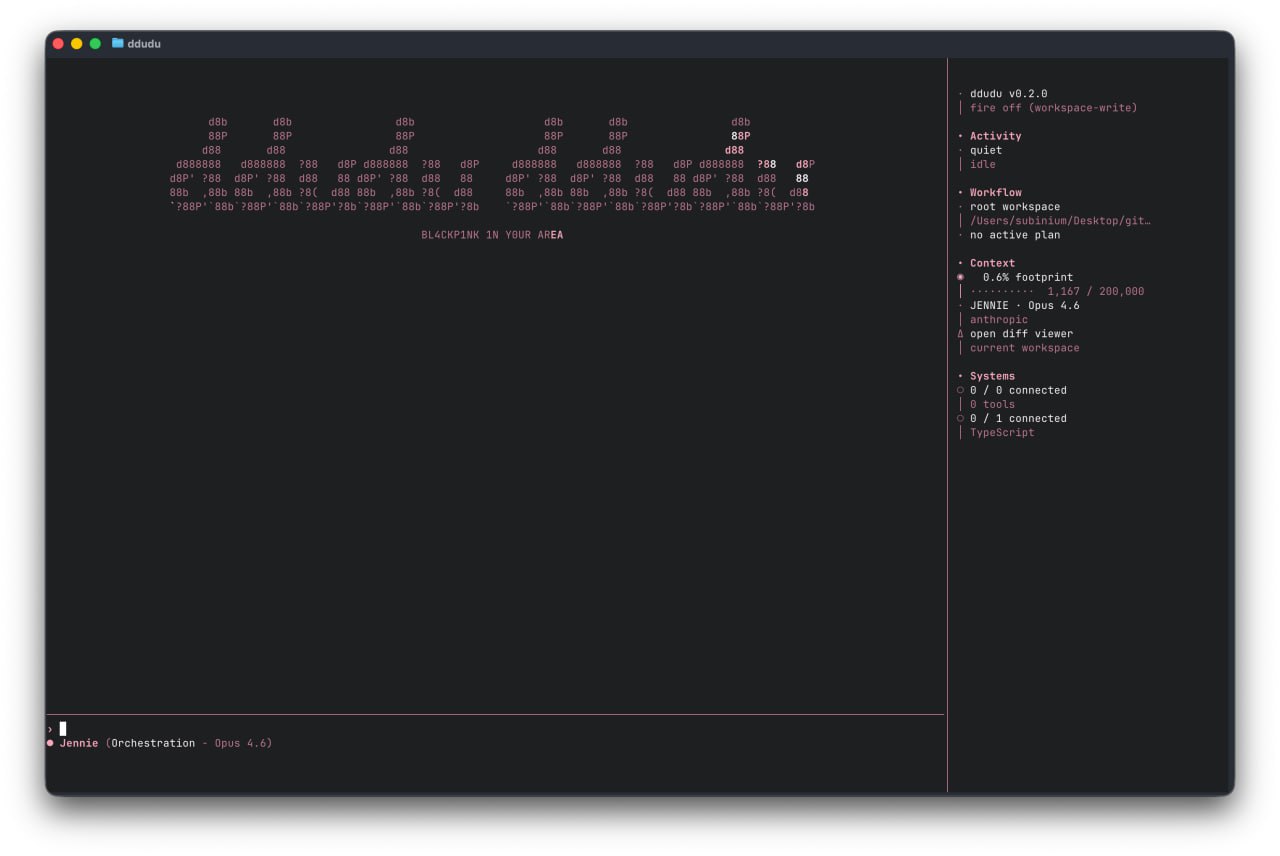
I've been having fun building an AI coding CLI over the weekend, thanks to a concept that's been popping into my head. The image below is the startup interface. I named it "DDUDU DDUDU" and it came to me while I was humming it to myself. As everyone knows, the harness that surrounds a model is just as important as its performance. Even with the same model, the results can vary significantly depending on the harness it's running on. I wanted to focus on the design aspect and refine it further. Originally, I was using existing tools by adding plugins like OMO/OMC, but at some point, I thought it might be fun to build one from scratch. I considered building one based on the idea of an open customization area like the Pi, but I also wanted to experiment with my own UI for learning. Since design was the most important aspect of the concept, I ultimately decided to research and build it myself from the ground up. I've recently had a great experience with OpenCode and OMO, and I wanted to break down what makes them so great and incorporate them from the ground up. I currently have many services I've already subscribed to (Claude, Codex, Gemini), so I'm reusing existing local credentials and adding my desired context management and tool combinations on top of them. It's a bit of a stretch to call this "from scratch" because it's a custom project built on the infrastructure and design knowledge base of these already-existing services (even the production work is done using Codex). However, I started this project because I knew I needed to experience it myself to get a feel for how to structure these pieces. These are existing features, and many of you are probably familiar with them, but as I built them from scratch, I had to consider all these factors. To summarize: [1] Model invocation and routing. As you may know from experience, each provider has its own strengths. I'm trying to structure the routing by dividing the modes into tasks: a robust model for orchestration requiring complex decisions, a fast model for simple iterative execution, and another model for design and design decisions. [2] Tool configuration. Looking at various coding agents, I see a wide variety of tool combinations. The scope ranges from basics like file I/O and shell execution to codebase searches, symbol navigation, and delegation of tasks to other agents. We'll be examining each tool individually, examining why it's needed. We're also constantly adjusting how much should be built-in and where to remove extensions like MCP. [3] Context Management. This involves filling a limited context window with only the information needed at the moment. While it might seem feasible to include the entire conversation, the accumulation of unnecessary context actually degrades performance. I've been particularly interested in context compaction, considering when and how much to compress, and how to ensure the user's flow remains intact even after compression. [4] Sessions and State Maintenance. While humans naturally continue their previous tasks, from the model's perspective, each turn is a completely new request. We need a flow that allows us to resume or branch sessions, summarize long sessions, and move them to the next task. Delegated tasks can be isolated using the git worktree to avoid interfering with the main task, and long-running tasks can be moved to the background to avoid blocking the main flow. This is also where we're addressing these issues. [5] Verification and Recovery. Rather than writing code correctly in one go, I'm focusing on creating a complete loop that verifies it after it's written, fixes any failures, passes it on to another agent if necessary, and applies it to the actual workspace if it passes. I'm also experimenting with a workflow that retains the results of verification in memory so they can be reused when similar tasks arise. [6] Memory. I'm experimenting with a structure that allows for different retention periods and storage methods for the current session's work context, lessons learned from past sessions, structural knowledge of the codebase, and repetitive rules and procedures. Rather than finding the right answer yet, I'm still experimenting with various combinations. [7] Permissions and Trust Boundaries. The question is how much autonomy to give the agent. Allowing everything is dangerous, and asking for permission every time slows it down. I'm developing a structure that allows for granular permission/confirmation/denial for each tool and allows for gradual transitions in overall permission levels. (However, to be honest, this doesn't deviate significantly from the AI-recommended approach.) [8] UI/UX. I need to be able to see at a glance what the agent is currently doing, the status of background tasks, and the status of external tool connections. I initially developed the TUI in Ink, but it was too heavy, so I switched to the Rust-based Ratatui. The IME and usability were a really good choice. (This shows me that Opencode's strength lies not just in their design, but also in the quality of their Opentui.) I personally enjoy TUI and am obsessed with clean design and readability within the terminal. So, I'm focusing on making information as quickly and easily interpretable as possible through color and layout. This is where I spend the most time, as it satisfies both functionality and personal preference. Beyond this, the data structure of the entire system, slash commands, and notification display methods are constantly evolving, which is exciting. I'm still working on basic functionality improvements, and I'll share more when I get better results than existing harnesses. My goals are to enhance my own harness based on mine and to build a modular harness that's even better than the Pi, allowing everyone to easily create their own CLI tools. github.com/subinium/ddududdudu
This article is machine translated
Show original

Telegram
Disclaimer: The content above is only the author's opinion which does not represent any position of Followin, and is not intended as, and shall not be understood or construed as, investment advice from Followin.
Like
Add to Favorites
Comments
Share
Relevant content