This article is machine translated
Show original
Karpathy shared how he built his local AI knowledge base.
The method I used is similar, but there are still many aspects worth learning from, so I recommend checking it out.
Both used Obsidian, pure local Markdown, and then connected them using backlinks and indexes.
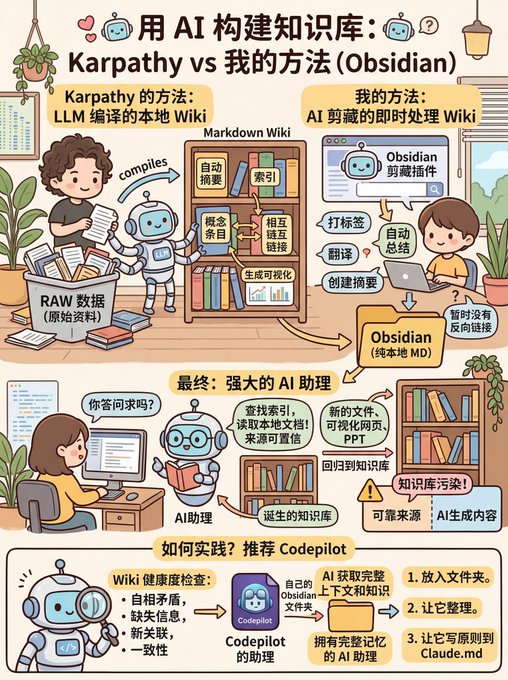
He built a personal Wiki knowledge base driven by a large language model, and then put all the raw materials into a directory called RAW.
Then the large language model compiled these raw materials into a Markdown Wiki, achieving the following functions: automatically creating summaries, creating indexes, creating concept entries, adding crosslinks, generating visualizations, etc.
I had already done this during content collection, using the Obsidian clipping plugin.
During content collection, the AI automatically performs the following processing: tagging, automatic summarization, translation, and summary creation; currently, there are no backlinks yet.
After its Wiki is built, you can ask questions on this Wiki to ensure the credibility of the data sources.
For example, the large language model will automatically search the index, read relevant documents, and write answers or reports, not just search on web pages. In this way, the information it acquires is primarily relevant to you.
Its output is also designed to be more than just a single sentence; it generates new documents, visual web pages, or PowerPoint presentations, which are then fed back into the knowledge base, making it increasingly rich and comprehensive.
However, this presents a problem, as the authors of Obsidian have stated, as it can pollute the knowledge base. Therefore, it's best to separate reliable sources from AI-generated content.
Another positive aspect is that it allows a large model to perform health checks on the Wiki. This includes identifying contradictions, supplementing missing information, discovering new connections, and improving consistency.
Many companies are already doing this, and I've incorporated this approach into CodePilot.
Regarding the choice of assistant folder, I generally recommend using the Obsidian folder.
If you have your own Obsidian folder, the AI will directly access all your context and knowledge.
For example, here I had it search my Obsidian folder and the internet for articles on UI design principles for the AI era—the quality was very high.
This way, you directly obtain an AI assistant with complete memory.
If you're unsure how to put this into practice, I recommend trying Codepilot's assistant.
Put your Obsidian folder inside and let it organize it for you, while also having it write these principles into Claude.md.

Andrej Karpathy
@karpathy
LLM Knowledge Bases
Something I'm finding very useful recently: using LLMs to build personal knowledge bases for various topics of research interest. In this way, a large fraction of my recent token throughput is going less into manipulating code, and more into manipulating
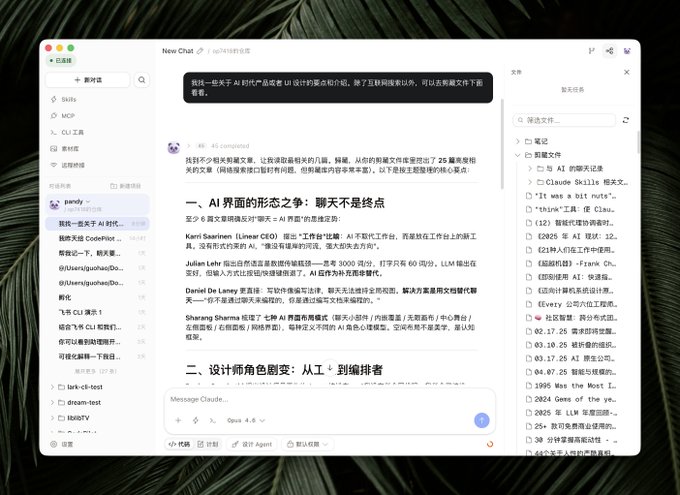
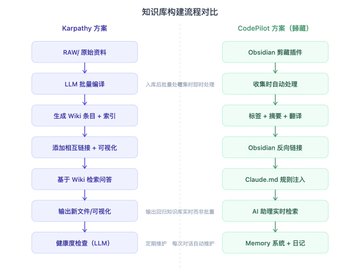
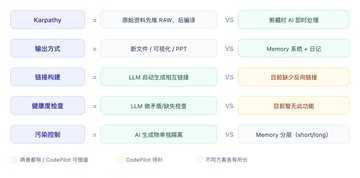
Image made of bananas 🍌

歸藏(guizang.ai)
@op7418
用香蕉做一张图片,来解释 Karpathy 的方法和我的方法之间的一些区别和共性 x.com/op7418/status/…

From Twitter
Disclaimer: The content above is only the author's opinion which does not represent any position of Followin, and is not intended as, and shall not be understood or construed as, investment advice from Followin.
Like
Add to Favorites
Comments
Share