- 1 What is MOMO Wallet?
- 2 Functions of MOMO wallet
- 3 Detailed instructions for registering MOMO wallet
- 4 Instructions for authenticating MOMO account
- 5 Detailed instructions on how to use MOMO wallet
- 5.1 How to link MOMO wallet with bank account
- 5.2 How to withdraw money from MOMO wallet
- 5.3 Invite friends to join MOMO to receive promotions
- 5.4 Buy phone cards with MOMO wallet
- 5.5 XEM CGV movie tickets with MOMO
- 5.6 Pay utility bills on MOMO wallet
- 5.7 Buy apps on Appstore using MOMO wallet
- 5.8 Deposit money into MOMO wallet using Visa, Master Card, JCB card
- 6 Frequently asked questions when using MOMO wallet?
- 6.1 What is MOMO wallet used for?
- 6.2 Is MOMO wallet a scam?
- 6.3 Is MOMO wallet a scam?
- 6.4 What is MOMO account number?
- 6.5 What should I do if I lose my phone to use MOMO?
- 6.6 How much is the fee for using MOMO wallet?
- 6.7 What is the minimum balance on MOMO wallet?
- 6.8 What should I do if I transfer the wrong money to MOMO wallet?
- 6.9 Can I withdraw cash from MOMO wallet?
- 6.10 MOMO wallet withdrawal/deposit limit?
- 6.11 How to contact MOMO support?
- 6.12 Which country is MOMO wallet from?
- 6.13 Transaction limit on MOMO wallet?
- 6.14 Has MOMO wallet ever been hacked?
- 6.15 Can I install the MOMO wallet application on my computer?
- 7 Summary
E-wallets are increasingly popular and are XEM one of the indispensable applications in many people's smartphones. Some names are very familiar to you such as MOMO, Viettel Pay, Zalo Pay, Airpay, etc. In this series of articles about these types of e-wallets, I will give you detailed instructions on how to install and use them. Use and participate in promotional programs to receive gifts. Today I invite you to join me in learning about MOMO wallet.
What is MOMO Wallet?
MOMO Wallet or full name is MoMo e-Wallet application.
This is a product of Online Mobile Services Joint Stock Company (M_Service). Users can top up their MoMo account to pay for more than 200 services such as phone top-up, electricity and water payments, consumer loan payments, etc.
More information:
- M_Service is a strategic partner of Vietcombank, OCB, VPBank, Vietinbank, TPBank, ACB, Eximbank, Sacombank, VIB, BIDV and Shinhan Bank. From October 16, 2015, M_Service was licensed by the State Bank of Vietnam to provide e-Wallet services No. 16/GP-NHNN.
- Working address: Floor M, Petroland Building, 12 Tan Trao, Ward Tan Phu, District 7, City. Ho Chi Minh
- In the Fintech100 rankings published in October 2018, MOMO is the only representative name in Vietnam among the 100 leading companies bringing breakthrough value to customers, the business community and society.
- Money in MoMo Wallet account is guaranteed by Vietcombank.
- Licensed and managed by the State Bank of e-Wallet service in 2015.
- Being a strategic partner of major banks such as: Vietcombank, VietinBank, AgriBank, BIDV, ACB, TPBank, VPBank, EximBank, OCB, VIB, Shinhan Bank, SCB, SacomBank, VRB, BAOVIET Bank and Visa/card organizations Master/JCB.
As an end user, you can simply understand MOMO as an online wallet on your phone. You transfer (deposit) money from your bank account to your wallet, then use that money to use products, services, and utilities within the MOMO wallet ecosystem. By linking with many partners providing other products and services, users can comfortably shop and receive promotions right on the wallet application.
Functions of MOMO wallet
With the amount deposited into MOMO wallet, users can use the following services:
- Bill paymentPay your electricity, water, television, internet bills... right on the MOMO application.
- Transfer and receive moneyUsers can transfer money to each other through MOMO accounts, or request to transfer money, receive money from others, or send congratulatory money or lucky money at the beginning of the year.
- Top up your phone Buy phone cards now on the MOMO wallet application from carriers: Viettel, Mobifone, Vietnammobile, Vinaphone, Gphone.
- Supermarkets & Convenience StoresPay for items at a system of supermarkets and convenience stores: Co- OP mart, Vissan, Lotte, Aeon, Circle K, Mini Stop, G25, 7 Eleven, GS25, Co- OP Smile, Cheers.
- Cafe & Milk Tea Trung Nguyen Legend, The Coffee House, Bobapop, Phuc Longing,..
- RestaurantsKFC, 37 Street, Vuvuzela, Kichi kichi, The Pizza Company,…
- Transportation - Travel Order tickets from carriers: Vietnam Airlines, Vietjet Air, Jetstars Pacific Airlines, Comeco, PVoil, Vexere.
- EntertainmentPay for XEM tickets at CGV, Lotte, Galaxy Cinema, BHD.
- Shopping.
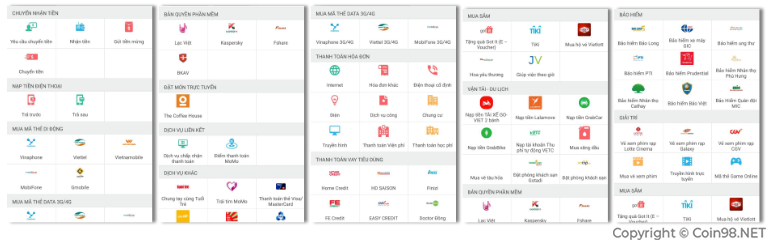
On the application, there are many products and services that can be paid with MOMO, you can go there to experience more. Personally, I buy CGV tickets every week with MOMO and often pay when having coffee with friends at The Coffee House via MOMO.
In addition, I also use the phone top-up feature very often. It has been a long time since I had to go to the store to buy phone scratch cards anymore.
Detailed instructions for registering MOMO wallet
Currently, the MOMO wallet application has versions on Google Play and App Store, you can go there to search and download directly to your phone. Then install it like a normal application.
Below I will guide you how to register for a MOMO account.
Step 1: Enter the phone number used to register an account on MOMO.
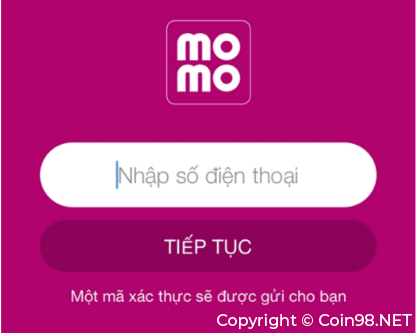
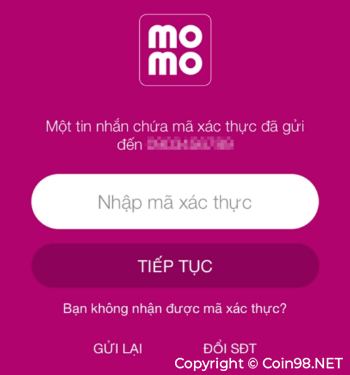
Step 2: Enter the authentication code.
An authentication code will be sent to this phone number. You now just need to enter the correct authentication code into the application and then click Continue.
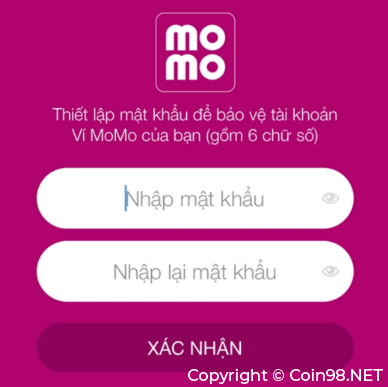
Step 3: Create a login password.
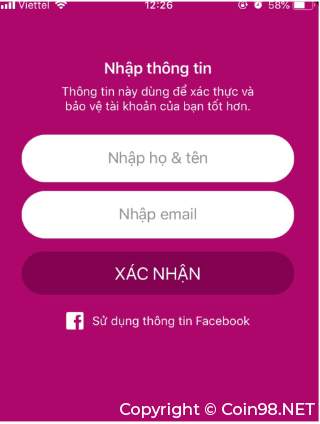
Step 4: Enter basic information.
Enter your full name and email address.
Instructions for authenticating MOMO account
Account authentication will help MOMO better protect users in case problems arise related to money in the account. You authenticate your MOMO account by following these simple steps:
Step 1: In the main interface select My Wallet.
Step 2: Select settings to enter the authentication section.
Step 3: Select partial authentication.
Step 4: Fill in authentication information.
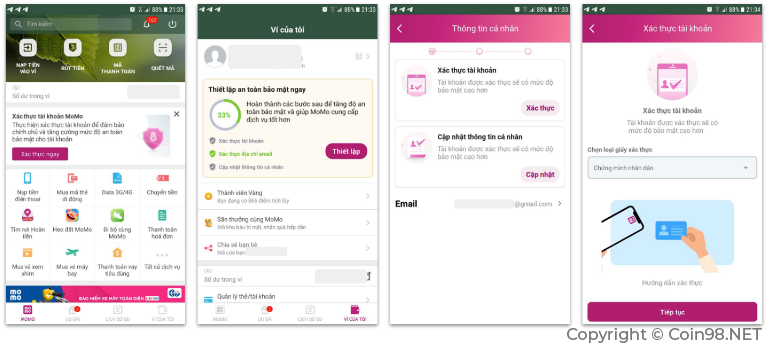
Wait for MOMO's team to check and verify the uploaded information.
Detailed instructions on how to use MOMO wallet
How to link MOMO wallet with bank account
This is the first important step for you to be able to make payments with MOMO wallet. Here's how:
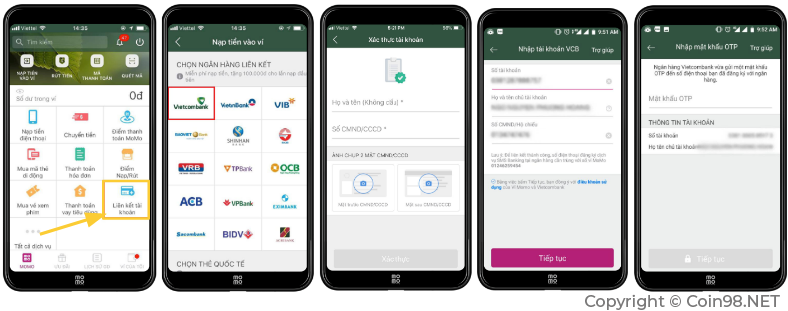
Step 1: In the main interface, select Bank Link.
Step 2: Select the bank you want to link.
Step 3: Verify account.
Step 4: Enter account information. Note: This is the information you used to register your bank account.
Step 5: Enter the OTP authentication code (this code will be sent via text message to your original phone number).
I linked MOMO wallet with Vietcombank bank account. In addition, you can also add many other cards/accounts (bank cards or Visa/Mastercard cards) to suit each person's needs.
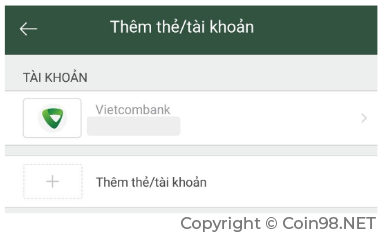
After linking your MOMO wallet with your bank account, you can now deposit money directly from your bank account into your MOMO wallet account.
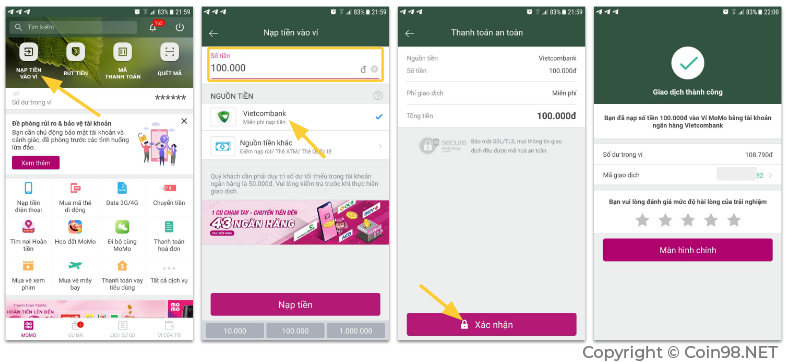
Step 1: Select Deposit money to wallet on the main screen.
Step 2: Enter the amount you want to deposit and select the bank.
Step 3: Confirm – MOMO will ask for confirmation by password or fingerprint.
Step 4: Successful transaction.
This is the amount of money transferred from the bank account (originally registered) to the account in the MOMO wallet. Now you can use it to pay for services on MOMO.
How to withdraw money from MOMO wallet
In cases where you deposit too much money and want to withdraw it to your bank account, MOMO fully allows users to withdraw the money from their wallet.
The steps are as follows:
Step 1: Select Withdraw money on the main screen.
Step 2: Enter the amount you want to withdraw & select the bank you want to withdraw to.
Step 3: Confirm withdrawal request.
After successful confirmation, you will receive the withdrawn amount in your bank account.
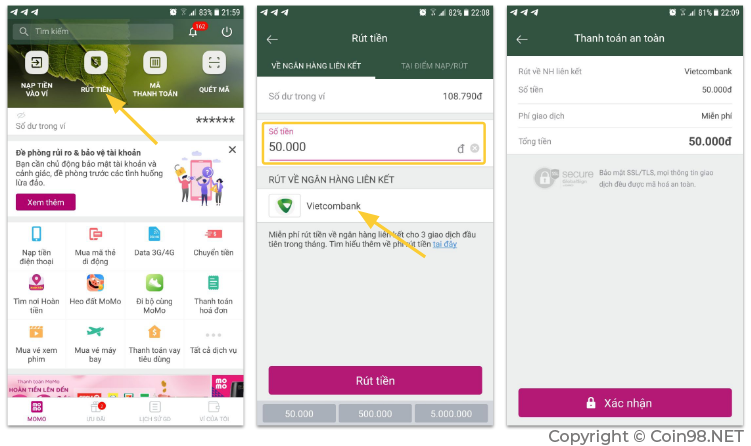
Note: In addition to withdrawing to bank accounts, users can also withdraw cash at Deposit/Withdraw points. These deposit and withdrawal points can be convenience stores, Viettel Post or electronics centers (cooperating with MOMO). So quite convenient for users.
Invite friends to join MOMO to receive promotions
This is MOMO's new user incentive program that I quite like. In this program, users can invite their friends to register for new MOMO wallet applications and both of them will receive promotions.
Here's how:
First, each person's referral code is the phone number you use to register for a MOMO account. So it's easy to remember and convenient to use.
You instruct your friends to download, install and link bank accounts on MOMO wallet. In order for both of you to receive promotional gifts, please continue as follows:
Step 1: Select Offers on the main screen.
Step 2: Enter the referrer's phone number in the box above.
Step 3: New users must link to a bank account.
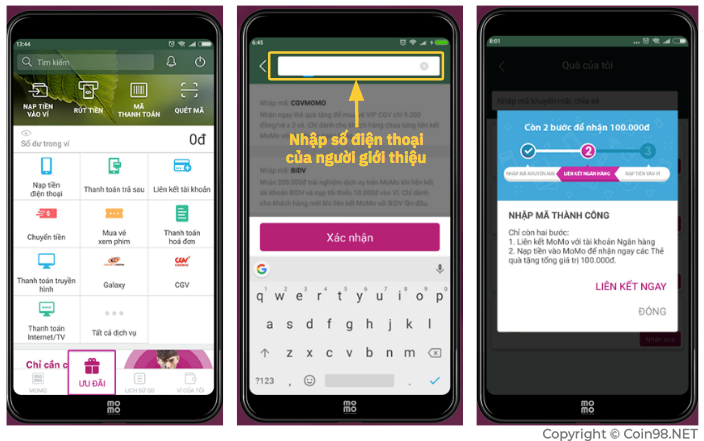
Note: The condition for both people to receive the promotion is that the new user must enter the correct phone number of the referrer, and of course they must link their bank account and deposit money into the MOMO wallet.
Update: At the time I wrote this article in December 2019, MOMO was having an attractive promotion to attract more new users.
For referrers:
- The referrer randomly receives 1 of 4 gift packages of 500,000 VND - 600,000 VND - 800,000 VND - 999,000 VND (multi-purpose gift values are 100,000 VND - 150,000 VND - 200,000 VND - 299,000 VND respectively).
- Unlimited number of referrals and rewards
- For referrals: Receive a gift package worth 500,000 VND to pay for many services on MOMO.
Buy phone cards with MOMO wallet
Buying phone cards with MOMO wallet is a feature I often use. Very convenient and get a partial refund right on MOMO wallet.
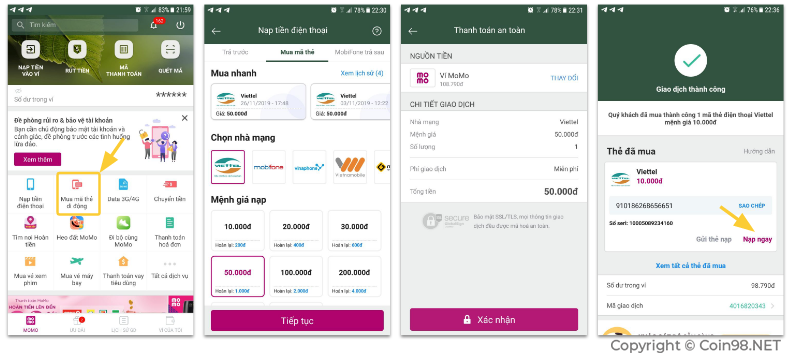
Step 1: Select Buy mobile card code on the main screen.
Step 2: Choose the carrier and card value.
Step 3: Verify payment.
Step 4: You will receive a card code with the corresponding denomination, click the Top up button now to top up the card.
Buy CGV movie XEM with MOMO
This is also one of the utilities on MOMO that I really like, which is paying for CGV XEM tickets right on the phone.
There are 2 ways to pay for XEM tickets with MOMO.
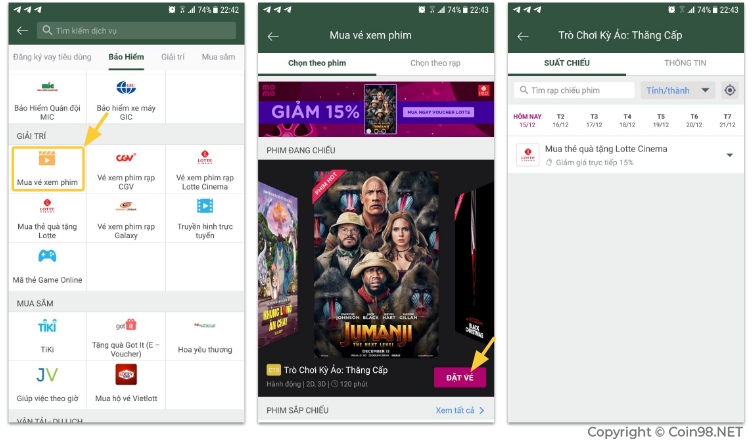
Method 1: On the home page interface, select Buy XEM tickets (in the Entertainment section) => Select the movie you want to XEM => Select theater & showtime then pay.
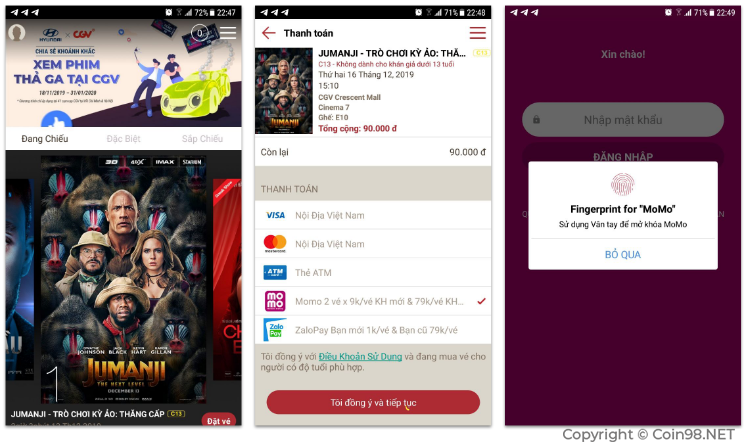
However, I often go directly to the theater's app, select the movie, then pay via MOMO. Method 2 is simple as follows:
Step 1: Choose a movie on the CGV application.
Step 2: At the payment step, select MOMO.
Step 3: You will be transferred to the MOMO application, where you confirm payment to complete the purchase of XEM tickets at CGV.
Pay utility bills on MOMO wallet
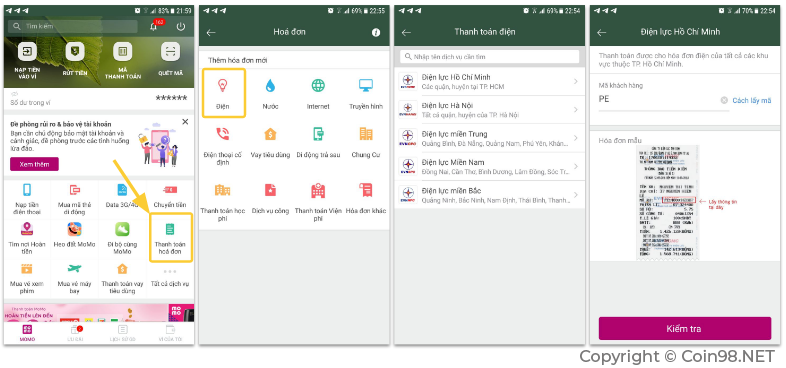
Step 1: On the main screen, select Bill payment.
Step 2: Select the type of bill you want to pay, here I pay the electricity bill.
Step 3: Select the electricity facility to use.
Step 4: Enter customer code (recorded on the electricity bill).
Then confirm the payment and you are done, the amount to be paid will be directly linked to the customer code when you enter it.
In addition to electricity and water bills, users can also pay other bills such as:
- Internet
- TV
- Landline phone
- Consumer loans
- Postpaid mobile
- Apartment fees
- Payment of tuition/hospital fees
- Public service..
Buy apps on Appstore with MOMO wallet
Since August 2019, App Store users have been able to add the payment method MOMO e-wallet to purchase applications on Apple's store.
Making:
Step 1: On the App Store application – add payment method MOMO
Step 2: Go to the MOMO application to confirm the link.
Step 3: With applications or games on the App Store, when paying, you can choose MOMO to have money deducted directly from MOMO wallet.
Deposit money into MOMO wallet using Visa, Master Card, JCB card
Depositing money from the above cards is similar to depositing money from a bank card
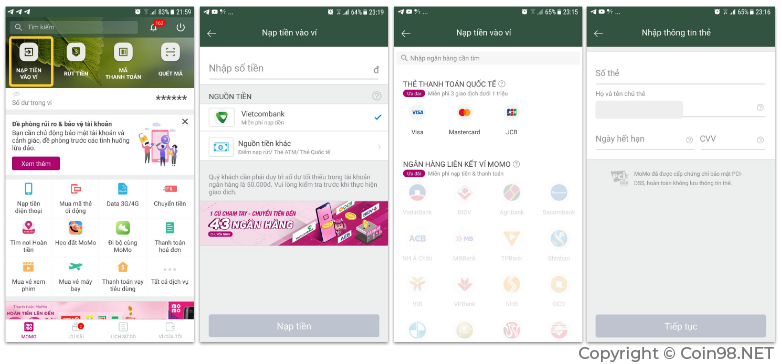
Step 1: On the main screen, select Deposit money to wallet
Step 2: Enter the amount you want to deposit and select Other money source
Step 3: Select the type of international card you want to use
Step 4: Enter card information then confirm to complete the deposit
Frequently asked questions when using MOMO wallet?
What is MOMO wallet used for?
MOMO is an electronic wallet. It allows users to deposit money from bank accounts and credit card accounts into wallets. With the deposited amount, users can use the wallet to pay for products and services linked to MOMO wallet. Some familiar services users can pay with MOMO wallet: Pay for purchases at stores, supermarkets, buy phone cards, receive promotional codes, buy XEM tickets, pay bills,...
Is MOMO wallet a scam?
Are not
Mobile Online Service Joint Stock Company (M_Service) was licensed by the State Bank and managed the e-Wallet service (MOMO) in 2015. They are a clearly registered business company and affiliated with many large banks. There is no such thing as MOMO being a scam.
However, some cases users encounter such as not receiving promotions or complaints not being resolved promptly make customers frustrated. But that was a mistake in MOMO's operations, not a scam.
Is MOMO wallet a scam?
List of banks that MOMO is supporting:
Vietcombank, OCB, VPBank, Vietinbank, TPBank, ACB, Eximbank, Sacombank, VIB, BIDV and Shinhan Bank
What is MOMO account number?
The user's MOMO account number is the original registered phone number. When introducing friends to receive promotions, you only need to send this account number as your phone number.
What should I do if I lose my phone to use MOMO?
Case 1: If you lose your phone & also lose your SIM card
Call MOMO's support hotline directly at the following number: 1900 54 54 41 or 028.399.171.99 to report the problem, temporarily lock your account and receive instructions to log back in.
Case 2: If you lose your phone but still have the SIM card
Insert another SIM and phone to log in to MOMO. You will receive an OTP code to log in on your new device. At that time, the MOMO account on the lost phone will automatically log out. This will help increase security for users when problems related to money in the account occur.
How much is the fee to use MOMO wallet?
Creating an account, using and maintaining a MOMO wallet are all free. Users do not have to pay any other fees. However, some withdrawal or deposit services require fees as follows:
- Deposit money from ATM cards of 30 banks in the Napas system. Fee: 2,000 VND + 1.6% transaction value.
- From Visa/Master/JCB international card. Fee: 2,200 VND + 2% transaction value
- Withdraw money from MoMo account to bank account or at MoMo Deposit/Withdraw Point.
What is the minimum balance on MOMO wallet?
Are not.
MOMO does not require a minimum balance. However, in some cases you cannot successfully deposit from your bank account to MOMO, it may be because the minimum balance in the BANK ACCOUNT is not enough.
What should I do if I transfer the wrong money to MOMO wallet?
At this time, please calm down and contact MOMO's customer service department so they can resolve the issue. Some things to discuss with customer care staff:
- Content needs support
- Date of implementation of GD
- Correct amount
- Wrong amount
Can I withdraw cash from MOMO wallet?
Have
You just need to make a withdrawal request and select the withdrawal type as At Withdrawal Point. Then go to that location to receive your withdrawal.
MOMO wallet withdrawal/deposit limit?
For authenticated accounts:
- Maximum Wallet balance: 50,000,000 VND/day.
- The maximum amount deposited into the Wallet is 50,000,000 VND/day, maximum withdrawal from the Wallet is 20,000,000 VND/day.
- Unlimited number of transactions
With an unverified bank account, you cannot withdraw and deposit into MOMO.
How to contact MOMO support?
When there is a problem or complaint, users can contact MOMO directly through the following channels:
- Hotline: 1900 5454 41 (1000 VND/minute)
- Email: hotro@momo.vn
Which country's MOMO wallet is from?
Vietnam's MOMO wallet. Operated by Online Mobile Service Joint Stock Company (M_Service)
Transaction limit on MOMO wallet?
Depends on each bank.
For example: TP Bank, the maximum limit for 01 transaction is 1 million VND. The maximum limit for all daily transactions is 5 million VND.
Has MOMO wallet ever been hacked?
Not yet!
Can I install the MOMO wallet application on my computer?
Are not!
At the time of launch, MOMO also supported web browsers, but according to my understanding, since January 2016, the MOMO wallet application is only supported on mobile devices.
Some brothers share APK files or Arm Virtual Machine software with each other to install on personal computers. But I advise you not to use this method.
MOMO as well as other financial applications are directly related to users' money, especially it is directly linked to bank accounts. Therefore, you should only use officially released applications. Files or applications from unofficial sources can be installed with malicious code, causing your account to be hacked or, even more dangerous, losing money.
summary
Hopefully this article has helped you understand an overview of MOMO wallet and how to use it. The use of electronic payment wallets is becoming increasingly popular in Vietnam.