Looking back at Bitcoin's 17-year history, two extraordinary figures have made significant contributions to its development.
One is Satoshi Nakamoto, who gave Bitcoin its life, needing no introduction.
The other is Michael Saylor, who brought Bitcoin into the true financial world. This article will discuss him in more detail.
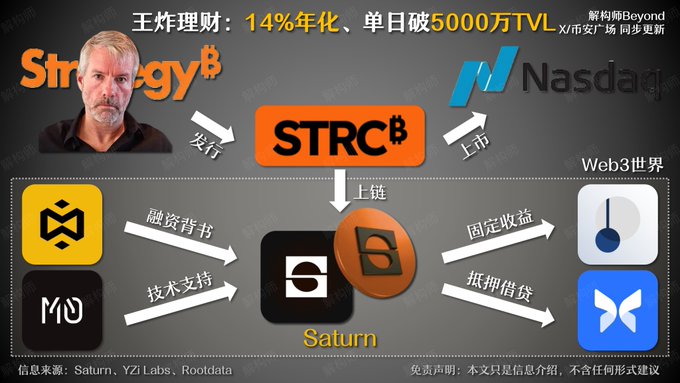
Today, we'll talk about Saturn (@saturn_credit), a protocol built on Saylor's financial system.
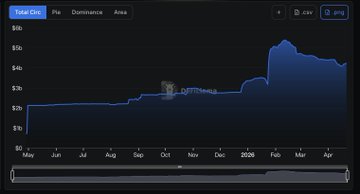
Starun's TVL surpassed $50 million within just 24 hours of its launch and is now steadily approaching $100 million.
Remember this name; we'll explain why it's worth paying attention to later.
Under Saylor's leadership, MicroStrategy continuously raised funds through debt financing to purchase Bitcoin, achieving a remarkable upward spiral in both its stock price and Bitcoin price.
To date, MicroStrategy holds a total of 780,000 Bitcoins, making it the publicly traded company with the largest Bitcoin holdings globally.
Saylor's greatest contribution wasn't just buying massive amounts of Bitcoin, but establishing a credit system supported by Bitcoin, attracting funds from Wall Street with varying risk appetites.
In simpler terms, Saylor... They lured the wealthiest people on the planet onto this train.
The most crucial interest-earning tool in this financial system is called $STRC. This is a type of preferred stock listed on Nasdaq, with a relatively simple mechanism:
- Stable returns: Monthly interest payments, approximately 11.5% annualized
- High collateral: Backed by Bitcoin held by MicroStrategy, with an asset-to-debt collateral ratio of approximately 4.5:1
- Risk buffer: Approximately 21.8 months of cash reserves are available to ensure uninterrupted interest payments; the principal is only at risk if the Bitcoin price falls below $24,000.
However, the problem is that ordinary people simply cannot access this return.
As a US stock security, STRC requires buyers to have a US brokerage account and complete complex compliance procedures, which keeps the 11.5% stable interest rate largely confined to Wall Street institutions and a small number of high-net-worth individuals.
Saturn is the protocol that opened this door.
Saturn established a compliant asset distribution system, bringing the Nasdaq market... STRC yields are introduced on-chain, and the core consists of two interrelated assets:
- $USDat: The protocol's gateway, pegged 1:1 to the US dollar, initially 100% backed by tokenized US Treasury bonds. As a non-interest-bearing asset, it is primarily used for payments, settlements, and compliance access.
- $sUSDat: Obtained by staking USDat. The protocol allocates the corresponding assets as STRC preferred stock in the background, thereby capturing the 11.5% dividend backed by Bitcoin.
Saturn's yield enhancement logic is as follows: The US Treasury bonds held in USDat reserves generate approximately 3%–3.5% cash yield. The protocol distributes all of this yield to sUSDat holders through interest retargeting.
Therefore, the final yield of sUSDat =
11.5% base interest from STRC + approximately 3% interest subsidy
The target yield is approximately 14%. Looking at various financial products, a 14% APY is a very solid figure.
How can ordinary people participate?
- Users who pass KYC can directly mint USDat on the protocol, while ordinary users can directly buy it on secondary markets of DEXs like Curve.
- Staking USDat on the Saturn website to exchange for sUSDat allows you to enjoy an annualized return of approximately 14%.
- Advanced strategies: Use sUSDat for fixed income on Pendle, or leverage it through revolving loans on Morpho to further amplify your interest rate spread.
- sUSDat supports permissionless instant deposits; redemptions typically require a 3-7 day window. If you need to redeem urgently, simply exchange it on Swap.
Of course, no matter how good the return logic is, I wouldn't easily start using it without reliable institutional backing.
Saturn was incubated by YZi Labs and has received top-tier capital support from Galaxy, Flowdesk, and others.
It uses an M0 technology architecture and is deeply integrated with Wall Street compliance infrastructure such as Securitize and Clear Street, ensuring the authenticity and transparency of all STRC holdings and reserve reports. During the private testing phase, it has already attracted deposits from institutions such as Galaxy, Susquehanna, and Flowdesk. $10 million: Institutional investors enter first to test the waters, then retail investors follow.
Saturn and MicroStrategy actually do things somewhat similarly.
MicroStrategy attracts ultra-wealthy individuals and traditional financial institutions to indirectly buy Bitcoin through high interest rates, while Saturn allows ordinary people to also benefit from MicroStrategy's money-spreading incentives.
Who would turn down money?
twitter.com/0xBeyondLee/status...