🥳How far can you achieve the best results with Stitch?
↑ I'm curious, so I'm using 15 free credits every day to try out the prompts.
Today, I wanted to redesign "Minigame Heaven" with a Naruto anime-style color palette.
🖋Basic Prompt Sketch
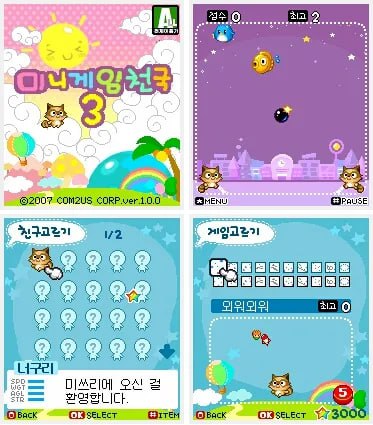
Photo 1 - Reference screen for the Minigame Heaven I'm redesigning.
Photos 2 & 3 - Characters and fight scenes from the Naruto anime.
※Photo references are not included in this post.
- Design elements and characteristics from the Naruto anime (photos attached)
- Ninja, Japanese style, fighting, ninjutsu, Akatsuki, jinchuriki, Naruto, Sasuke
- Design inspired by terms like Japanese anime, war, cool action, and flashy techniques.
- Design sketch with a basic anime-style color palette.
🖋Final prompt content (created by inserting the basic sketch into Gemini)
▸Prompt: "Redesign the first uploaded image (casual mobile game UI) by applying the art style and themes of the second and third uploaded images (Naruto anime).
▸Art Style: Masashi Kishimoto's manga and anime style. High-quality cel-shading, vibrant anime colors, bold outlines.
▸Theme & Atmosphere: Ninja world, Great Ninja War, intense action. A cool and flashy atmosphere with dynamic energy.
⟐ Content Transformation:
• Characters: Replace the cute animal characters with chibi-style ninjas, Akatsuki members, or Jinchuriki (Naruto, Sasuke).
• UI Elements: Change the pastel UI into a ninja scroll or metallic ninja tool aesthetic.
• Effects: Add flashy Ninjutsu effects (Rasengan, Chidori, Fire Style), chakra auras, flying shurikens, and kunai.
• Background: Hidden Leaf Village or a dramatic battlefield.”
🍿And...what is the result? As you can see, the attached photos!
1⃣A Brilliant Reinterpretation + Enhancement of the Screen Cutscene
The attached "Minigame Heaven" example game cutscenes are as follows:
1. Start Screen 2. Versus Match
3. Character Select 4. Game Selection
The designs Stitch created may seem disjointed at first glance, but
upon closer inspection, they effectively incorporate the concept structures from steps 1-4, further enhancing them and making them even more "Naruto"-like.
2⃣Appropriate Asset Creation in the Design
As you can see, the assets in the Minigame Heaven example consist of nothing more than bombs and rainbows.
In other words, there was little basic information to reference...
• Effects: Add flashy Ninjutsu effects (Rasengan, Chidori, Fire Style), chakra auras, flying shurikens, and kunai.
Adding the one-line asset prompt [Shuriken, Scroll, Kunai, Firefly, Chidori] above dramatically offsets the poorly executed example.
The assets were created in appropriate locations and situations, allowing them to be seamlessly integrated into the game. The spiral-shaped Start button is a nice touch, too!
3⃣ It automatically identifies and incorporates key Naruto elements.
Mission Selection ← This tab shows the Valley of the End.
I never included this prompt or explained the situation, yet the AI figured out key locations from "Naruto" and added them to the background map.
In addition, it generated elements throughout the design that I hadn't input or trained, based on the main concept of "Naruto."
🔽Let's go play before Stitch becomes paid! ㄱㄱ
stitch.withgoogle.com