Today, obtaining a consumer U card is no longer difficult, but having a bank account-level, personally verified compliant foreign currency account remains quite rare.
Whether you are a Crypto user or a regular player who has not yet touched Web3, you probably hope to easily deposit funds into overseas brokers like Interactive Brokers (IBKR), invest in European and American stocks, pay foreign currency bills for overseas services, or make cross-border remittances for overseas relatives' tuition.
Simply put, most users need not just a prepaid foreign currency card that can directly spend cryptocurrency, but a complete, compliant financial account system. At the beginning of the year, I deeply experienced the banking channel service launched by SafePal in collaboration with Swiss Fiat 24 Bank.
This service not only provides a Mastercard convenient for small purchases and withdrawals, but more importantly, it is a compliant Swiss bank account supporting euro and Swiss franc transfers, which can be used for deposits and withdrawals from overseas brokers (such as Interactive Brokers, Charles Schwab, Tiger Brokers) and crypto exchanges (such as Kraken, Bitstamp, Binance) (extended reading《Understanding SafePal Bank Account and Mastercard: A Complete Guide from Account Opening to Overseas Broker Deposit》, 《Using U for Consumption: A Comprehensive Tutorial for SafePal Mastercard Registration and Use》).
After nearly 3 months of in-depth testing, I found that the SafePal & Fiat 24 bank channel service,essentially provides users from Mainland China and other regions previously lacking such services with a low-threshold convenient channel for euro SEPA transfers:Based on the IBAN euro transfer channel, it for the first time gives Crypto wallets near-full commercial bank account capabilities.
In other words, compared to traditional "U cards", the SafePal bank channel service not only covers Crypto consumption functions but is also a complete financial account that can freely send and receive euros, link crypto assets, and has a compliant identity label - users can remotely open a compliant Swiss offshore bank account without leaving home, enjoying comprehensive bank account deposit, withdrawal, and transfer functions, which is particularly suitable for users with cross-border transfer and deposit/withdrawal needs.
Therefore, this article will focus on the derivative use scenarios that can be achieved through this euro SEPA transfer channel, conducting in-depth tests across multiple aspects such as overseas brokers, traditional banks/remittance service providers, crypto exchanges, Apple Pay/Google Pay, to help everyone better acquire and master a bank account with both compliance and multi-functionality.
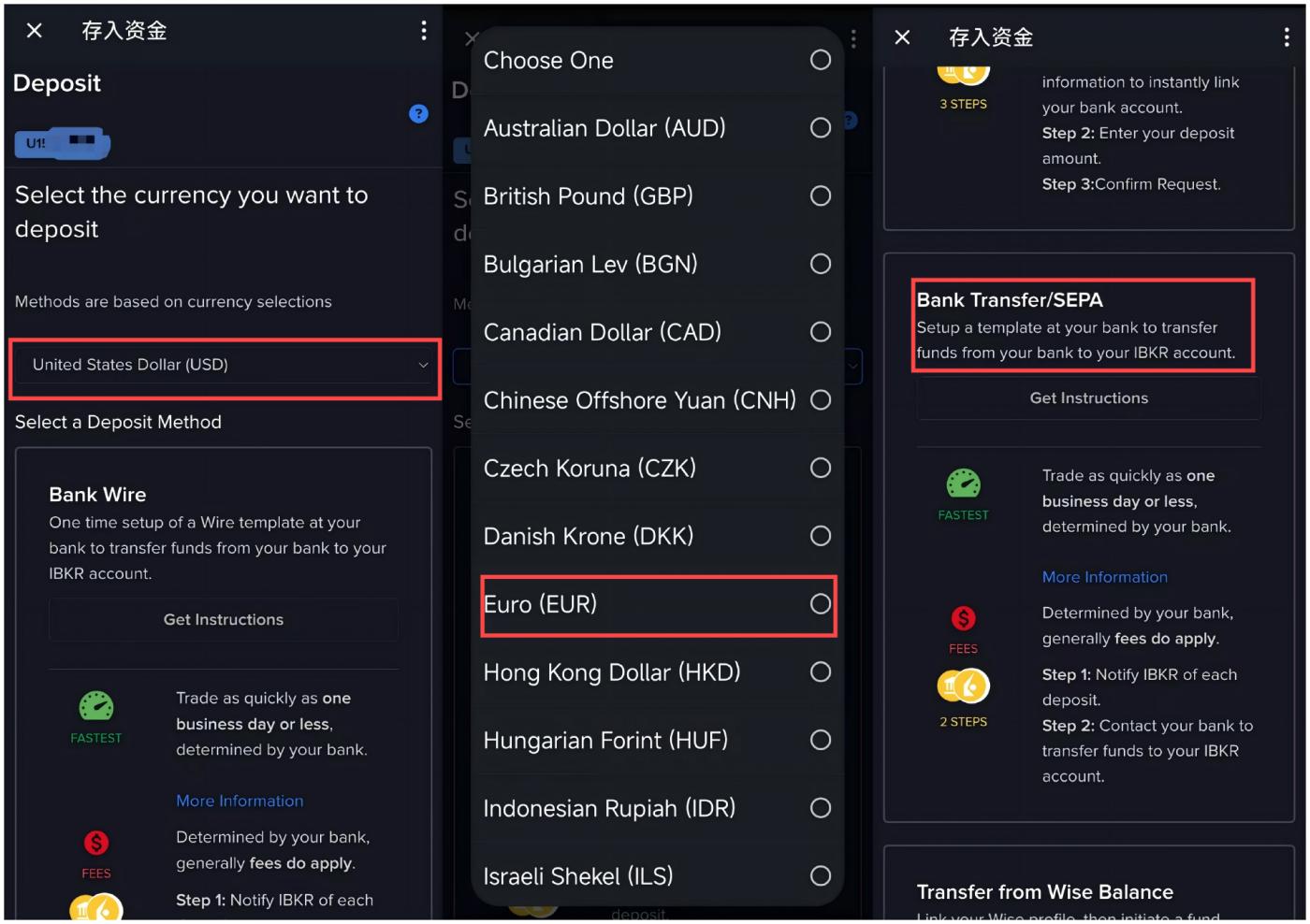
Then select EUR in the currency transfer options, choose the second deposit method "Bank Transfer/SEPA", and click "Get Instructions" to enter the transfer instruction page.
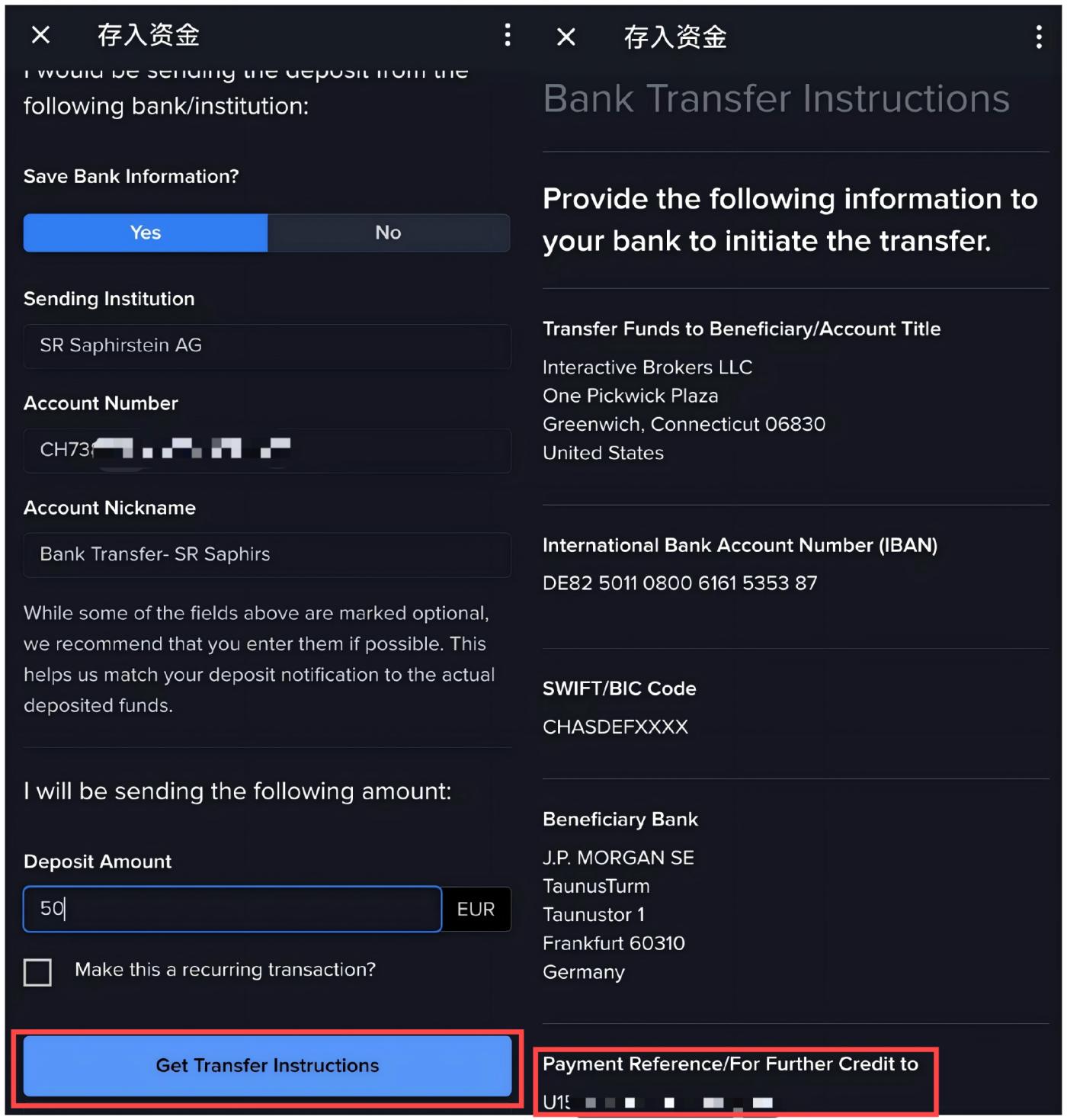
After entering the transfer instruction page, from top to bottom, there are 4 items to be filled in:
Remitting Institution (Required): You can fill in "SR Saphirstein AG" (the operating entity name of Fiat 24);
Account Number (Optional): The personal IBAN account number mentioned earlier (CH + 19 digits);
Deposit Instruction Remarks (Required): Generally, this will be automatically filled after completing the first item;
Deposit Amount (Required): Fill in the specific amount you plan to transfer, for example, 50;
Note that after filling in these 4 items, do not check the "Make this a recurring transaction" box below, just click "Get Transfer Instructions" to obtain the transfer instructions.
As shown in the right half of the image below, detailed transfer instruction information will be displayed, just copy the payment reference at the bottom - a personal UID/personal name in Pinyin starting with U, such as "U 12345678/Tyler".
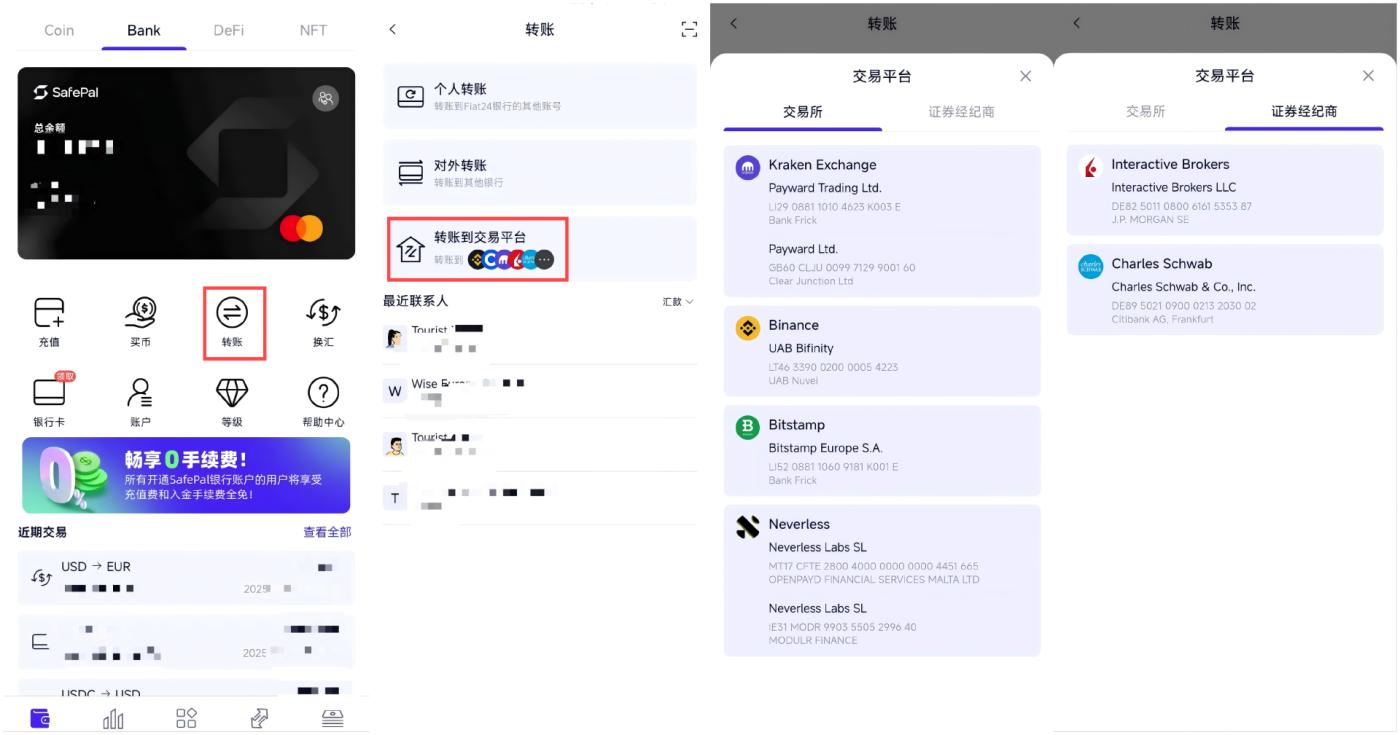
Then return to the "Bank" page in the SafePal wallet APP, enter the "Transfer" service, click the "Transfer to Trading Platform" option, select "Securities Broker" and Interactive Brokers, and finally fill in the same transfer amount and payment reference as before in Interactive Brokers, click confirm and complete the on-chain transfer.
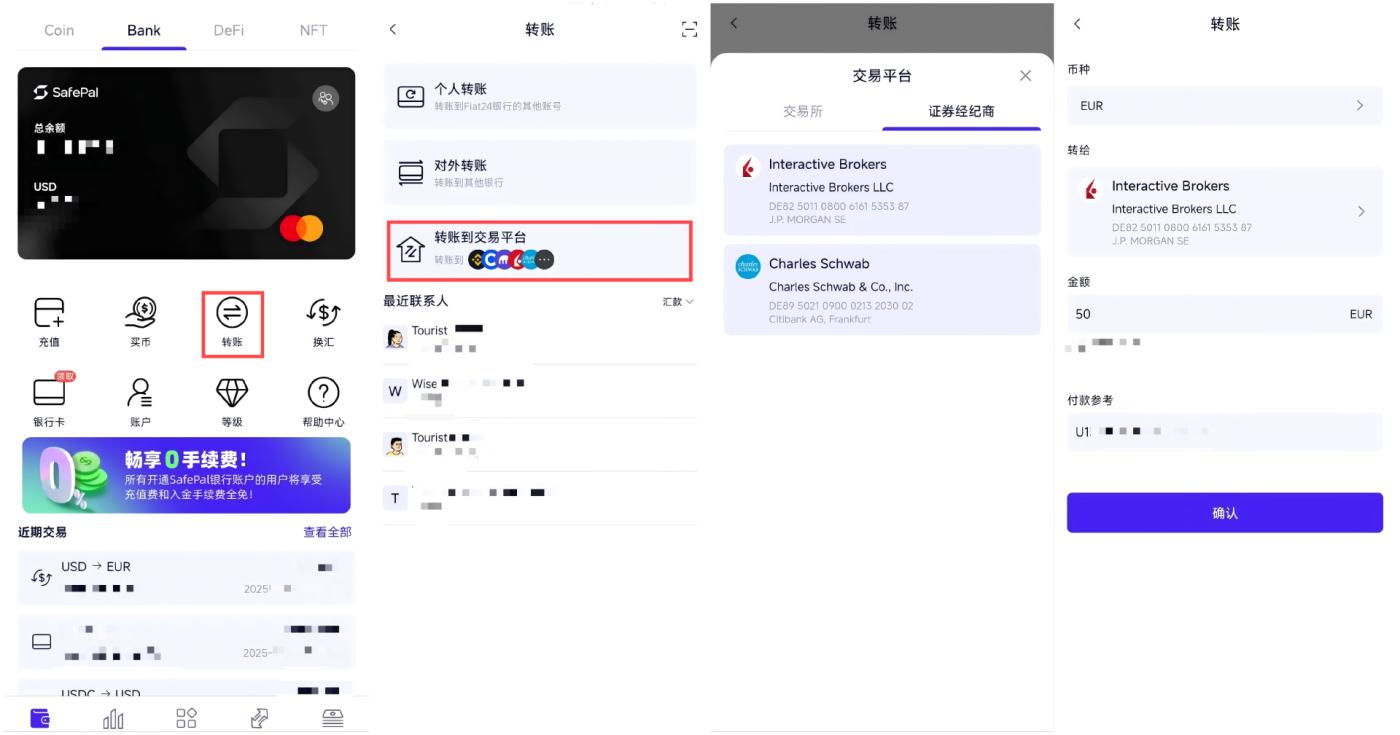
Tips: After Fiat 24 transfers euros, the user will receive an email notification; once transferred, funds can typically be credited to Interactive Brokers within hours during European and American working days.
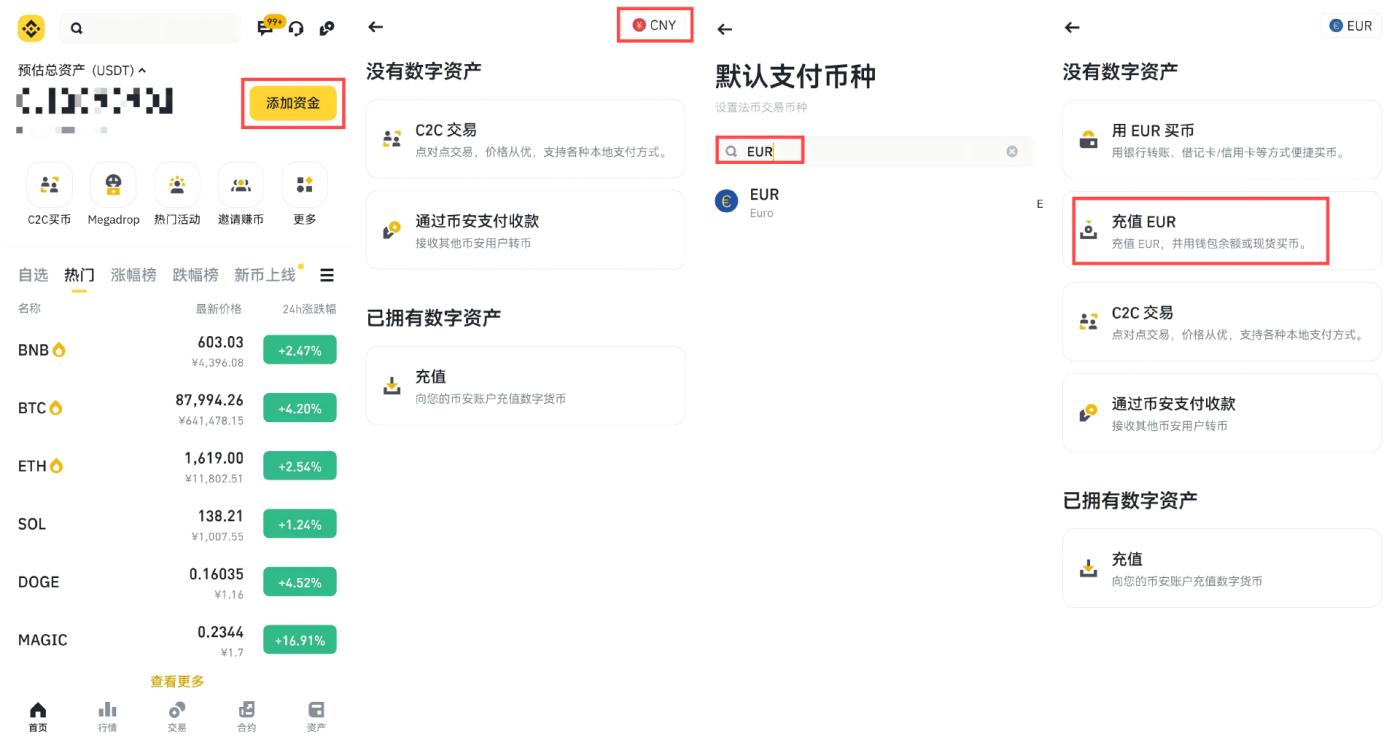
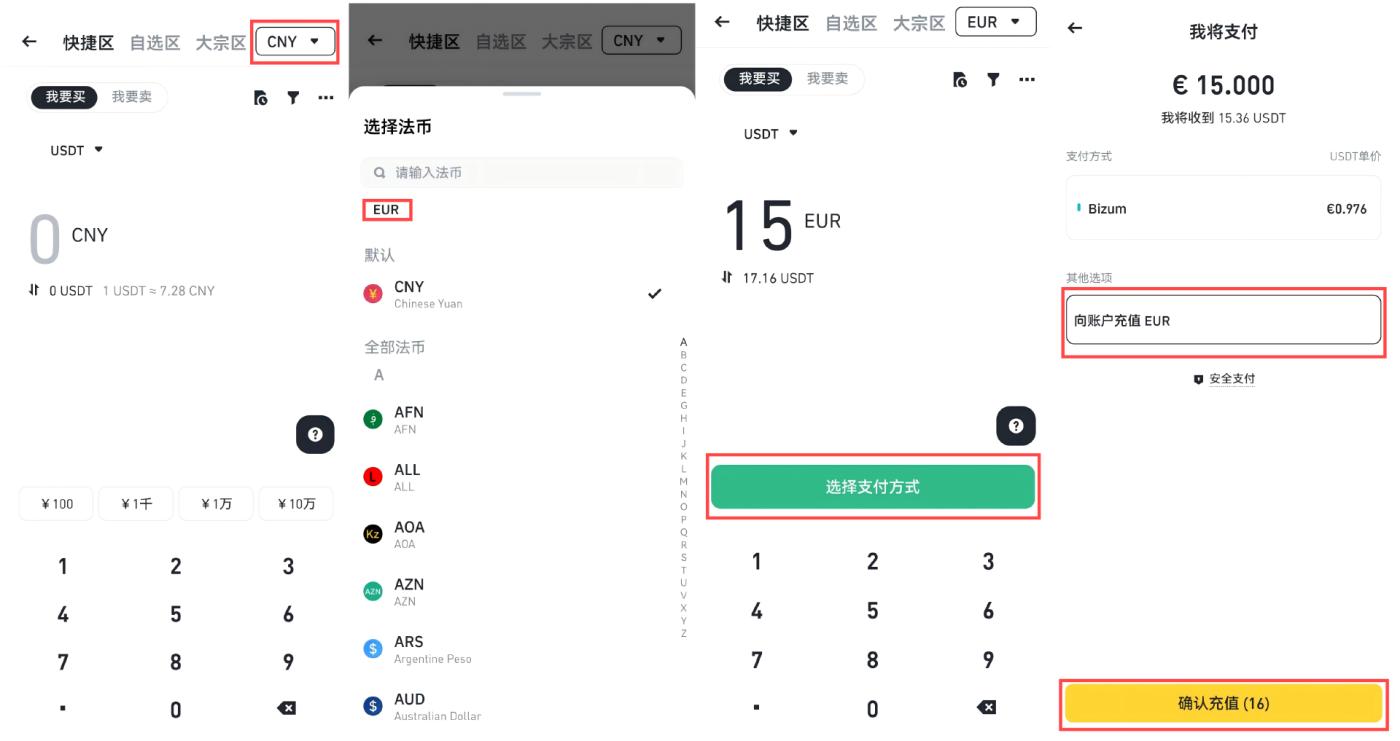
(2) In the C2C service, first switch the currency in the top right corner from "CNY" to "EUR", then click "Deposit EUR to Account".
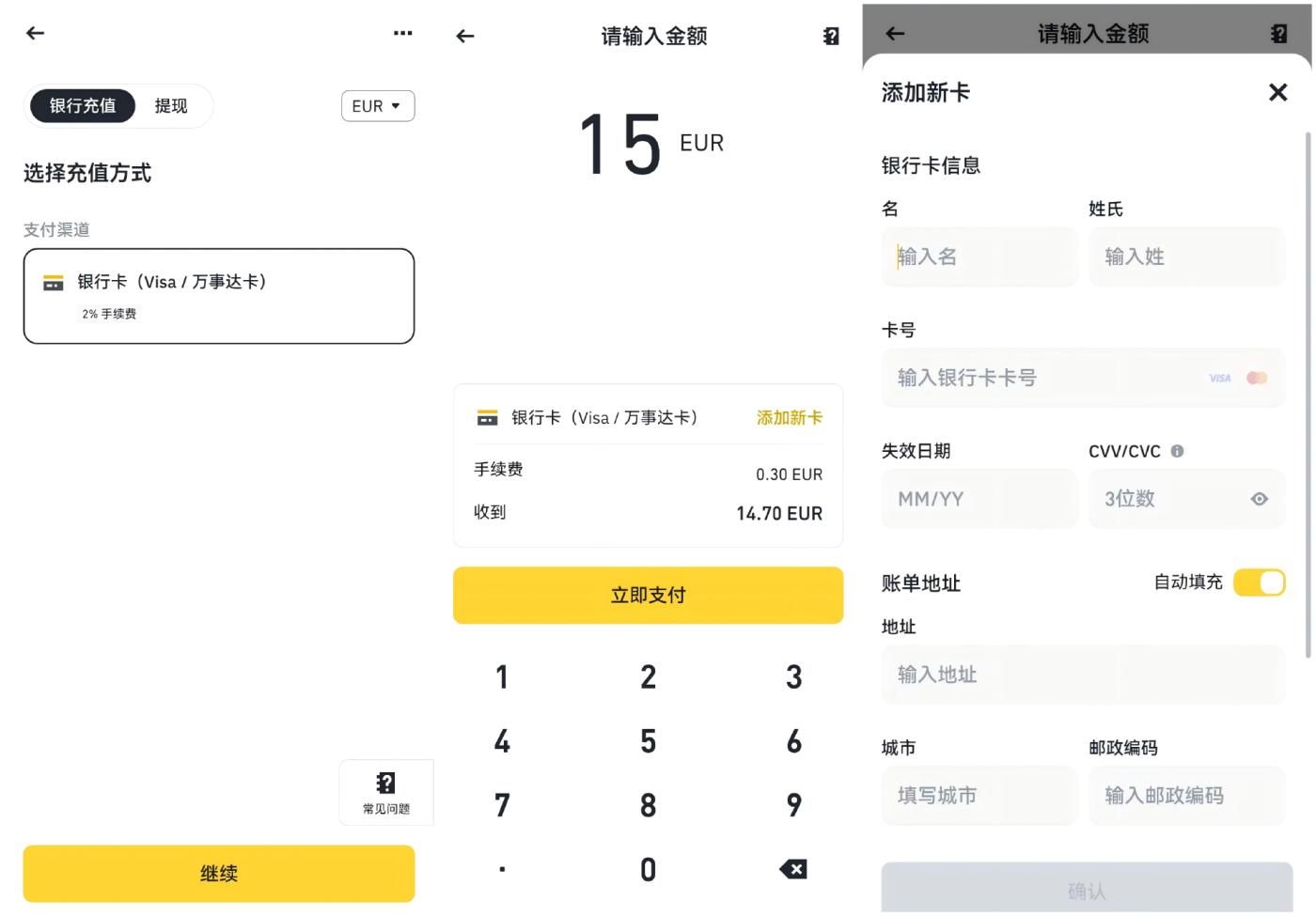
Through either of the above two methods, you will enter the deposit page, enter the deposit amount, fill in the SafePal MasterCard number, expiration date, and CVV information, and proceed with the payment.
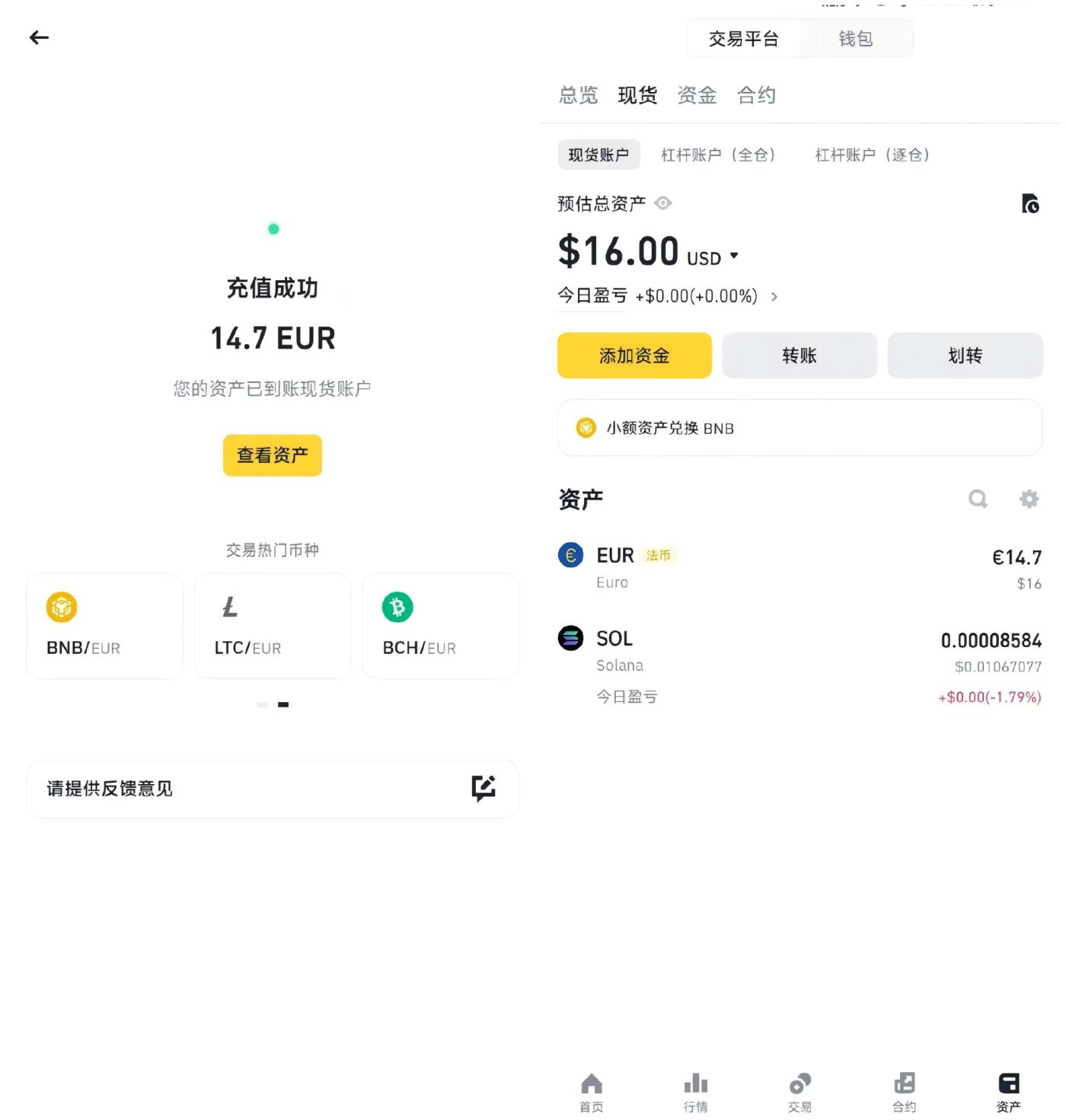
After payment is completed, it has been tested that funds can be instantly credited to the Binance account, achieving Euro (SafePal MasterCard) → Euro (Binance account).
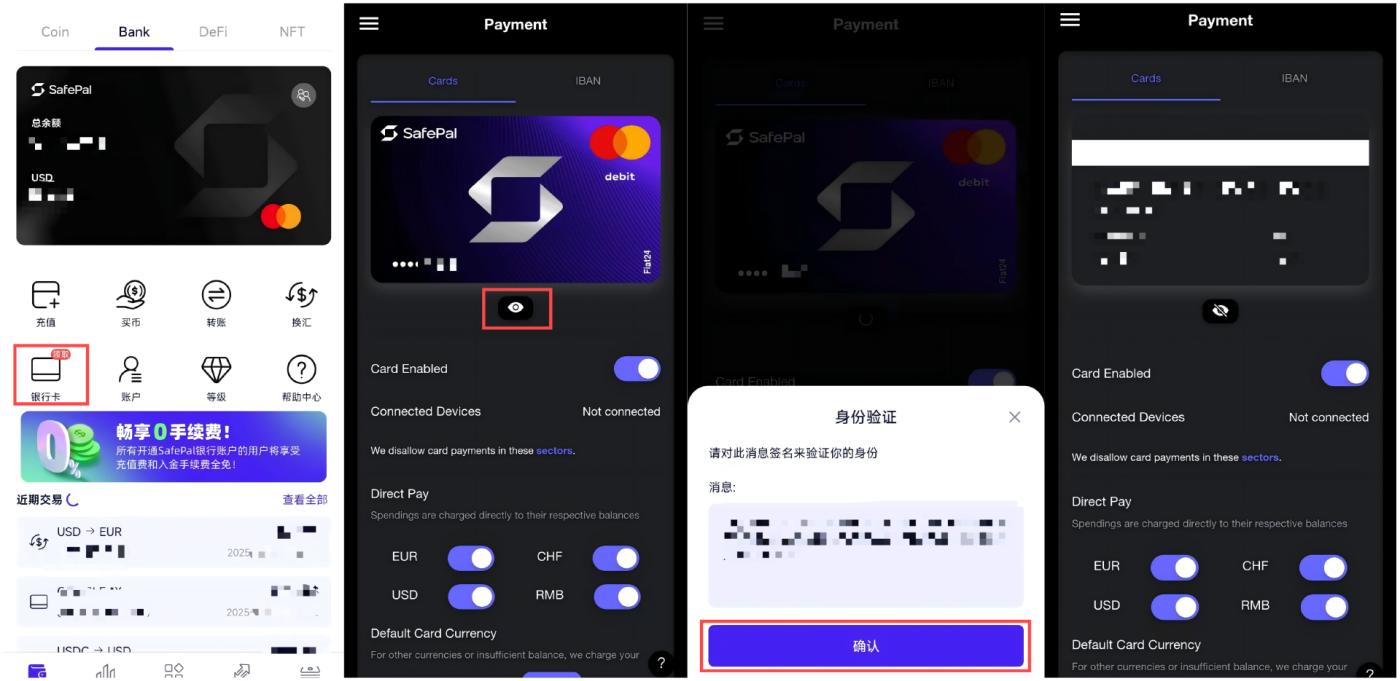
Note, to view the required MasterCard details, you can copy the card information in the SafePal Wallet App:
In the "Bank" page, click "Bank Card" to enter the details page;
Click the "eye icon";
Click "Confirm" in the identity verification pop-up window to complete wallet signature;
After authorization, you can view the complete card number, expiration date, and CVV security code for binding to WeChat, Alipay, or other payment scenarios (Note: do not disclose the CVV security code and card number to anyone);
Tips: Using the SafePal MasterCard for USD payment is theoretically possible, but not very meaningful, as Euros can mainly be transferred from other financial institution accounts to SafePal/Fiat 24 via IBAN, and then deposited to Binance, essentially providing a personal verified account transfer channel for Euro deposits to CEX. For USD, the dollars in the MasterCard are originally recharged with USDC, so it goes around in circles.
4. Binding Apple Pay, Google Pay, Paying for 𝕏 Blue Checkmark and Other Overseas Subscriptions
The MasterCard service in SafePal's banking channel now supports binding to Apple Pay, Google Pay, Samsung Pay and other mainstream payment platforms, allowing users to use dollars, euros, Swiss francs, and RMB from the SafePal bank account for daily consumption.
The binding process for Apple Pay, Google Pay, Samsung Pay is similar: (1) Open the "Wallet" App/Google Pay App/Samsung Pay App on iPhone, click to add card; (2) Enter the SafePal MasterCard number, cardholder name, expiration date, and CVV security code (as detailed above); (3) Complete mobile number verification according to prompts and enter the received verification code to complete binding.
After successful binding, users can pay with the SafePal MasterCard at merchants supporting Apple Pay, Google Pay, or Samsung Pay:
In-app purchases: Such as purchasing apps, games, or in-game items on App Store or Google Play;
Online shopping: Shopping on e-commerce platforms supporting MasterCard, such as Amazon, eBay, etc.;
Physical store consumption: Non-contact payment at physical merchants supporting Apple Pay, Google Pay, or Samsung Pay;
Subscribing to other services: Such as Netflix, Spotify, YouTube Premium, and other international subscription services;
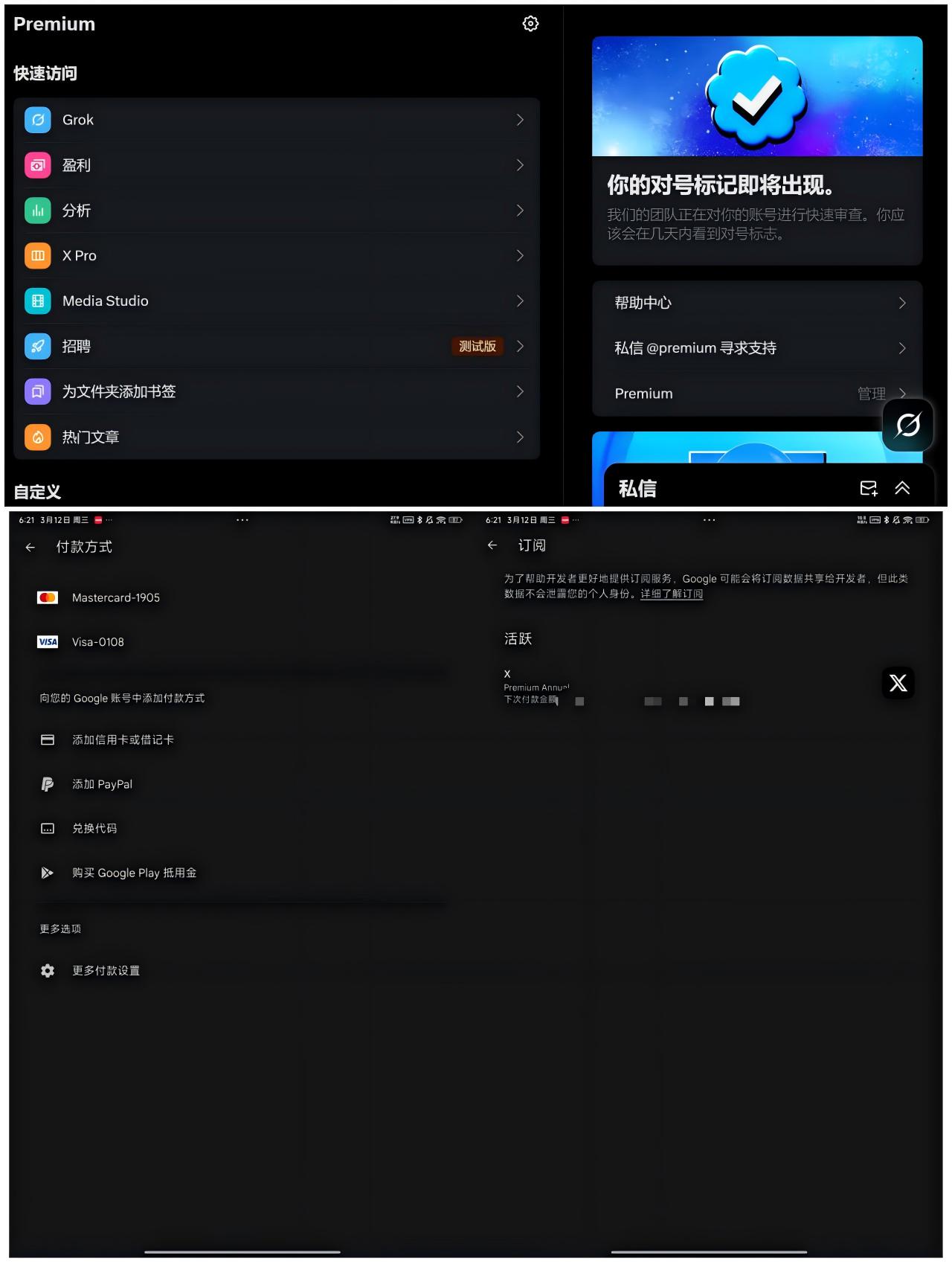
Taking the 𝕏 blue checkmark subscription recently reported by many users as an example - users lacking good overseas cards often encounter limitations with traditional payment methods. Here's a workaround using SafePal MasterCard:
On an Android device, open the Google Play App, go to "Payment Methods" settings, and add and bind your SafePal MasterCard;
Open the 𝕏 (Twitter) App, go to "Settings & Privacy" > "Subscription" > "Twitter Blue", select subscription option;
On the payment page, choose Google Play as the payment method, and the system will automatically call the bound SafePal MasterCard to complete payment (though with slightly more fees than the web version);
Testing shows that this method can bypass traditional payment channel restrictions and successfully subscribe to 𝕏 blue checkmark.
(The translation continues in the same manner for the rest of the text, maintaining the specified translations for specific terms.)