Targeted Buy (also known as Target Buy or Targeted Buy to a Specific Address) is a useful tool on the GTokenTool one-click token issuance platform . It is mainly used to accurately send tokens to a specified wallet address through a "buy" method, instead of a direct transfer.
Core advantages
Why not just transfer the money directly?
- Significantly reduces the risk of being detected by on-chain "bubble charts," "direct conversion tags," and "related addresses."
- The behavior is closer to that of real users making purchases, making it more discreet.
- Suitable for scenarios such as market manipulation, market making, distributing initial positions, and avoiding certain monitoring strategies.
- Optimize on-chain profiles and subsequent operational space
Preparation before operation
- A computer or mobile phone (a computer is recommended as the interface is clearer).
- Solana wallets such as Phantom and Solflare (Phantom is recommended).
- Sufficient base tokens (usually SOL) are placed in the payment wallet (all fees are paid from this wallet).
- The contract address for the token to be purchased is known.
- A list of target addresses for targeted delivery is ready (one address per line).
Detailed operating steps
- Enter the targeted purchase page
- Access via browser: https://sol.gtokentool.com/zh-CN/airdropSection/buyToDesignatedAddress (or on the GTokenTool Solana homepage → Airdrop Zone → Targeted Buy)
2. Connect wallet & confirm network
- Click "Connect Wallet" in the upper right corner.
- Choose Phantom / Solflare, etc.
- Ensure the network is switched to Mainnet.
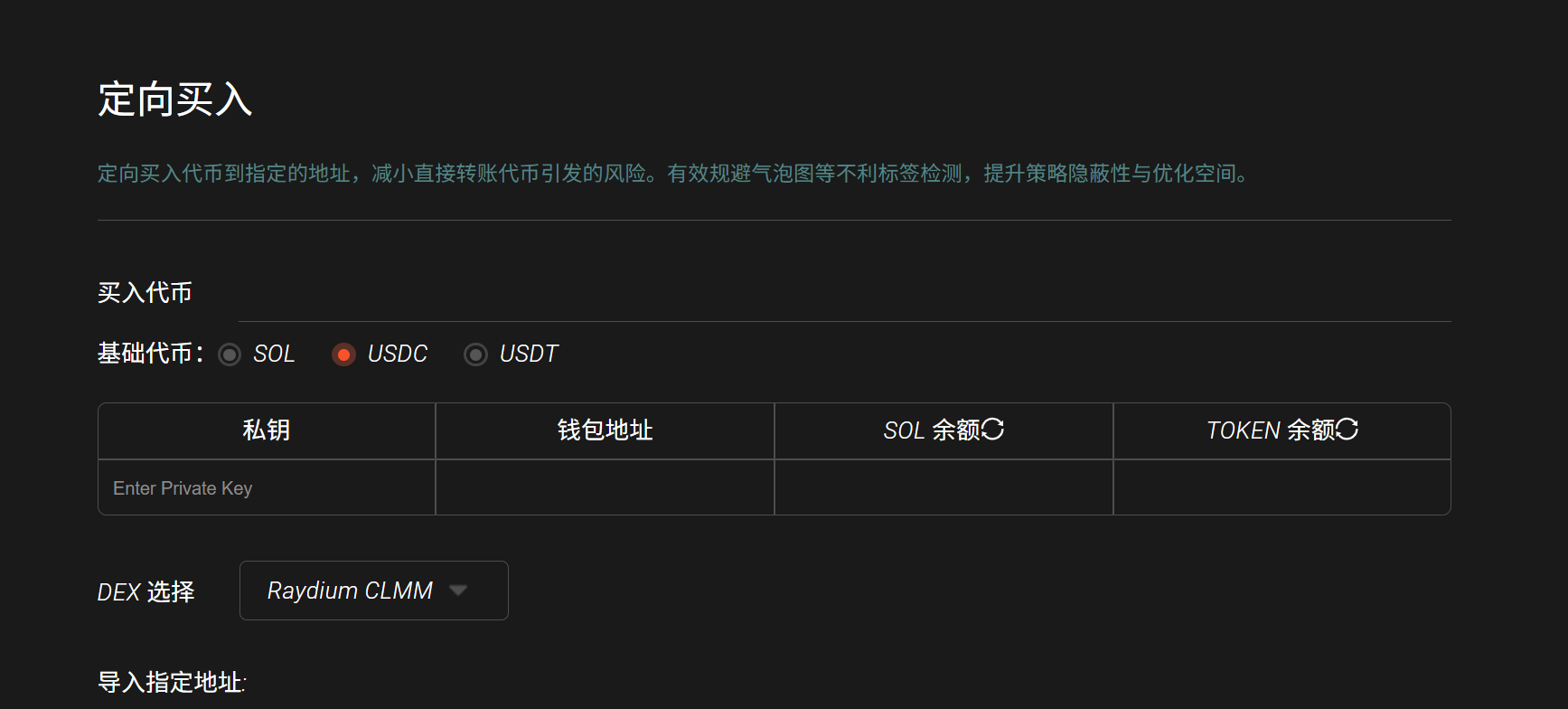
3. Enter the token contract address
Paste the correct address into the "Buy Token Address" input box → The table below will automatically display the token abbreviation after it is correct.
- Choose DEX and base token
- DEX: Currently, the mainstream choices are Raydium or Jupiter (depending on which pool the token's liquidity is primarily in).
- Base Token: In most cases, choosing SOL is crucial: choosing the wrong one will cause the transaction to fail immediately!
- Import payment wallet private key
- Wallet address
- Current SOL balance
- The token balance (usually 0)
- Click on the "Import Private Key" area and paste your payment wallet's private key into it (please be careful!).
- After successful import, the following will be displayed:
- You can click the refresh icon in the table at any time to update the latest balance. All transaction fees and purchase amounts are deducted from this wallet.
- Import target receiving address
- In the "Specified Address" area, paste one wallet address per line.
- Supports batch import (multiple rows can be copied directly from Excel).
- Set purchase amount
- There are two modes, choose one:
- Model Description: Suitable Scenarios: Fixed amount; each address buys the same amount of SOL; even distribution; consistent control. Random amount setting: minimum to maximum SOL range; system randomization more like real users; further dissipates traces.
- Recommendation: Don't set the amount too high; 0.05 to 1 SOL per transaction is more natural.
- Click "Start" to execute
- The system will initiate buy transactions for each address one by one.
- The transaction log will be displayed in real time below.
- After each successful transaction, you can copy the transaction hash (Signature) to Solscan/Solana Explorer to view details.
Precautions & Frequently Asked Questions
- You must ensure that your payment wallet has sufficient SOL (purchase amount + transaction fee + priority fee).
- Choosing the wrong DEX or base coin → 99% chance of failure.
- The private key is only used for signing locally and is not stored on the platform (but it is still recommended to use a small-amount dedicated wallet).
- If the log shows a failure, you can copy the hash and check the specific error reason in your browser (common errors include insufficient balance, excessive slippage, and insufficient pool liquidity).
- Do not confuse the destination address with the payment address.
- It is recommended to perform large-scale operations in batches to avoid network congestion affecting the process.
Once you complete the above steps, you can securely and discreetly distribute tokens to designated addresses through a "buy" process.