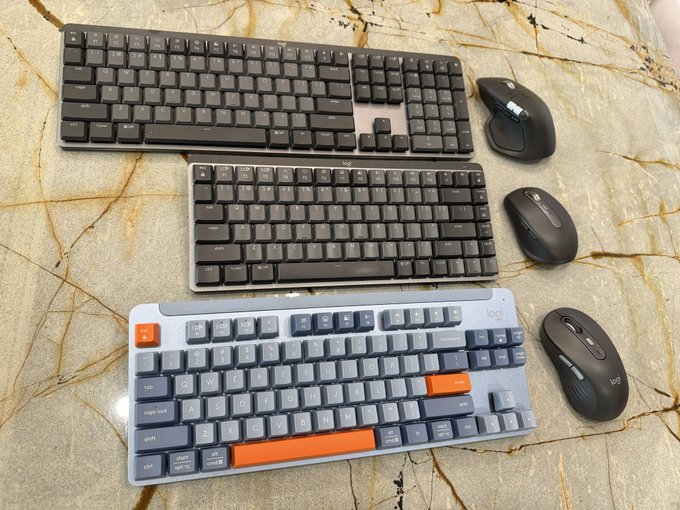
I've tried them all, even if it costs me money! As shown in the photos: Logitech keyboards and mice that support Options Flow. From top to bottom in the photo: Keyboards: MX Mechanical / MX Mechanical Mini / K855 Mice: MX Master 4S / MX Anywhere 3S / M750L Corresponding JD.com prices: 7xx/6xx/4xx 7xx/3xx/2xx But the K855 + M750 keyboard and mouse combo is only a little over 300 RMB. One Bolt receiver connects both the keyboard and mouse simultaneously. (If bought separately, it's 4xx + 2xx, plus an extra Bolt receiver). The only downside is that it's only available in black, and the mouse is a small to medium size, so the L size isn't available for large hands. My impression after trying them all is: The MX Mechanical keyboard is too wide and takes up too much space; The MX Mechanical Mini is too compact, making it easy for large hands to cross their fingers; The K855, on the other hand, is the right size, suitable for both office work and gaming, and has a higher key travel. Mice The MX Master 4S is a high-end productivity mouse, but it's heavy and not agile enough for me. The MX Anywhere 3S is also positioned for productivity, but its small size makes my hands too big. The M750, while not designed for gaming, is relatively lightweight and comes in two sizes to fit small/medium/large hands (size differences: 107x61x37 mm, 101g / 118x65x41 mm, 111g, suitable for palm to fingertip width >19cm). All four MX keyboards and mice use Type-C charging. The descriptions state that the MX keyboard has a battery life of 15 days/10 months with backlight on/off. Both MX mice have a battery life of 70 days. The K855 and M750 use AAA and AA batteries respectively. The descriptions state that the K855 has a 3-year battery life, and the M750 has a 2-year battery life. Overall, the K855 and M750 offer a comfortable and balanced experience for general use, and they also offer high value for money; a black set for just over 300 RMB feels like a bargain. A friend of mine bought it quickly and gave positive feedback.
This article is machine translated
Show original

paulwei
@coolish
03-14
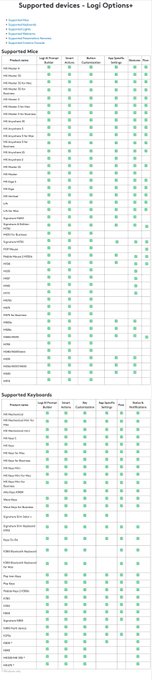
更正,罗技支持Options+ Flow跨屏功能的键盘鼠标
准确列表应参考这个链接:
https://support.logi.com/hc/cs/articles/25528092585879-Supported-devices-Logi-Options…
既支持Options+ Flow
且可能更适合玩游戏的键盘鼠标还有
Signature K855 TKL 无线机械键盘
(https://logitech.com/zh-cn/shop/p/k855-signature-wireless-mechanical-tkl.920-011071…)
Signature Plus M750 鼠标,还有大手型号M750L
(https://logitech.com/zh-cn/shop/p/m750-signature-plus-wireless-mouse.910-006271…)

From Twitter
Disclaimer: The content above is only the author's opinion which does not represent any position of Followin, and is not intended as, and shall not be understood or construed as, investment advice from Followin.
Like
Add to Favorites
Comments
Share
Relevant content