Author: Zibu
cz(@cz_binance) started by shouting $tst in a hesitant manner, and now he is also mentioning his pet dog on Twitter, it seems he really wants to make the meme on bsc happen. So, how to play the meme on bsc? To do the job well, one must first sharpen the tools. This article will introduce the tools that can be used in the various processes of participation.
I. Scan the chain
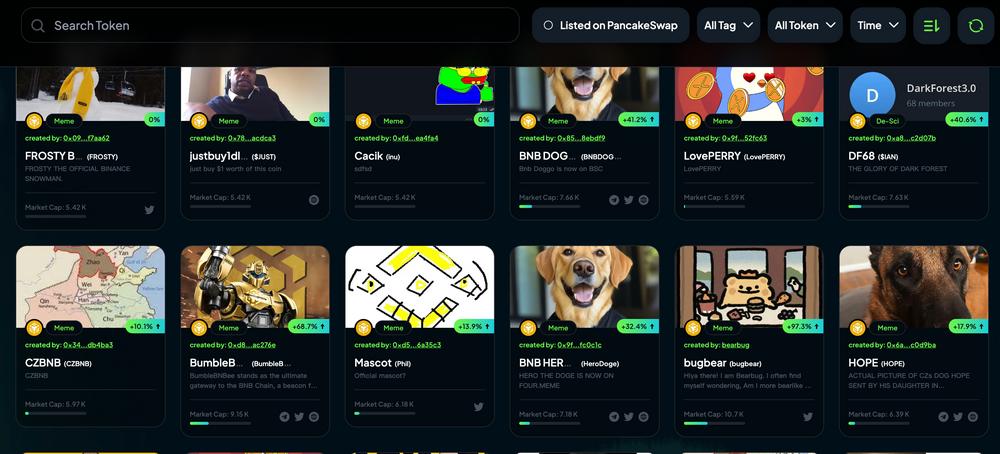
The pump platform on BSC is https://four.meme/, we can check the coins in the internal order book on the【Board】page, and we can filter them in various ways; we can also check the market cap ranking and 24-hour trading volume ranking on the【Ranking】page.
II. On-chain tools
In addition to scanning the chain, we can also use many on-chain tools to help us filter the coins, mainly considering indicators such as market cap/pool, trading volume, number of transactions, and creation time.
The main on-chain tools are as follows.
1. UniversalX
Website: https://universalx.app/user/x/0x_zibu?inviteCode=E8LJSP
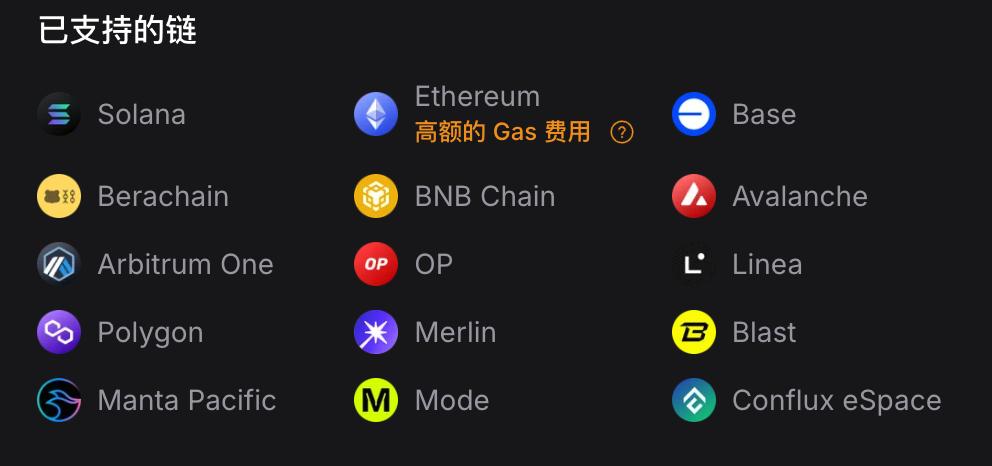
UniversalX (@UseUniversalX) is the first official application of Particle Network (@ParticleNtwrk), which can seamlessly call cross-chain assets in a non-custodial manner, without manual bridging and gas management. UniversalX currently supports Solana, BSC and 13 other mainstream EVM chains. UniversalX also supports mobile, and is available on both App Store and Google Play.
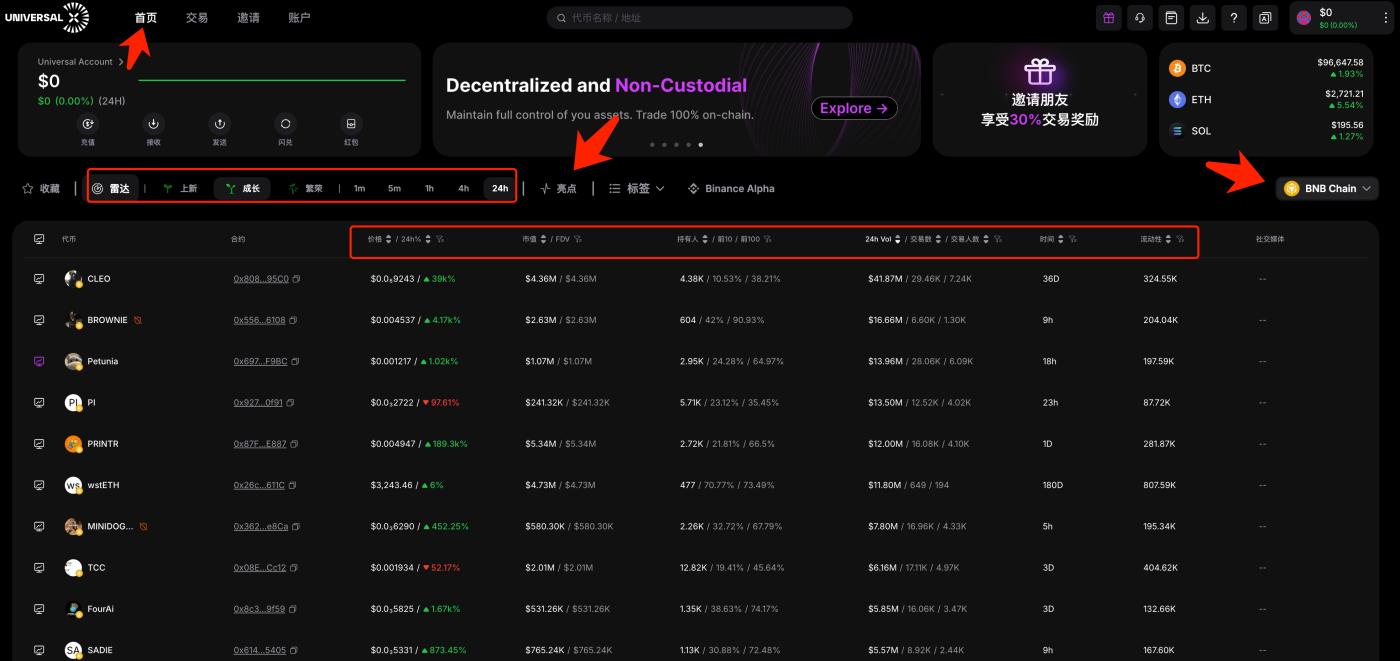
On the homepage of UniversalX, select【BNB Chain】in the【Radar】section, you can choose coins from different periods by "New", "Growth", and "Prosperity". The main filtering indicators are market cap, holders, trading volume, and liquidity.
For new coins, you can focus more on "New", for the second stage you can focus more on "Growth", and "Prosperity" is mainly for old coins with a long listing time.
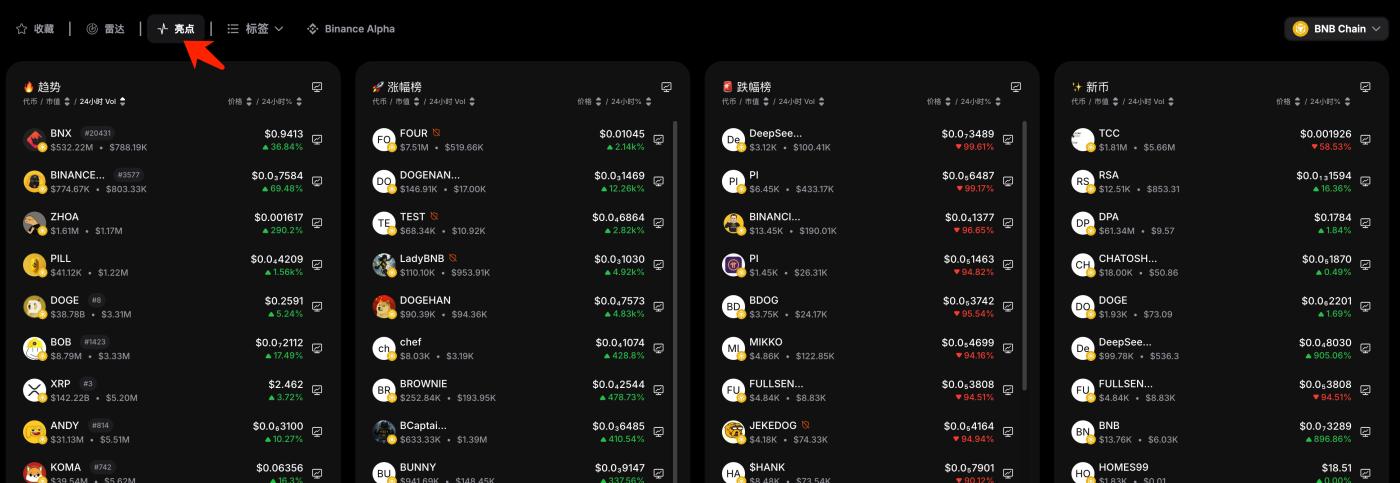
【Highlights】The function has 4 rankings, including "Trend", "Gainers", "Losers", and "New Coins". "Trend", "Gainers", and "New Coins" can be focused on.
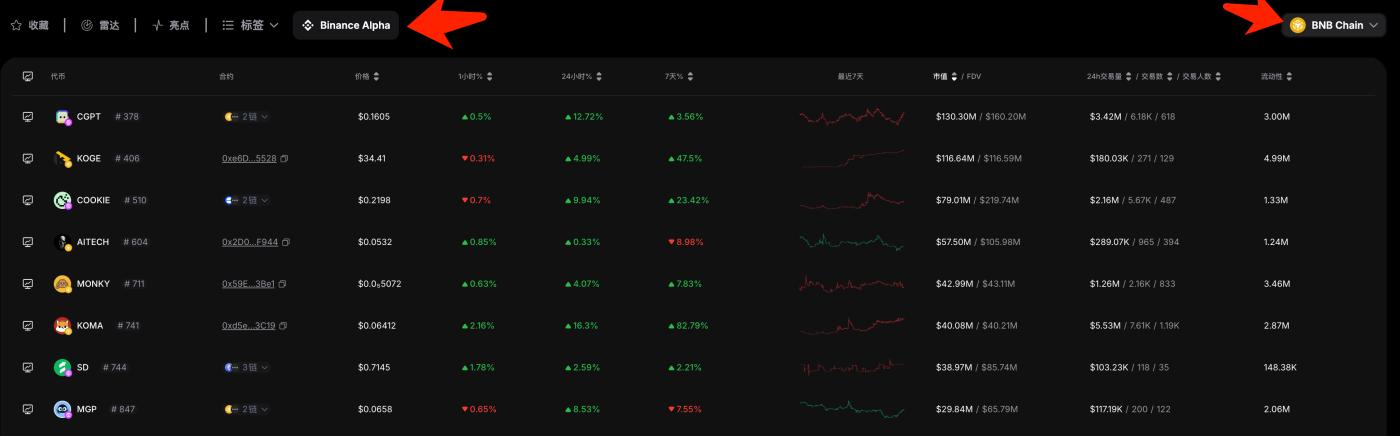
UniversalX also lists the coins on Binance Alpha, which can be viewed across the chain or only for a specific chain, such as the BSC chain. This function is better than the Binance wallet, which cannot filter by chain.
2. debot
Website: https://debot.ai?inviteCode=175623
debot mainly has two sections: 【New Listings】and 【Hot】.
The 【New Listings】section is for new coins that have been launched within the last 24 hours, and you can filter them by time period, market cap, trading volume, number of transactions, etc. Its advantage is the additional "Wallet Count" indicator.
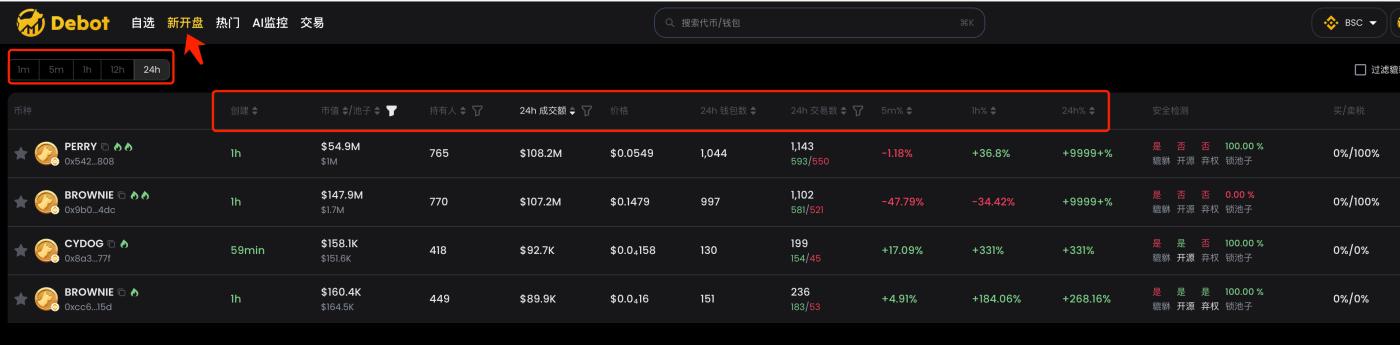
The 【Hot】section filters all the listed coins by heat, with similar indicators to the 【New Listings】section.
3. gmgn
Website: https://gmgn.ai/?ref=sxsy7oyJ
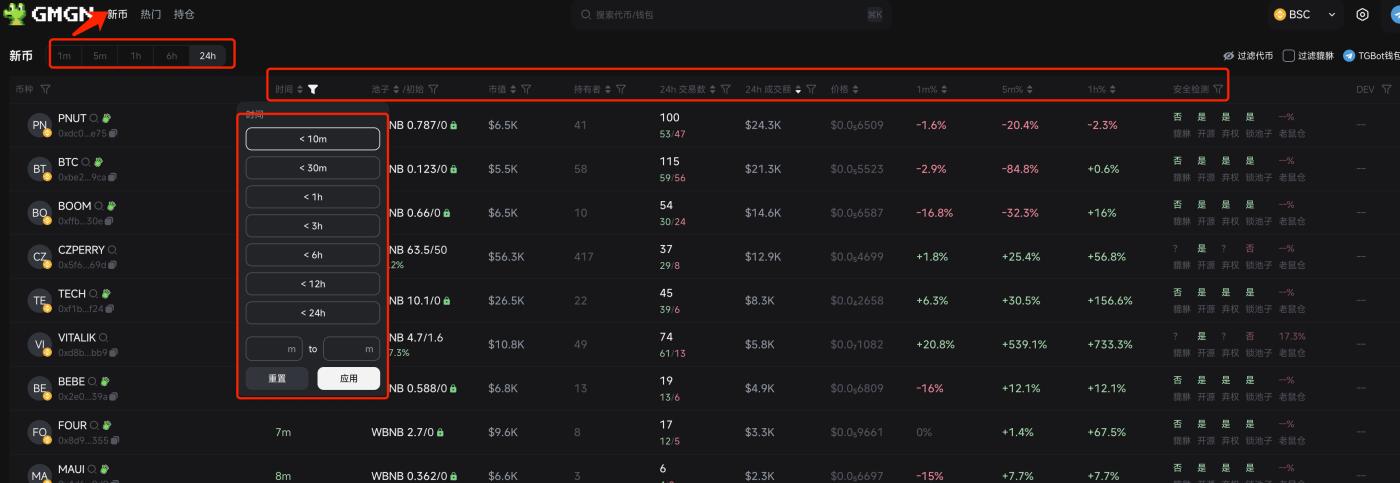
gmgn recently supported the BSC chain and was retweeted by cz. The BSC chain of gmgn mainly has two sections: 【New Coins】and 【Hot】, similar to debot.
The 【New Coins】section is also for new coins launched within the last 24 hours, and you can filter by time, with a finer granularity; the security detection also supports filtering, as it is common for some coins on EVM to not be open source, not renounce, and not lock the pool when they are just launched, so the support for filtering is very practical; other indicators are common, as shown in the image.
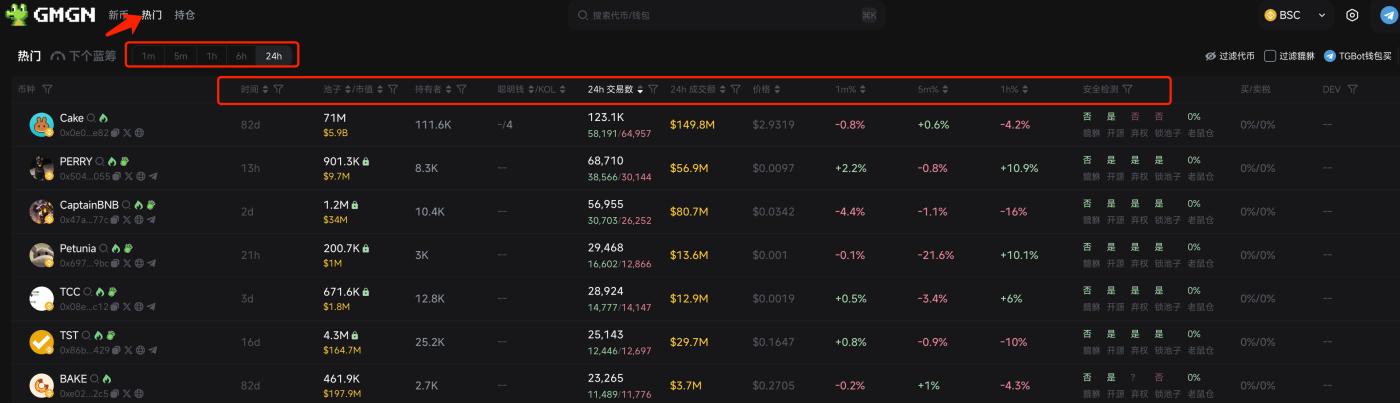
The 【Hot】section filters all the listed coins by heat, with similar indicators to the 【New Coins】section.
gmgn has also designed a 【Next Blue Chip】function on the BSC chain, but there is no data yet. By referring to the same function on the SOLANA chain, it is roughly a selection of some promising coins that may be listed later, so this can also be focused on in the future.
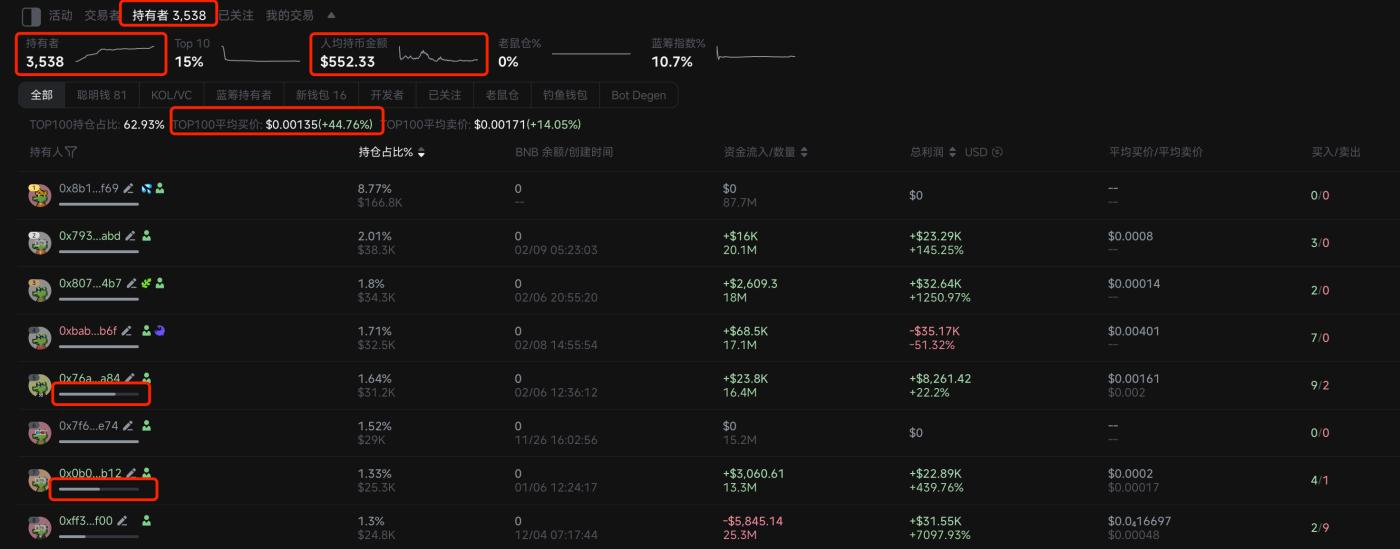
When looking at the charts, gmgn's 【Holders】section has added a new feature, which can directly see the changes in the number of holders, the average amount held per holder, and the average buy price of the top 100 holders, which is very convenient to quickly assess the basic situation of the holders. There is a progress bar under each holder's address to display the remaining holdings of the current address, which is very intuitive and a very practical feature.
4. okx
Website: https://www.okx.com/zh-hans/web3
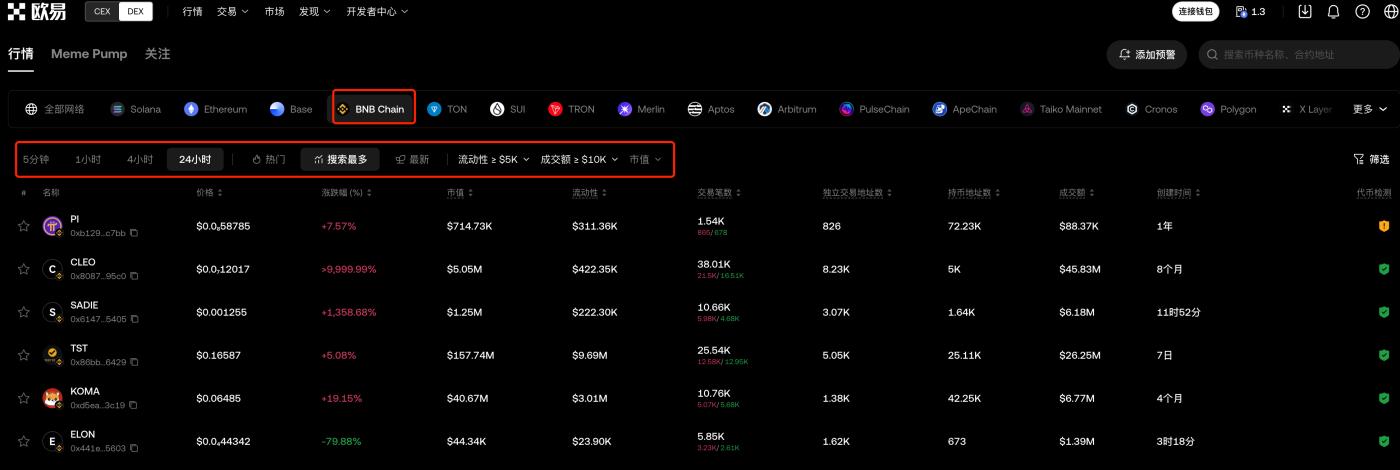
okx is more comprehensive, supporting various chains including BSC. The web page is more feature-rich than the Web3 wallet, and you can filter by time, popularity, most searched, and newest indicators.
5. ave
Website: https://ave.ai/
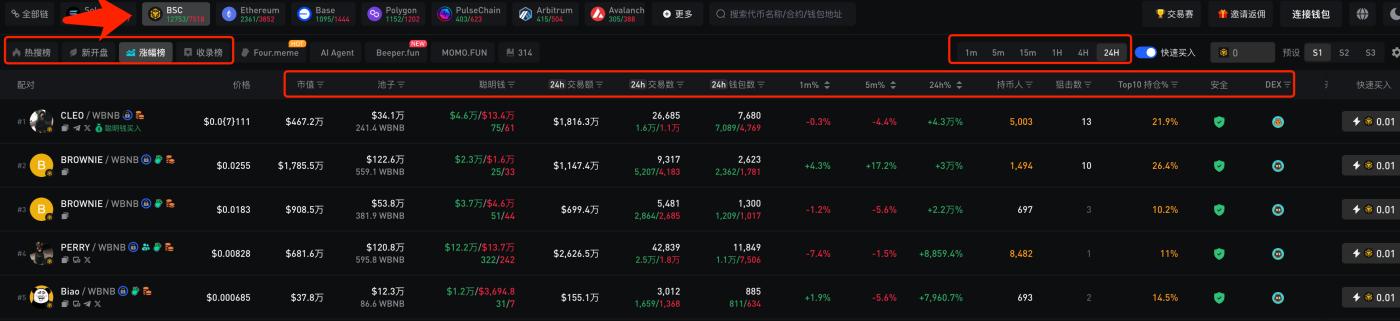
ave is an old tool that has been widely used since the last bull market, supporting multiple chains, and also has an app for convenient chart viewing. The BSC chain functions include 【Hot Search】, 【New Listings】, 【Gainers】, and 【Trending】. Each section can be filtered by different indicators, and some indicators can only be filtered but not sorted, depending on personal preference.
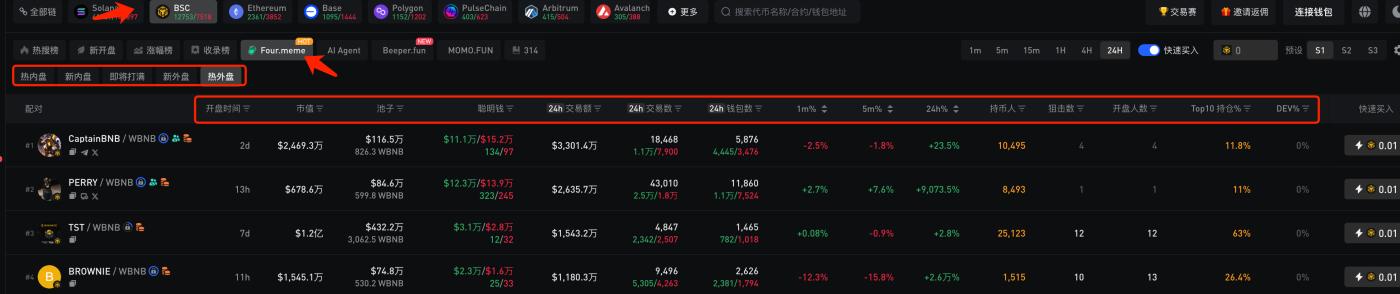
ave has a separate section for the coins of Four.meme, supporting 【Hot Internal Order Book】, 【New Internal Order Book】, 【About to be Full】, 【New External Order Book】, and 【Hot External Order Book】. It's still good for scanning the chain, and feels more comfortable than the official website, hopefully other tools will follow suit soon.
6. Eagle
Website: https://dexscreener.com/
Eagles and ave are both old tools that support many chains. Eagles support filtering by time period, trend, TOP trading volume/number of transactions, yield, new pools, and other indicators, and you can also customize various filtering conditions. The indicators are quite rich overall. I have previously used the filtering indicators of Eagles to run data for a few years and have developed a number of strategies.
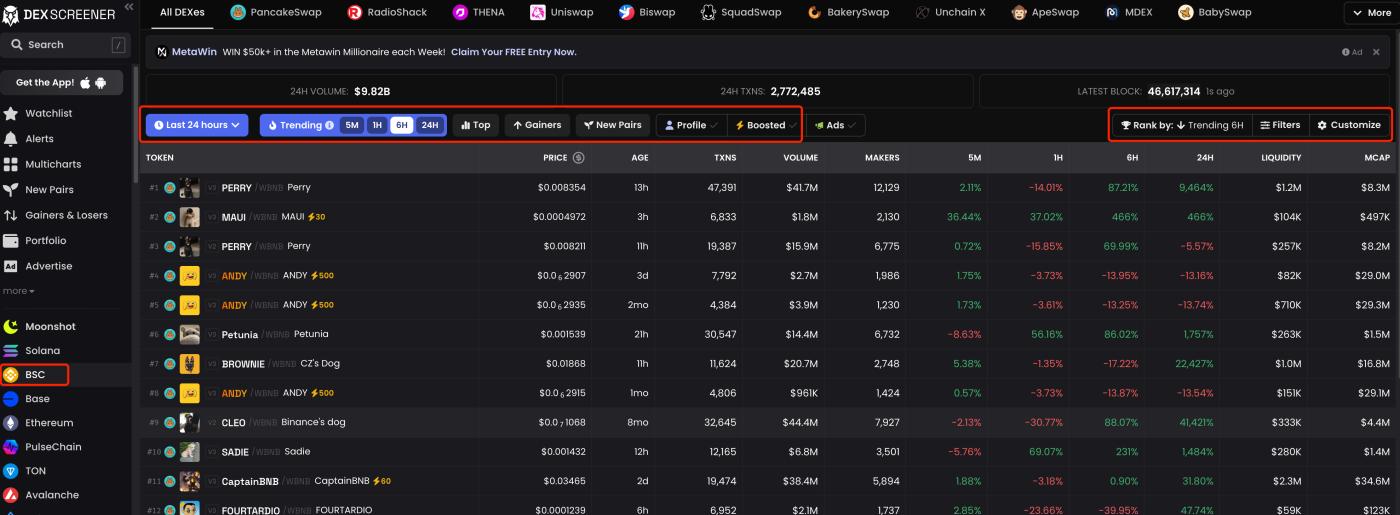
The advantage of Eagles is that it is comprehensive, but the disadvantage is that the candlesticks are not as fast, and it will be a few seconds later than other tools. Its multicharts function is particularly useful, especially suitable for watching multiple coins, and some tools also have this function, but none are as good as Eagles, although there are also some areas that can be improved in Eagles.
III. How to find smart money
Monitoring smart money is an effective way to obtain the current on-chain early large MC memecoins and popular coins, and it is used more on Solana, the BSC chain has been dormant for too long in this bull market, and many people around me do not have accumulated smart money on the BSC chain, so how should we find smart money?
One is to use the smart money on other EVM-based chains, such as the ETH chain and the BASE chain, and see if the smart money on those chains is active on the BSC chain, if it remains active, then it can be used directly.
The other is to use the existing tools to analyze the emerging large MC memecoins and find the smart money.
1. debot
Website: https://debot.ai?inviteCode=175623
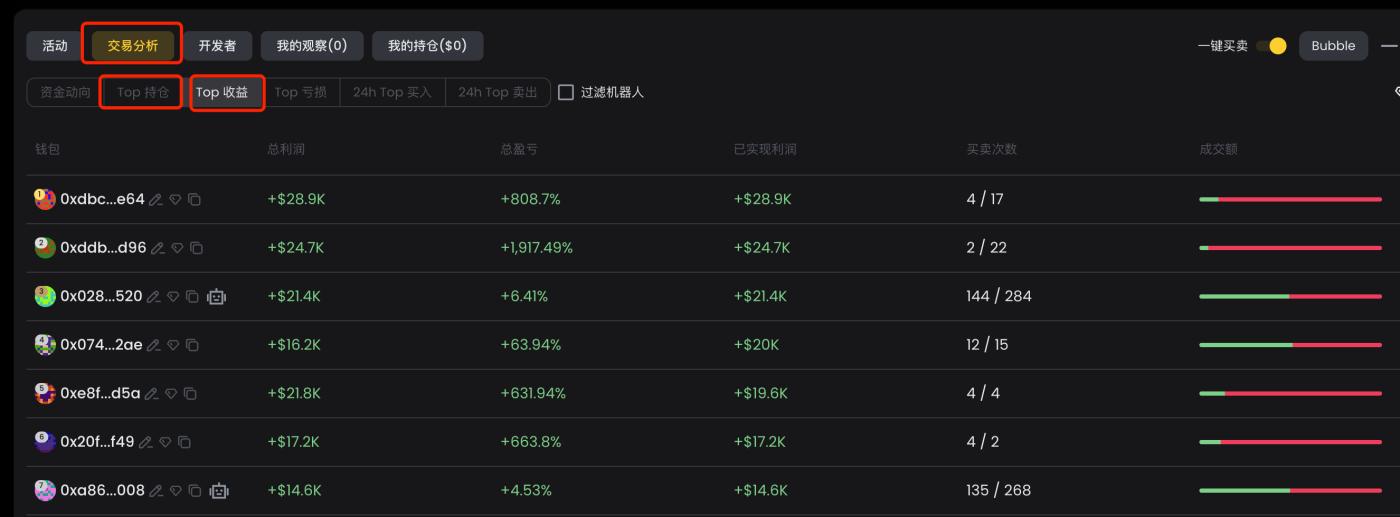
In debot, enter the CA of the coin you want to analyze, and open the [Transaction Analysis] at the bottom, we focus on the [Top Holdings] and [Top Profits] sections. [Top Holdings] is a list of the top 100 holding addresses, and [Top Profits] is a list of the top 100 most profitable addresses.
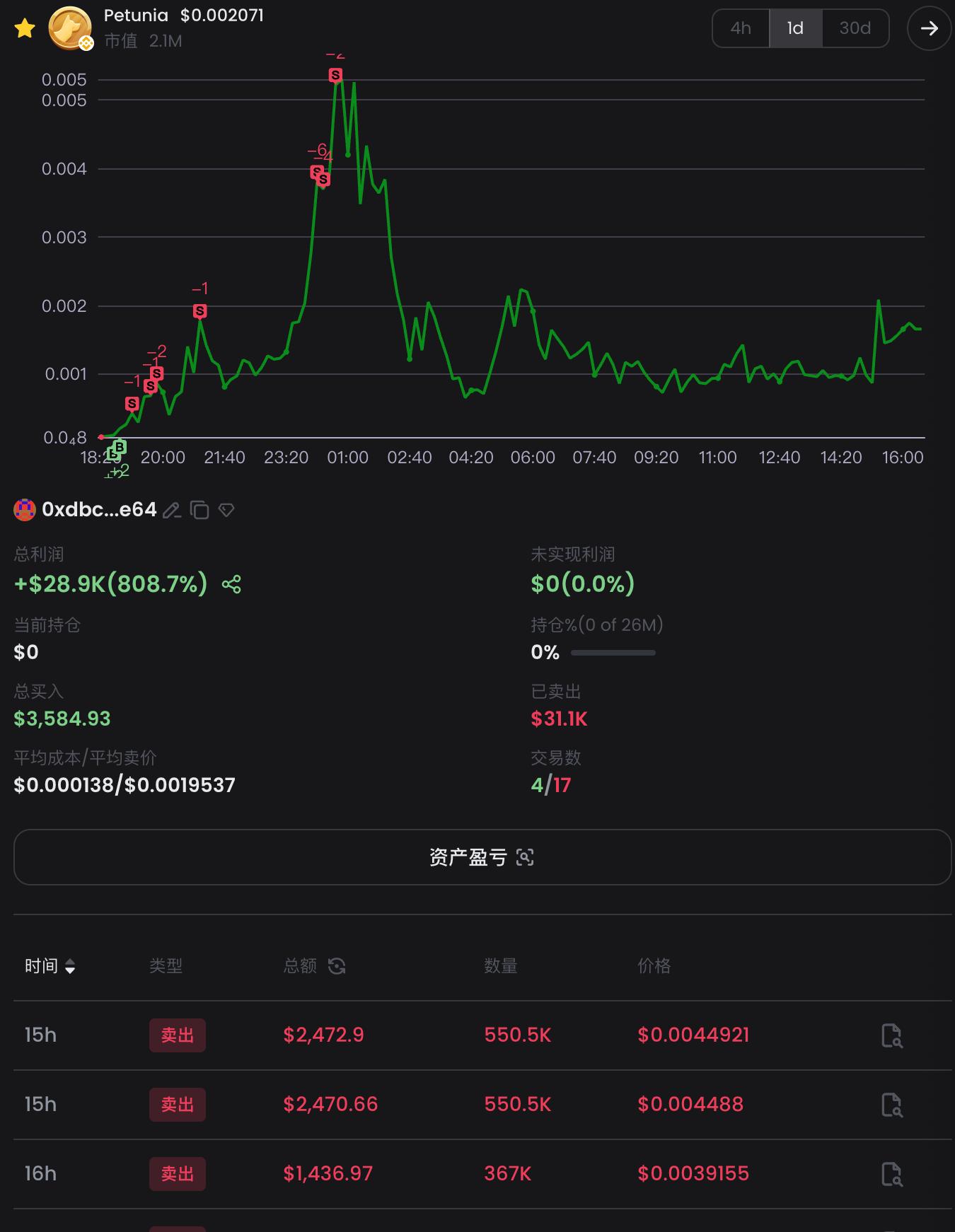
Just click on an address, and the detailed profit data and transaction records of that address will appear on the right side of the interface.
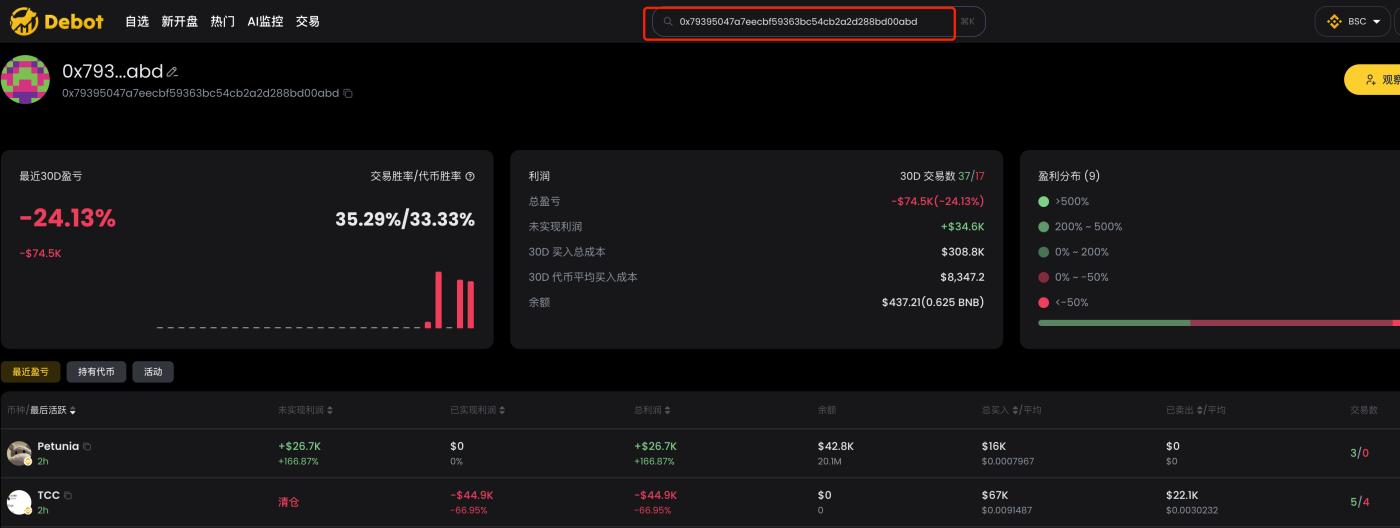
If we want to see the overall profit data, recent profits and losses, held tokens, and recent transaction records of an address, we can also enter that address in the search box to see the detailed data.
2. gmgn
Website: https://gmgn.ai/?ref=sxsy7oyJ
In gmgn, enter the CA of the coin you want to analyze, and pay attention to the [Traders] and [Holders] sections at the bottom.
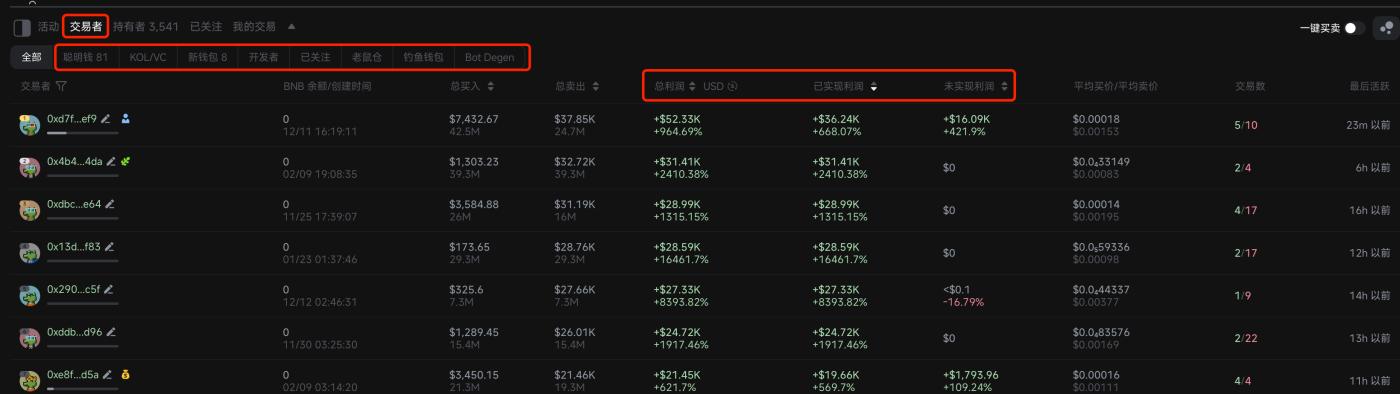
[Traders] is a list of the top 100 most profitable addresses, which are further classified into "smart money", "KOL/VC", "new wallets", "developers", "rat holes", "phishing wallets", and "Bot Degen". We can sort by "total profit", "realized profit", and "unrealized profit" to filter out the smart money that meets our criteria.
[Holders] is a list of the top 100 holding addresses, which are also classified into "smart money", "KOL/VC", "blue-chip holders", "new wallets", "developers", "rat holes", "phishing wallets", and "Bot Degen". We can sort by "capital injection/quantity" and "total profit" to filter out the smart money that meets our criteria.
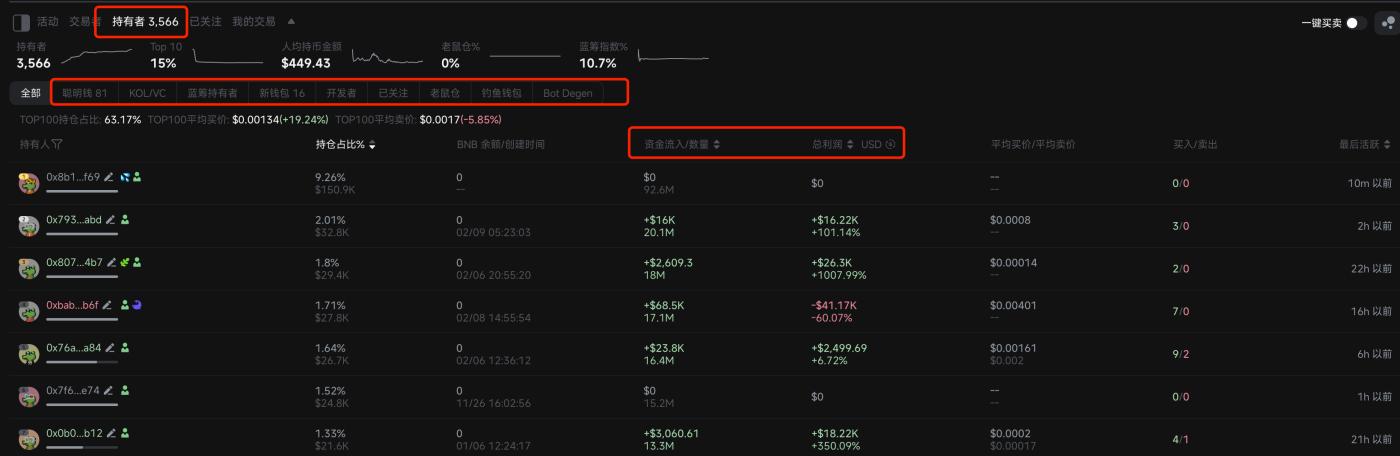
Just click on an address, and the detailed profit data and transaction records of that address will appear on the right side of the interface.
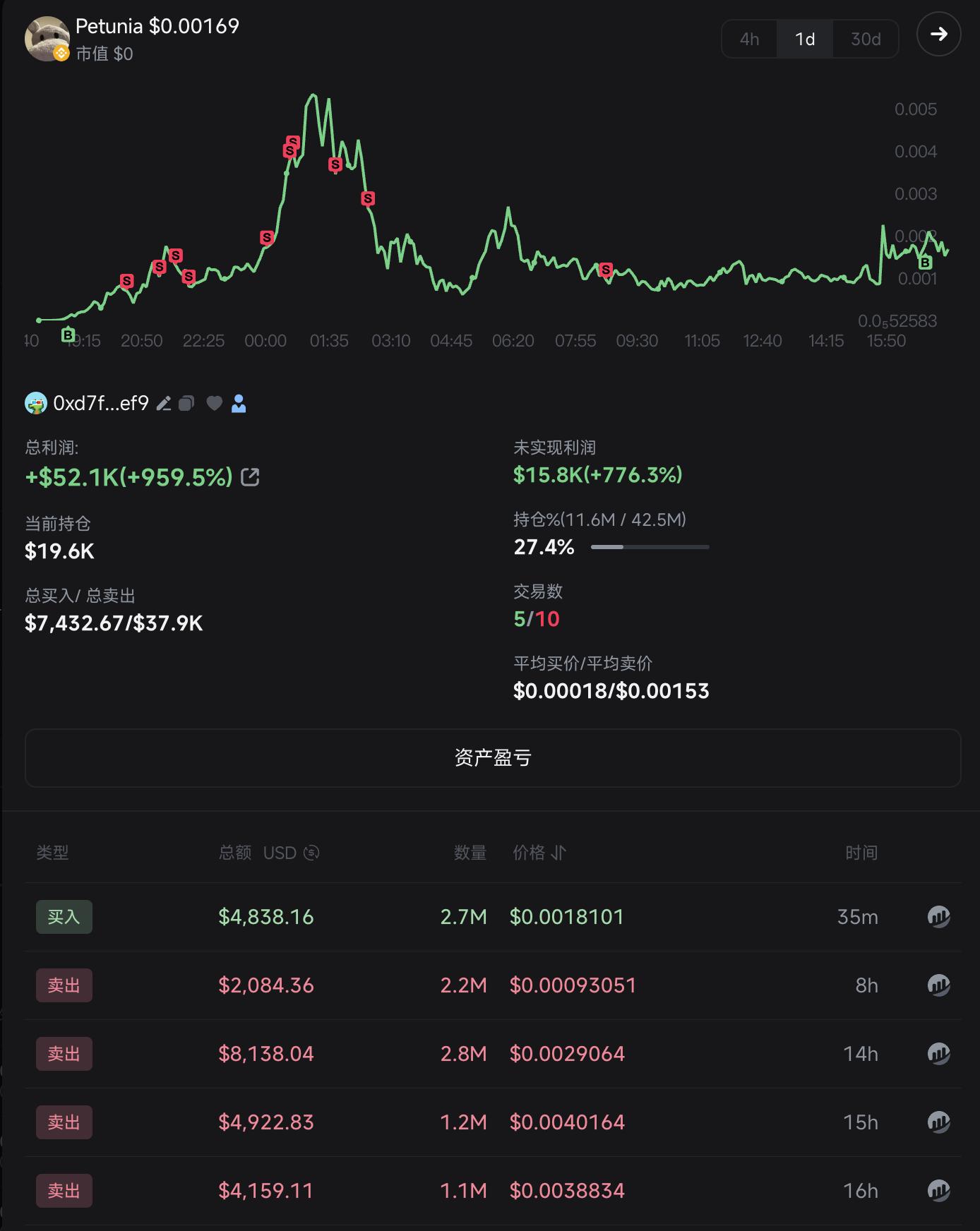
Currently, gmgn does not support analyzing the overall profitability and historical data of a single address, and I hope gmgn can add this feature as soon as possible.
3. ave
Website: https://ave.ai/
ave also has analysis of [Holders] and [Top Traders].
[Holders] is a list of the top 100 holding addresses, which are further divided into "smart money", "DEV", and "snipers".
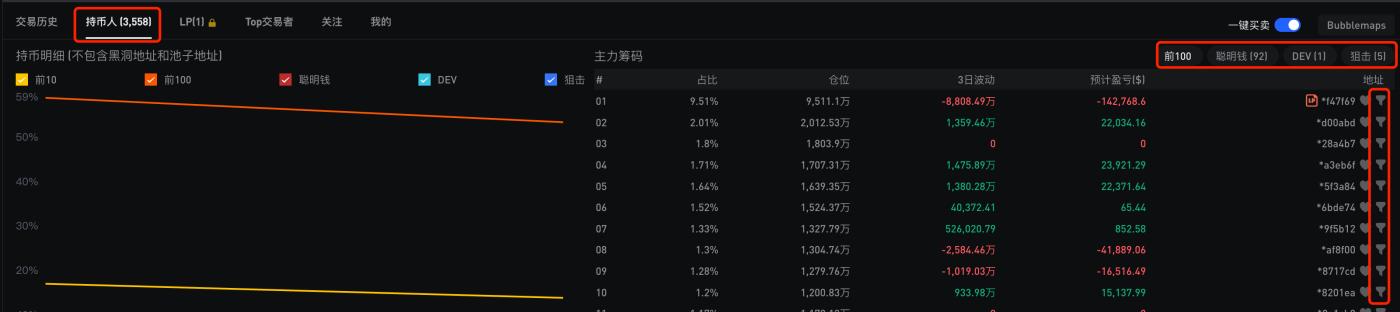
When we click the filter button behind an address, we can see the profit and transaction data of that address on this coin.
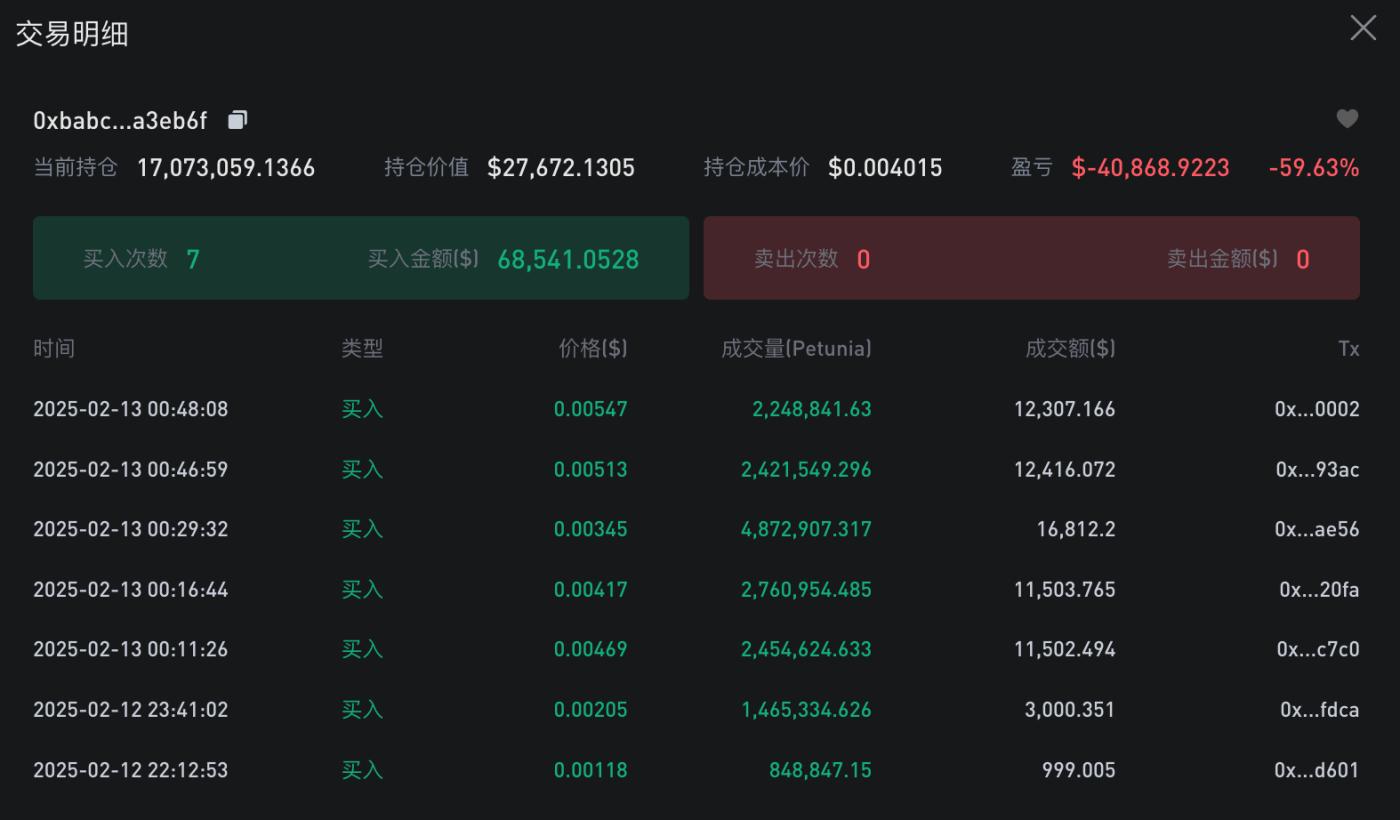
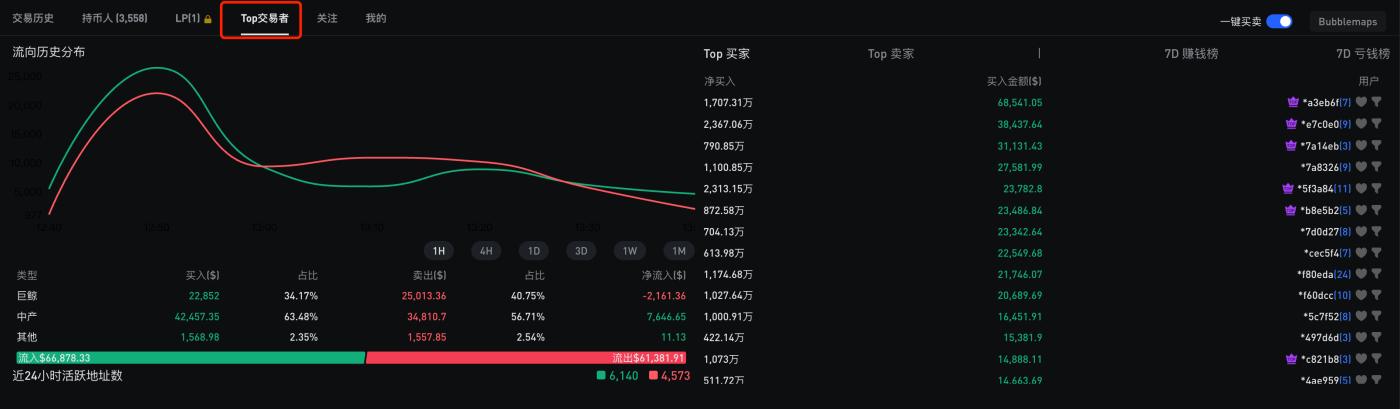
[Top Traders] currently only lists the situation of the top 15 profitable addresses, with limited data.
4. Eagles
Website: https://dexscreener.com/
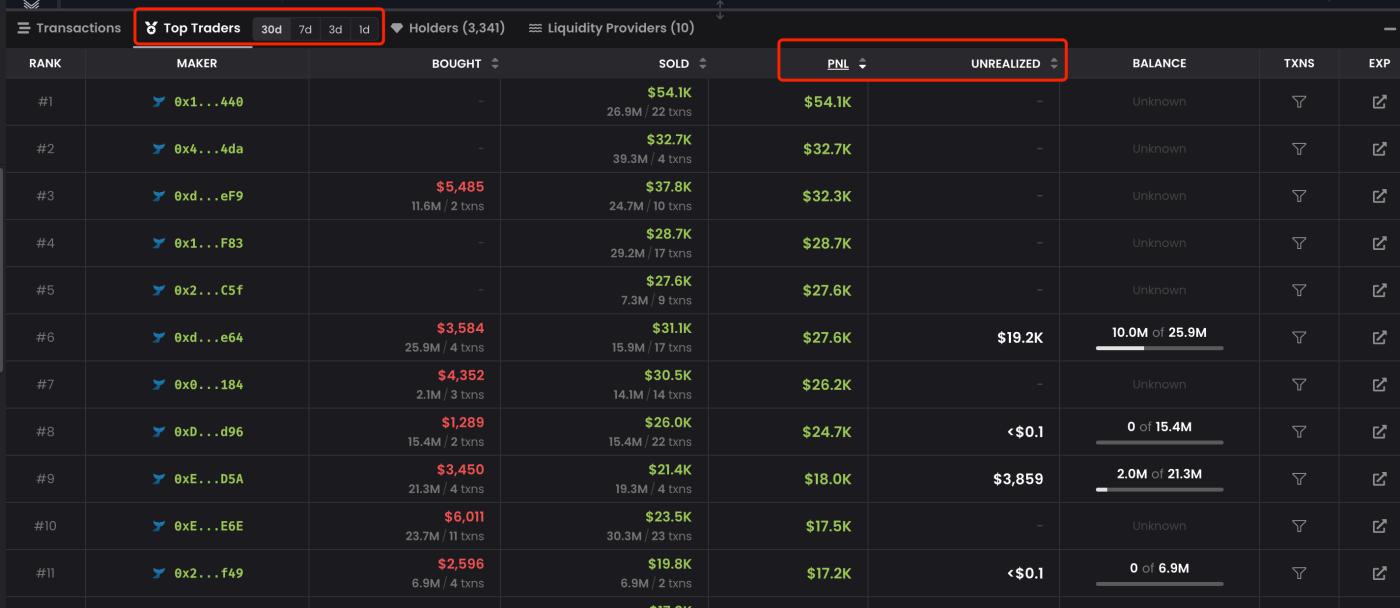
The [Top Traders] section of Eagles lists the top 100 most profitable addresses, which can be sorted by total profit and unrealized profit, but the information displayed is limited, not as functional as debot and gmgn.
IV. Monitor smart money
With the smart money, we need to monitor it so that we can know what coins these powerful people are playing on the chain in the first time. When it comes to monitoring, I recommend debot, which is the most feature-rich and granular monitoring product I have used.
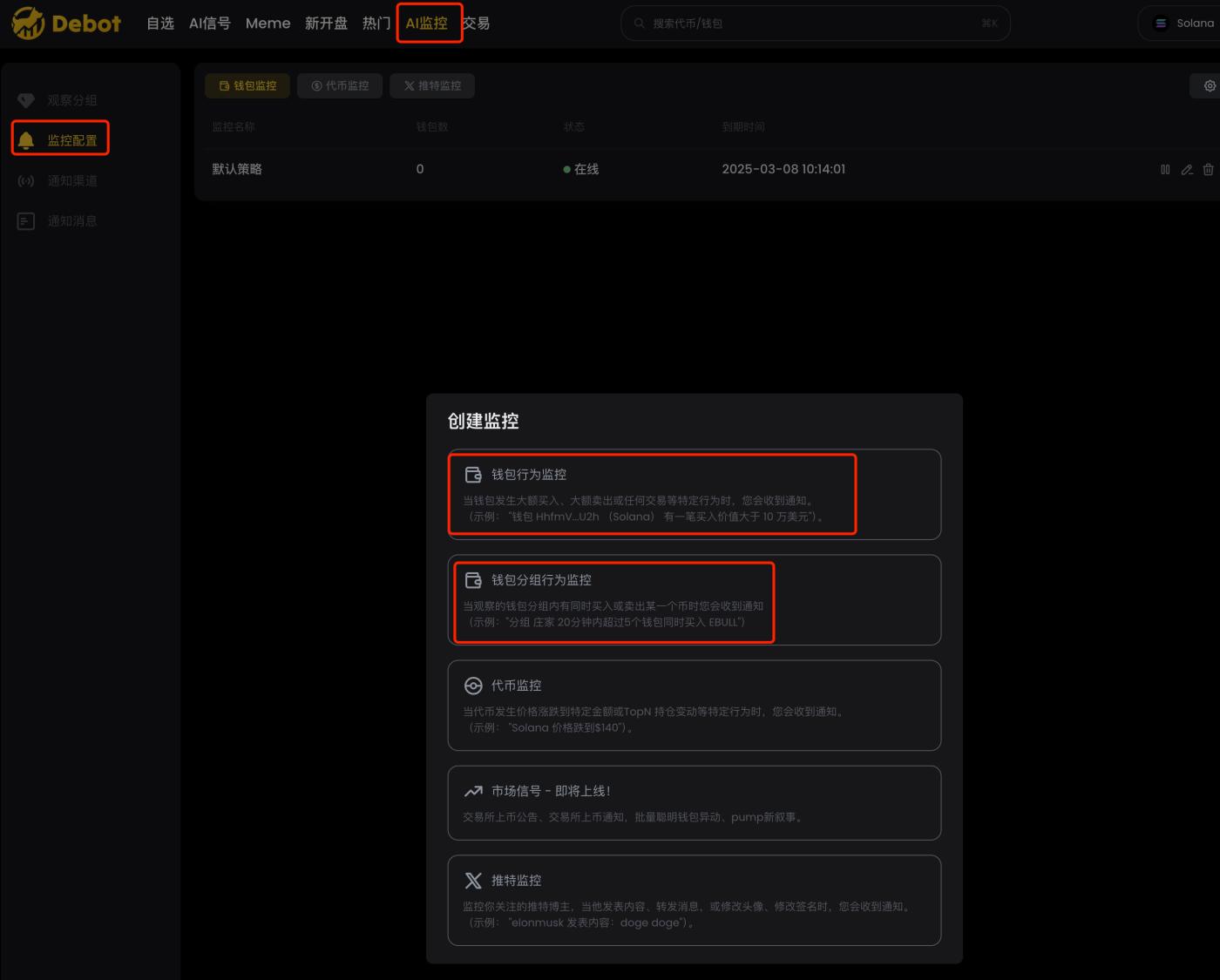
debot's wallet monitoring is divided into two types: wallet behavior monitoring and wallet group behavior monitoring, as shown in the figure.
1. Wallet behavior monitoring
This monitoring is the ordinary monitoring that all tools have, but the monitoring of other tools is to push all the addresses to a single Telegram group, while the advantage of debot is that it can divide the addresses into groups and then push them to different Telegram groups according to the grouping, as shown in the figure.
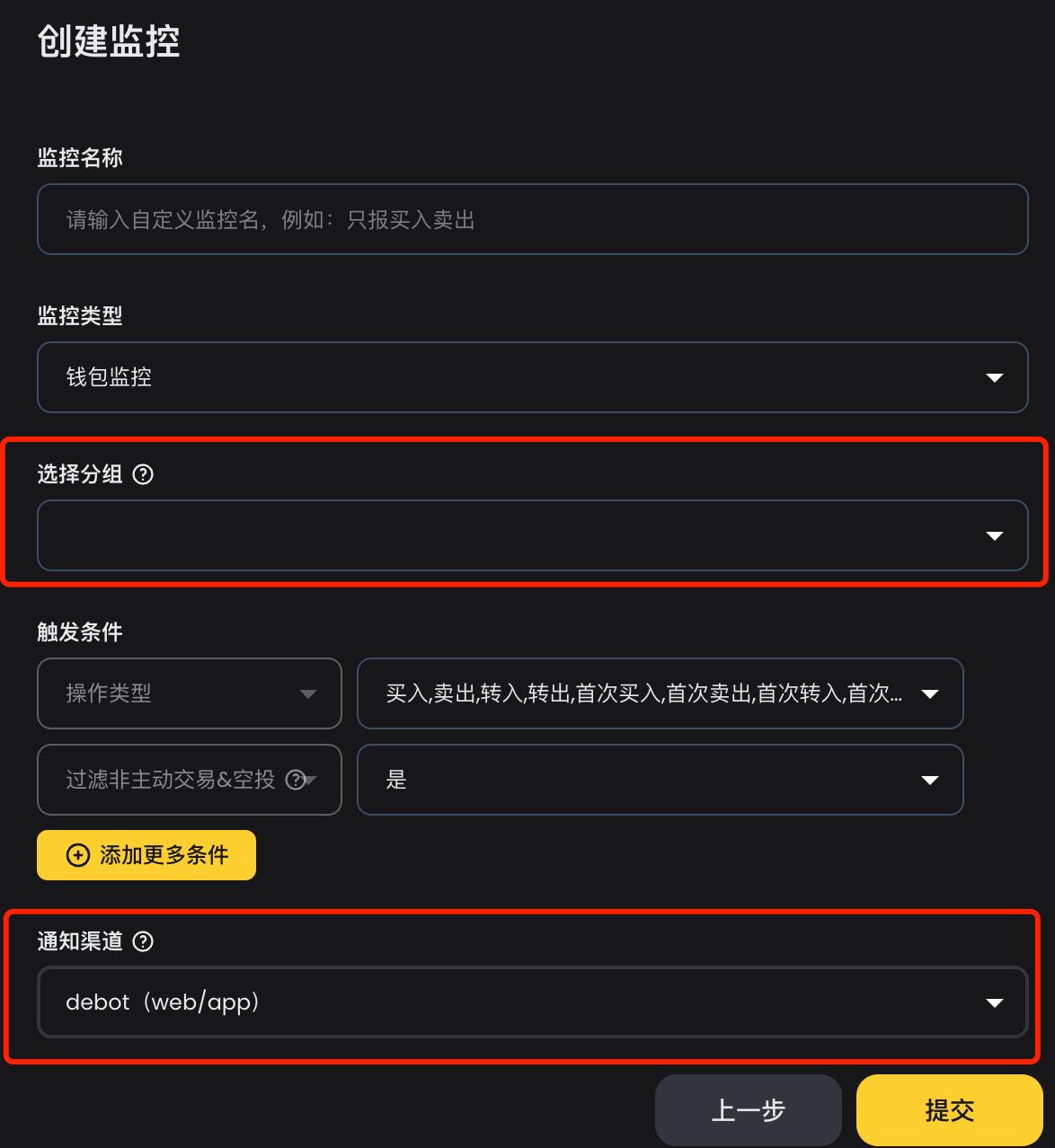
This way, we can establish different Telegram groups for push notifications based on the labeling, such as domestic players, overseas second-stage players, key addresses to watch, etc. Tools that can provide hierarchical monitoring information are good tools. When I was using abot for monitoring before, in order to achieve the effect of group push, I would first label the addresses, and then after receiving the monitoring messages in the Telegram group, I would do secondary distribution based on the labeling. Now with debot, I don't need to do secondary development anymore.
2. Wallet Grouping Behavior Monitoring
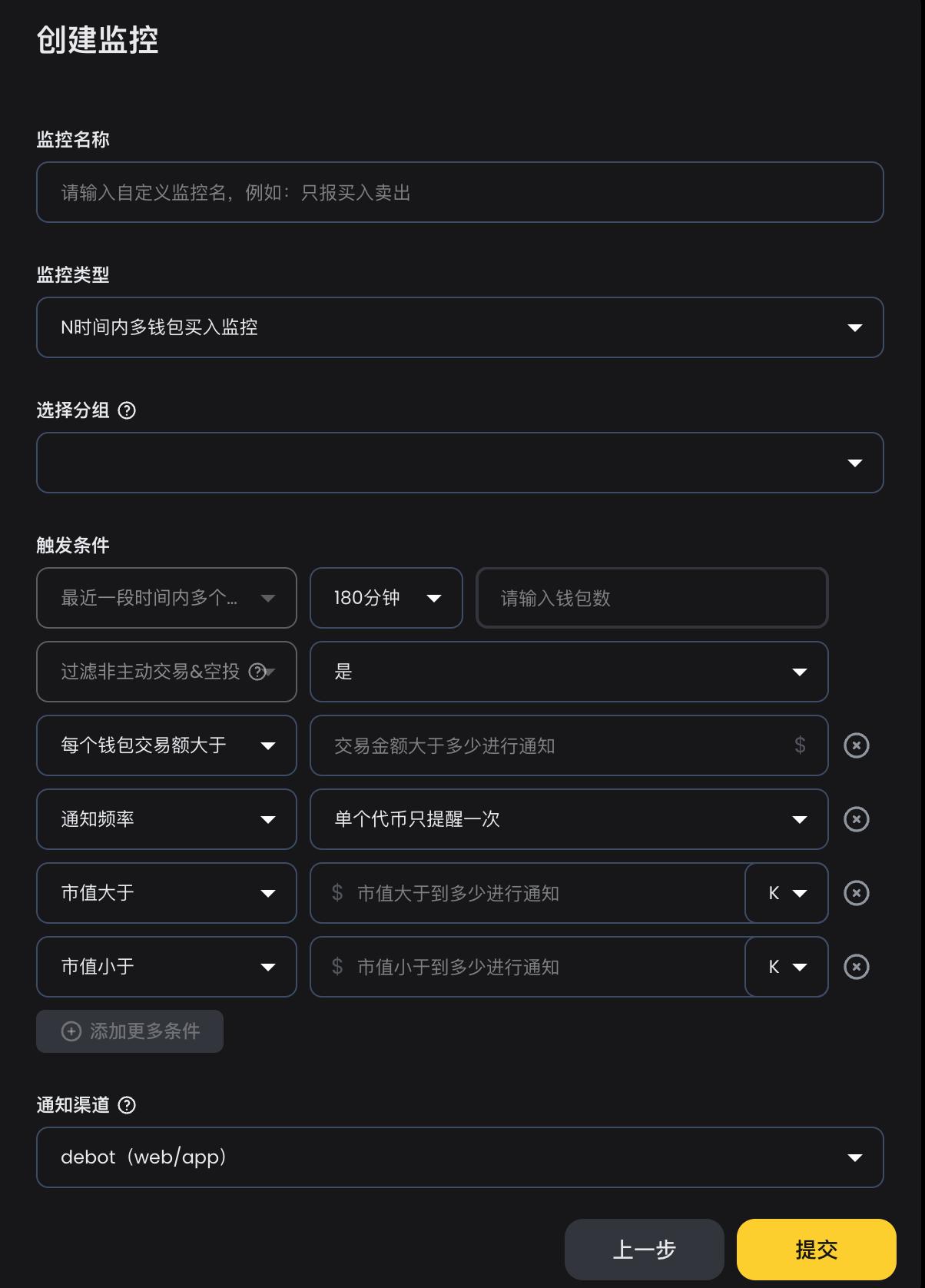
If we monitor a large number of addresses, there is an unavoidable problem: too many push notifications. When there are too many messages, the human brain cannot process them, and people may want to give up, which would defeat the purpose of monitoring. For this problem, my previous strategy was to do secondary development on the push messages, setting a certain time period where if a certain number of different addresses made purchases, then a notification would be pushed, for example, if there were 5 different addresses that bought within 30 minutes, then a notification would be pushed. I used this strategy for about a year, and the effect was very good, reducing a lot of messages while not missing out on hot coins.
debot's wallet grouping behavior monitoring has just implemented the strategy I mentioned above, and it is even more refined, with finer-grained indicators, as shown in the figure. We can monitor based on buying and selling, set monitoring time periods, transaction amounts, notification frequencies, and market capitalizations. It can fully meet various monitoring needs, and I strongly recommend this feature.
3. Grouped Token Trading and Recent Transactions
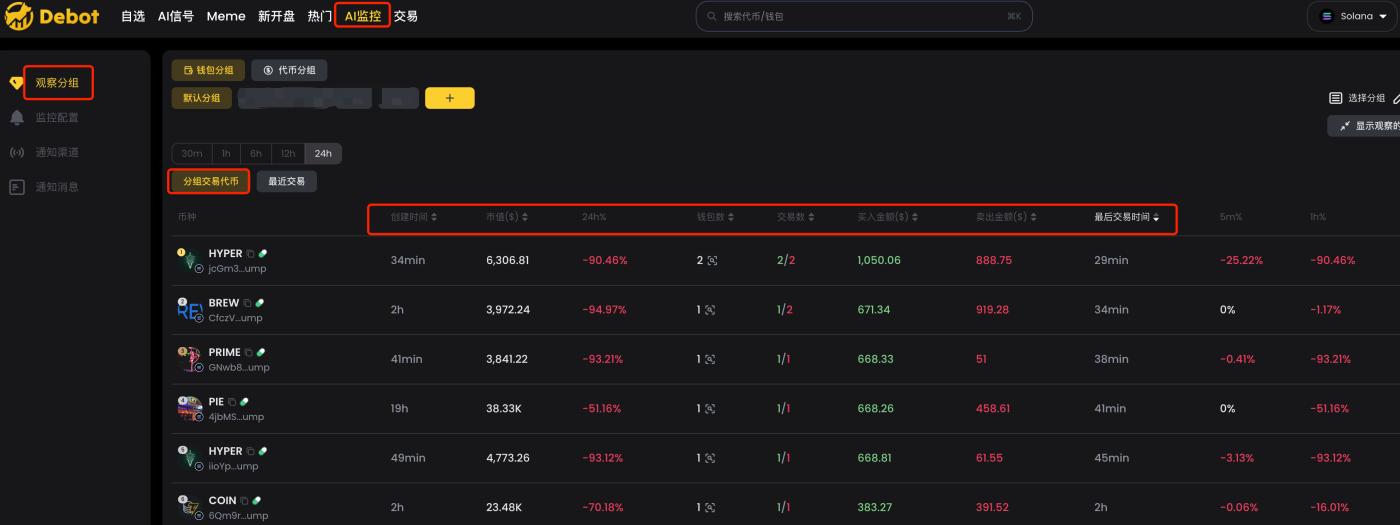
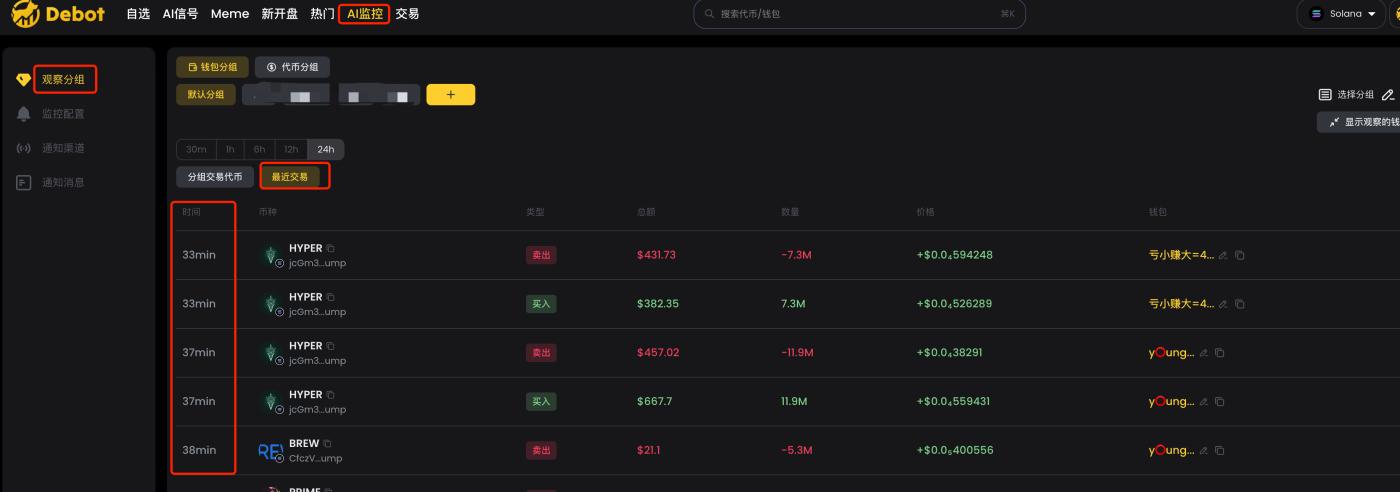
After monitoring the smart money in debot, we can view the [Grouped Token Trades] and [Recent Transactions] by group in the [Observation Groups].
[Grouped Token Trades] lists all the tokens that the smart money in this group has traded within a certain time period, such as 24 hours, and you can filter and sort by different indicators. When we haven't been closely monitoring the real-time monitoring messages of the smart money, but want to know which coins they have bought, this function is very useful.
[Recent Transactions] lists the transaction records of the smart money in this group, sorted by time.
4. Holding Details and Transaction Details
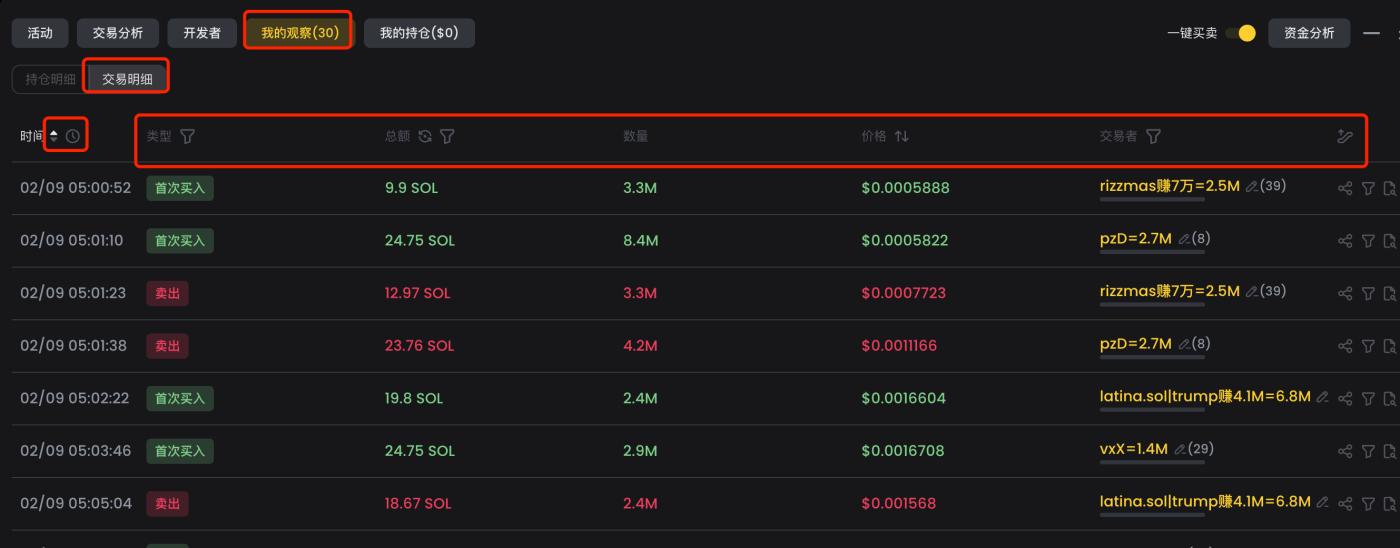
After monitoring the smart money in debot, we can see the [Holding Details] and [Transaction Details] in the [My Observation] section on the coin's K-line page.
[Holding Details] lists the data of all the smart money that has traded this coin, which can be sorted and filtered by various indicators, making it convenient for us to see which smart money has already boarded.
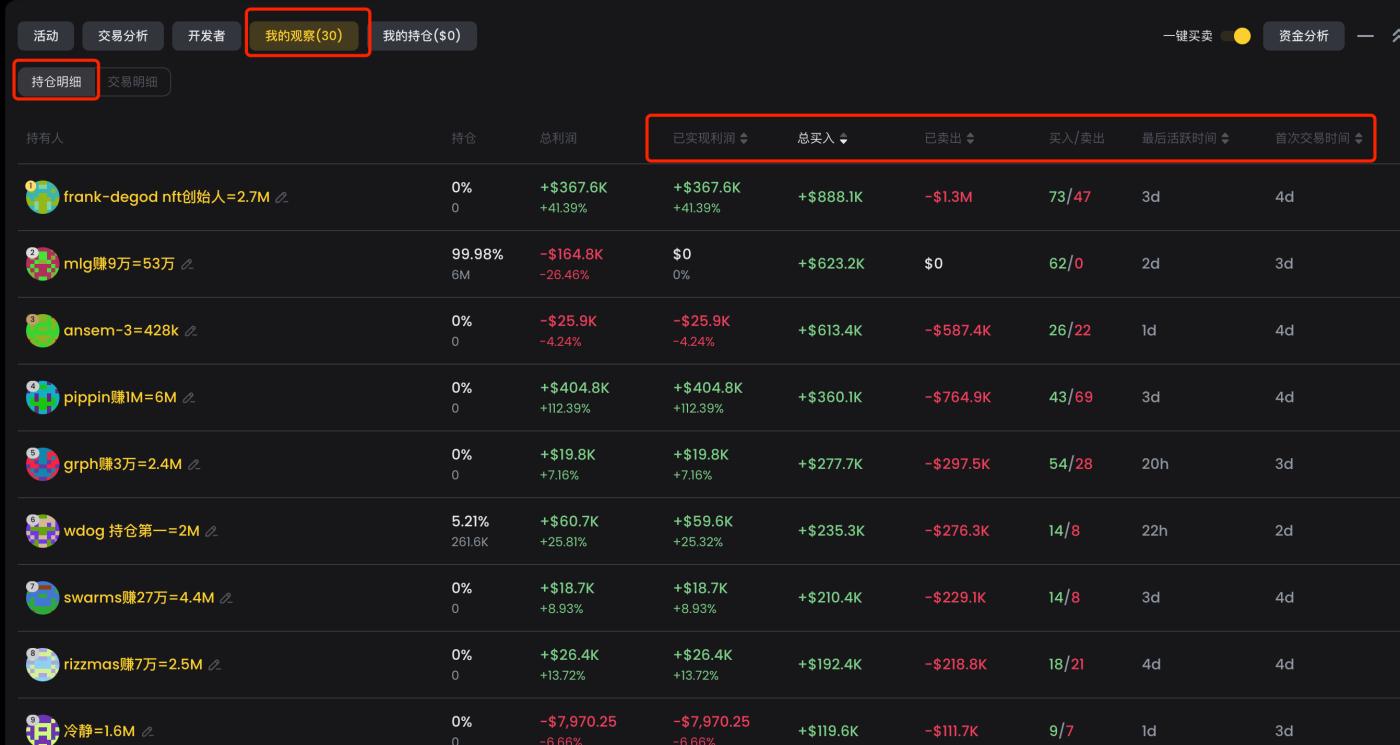
[Transaction Details] lists the transaction records of all the smart money that has traded this coin in time order, which can be sorted in ascending or descending order. This way, when we want to know which address in our smart money was the first to buy this coin, we can sort it in ascending order, and the first transaction will be it. This feature is very practical and can filter out the smartest money.
Five. Security Check Tools
The EVM chain has a big problem, which is that it is easy to encounter 'Qilin'. Performing a security check before buying is a must-do operation. The main security check tools are as follows.
1. goplus
Website: https://gopluslabs.io/token-security
goplus is a security check tool that appeared in the last bull market, with investment from Binance Labs. Currently, many tools are integrated with goplus's functions, and you can use the web version, plugin, or API, which can be considered if you are writing scripts to run strategies.
2. honeypot.is
Website: https://honeypot.is/
honeypot.is was quite popular in the last bull market and is relatively accurate in security checks. They also have an API.
3. tokensniffer
Website: https://tokensniffer.com/
tokensniffer is also an old-fashioned security check tool.
Since there are many tricks on the EVM, with various traps and variants of 'Qilin', you can use multiple tools together to prevent losses due to problems with a single tool.
Six. Trading
The BSC chain was very hot in the last bull market, and many trading tools used at the time are now discontinued. Fortunately, more trading tools have emerged, and here are a few that are quite popular now.
1. UniversalX
Website: https://universalx.app/user/x/0x_zibu?inviteCode=E8LJSP
UniversalX is a chain-based CEX, which can trade using the balances of all chains. When you have USDT, USDC, ETH, BTC, SOL, etc. in your account, you can trade. It currently supports basic buying and selling, and will later add features like internal order book and limit orders.
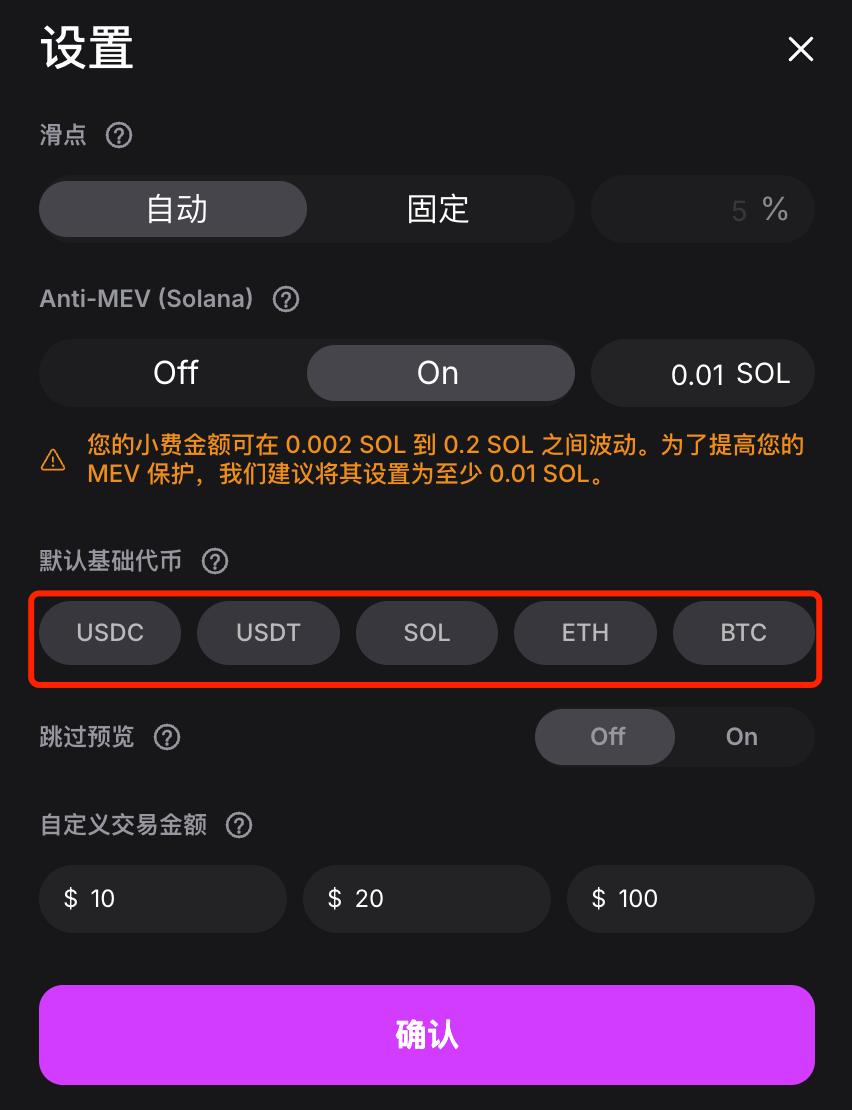
The advantage of UniversalX is that it is chain-agnostic, and as long as you have a basic token, you can trade on 15 chains. This is especially useful when other chains have no coins and the exchanges are stuck on withdrawals. In addition, UniversalX has very fast chart speeds and trading speeds, with automatic anti-sandwich protection, and supports mobile trading, which is very convenient.
Additionally, UniversalX has reduced the trading fees for mainstream tokens to one-thousandth, on par with CEXs, including $AI16Z, $Fartcoin, $ARC, $AIXBT, $TST, etc.
Since they have investment from Binance Labs, they are expected to issue tokens this year, and trading on UniversalX is equivalent to interacting, with the expectation of airdrops.
2. debot
Website: https://debot.ai?inviteCode=175623
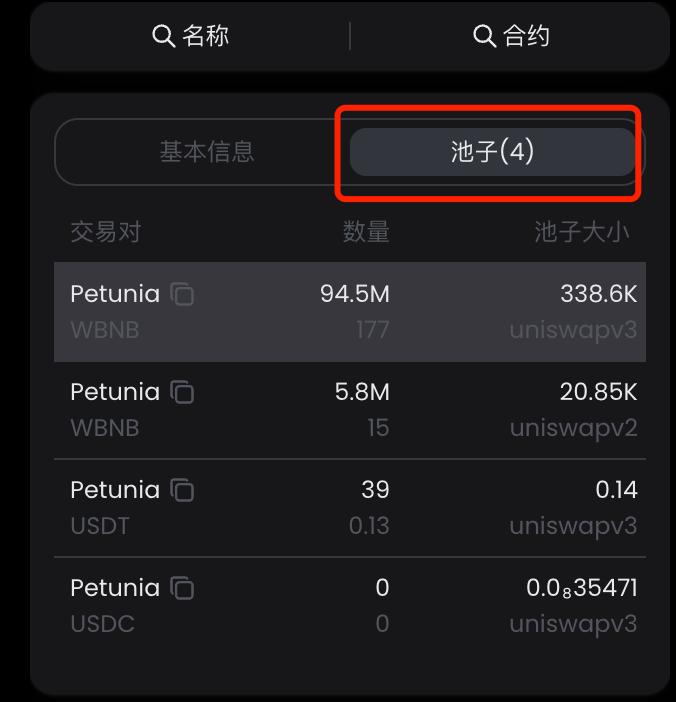
debot supports trading on the BSC chain, currently supporting basic buying and selling, and is preparing to add anti-sandwich protection later. One advantage of trading with debot is that it can display all the pools of the current token, and this feature is currently the most comprehensive among the tools I've seen, which makes it convenient for us to choose different pools for trading.
debot has a mobile app, which allows for convenient and fast trading.
3. gmgn
Website: https://gmgn.ai/?ref=sxsy7oyJ
gmgn has already supported the BSC chain, currently supporting basic buying and selling. The advantage of using gmgn is that you can conveniently utilize its data analysis functions, which display the basic data of the holders very clearly.
gmgn supports mobile trading.
4. okx
Website: https://www.okx.com/zh-hans/web3
okx is a large platform, supporting basic buying and selling in regular mode, and MEV protection to prevent sandwich attacks. The meme mode supports BSC meme coins, allowing for quick buying and selling, and preset parameters. The advantage is multi-platform coverage, supporting web, plugin, and mobile.
5、PinkPunk
Link: https://t.me/PinkPunkTradingBot?start=ref_8CEB8FBBC7EE9B050033
PinkPunk is a long-established tg bot that supports multiple chains. The advantage is that in addition to realizing the basic buying and selling, it also supports limit orders and sniping, and the speed is also relatively fast.