meaning
SUI One-Click Token Issuance refers to a simple way to quickly create and deploy tokens on the SUI network using the GTokenTool platform . As the native cryptocurrency of the SUI Network, the SUI token was launched simultaneously with the SUI mainnet on May 3, 2023, quickly attracting market attention. This one-click token issuance tool developed by GTokenTool allows users to issue MEME coins or other types of tokens on the SUI chain with a single click, without writing any code, thus enabling more people to easily participate in the SUI ecosystem. This method simplifies the complex process of traditional token development, allowing ordinary users to quickly launch their own token projects.
Features
SUI One-Click Coin Issuance has the following main features:
- No-code development: Users operate through a graphical interface without any programming knowledge.
- The parameter settings are simple but strict: the token name and abbreviation do not support Chinese characters or symbols; there is a linkage limit between precision and supply (e.g., when the precision is 9, the supply will not exceed 10 billion); the logo image must be less than 100k and is recommended to be 256x256 pixels.
- One-click token issuance: Simply connect your wallet, enter the parameters, and confirm the transaction to complete the deployment.
- Strong wallet compatibility: Supports Suiet wallet, SuiWallet plugin or Ouyi Web3 wallet; Ouyi Web3 wallet is recommended for mobile devices (TP wallet does not support uploading logos).
- Designed for the mainnet: Optimized specifically for the SUI mainnet(Main network) to ensure compatibility and security.
effect
The main functions of SUI's one-click currency issuance include:
- Promote ecosystem participation: Help users quickly create MEME coins or other tokens, integrate into the SUI network's cryptocurrency ecosystem, and drive community development and project innovation.
- Token Management and Expansion: After token issuance, users can view transaction details through the SUI browser and display the token logo in their wallets; it also supports subsequent transfers, verification, and restrictions on token issuance.
- Project building support: Suitable for developers or ordinary users to build SUI ecosystem projects and expand network application scenarios, such as games, finance or social fields.
Advantages
Compared to traditional token development, SUI's one-click token issuance has significant advantages:
- Highly efficient and fast: The entire token issuance process takes only a few minutes, avoiding the tedious steps of writing Move language code, making it suitable for the high-profile market of the SUI ecosystem.
- Low barrier to entry: No professional skills are required, and anyone can participate, which lowers the entry barrier for the SUI network.
- Safe and reliable: Adheres to the security model of the Move language, supports wallet integration and browser queries, and ensures a stable deployment process.
- Costs are controllable: Only 11 SUIs need to be prepared as gas fees to avoid the risk of failure, and the overall cost is low.
Operating steps
The following are the detailed steps for issuing tokens with SUI. Please ensure you have the necessary tools ready before proceeding.
Preparations
- Install the Suiet wallet or SuiWallet plugin, or use the Ouyi Web3 wallet.
- You must have at least 11 SUI in your wallet for gas fees, otherwise the token issuance may fail.
- Mobile users are advised to use Ouyi Web3 wallet and avoid using TP wallet (which cannot upload logos).
Coin issuance process
1. Connect your SUI wallet: Visit the SUI token creation page on GTokenTool ( https://sui.gtokentool.com/zh-CN/Token/createToken ). Select the Main network in the upper right corner and connect your wallet (e.g., Suiet). After a successful connection, the page will display your wallet address.
2. Enter token parameters:
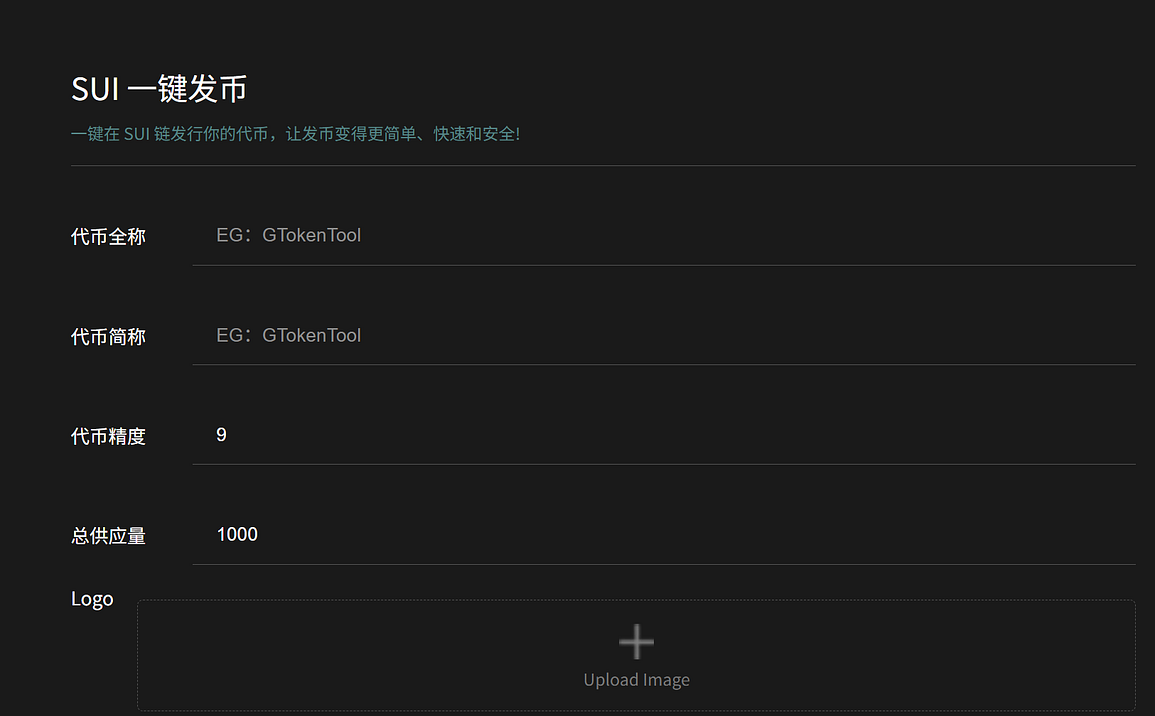
- Full token name: Maximum 32 characters, Chinese characters or symbols are not supported.
- Token abbreviation: 2-8 characters, Chinese characters or symbols are not supported.
- Token precision: 9 by default (affects the upper limit of supply).
- Total supply: No more than 10 billion, depending on the precision limit, for example, at precision 9.
- Logo: Upload a 256x256 pixel square image smaller than 100k.
- Description: Optional, Chinese characters are not supported.
3. Click “Create Token”: After confirming the parameters are correct, click the button. A wallet authorization interface will pop up. Confirm and pay the gas fee. The appearance of the token contract address hash value on the page indicates that the token issuance was successful.
4. Verify Token: Click the hash value to jump to the SUI browser to view transaction and token information. Open the wallet to see the logo display.
Summarize
SUI One-Click Token Issuance, through the GTokenTool platform, provides users with an efficient and low-barrier method for issuing tokens, promoting the rapid development of the SUI ecosystem. Its simplicity, practicality, and clear advantages make it an ideal tool for participating in cryptocurrency projects.