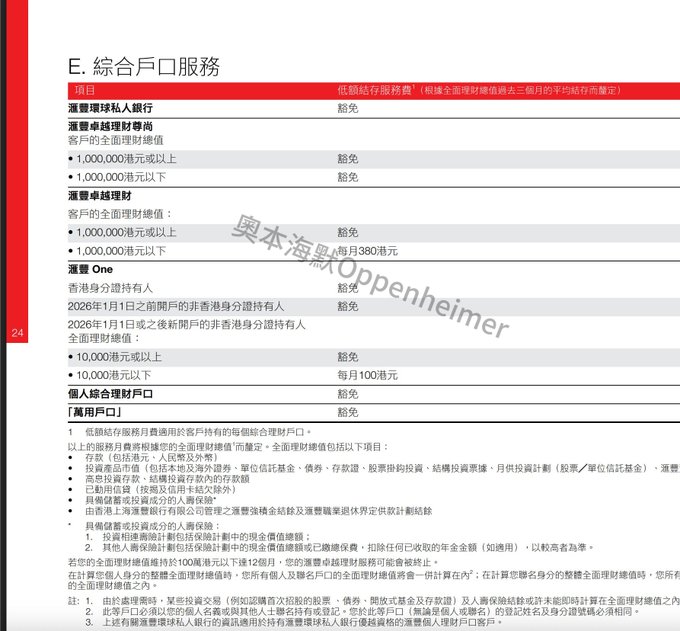
The final window for the HSBC One Hong Kong credit card with zero entry requirements is closing in just half a month! - New policy effective January 1, 2026: Non-Hong Kong residents with less than HK$10,000 in savings will be charged a monthly management fee of HK$100. - Existing user privileges: Accounts opened before this date are exempt from this fee, enjoying permanent 0 threshold and 0 monthly fee benefits. Those who haven't applied are advised to go to Hong Kong immediately and follow the step-by-step instructions below to secure their benefits. ❚ Preparation The first thing to do after clearing customs is to connect to Hong Kong WiFi (airport/shopping mall/McDonald's), turn on location services on your phone, and download "Immigration Records" from the "Immigration Department" mini-program. ❚ Detailed Account Opening Steps 1/ Launch the "HSBC Hong Kong" App 2/ Select "I don't have an account" 3/ Select "I am in Hong Kong" and do not have a Hong Kong ID card 4/ Select "Open an HSBC One" account 5/ Key point: The reason for opening an account must be "Investment" 6/ Select "Apply online" 7/ Enter the linked email address 8/ Select +86 for mobile number and enter the verification code 9/ Select China as the nationality 10/ Select "Exit-Entry Permit for Hong Kong and Macau" as the document type 11/ Prepare your entry/exit records (white slip or customs SMS is acceptable) 12/ Confirm your phone's location services are enabled to ensure you are in Hong Kong 13/ Click "Identify Identity Now" 14/ Upload a photo of your travel permit 15/ Perform facial recognition scanning 16/ Carefully verify your information 17/ Use your phone's NFC function to tap your travel permit to read information 18/ Upload a PDF file or screenshot of your entry/exit records 19/ Fill in your accurate place of birth 20/ Accurately fill in your occupation and company name 21/ Select "My Account" for account type, and "Select All" for source of funds options 22/ Key point: Your residential address is very important (for receiving the physical card). Fill in the address in pinyin on two lines, and it is recommended to include your mobile phone number at the end. 23/ Key point: It is recommended to write a monthly income of less than 50,000 (to avoid income verification and save trouble) 24/ Select "No" for whether the first deposit was made with salary 25/ Fill in your employment status 26/ Select "No" for whether your employer has a primary source of funds 27/ Fill in your mainland ID card number for tax identification number 28/ Choose your account purpose based on your personal circumstances 29/ Freely choose your advertising receiving method 30/ Accept the terms of the agreement 31/ Patiently wait for approval 32/ Account opening successful 33/ The most important finishing touch (not doing this is a waste of time): Immediately set up mobile banking: After approval, you must immediately set up your username, online banking password, and security questions to truly have the account. / Since you're already here, it's recommended to open accounts with "ZhongAn Bank" and "Bank of China (Hong Kong)" at the same time. Overseas card application opportunities are constantly shrinking; you might not be able to apply for these two accounts anytime soon!
This article is machine translated
Show original

From Twitter
Disclaimer: The content above is only the author's opinion which does not represent any position of Followin, and is not intended as, and shall not be understood or construed as, investment advice from Followin.
Like
Add to Favorites
Comments
Share
Relevant content