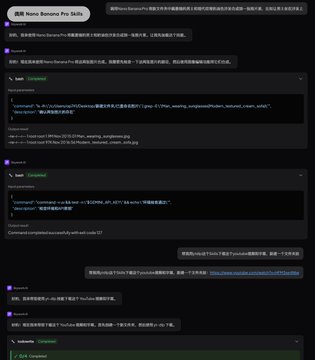
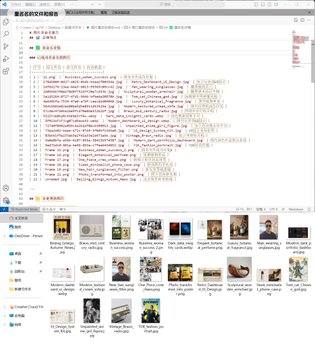
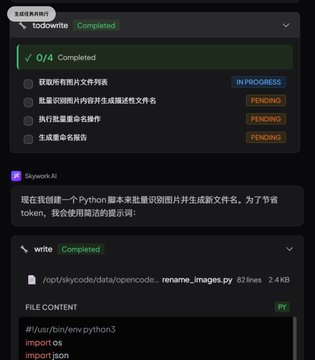
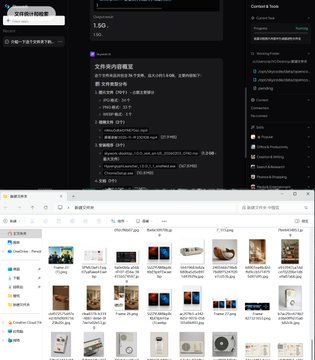
Skywork's timing is incredibly smart: Anthropic's Cowork hadn't even released a Windows version yet, and they launched it directly. Kunlun Tiangong just released a desktop version similar to Cowork, and it directly supports Windows. This timing is perfect, considering Mac's limited market share; most people still use Windows for work. The features are very practical; see how I use it 👇 ====== Understands your files and generates new content I have a folder on my computer with all sorts of random things. I asked Skywork to analyze it first, and it immediately gave me a report: file type distribution, image formats, naming rules, time statistics—everything was organized. This perfectly matches the real-world work scenario for white-collar workers. Whether it's images, documents, spreadsheets, or PPTs, everything can be understood, broken down, and regenerated. No need to open each file individually; AI sorts it all out for you. ------ Automatically Renaming Design Drafts We designers all have this pain point: the images and design drafts we save are named like IMG_1234.jpg. I had it use a multimodal model to categorize and tag the images, renaming them directly based on their content. Because the number of images was too large, I had it process a portion first. It writes code and calls the multimodal model very quickly. Looking at the processed images, the renaming was very accurate, and it even provided a report in both Chinese and English. I also had it guess my profession based on the folder contents, and it guessed very accurately: the folder was full of UI design drafts, and it directly said I was a designer. ------ 100+ Carefully Selected Skills Skywork Desktop supports installing skills to complete tasks. It comes pre-loaded with over 100 skills, covering almost all common needs: ▸ Document generation and format conversion ▸ Video download (e.g., YouTube videos and subtitles) ▸ Image and video generation (can use Nano banana Pro, requires your own API key) ▸ You can manually specify skills, and it will automatically apply them based on your needs. These 100+ skills are carefully selected, high-quality, and not just filler. ----- Support for All Mainstream Models Skywork Desktop can freely switch between and use all mainstream models, including Gemini and Claude. This is very convenient, preventing you from being locked into a single model. ====== Pricing and Availability Currently only available overseas: ▸ $19.90 Membership: Unlimited use ▸ $49.90 Membership: Almost unlimited usage If you frequently have these kinds of needs, it's quite cost-effective. Windows users finally have a useful AI desktop assistant; I highly recommend giving it a try.
This article is machine translated
Show original

Skywork
@Skywork_ai
02-05
Introducing Skywork Desktop:
An intelligent integrated layer built directly into your operating system.
Skywork Desktop is available to all Windows users with Skywork Basic & Plus Subscription.
Sector:

From Twitter
Disclaimer: The content above is only the author's opinion which does not represent any position of Followin, and is not intended as, and shall not be understood or construed as, investment advice from Followin.
Like
Add to Favorites
Comments
Share
Relevant content