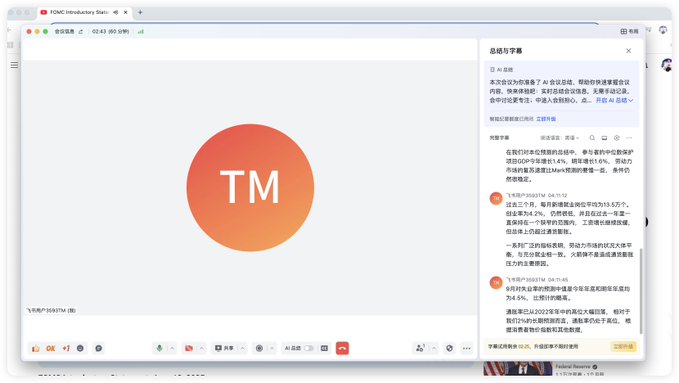
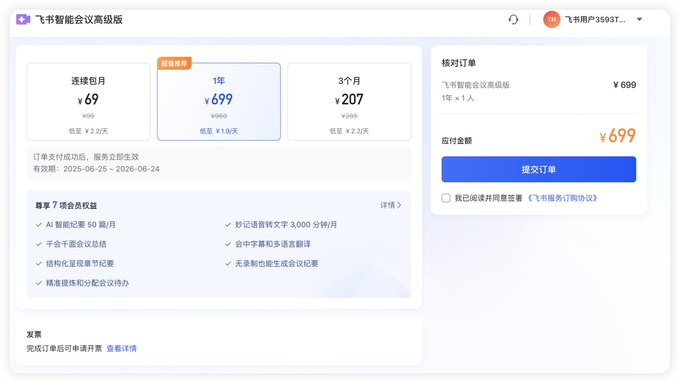
It's very useful, thanks to @butaidongjiaoyi. I tried Feishu and found it really good. I tested translating Powell's speech, and the accuracy is quite high. With my own understanding, about 80% should be no problem. Download Feishu, then simply register, open "More" on the left side, select video conference, and choose to start a meeting. You need to turn on the microphone. If you don't have a microphone, you'll need a device with voice input. The key is to let Feishu hear the playing sound. Then open the English video you want to translate, keep it open, and play the sound. Then click the CC button in the bottom right corner of Feishu, activate the sidebar on the right side, which should initially be in English. Select the third A button on the right side, choose Chinese, and you can get Chinese information in a very short delay, which can be full Chinese or bilingual. The only drawback is that it's paid, 699 CNY per year, which isn't high, about 100 USD. If you find this price high, you can also choose the simultaneous interpretation function of , which is about 30 RMB per month, if I remember correctly. It can also translate some key content, but the accuracy is relatively lower. Once again, thanks to for really helping me out.
This article is machine translated
Show original

如果我不懂
@butaidongjiaoyi
06-25
给倪大支个招:现在的很多办公或会议软件比如飞书/钉钉都支持会议实时翻译。可以打开一个会议和听筒,然后打开字幕+双语翻译。还能随时复制。


From Twitter
Disclaimer: The content above is only the author's opinion which does not represent any position of Followin, and is not intended as, and shall not be understood or construed as, investment advice from Followin.
Like
Add to Favorites
Comments
Share